
horizontal lines on desktop

paddywack

New member
Local time
9:35 PM
Messages
4
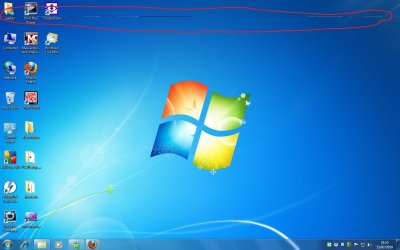
Can someone help,since installing windows 7 i am experiencing horizontal lines appearing randomly on desktop screen,browser and application windows.I have an xfx 7600gt pci-e graphics card with latest drivers.
When browsing and scrolling the page the line can move up and down the web page.
Have tried setting refresh rate,resolution and other drivers,but nothing.
I have included a picture,any ideas?
PS have circled line in red.
 

Attachments
  • pixellines.jpg
    pixellines.jpg
    84 KB · Views: 977

My Computer

OS
windows 7
Hi there,

Does this happen when you boot in Safe Mode?

Cheers,

Walker
Windows Outreach Team
 

My Computer

Computer Manufacturer/Model Number
HP Pavilion dm3 (netbook) *** 27" iMac (Dual-Boot)
OS
Windows 7 Home Premium (64-bit) *** Windows XP SP3 (32-bit), OSX 10.6
CPU
AMD Athlon Neo X2 1.6GHz *** Intel Core i7 Quad Core 2.8GHz
Memory
4.00 GB *** 4.00 GB
Graphics Card(s)
ATI Radeon HD 3200, 384MB *** ATI Radeon HD 4850, 1GB
Sound Card
ATI High Definition Audio *** ATI High Definition Audio
Monitor(s) Displays
LG Flatron W2053TX
Screen Resolution
1600 x 900 (monitor), 1266 x 768 (laptop) *** 2560 x 1440
Hard Drives
300 GB SATA (internal), 500 GB HP SimpleSave (external) *** 1 TB SATA (internal), 160 GB LaCie (external)
Mouse
Logitech Cordless Optical Mouse for Notebooks
Internet Speed
Broadband
List your system specs and in particular your monitor.
That way we can be more helpful.
 

My Computer

Computer Manufacturer/Model Number
HP M9077c
OS
Windows 7 Home Premium 64bit
CPU
Intel(R)Core(TM)2 quad [email protected] 2.39GHz
Motherboard
ASUSeK
Memory
6GB DDR2 6400
Graphics Card(s)
GeForce 8500/512MB
Sound Card
Realtek High Def Audio
Monitor(s) Displays
HP w2408 LCD 24" widescreen
Screen Resolution
1920x1200
Cooling
6 pack of Bud
Keyboard
MS wireless Inteli
Mouse
MS wireless Inteli
Since that appears in the screenshot, we know that it is your graphics card.

Give reinstalling your drivers a try anyways.
Is your card OCed at all?

~Lordbob
 

My Computer

Computer Manufacturer/Model Number
Hera
OS
Windows 7 Ultimate x64, Mint 9
CPU
Intel i5-2500k
Motherboard
ASUS P8P67 Pro
Memory
2x 4Gb Corsair VENGEANCE DDR3-1600
Graphics Card(s)
NVidia GeForce N260GTX Twin Frozr
Sound Card
Realtek HD OnBoard Audio
Monitor(s) Displays
ASUS 24" Monitor
Screen Resolution
1920x1080
Hard Drives
G.SKILL Phoenix Series 60GB SATA II MLC Internal Solid State Drive (SSD)
SAMSUNG Spinpoint F3R 1TB 7200 RPM 32MB Cache SATA II
PSU
Cooler Master Real Power Pro 750W
Case
Cooler Master Haf 932
Cooling
Fans
Keyboard
Razer Tarantula
Mouse
Razer Lachesis
Internet Speed
not fast enough
horizontal lines

The card is not overclocked,the monitor is an Acer P193w Lcd,
MY system specs are
Windows 7 ultimate.
AMD Athlon 3200 2.1ghz
2gb Ram
XFX Nvidia 7600gt PCI-E

Doesnt seem to do it in safe mode.

Thanks
 
Last edited:

My Computer

OS
windows 7
For clarification, when you say the horizontal lines are "appearing randomly on desktop screen,browser and application windows" are you saying the lines physically change location and appear at random places on the screen? Or do they appear in the same physical place on the screen at random times? Reason I ask is I had a similar problem with my monitor after a hard bump messed up the pixils in three separate rows and gave a very similar appearance to your screenshot.
 

My Computer

Computer type
Laptop
Computer Manufacturer/Model Number
Sony Vaio VPCEB47GM Laptop
OS
Win 7 Pro 64-bit
CPU
Intel i5 2.4 Ghz
Memory
8GB DDR3
Graphics Card(s)
Intel HD 3000
Sound Card
IDT High Definition
Monitor(s) Displays
15.6 WGXA Anti-Glare LED
Screen Resolution
1280x800
Hard Drives
640Gb 7200rpm
Antivirus
MSE
Browser
Opera (primary) with IE9 backup
horizontal lines

They appear randomly across the screen ,and not not in one place .
 

My Computer

OS
windows 7
They appear randomly across the screen ,and not not in one place .
As I said above, I am 100% certain this is NOT a monitor problem.

I am fairly certain it is a graphics card problem. Have you followed my suggestions?

~Lordbob
 

My Computer

Computer Manufacturer/Model Number
Hera
OS
Windows 7 Ultimate x64, Mint 9
CPU
Intel i5-2500k
Motherboard
ASUS P8P67 Pro
Memory
2x 4Gb Corsair VENGEANCE DDR3-1600
Graphics Card(s)
NVidia GeForce N260GTX Twin Frozr
Sound Card
Realtek HD OnBoard Audio
Monitor(s) Displays
ASUS 24" Monitor
Screen Resolution
1920x1080
Hard Drives
G.SKILL Phoenix Series 60GB SATA II MLC Internal Solid State Drive (SSD)
SAMSUNG Spinpoint F3R 1TB 7200 RPM 32MB Cache SATA II
PSU
Cooler Master Real Power Pro 750W
Case
Cooler Master Haf 932
Cooling
Fans
Keyboard
Razer Tarantula
Mouse
Razer Lachesis
Internet Speed
not fast enough
horizontal lines

I have done what you suggested,but it still does it.
Did a complete uninstall of nvidia drivers,rebooted ,installed latest drivers,rebooted ,but still getting the lines.As i said before it doesnt do it in safe mode.
What does this mean.
cheers
 

My Computer

OS
windows 7
I have done what you suggested,but it still does it.
Did a complete uninstall of nvidia drivers,rebooted ,installed latest drivers,rebooted ,but still getting the lines.As i said before it doesnt do it in safe mode.
What does this mean.
cheers
Lets try this then:

Hit start and type msconfig and hit enter
Choose diagnostic boot up and restart. Does the problem reoccur?

~Lordbob
 

My Computer

Computer Manufacturer/Model Number
Hera
OS
Windows 7 Ultimate x64, Mint 9
CPU
Intel i5-2500k
Motherboard
ASUS P8P67 Pro
Memory
2x 4Gb Corsair VENGEANCE DDR3-1600
Graphics Card(s)
NVidia GeForce N260GTX Twin Frozr
Sound Card
Realtek HD OnBoard Audio
Monitor(s) Displays
ASUS 24" Monitor
Screen Resolution
1920x1080
Hard Drives
G.SKILL Phoenix Series 60GB SATA II MLC Internal Solid State Drive (SSD)
SAMSUNG Spinpoint F3R 1TB 7200 RPM 32MB Cache SATA II
PSU
Cooler Master Real Power Pro 750W
Case
Cooler Master Haf 932
Cooling
Fans
Keyboard
Razer Tarantula
Mouse
Razer Lachesis
Internet Speed
not fast enough
Having a very similar problem...

Can someone help,since installing windows 7 i am experiencing horizontal lines appearing randomly on desktop screen,browser and application windows.I have an xfx 7600gt pci-e graphics card with latest drivers.
When browsing and scrolling the page the line can move up and down the web page.
Have tried setting refresh rate,resolution and other drivers,but nothing.
I have included a picture,any ideas?
PS have circled line in red.

I was wondering if paddywack resolved this issue? I believe I have the same issue on a different system, though. I had to replace my AGP graphics card, an nvidia, with an ATI HD 3650 (HP Pavilion desktop, AMD Athlon(B) XP 3000+ 2.10 GHz). I have been all around the driver installs, hotfixes etc. from ATI without real success. This includes adding a line to the .inf specific to my card, a tip I gathered from these forums, which appeared to work temporarily. The screenshot paddywack provided caught my eye- looks just like my problem.

It looked like lordbob was asking more about the nature of the problem; it can appear on the desktop as shown, but also in any application and'or dialog box and often in video playback windows. I notice it near the top or bottom of IE8 windows and it can change position durring scrolling. It sometimes appears as a regularly spaced broken line all the way across the screen, sometimes just part of the screen.

Any additional thoughts would be appreciated!
 

My Computer

Computer Manufacturer/Model Number
HP Pavilion a610n
OS
Windows 7 Home Premium 32 Bit
CPU
AMD Athlon(B) XP 3000+ 2.10 GHz
Motherboard
ASUS A7V8Z-LA
Memory
1GB
Graphics Card(s)
ATI Radeon HD 3650 1GB
Sound Card
Integrated AC97
Monitor(s) Displays
Viewsonic
Hard Drives
160GB original +500GB WD
Case
-
Cooling
-
I have a followup- with fingers crossed, my issue may be solved. I changed a BIOS setting- making the primary graphics type AGP rather than the default PCI- and I seem to be running in good shape for now. I'll check back in if anything changes, but thanks to all for contributing to these helpful forums.

Although it doesn't have much Win 7 specific information, there is some very interesting reading at www.playtool.com regarding video cards, power supplies, etc. It can get one thinking- thanks to Mark Allen there who has done a huge amount of work to make a usful and interesting site.
 

My Computer

Computer Manufacturer/Model Number
HP Pavilion a610n
OS
Windows 7 Home Premium 32 Bit
CPU
AMD Athlon(B) XP 3000+ 2.10 GHz
Motherboard
ASUS A7V8Z-LA
Memory
1GB
Graphics Card(s)
ATI Radeon HD 3650 1GB
Sound Card
Integrated AC97
Monitor(s) Displays
Viewsonic
Hard Drives
160GB original +500GB WD
Case
-
Cooling
-
slideman 77 has exactly described my problem with a Dell Dimension 9200 with NVIDIA GeForce GTX 590 card. I have updated the driver and looked to change the BIOS default to AGP but this is not available. The default is PEG and I have also tried the alternative, PCI but both give the same results.

Does anyone have more ideas? I would buy a more modern graphics card but there seems no guarantee that it would solve the problem.
 

My Computer

OS
W7 Home Premium
Back
Top