Hotkey for closing taskbar items?

mooseman99

New member
Local time
7:01 PM
Messages
13
Hey,
Quick question:
Does anyone know if there is a hotkey to close an item on the taskbar?
I know you can open them with Windows key+ 1,2,3,etc

But for example if I am watching a video in firefox (current window) and want to exit my music player(songbird, minimized in the background) So i can hear the video, is there a hotkey where i can simply press some key combination and select its number on the taskbar?

Thanks
 

My Computer

Computer Manufacturer/Model Number
Alienware m9750 Laptop
OS
Windows 7 Ultimate 64 Bit
CPU
Intel Core 2 T7200 @ 2.00GHZ
Memory
2x2GB DDR2 -only 2.5 available due to chipset :(
Graphics Card(s)
SLI: 2xNvidia Geforce Go 7950GTX
Screen Resolution
1440x900
I may be missing your question entirely, but if you have the program on your taskbar, right click and choose 'close window'.
 

My Computer

Computer type
PC/Desktop
Computer Manufacturer/Model Number
Bruce ... somewhere in his 40's
OS
Windows 7 Ultimate 32bit SP1
CPU
Intel(R) Core(TM)2 Quad CPU @ 2.40GHz, 2400 MHz
Motherboard
INTEL/D975XBX2
Memory
4 GB
Graphics Card(s)
ATI Radeon HD 2600 Pro
Monitor(s) Displays
Samsung SyncMaster 914v
Screen Resolution
1280 x 1024
Hard Drives
2/500GB each ... ST3500630AS ATA Device.
One is not connected
PSU
Rocketfish 700 W
Case
G.Skill Gigabyte Chassis
Keyboard
Standard PS/2 Keyboard
Mouse
Microsoft PS/2 Mouse
Internet Speed
DSL
Antivirus
Avira Internet Security
Browser
IE 11
Other Info
ATI HDMI Audio
Yeah that works but i would rather have a hotkey
 

My Computer

Computer Manufacturer/Model Number
Alienware m9750 Laptop
OS
Windows 7 Ultimate 64 Bit
CPU
Intel Core 2 T7200 @ 2.00GHZ
Memory
2x2GB DDR2 -only 2.5 available due to chipset :(
Graphics Card(s)
SLI: 2xNvidia Geforce Go 7950GTX
Screen Resolution
1440x900
Thanks for replying back ... you may have to Google (search) the 'hot key' for what you want to do.
 

My Computer

Computer type
PC/Desktop
Computer Manufacturer/Model Number
Bruce ... somewhere in his 40's
OS
Windows 7 Ultimate 32bit SP1
CPU
Intel(R) Core(TM)2 Quad CPU @ 2.40GHz, 2400 MHz
Motherboard
INTEL/D975XBX2
Memory
4 GB
Graphics Card(s)
ATI Radeon HD 2600 Pro
Monitor(s) Displays
Samsung SyncMaster 914v
Screen Resolution
1280 x 1024
Hard Drives
2/500GB each ... ST3500630AS ATA Device.
One is not connected
PSU
Rocketfish 700 W
Case
G.Skill Gigabyte Chassis
Keyboard
Standard PS/2 Keyboard
Mouse
Microsoft PS/2 Mouse
Internet Speed
DSL
Antivirus
Avira Internet Security
Browser
IE 11
Other Info
ATI HDMI Audio
How about Alt+F4 ? that closes the window you're viewing, and if you wanna close all windows, just hold down the keys.

And if that's too many keys, you can use macros to remap those 2 keys to 1 key. LoL.
 

My Computer

Computer Manufacturer/Model Number
SevenForums
OS
7 Prof
CPU
Q9550
Motherboard
Maximus II Formula
Memory
2x2 Mushkin Ascent 8500
Graphics Card(s)
4870X2
Sound Card
X-Fi Xtreme Gamer
Monitor(s) Displays
LN32A550
Screen Resolution
1920x1080
Hard Drives
Intel G2 80GB
5x1TB
PSU
Corsair 1000
Case
Cosmos
Cooling
Yates^13
Keyboard
G15v1
Mouse
MX518
Internet Speed
6Mbps
Alt+F4 will close whatever the program is that currently has focus if that helps.
 

My Computer

Computer Manufacturer/Model Number
Custom
OS
Windows 7 Ultimate RTM (Technet)
CPU
3.00 gigahertz Intel Core2 Duo E8400
Motherboard
ASUSTeK Computer INC. P5K/EPU Rev 1.xx
Memory
4GB
Graphics Card(s)
ATI Radeon X1950 Pro
Sound Card
Built in HD Audio
Monitor(s) Displays
22" Gateway LCD
Screen Resolution
1920 x 1200
Hard Drives
ST3160023A [Hard drive] (160.04 GB) -- drive 0, rev 8.01, ST3500630AS [Hard drive] (500.11 GB) -- drive 2, rev 3.AAK
ST3500630AS [Hard drive] (500.11 GB) -- drive 1, rev 3.AAK
Keyboard
Logitech G11
Mouse
Microsoft Wireless Laser Mouse 5000
Internet Speed
13.44 Mbps
Well I'm really looking for a way to close windows in the background, not the current one.
another example would be if you have photoshop open or something and its running slowly so you want to close background programs

I guess i could just do
Win+Number-> Alt F4
but I'm lazy I guess
 

My Computer

Computer Manufacturer/Model Number
Alienware m9750 Laptop
OS
Windows 7 Ultimate 64 Bit
CPU
Intel Core 2 T7200 @ 2.00GHZ
Memory
2x2GB DDR2 -only 2.5 available due to chipset :(
Graphics Card(s)
SLI: 2xNvidia Geforce Go 7950GTX
Screen Resolution
1440x900
If WIN+1 switches to the first application from the start button so that you can do Alt+F4 on that application, then your problem is easy to solve. You just need a software or hardware macro. Software macros can be had from American System, their EZMacros is the best if you can hunt it down, if you can't, let me know. Hardware macros can be had in some keyboards like the G15 from Logitech.
 

My Computer

Computer Manufacturer/Model Number
SevenForums
OS
7 Prof
CPU
Q9550
Motherboard
Maximus II Formula
Memory
2x2 Mushkin Ascent 8500
Graphics Card(s)
4870X2
Sound Card
X-Fi Xtreme Gamer
Monitor(s) Displays
LN32A550
Screen Resolution
1920x1080
Hard Drives
Intel G2 80GB
5x1TB
PSU
Corsair 1000
Case
Cosmos
Cooling
Yates^13
Keyboard
G15v1
Mouse
MX518
Internet Speed
6Mbps

Attachments

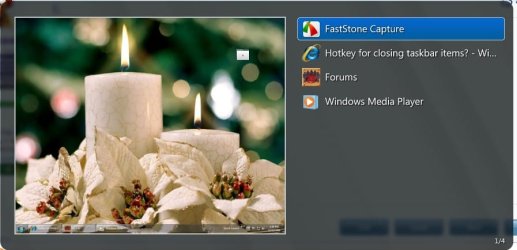
  • VistaSwitcher.jpg
    VistaSwitcher.jpg
    43 KB · Views: 11
Last edited:

My Computer

Computer type
PC/Desktop
Computer Manufacturer/Model Number
Bruce ... somewhere in his 40's
OS
Windows 7 Ultimate 32bit SP1
CPU
Intel(R) Core(TM)2 Quad CPU @ 2.40GHz, 2400 MHz
Motherboard
INTEL/D975XBX2
Memory
4 GB
Graphics Card(s)
ATI Radeon HD 2600 Pro
Monitor(s) Displays
Samsung SyncMaster 914v
Screen Resolution
1280 x 1024
Hard Drives
2/500GB each ... ST3500630AS ATA Device.
One is not connected
PSU
Rocketfish 700 W
Case
G.Skill Gigabyte Chassis
Keyboard
Standard PS/2 Keyboard
Mouse
Microsoft PS/2 Mouse
Internet Speed
DSL
Antivirus
Avira Internet Security
Browser
IE 11
Other Info
ATI HDMI Audio
Back
Top