Hotkey For Language Bar

psydex

New member
Member
Local time
1:12 PM
Messages
35
Location
Plovdiv , Bulgaria
Is there any way to make a hotkey for switching between the languages in Win7 language bar (to use ONLY Ctrl instead Alt+Shift or whatever):rolleyes:
 

My Computer

OS
Windows 7
CPU
Pentium 4 (3.2GHz)
Memory
512 MB RAM
Graphics Card(s)
Radeon X550
Monitor(s) Displays
Samsung SyncMaster 710n
Case
Bevod
Keyboard
Pleomax
bump!:sarc:
 

My Computer

OS
Windows 7
CPU
Pentium 4 (3.2GHz)
Memory
512 MB RAM
Graphics Card(s)
Radeon X550
Monitor(s) Displays
Samsung SyncMaster 710n
Case
Bevod
Keyboard
Pleomax
Do i have to count this silence as impossible?
 

My Computer

OS
Windows 7
CPU
Pentium 4 (3.2GHz)
Memory
512 MB RAM
Graphics Card(s)
Radeon X550
Monitor(s) Displays
Samsung SyncMaster 710n
Case
Bevod
Keyboard
Pleomax
Bump :p
Im not sure, but theres gotta be a way :)
 

My Computer

Computer Manufacturer/Model Number
Custom
OS
Windows 7 build 7600 64 bit
CPU
Phenom II X4 955 retail 3.2GHz
Motherboard
ASRock M3A790GXH/USB3 ATX AMD AMD3
Memory
4x GeiL 2GB Value PC3-10660 CL9 DC DDR3-1333, CL 9-9-9-28
Graphics Card(s)
PowerColor Radeon HD5850 PCS+ 1024MB, 256-bit GDDR5
Sound Card
Built in
Hard Drives
G.Skill Phoenix Pro 120GB SATA2 SSD Sandforce SF-120
Samsung Spinpoint 500GB SATA2 7200RPM
PSU
Tacens Radix III Smart 520W
It must be a way !
I need it because yesterday i uninstalled "Flex Type" (which was buggy on my Win7) and still can't get used with Alt+Shift (to switch between languages)
 

My Computer

OS
Windows 7
CPU
Pentium 4 (3.2GHz)
Memory
512 MB RAM
Graphics Card(s)
Radeon X550
Monitor(s) Displays
Samsung SyncMaster 710n
Case
Bevod
Keyboard
Pleomax
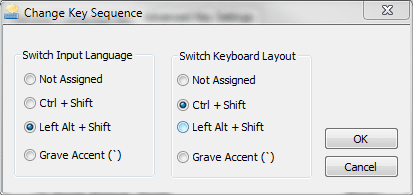
Only possible key combinations:

shortcuts.PNG

Kari
 

My Computer

Computer type
Laptop
Computer Manufacturer/Model Number
HP ENVY 17-1150eg
OS
Windows 10 Pro x64 EN-GB
CPU
1.6 GHz Intel Core i7-720QM Processor
Memory
6 GB
Graphics Card(s)
ATI Mobility Radeon HD 5850 Graphics
Sound Card
Beats sound system with integrated subwoofer
Monitor(s) Displays
17" laptop display, 22" LED and 32" Full HD TV through HDMI
Screen Resolution
1600*900 (1), 1920*1080 (2&3)
Hard Drives
Internal: 2 x 500 GB SATA Hard Disk Drive 7200 rpm
External: 2TB for backups, 3TB USB3 network drive for media
Cooling
As Envy runs a bit warm, I have it on a Cooler Master pad
Keyboard
Logitech diNovo Media Desktop Laser (bluetooth)
Mouse
Logitech Performance Mouse MX
Internet Speed
50/10 Mbps VDSL
Antivirus
Windows Defender 4.3.9431.0
Browser
Maxthon 3.5.2., IE11
I know what's possible by default , but is there any other way to avoid the default key combinations and make our own?
 

My Computer

OS
Windows 7
CPU
Pentium 4 (3.2GHz)
Memory
512 MB RAM
Graphics Card(s)
Radeon X550
Monitor(s) Displays
Samsung SyncMaster 710n
Case
Bevod
Keyboard
Pleomax
Back
Top