
Solved hotkey to disable an audio device of choice

fohrums

New member
Local time
6:10 PM
Messages
9
How would I add a hotkey to toggle on/off an audio device of choice in Windows 7 x64?

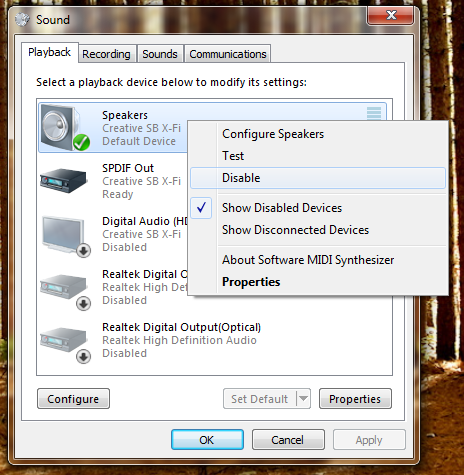
Here is an image of Windows 7 sound dialog window > playback tab to audio devices.

reason being: skype doesn't have a default audio device as an option so I switch between headphone (reciever) to speaker (PC creative sound card) with a hotkey I defined already using NirCmd. problem is skype doesn't switch along with it. my method is to disable an audio device so that way the next one is effective in skype. complicated but it's the best and only way I can think of without making it TOO complicated as it is already.

fM1rCoq.png
 

My Computer My Computer

At a glance

Windows 7 x64
Computer type
PC/Desktop
OS
Windows 7 x64
When I plug headphones in, the speaker is cut off. I have not tried this with Skype but will as soon as I can.
 

My Computer My Computer

At a glance

Windows 10 Pro X64Intel Quad Core i7-4770 @ 3.4Ghz16.0GB PC3-12800 DDR3 SDRAM 1600 MHzIntel Integrated HD Graphics
Computer type
PC/Desktop
Computer Manufacturer/Model Number
Lenovo IdeaCenter 450
OS
Windows 10 Pro X64
CPU
Intel Quad Core i7-4770 @ 3.4Ghz
Memory
16.0GB PC3-12800 DDR3 SDRAM 1600 MHz
Graphics Card(s)
Intel Integrated HD Graphics
Sound Card
Realtek HD Audio
Monitor(s) Displays
HP 22" LCD
Screen Resolution
1680 x 1050
Hard Drives
250GB Samsung EVO SATA-3 SSD
2TB Seagate ST2000DM001 SATA-2
1.5TB Seagate ST3150041AS SATA
Keyboard
Dell USB
Mouse
Lenovo USB
Internet Speed
Cable via Road Runner 3MB Upload, 30MB Download
Antivirus
Windows Defender, MBAM Pro, MBAE
Browser
Seamonkey
Other Info
UEFI/GPT
PLDS DVD-RW DH16AERSH
By default the way skype would be designed along with windows 7 architecture (i'm really dumbing this down :sarc:) ofcourse plugging it in would then use the headphones and speakers are cut off.

I use two seperate/different outputs. As I mentioned an external reciever for my headphones and my desktop speakers are connected via creative sound card which I have installed PCI-E. so a lot of manual work is needed to necessarily transition that sound without any interference.
 

My Computer My Computer

At a glance

Windows 7 x64
Computer type
PC/Desktop
OS
Windows 7 x64
All I can suggest then is to use a program like regmon to see what is being changed in the registry when you disable/enable, then write a small batch file to make the necessary registry changes as needed, one to disable and one to enable.
 

My Computer My Computer

At a glance

Windows 10 Pro X64Intel Quad Core i7-4770 @ 3.4Ghz16.0GB PC3-12800 DDR3 SDRAM 1600 MHzIntel Integrated HD Graphics
Computer type
PC/Desktop
Computer Manufacturer/Model Number
Lenovo IdeaCenter 450
OS
Windows 10 Pro X64
CPU
Intel Quad Core i7-4770 @ 3.4Ghz
Memory
16.0GB PC3-12800 DDR3 SDRAM 1600 MHz
Graphics Card(s)
Intel Integrated HD Graphics
Sound Card
Realtek HD Audio
Monitor(s) Displays
HP 22" LCD
Screen Resolution
1680 x 1050
Hard Drives
250GB Samsung EVO SATA-3 SSD
2TB Seagate ST2000DM001 SATA-2
1.5TB Seagate ST3150041AS SATA
Keyboard
Dell USB
Mouse
Lenovo USB
Internet Speed
Cable via Road Runner 3MB Upload, 30MB Download
Antivirus
Windows Defender, MBAM Pro, MBAE
Browser
Seamonkey
Other Info
UEFI/GPT
PLDS DVD-RW DH16AERSH
All I can suggest then is to use a program like regmon to see what is being changed in the registry when you disable/enable, then write a small batch file to make the necessary registry changes as needed, one to disable and one to enable.

It's no longer available and been replaced by "ProcessMonitor" I don't know how to use it to get the registry keys needed. Perhaps show me some example on how to use it or if possible find it out?
 

My Computer My Computer

At a glance

Windows 7 x64
Computer type
PC/Desktop
OS
Windows 7 x64
I use Audio Switcher. There's no hot key. But it sits in the tray and lets you click-choose from the available audio devices.
 

My Computer My Computer

At a glance

Windows 10 x64i7-7700K16 GB 2400 MHzGTX 1060
Computer type
PC/Desktop
Computer Manufacturer/Model Number
Dell
OS
Windows 10 x64
CPU
i7-7700K
Memory
16 GB 2400 MHz
Graphics Card(s)
GTX 1060
Sound Card
Integrated, plus external Presonus Audiobox USB
Monitor(s) Displays
2x AOC 27"
Screen Resolution
1920x1080
Hard Drives
512 GB M.2 SSD
2 TB 7200 RPM disk
Internet Speed
110 Mbps
Browser
Firefox
I figured out how to focus on a window's processes by using the crosshair tool (8th from the left of toolbar). Simply drag it to the window you want to focus on.

KxmZGL5.jpg


PROBLEM IS: I can't figure out how to put this into action or so you said "batch file" to have this be applied to a hotkey via shortcut.

So basically by right clicking on an audio device these are the registry keys in use:

Uzi1hOW.jpg


when I make the action to "disable" these are these are the registry keys in use:

orL7Xuq.jpg
 
Last edited:

My Computer My Computer

At a glance

Windows 7 x64
Computer type
PC/Desktop
OS
Windows 7 x64
I use Audio Switcher. There's no hot key. But it sits in the tray and lets you click-choose from the available audio devices.

Yes, "choose" is already what I've mentioned binded to a hotkey with NirCmd. I specifically and only want a hotkey to "Disable"

Using audio switcher just adds to the ram as it's necessarily running in the background for a quick task that I don't find myself switching that much too often.

atleast with batch files it's there until you run it not using any resources in the meantime what so ever.
 

My Computer My Computer

At a glance

Windows 7 x64
Computer type
PC/Desktop
OS
Windows 7 x64
You would have to write the batch file to apply the registry changes, then setup a hotkey to invoke the batch file.

The Open and Set registry actions indicate the key you need to modify. After disabling, go into regedit and export that key. Do it again after you enable it again.

That should give you the registry changes you need to apply.
 

My Computer My Computer

At a glance

Windows 10 Pro X64Intel Quad Core i7-4770 @ 3.4Ghz16.0GB PC3-12800 DDR3 SDRAM 1600 MHzIntel Integrated HD Graphics
Computer type
PC/Desktop
Computer Manufacturer/Model Number
Lenovo IdeaCenter 450
OS
Windows 10 Pro X64
CPU
Intel Quad Core i7-4770 @ 3.4Ghz
Memory
16.0GB PC3-12800 DDR3 SDRAM 1600 MHz
Graphics Card(s)
Intel Integrated HD Graphics
Sound Card
Realtek HD Audio
Monitor(s) Displays
HP 22" LCD
Screen Resolution
1680 x 1050
Hard Drives
250GB Samsung EVO SATA-3 SSD
2TB Seagate ST2000DM001 SATA-2
1.5TB Seagate ST3150041AS SATA
Keyboard
Dell USB
Mouse
Lenovo USB
Internet Speed
Cable via Road Runner 3MB Upload, 30MB Download
Antivirus
Windows Defender, MBAM Pro, MBAE
Browser
Seamonkey
Other Info
UEFI/GPT
PLDS DVD-RW DH16AERSH

My Computer My Computer

At a glance

Windows 10 ProIntel i7-3770K 4.4GHz8GB G.SKILL Ripjaws 1866 MHzEVGA GTX 980 Classified
Computer type
PC/Desktop
Computer Manufacturer/Model Number
Weekend Warrior Rig
OS
Windows 10 Pro
CPU
Intel i7-3770K 4.4GHz
Motherboard
ASUS P8Z77-V Pro
Memory
8GB G.SKILL Ripjaws 1866 MHz
Graphics Card(s)
EVGA GTX 980 Classified
Monitor(s) Displays
Asus VH238H 23" 2ms
Screen Resolution
1920x1080
Hard Drives
Intel 330 120GB SSD /
WD Blue 1TB /
WD Black 500GB
PSU
Corsair CX750M
Case
NZXT H440
Cooling
Corsair H80i- CPU / Corsair H90- GPU
Keyboard
Logitech K360 LE
Mouse
Logitech G500
Antivirus
Avast
Browser
Chrome
Other Info
1200W 2.1 Surround Sound Audio

No.

I can't emphasis this enough. keyword: "Disable"

In other words. I'm looking for a way to "Disable" (turn off) a device. I mentioned twice that I have a hotkey to switch audio devices already using NirCmd in which from that command-line tool i'm able to set between (or all) which device I want as default device and communication device, etc.
 

My Computer My Computer

At a glance

Windows 7 x64
Computer type
PC/Desktop
OS
Windows 7 x64
You would have to write the batch file to apply the registry changes, then setup a hotkey to invoke the batch file.

The Open and Set registry actions indicate the key you need to modify. After disabling, go into regedit and export that key. Do it again after you enable it again.

That should give you the registry changes you need to apply.

thanks what I did was found which of the 4 I highlighted made the change and it was the one listed with the description changing the DWORD value. How I made I signed it to a hotkey was sending it to desktop (as shortcut) and right-click properties to define the key combination.

only problem now is that it's always verifying yes/no if I want to go forth with the action. How do I disable that security? I tested it out and know it's safe.
 

My Computer My Computer

At a glance

Windows 7 x64
Computer type
PC/Desktop
OS
Windows 7 x64
How are you applying the change? Are you using the reg command? If so, looks like the /F parameter is what you need.

C:\Users\rrkurtz>reg add /?

REG ADD KeyName [/v ValueName | /ve] [/t Type] [/s Separator] [/d Data] [/f]
[/reg:32 | /reg:64]

KeyName [\\Machine\]FullKey
Machine Name of remote machine - omitting defaults to the
current machine. Only HKLM and HKU are available on remote
machines.
FullKey ROOTKEY\SubKey
ROOTKEY [ HKLM | HKCU | HKCR | HKU | HKCC ]
SubKey The full name of a registry key under the selected ROOTKEY.

/v The value name, under the selected Key, to add.

/ve adds an empty value name (Default) for the key.

/t RegKey data types
[ REG_SZ | REG_MULTI_SZ | REG_EXPAND_SZ |
REG_DWORD | REG_QWORD | REG_BINARY | REG_NONE ]
If omitted, REG_SZ is assumed.

/s Specify one character that you use as the separator in your data
string for REG_MULTI_SZ. If omitted, use "\0" as the separator.

/d The data to assign to the registry ValueName being added.

/f Force overwriting the existing registry entry without prompt.

/reg:32 Specifies the key should be accessed using the 32-bit registry view.

/reg:64 Specifies the key should be accessed using the 64-bit registry view.

Examples:

REG ADD \\ABC\HKLM\Software\MyCo
Adds a key HKLM\Software\MyCo on remote machine ABC

REG ADD HKLM\Software\MyCo /v Data /t REG_BINARY /d fe340ead
Adds a value (name: Data, type: REG_BINARY, data: fe340ead)

REG ADD HKLM\Software\MyCo /v MRU /t REG_MULTI_SZ /d fax\0mail
Adds a value (name: MRU, type: REG_MULTI_SZ, data: fax\0mail\0\0)

REG ADD HKLM\Software\MyCo /v Path /t REG_EXPAND_SZ /d ^%systemroot^%
Adds a value (name: Path, type: REG_EXPAND_SZ, data: %systemroot%)
Notice: Use the caret symbol ( ^ ) inside the expand string
 

My Computer My Computer

At a glance

Windows 10 Pro X64Intel Quad Core i7-4770 @ 3.4Ghz16.0GB PC3-12800 DDR3 SDRAM 1600 MHzIntel Integrated HD Graphics
Computer type
PC/Desktop
Computer Manufacturer/Model Number
Lenovo IdeaCenter 450
OS
Windows 10 Pro X64
CPU
Intel Quad Core i7-4770 @ 3.4Ghz
Memory
16.0GB PC3-12800 DDR3 SDRAM 1600 MHz
Graphics Card(s)
Intel Integrated HD Graphics
Sound Card
Realtek HD Audio
Monitor(s) Displays
HP 22" LCD
Screen Resolution
1680 x 1050
Hard Drives
250GB Samsung EVO SATA-3 SSD
2TB Seagate ST2000DM001 SATA-2
1.5TB Seagate ST3150041AS SATA
Keyboard
Dell USB
Mouse
Lenovo USB
Internet Speed
Cable via Road Runner 3MB Upload, 30MB Download
Antivirus
Windows Defender, MBAM Pro, MBAE
Browser
Seamonkey
Other Info
UEFI/GPT
PLDS DVD-RW DH16AERSH
I see, so forcing it using /f command.

Problem is skype doesn't recognize the change and I have to still manually switch the output so it doesn't matter. I ended up not needing this method.

Appreciate the help, hopefully others read and value that.
 

My Computer My Computer

At a glance

Windows 7 x64
Computer type
PC/Desktop
OS
Windows 7 x64
Ah well, it was worth a try.
 

My Computer My Computer

At a glance

Windows 10 Pro X64Intel Quad Core i7-4770 @ 3.4Ghz16.0GB PC3-12800 DDR3 SDRAM 1600 MHzIntel Integrated HD Graphics
Computer type
PC/Desktop
Computer Manufacturer/Model Number
Lenovo IdeaCenter 450
OS
Windows 10 Pro X64
CPU
Intel Quad Core i7-4770 @ 3.4Ghz
Memory
16.0GB PC3-12800 DDR3 SDRAM 1600 MHz
Graphics Card(s)
Intel Integrated HD Graphics
Sound Card
Realtek HD Audio
Monitor(s) Displays
HP 22" LCD
Screen Resolution
1680 x 1050
Hard Drives
250GB Samsung EVO SATA-3 SSD
2TB Seagate ST2000DM001 SATA-2
1.5TB Seagate ST3150041AS SATA
Keyboard
Dell USB
Mouse
Lenovo USB
Internet Speed
Cable via Road Runner 3MB Upload, 30MB Download
Antivirus
Windows Defender, MBAM Pro, MBAE
Browser
Seamonkey
Other Info
UEFI/GPT
PLDS DVD-RW DH16AERSH
Back
Top

