Hotspot Shield and maybe DNS Look up problem?

mrknownothing

New member
Local time
5:22 PM
Messages
15
Hi,

I ve tested XP (32 bits) and macbook osx 10.6 and they worked.

Only Windows 7 Ultimate (64bits) doesn't work even the HS Status: Green (Connected) on the task bar.

I followed this instruction:
CONNECTION PROBLEM FOP HOT SPOT SHIELD

Hi,


a. Do you get any error message while you try to connect?
b. Is it a wired or a wireless connection?
c. which version of hot spot shield are you using?
c. Are you able to browse the internet when you try to connect this application?

It is a possibility that one of the installed third party application might be causing the conflict.
You are required to perform a clean boot to find the program that is causing this and then disable or remove it.
Here is the procedure to do it:
1. Click Start, type msconfig in the Start Search box, and then press ENTER.
User Account Control permission.
If you are prompted for an administrator password or for a confirmation, type the
password, Or click Continue.
2. On the General tab, click Selective Startup.
3. Under Selective Startup, click to clear the Load Startup items check box.
4. Click the Services tab, click to select the Hide All Microsoft Services check box, and then click Disable All.
5. Click OK.
6. When you are prompted, click Restart.
7. After the computer starts, check whether the problem is resolved.

If the issue is resolved check which third party is causing the problem, referring the link given below:
How to Troubleshoot a Problem by Performing a Clean Startup in Windows 7 or Vista

8. Also you need to uninstall and reinstall the problem software on your computer.
Reset the computer to start as usual
9. After you have finished troubleshooting, follow these steps to reset the computer to start as usual:
Click Start, type msconfig.exe in the Start Search box, and then press ENTER.
10. If you are prompted for an administrator password or for confirmation, type your password, or click Continue. On the General tab, click the Normal Startup option, and then click OK.
11. When you are prompted to restart the computer, click Restart.
a)

"Server not found: Firefox can't find the server at box.anchorfree.net"

b) Wired connection

c) v1.50 for Windows 7 Ultimate (64bits version)

d) No

The problem persists.

Difference between Windows 7 & laptops (XP & Macbook) is Windows 7 Ultimate uses static IP and laptops use wifi access via my router.

I think it has do with a DNS look up service because I can see at the bottom of firefox browser progress bar stuck at DNS look up and how to resolve it?
 
Last edited by a moderator:

My Computer My Computer

Computer Manufacturer/Model Number
Customised
OS
Windows 7 Ultimate x64
CPU
Q9550
Motherboard
ASUS P5Q-EM
Memory
8GB (Geil 800Mhz a pair of dual channels RAM) DDR2
Graphics Card(s)
none (integrated)
Sound Card
none (integrated)
Monitor(s) Displays
2
Hard Drives
128GB SSD
128GB SSD
2TB WD
2TB WD
1TB WD
PSU
Cosair 620w Modular
Case
Li Lian PC-A10
Cooling
Zalman
Internet Speed
10Mbps
Can you connect to the internet without the Hotspot Shield application? Additionally, if you go to Internet Explorer's Internet Options (Control Panel --> Internet Options), then click on the "Connections" Tab, and then click on "LAN Settings", ensure "Automatically detect settings" is the only thing checked in there and nothing more.

Apart from that, another question is did this application ever work on this Windows 7 PC? Also, you mention the Windows 7 PC uses a static IP whereas the laptops use wi-fi access via your router; is the Windows 7 PC connected to this same router?
 

My Computer My Computer

OS
Windows 7 Ultimate x64 SP1
CPU
Intel Core i3 530 2.93 Ghz Clarkdale
Motherboard
ASRock P55 PRO/USB3 LGA 1156
Memory
4 GB OCZ DDR3 1600 (PC12800) Low Voltage Desktop Memory
Graphics Card(s)
Nvidia GeForce GTX 550 Ti with 1 GB of RAM
Sound Card
Realtek HD ALC892
Monitor(s) Displays
20'' eMachines E202HDbmd Glare Panel Widescreen
Screen Resolution
1600 x 900
Hard Drives
Western Digital 1 TB Caviar Black Edition (7200 RPM) SATA
Hitachi Deskstar 500 GB (7200 RPM) SATA
Samsung SpinPoint 400 GB (7200 RPM) SATA
PSU
Rosewill Xtreme Series RX750-D-B ATX12V v2.2 & EPS12V (750W)
Case
Cooler Master Centurion 534 RC-534-KKN2-GP Mid-Tower
Cooling
Standard Case Fans and Stock CPU Heatsink
Keyboard
Microsoft Wireless Optical Desktop Elite
Mouse
Microsoft Wireless Optical Desktop Elite
Internet Speed
7.1 Mbps Verizon DSL
Thank you Darican,

Can you connect to the internet without the Hotspot Shield application?
Yes when HS is switched off.

Additionally, if you go to Internet Explorer's Internet Options (Control Panel --> Internet Options), then click on the "Connections" Tab, and then click on "LAN Settings", ensure "Automatically detect settings" is the only thing checked in there and nothing more.
Yes

Is the Windows 7 PC connected to this same router?
Yes, both Windows 7 PC and laptops: macbook & Win XP connects to same router.
 

My Computer My Computer

Computer Manufacturer/Model Number
Customised
OS
Windows 7 Ultimate x64
CPU
Q9550
Motherboard
ASUS P5Q-EM
Memory
8GB (Geil 800Mhz a pair of dual channels RAM) DDR2
Graphics Card(s)
none (integrated)
Sound Card
none (integrated)
Monitor(s) Displays
2
Hard Drives
128GB SSD
128GB SSD
2TB WD
2TB WD
1TB WD
PSU
Cosair 620w Modular
Case
Li Lian PC-A10
Cooling
Zalman
Internet Speed
10Mbps
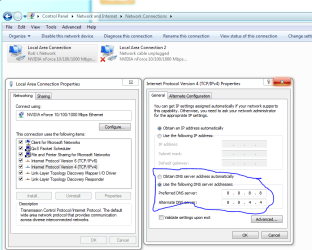
You can try typing the DNS into your IPv4 properties window. This might help you navigate around any problems the router or hotspot has in obtaining the DNS.

In my experience Windows 7 doesn't like using third party connection programs.
 

Attachments

  • DNS manual input.PNG
    DNS manual input.PNG
    35.9 KB · Views: 623

My Computer My Computer

Computer type
PC/Desktop
Computer Manufacturer/Model Number
Home built
OS
Windows 7 Ult, Windows 8.1 Pro,
CPU
Q9650-4.275GHz, E8600 4.5GHz, E6750-3.8GHz
Motherboard
Evga 780i FTW
Memory
G.Skill PC2 9600 1200Mhz 5 5 5 15 2T
Graphics Card(s)
GTX480
Sound Card
Asus Xonar D2
Monitor(s) Displays
HannsG
Screen Resolution
1680X1050
Hard Drives
GSkill Phoenix Pro 120GB SSD
PSU
ThermalTake Toughpower 1000Watt modular
Case
ThermalTake XaserV
Cooling
Xigmatek S1283
Keyboard
Logitech G15
Mouse
Logitech G9
Internet Speed
T1
You can try typing the DNS into your IPv4 properties window. This might help you navigate around any problems the router or hotspot has in obtaining the DNS.

In my experience Windows 7 doesn't like using third party connection programs.

Hi, Thank you for taking your time to post this.

Yes, I ve used 8.8.8.8 and 208.62.222.222 on all devices which laptops worked well minus Windows 7. Also I changed alternative DNS Server to 8.8.4.4, no successful effect. Yes, I suspense it has something has do with faulty DNS records on my Windows 7.

So I just resolved it more or less(i tried ipconfig with various parameters. For more info at ipconfig - Windows Command Line Utility) by:

Start -> "cmd" (admin) -> ipconfig /registerdns

And...it worked!!!!

Thanks guys for help
 

My Computer My Computer

Computer Manufacturer/Model Number
Customised
OS
Windows 7 Ultimate x64
CPU
Q9550
Motherboard
ASUS P5Q-EM
Memory
8GB (Geil 800Mhz a pair of dual channels RAM) DDR2
Graphics Card(s)
none (integrated)
Sound Card
none (integrated)
Monitor(s) Displays
2
Hard Drives
128GB SSD
128GB SSD
2TB WD
2TB WD
1TB WD
PSU
Cosair 620w Modular
Case
Li Lian PC-A10
Cooling
Zalman
Internet Speed
10Mbps
Back
Top