thanks2you
New member
- Local time
- 5:31 AM
- Messages
- 9
Edit 2 in case this helps someone — This particular list view issue was the result of disabling auto-arrange.
Of course, disabling auto arrange in W7 lets you sort files and/or folders like this - http://i.imgur.com/Vu71MxH.png
…But, you can *only* choose whether to gain the ability to arrange files & folders as you wish, *or* preserve the original appearance and behavior of list view. So far, it doesn't seem possible to have both.
▬▬▬▬▬▬▬▬▬▬▬▬▬▬▬▬▬▬▬▬▬▬▬▬▬▬▬▬▬▬▬▬▬▬▬▬▬▬▬▬▬▬▬▬▬▬▬▬
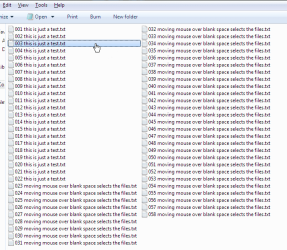
Screenshot - http://i.imgur.com/GLd9t1U.png
For some reason, whenever I move the mouse over the blank space in my folders, it immediately selects the files. This has been driving me nuts for quite a while, as it makes it a real pain to select only a specific range of files or folders.
I was unable to reproduce this issue on a new account using the same 'Folder Options', theme, mouse settings, 'Visual Effects' (under 'Performance Options') et cetera— so the issue lies elsewhere.
Does anyone know which settings control this? Many thanks in advance for any and all help!
Edit: recorded the behavior, in case this makes the issue more clear—
New account (this is what I want) - http://i.imgur.com/2Ol0zQG.gif
Old account - http://i.imgur.com/vxvw4Ak.gif
Of course, disabling auto arrange in W7 lets you sort files and/or folders like this - http://i.imgur.com/Vu71MxH.png
…But, you can *only* choose whether to gain the ability to arrange files & folders as you wish, *or* preserve the original appearance and behavior of list view. So far, it doesn't seem possible to have both.
▬▬▬▬▬▬▬▬▬▬▬▬▬▬▬▬▬▬▬▬▬▬▬▬▬▬▬▬▬▬▬▬▬▬▬▬▬▬▬▬▬▬▬▬▬▬▬▬
Screenshot - http://i.imgur.com/GLd9t1U.png
For some reason, whenever I move the mouse over the blank space in my folders, it immediately selects the files. This has been driving me nuts for quite a while, as it makes it a real pain to select only a specific range of files or folders.
I was unable to reproduce this issue on a new account using the same 'Folder Options', theme, mouse settings, 'Visual Effects' (under 'Performance Options') et cetera— so the issue lies elsewhere.
Does anyone know which settings control this? Many thanks in advance for any and all help!
Edit: recorded the behavior, in case this makes the issue more clear—
New account (this is what I want) - http://i.imgur.com/2Ol0zQG.gif
Old account - http://i.imgur.com/vxvw4Ak.gif
Attachments
Last edited:
My Computer
At a glance
Windows 7 Pro x64i7-3930K 3.20 GHz 6 core32 GigsNVIDIA GeForce GTX 780
- Computer type
- PC/Desktop
- Computer Manufacturer/Model Number
- Asus
- OS
- Windows 7 Pro x64
- CPU
- i7-3930K 3.20 GHz 6 core
- Motherboard
- ASUS P9X79 LE [SATA III , USB 3.0]
- Memory
- 32 Gigs
- Graphics Card(s)
- NVIDIA GeForce GTX 780
- Sound Card
- Integrated HD Audio
- Screen Resolution
- 1920x1080
- Case
- Cooler Master Storm Stryker
- Cooling
- (CPU Cooling) Asetek 550LC (whatever that means)
- Internet Speed
- whatever c*mcast deems fit
- Browser
- Firefox