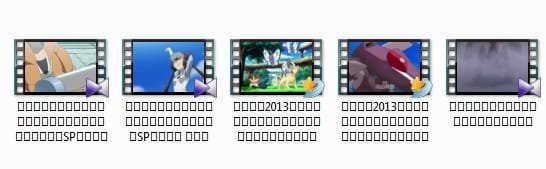
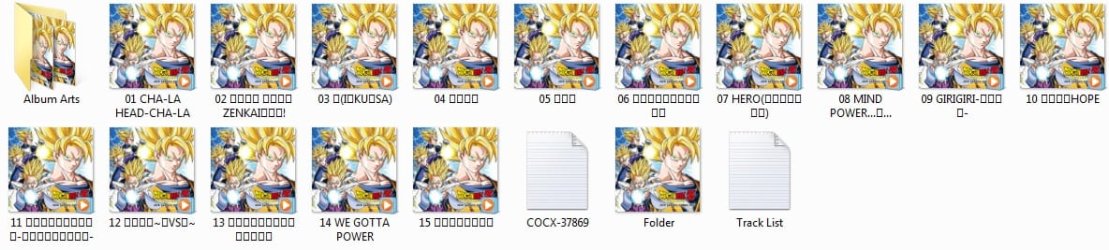
Solved How 2 make Japanese Text Appear Proper[not appear as Cube]in Explorer?

SelenaGomezFan

New member
Local time
1:52 PM
Messages
16
Location
Japan
Hello, I use Windows 7 SP1 with updates regularly. I get Proper Japanese Text for the Files(Videos/Songs. etc) in Windows Explorer Rarely .
But many times My File name's in Jap/Kor. etc Languages turns into Squares automatically .:(
Eg: jhfdd.jpg kfdds.jpg
But it works fine in iTunes. eg: nfsss.jpg
Is there anyway to make Japanese/Other Languages look correct in explorer forever ?
P.S - I can't fully uninstall English & install Japanese, because I'm still learning Japanese Xd!
Any help will be Appreciated!!
Thanks a Lot!!
 

My Computer My Computer

At a glance

Windows 7 Ultimate; SP1Pentinum Dual Core CPU E5300 @ 2.60GHzIntel G33/31 Chipset Family
Computer type
PC/Desktop
OS
Windows 7 Ultimate; SP1
CPU
Pentinum Dual Core CPU E5300 @ 2.60GHz
Graphics Card(s)
Intel G33/31 Chipset Family
Sound Card
Realtek
Monitor(s) Displays
HP Compaq W185q
Screen Resolution
1366 x 768
Hard Drives
500 GB Seagate Internal HDD
&
1 TB External HDD x 2 (Seagate+Transcend)
Case
HP Compaq
Internet Speed
50 Kb/ps :"(
Hello SelenaGomezFan,

Try this

:ar: Click start>control panel>region and language>click on administrative tab>

Under Language for non-uni-code programs click change system locale> click okay if you get a prompt>select Japanese. Then restart your computer.

When you restart everything will not be in Japanese, but it should fix the Japenese text from appearing as blocks.

Changing Locale

The steps listed are a little different, follow from my path
 

My Computer My Computer

At a glance

Windows 10 Pro X64Intel(R) Core(TM) i5-3570K CPU OC@ 4.5GHZ Turbo8.00 GB DDR3 1600MhzMSI Gaming X GTX 1070
Computer type
PC/Desktop
Computer Manufacturer/Model Number
Dude Build
OS
Windows 10 Pro X64
CPU
Intel(R) Core(TM) i5-3570K CPU OC@ 4.5GHZ Turbo
Motherboard
MSI Z77A-G45 Gaming
Memory
8.00 GB DDR3 1600Mhz
Graphics Card(s)
MSI Gaming X GTX 1070
Sound Card
Realtek High Definition
Monitor(s) Displays
Dell S23O9W, HP L1710
Screen Resolution
DELL-1920 x 1080 HP-1280 x1024
Hard Drives
Crucial m4 256 SSD, WD 7200RPM 500GB WD 1TB
PSU
Seasonic X650 GOLD
Case
Zalman Z12
Cooling
Antec Kuhler 920
Keyboard
Logitech
Mouse
MSI DS100 Interceptor
Internet Speed
50 down and 5 up
Antivirus
MSE
Browser
Chrome, IE 11
Other Info
Logitech X-620 Speakers
Hello SelenaGomezFan,

Try this

:ar: Click start>control panel>region and language>click on administrative tab>

Under Language for non-uni-code programs click change system locale> click okay if you get a prompt>select Japanese. Then restart your computer.

When you restart everything will not be in Japanese, but it should fix the Japenese text from appearing as blocks.

Changing Locale

The steps listed are a little different, follow from my path

It worked perfectly! Thanks a lot for the help! :D
 

My Computer My Computer

At a glance

Windows 7 Ultimate; SP1Pentinum Dual Core CPU E5300 @ 2.60GHzIntel G33/31 Chipset Family
Computer type
PC/Desktop
OS
Windows 7 Ultimate; SP1
CPU
Pentinum Dual Core CPU E5300 @ 2.60GHz
Graphics Card(s)
Intel G33/31 Chipset Family
Sound Card
Realtek
Monitor(s) Displays
HP Compaq W185q
Screen Resolution
1366 x 768
Hard Drives
500 GB Seagate Internal HDD
&
1 TB External HDD x 2 (Seagate+Transcend)
Case
HP Compaq
Internet Speed
50 Kb/ps :"(
Glad it's working now!
 

My Computer My Computer

At a glance

Windows 10 Pro X64Intel(R) Core(TM) i5-3570K CPU OC@ 4.5GHZ Turbo8.00 GB DDR3 1600MhzMSI Gaming X GTX 1070
Computer type
PC/Desktop
Computer Manufacturer/Model Number
Dude Build
OS
Windows 10 Pro X64
CPU
Intel(R) Core(TM) i5-3570K CPU OC@ 4.5GHZ Turbo
Motherboard
MSI Z77A-G45 Gaming
Memory
8.00 GB DDR3 1600Mhz
Graphics Card(s)
MSI Gaming X GTX 1070
Sound Card
Realtek High Definition
Monitor(s) Displays
Dell S23O9W, HP L1710
Screen Resolution
DELL-1920 x 1080 HP-1280 x1024
Hard Drives
Crucial m4 256 SSD, WD 7200RPM 500GB WD 1TB
PSU
Seasonic X650 GOLD
Case
Zalman Z12
Cooling
Antec Kuhler 920
Keyboard
Logitech
Mouse
MSI DS100 Interceptor
Internet Speed
50 down and 5 up
Antivirus
MSE
Browser
Chrome, IE 11
Other Info
Logitech X-620 Speakers
Back
Top