
You are using an out of date browser. It may not display this or other websites correctly.
You should upgrade or use an alternative browser.
You should upgrade or use an alternative browser.
how can disable this service ? sadly i don't know the name in english
- Thread starter drugo
- Start date
- Local time
- 10:49 AM
- Messages
- 8,138
Please tell us why you want it turned off.
It is a good thing to keep running.
It is a good thing to keep running.
My Computer
At a glance
W7 Pro SP1 64biti78GBIntel HD Graphics
- Computer type
- Laptop
- Computer Manufacturer/Model Number
- Employer provided Dell Latitude
- OS
- W7 Pro SP1 64bit
- CPU
- i7
- Memory
- 8GB
- Graphics Card(s)
- Intel HD Graphics
- Hard Drives
- crappy SSD
- Antivirus
- Employer mandated Symantec Endpoint Protection
- Browser
- Pale Moon 64bit, IE11 64bit & Chrome 64bit

- Local time
- 6:49 PM
- Messages
- 476
Please tell us why you want it turned off.
It is a good thing to keep running.

it's really boring
i have nod32 , automatic update , i'm bored to see it to pop up ..
My Computer
At a glance
windows 7 ultimate 64bit
- Computer type
- PC/Desktop
- OS
- windows 7 ultimate 64bit
- Local time
- 10:49 AM
- Messages
- 8,138
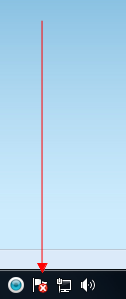
Please click on that icon...
...then click on the link named "Open Access Center"
...then post a screenshot of that window.
...then click on the link named "Open Access Center"
...then post a screenshot of that window.
My Computer
At a glance
W7 Pro SP1 64biti78GBIntel HD Graphics
- Computer type
- Laptop
- Computer Manufacturer/Model Number
- Employer provided Dell Latitude
- OS
- W7 Pro SP1 64bit
- CPU
- i7
- Memory
- 8GB
- Graphics Card(s)
- Intel HD Graphics
- Hard Drives
- crappy SSD
- Antivirus
- Employer mandated Symantec Endpoint Protection
- Browser
- Pale Moon 64bit, IE11 64bit & Chrome 64bit

Hello drugo,
If you like, you could just turn off any Action Center messages you no longer wish to receive in the taskbar notification area.
http://www.sevenforums.com/tutorials/364-action-center-change-message-settings.html
Hope this helps,
Shawn
If you like, you could just turn off any Action Center messages you no longer wish to receive in the taskbar notification area.
http://www.sevenforums.com/tutorials/364-action-center-change-message-settings.html
Hope this helps,
Shawn
My Computer
At a glance
64-bit Windows 11 Pro for WorkstationsIntel i7-8700K OC'd to 5 GHz64 GB (4x16GB) G.SKILL TridentZ RGB DDR4 3600...ASUS ROG-STRIX-GTX1080TI-O11G-GAMING
- Computer type
- PC/Desktop
- Computer Manufacturer/Model Number
- Self built custom
- OS
- 64-bit Windows 11 Pro for Workstations
- CPU
- Intel i7-8700K OC'd to 5 GHz
- Motherboard
- ASUS ROG Maximus XI Formula Z390
- Memory
- 64 GB (4x16GB) G.SKILL TridentZ RGB DDR4 3600 MHz
- Graphics Card(s)
- ASUS ROG-STRIX-GTX1080TI-O11G-GAMING
- Sound Card
- Integrated
- Monitor(s) Displays
- 2 x Samsung Odyssey G7 27"
- Screen Resolution
- 2560x1440
- Hard Drives
- 1TB Samsung 990 PRO M.2,
4TB Samsung 990 PRO PRO M.2,
TerraMaster F8 SSD Plus NAS
- PSU
- Seasonic Prime Titanium 850W
- Case
- Thermaltake Core P3
- Cooling
- Corsair Hydro H115i
- Keyboard
- Logitech wireless K800
- Mouse
- Logitech MX Master 4
- Internet Speed
- 2 Gb/s Download and 100 Mb/s Upload
- Antivirus
- Malwarebyte Anti-Malware Premium
- Browser
- Google Chrome
- Other Info
- Logitech Z625 speaker system,
Logitech BRIO 4K Pro webcam,
HP Color LaserJet Pro MFP M477fdn,
APC SMART-UPS RT 1000 XL - SURT1000XLI,
Galaxy S23 Plus phone
- Local time
- 10:49 AM
- Messages
- 8,138
Yep - that is where I was headed - but I would like to see what message the OP is getting before we hide them... curious to see if nod32 does not play nice with W7.Hello drugo,
If you like, you could just turn off any Action Center messages you no longer wish to receive in the taskbar notification area.
http://www.sevenforums.com/tutorials/364-action-center-change-message-settings.html
Hope this helps,
Shawn
My Computer
At a glance
W7 Pro SP1 64biti78GBIntel HD Graphics
- Computer type
- Laptop
- Computer Manufacturer/Model Number
- Employer provided Dell Latitude
- OS
- W7 Pro SP1 64bit
- CPU
- i7
- Memory
- 8GB
- Graphics Card(s)
- Intel HD Graphics
- Hard Drives
- crappy SSD
- Antivirus
- Employer mandated Symantec Endpoint Protection
- Browser
- Pale Moon 64bit, IE11 64bit & Chrome 64bit
Please tell us why you want it turned off.
It is a good thing to keep running.
Really? Are you sure? It's one of the most annoying things in Win 7 (besides the flawed explorer of course).
So far, in my computer it just popups useless alerts, and it's one of the first things I disable.
My Computer
At a glance
Windows 7 Ultimate x64Intel Core i7-740QM8 GB DDR3NVIDIA GeForce 330GT
- Computer type
- Laptop
- Computer Manufacturer/Model Number
- Toshiba Sattelite A665-S6092
- OS
- Windows 7 Ultimate x64
- CPU
- Intel Core i7-740QM
- Memory
- 8 GB DDR3
- Graphics Card(s)
- NVIDIA GeForce 330GT
- Screen Resolution
- 1366x768
- Hard Drives
- Samsung 840 SSD 500GB
1TB USB3 external HD
- Cooling
- Coolermaster Notepal U3 notebook cooling pad
- Internet Speed
- 3mbps ASDL
- Antivirus
- ClamWin 0.98.7
- Browser
- Opera 12.17 x86 (main), Firefox 38 (sec), IE11 (last resort)
- Local time
- 10:49 AM
- Messages
- 8,138
Yep, I'm sure. Just like I'm sure that 64bit browsers can be more secure than 32bit onesPlease tell us why you want it turned off.
It is a good thing to keep running.
Really? Are you sure? It's one of the most annoying things in Win 7 (besides the flawed explorer of course).
So far, in my computer it just popups useless alerts, and it's one of the first things I disable.
If it is one of the first things that you disable, then how could you have a lot of experience with it?
My Computer
At a glance
W7 Pro SP1 64biti78GBIntel HD Graphics
- Computer type
- Laptop
- Computer Manufacturer/Model Number
- Employer provided Dell Latitude
- OS
- W7 Pro SP1 64bit
- CPU
- i7
- Memory
- 8GB
- Graphics Card(s)
- Intel HD Graphics
- Hard Drives
- crappy SSD
- Antivirus
- Employer mandated Symantec Endpoint Protection
- Browser
- Pale Moon 64bit, IE11 64bit & Chrome 64bit
- Local time
- 6:49 PM
- Messages
- 476
Hello drugo,
If you like, you could just turn off any Action Center messages you no longer wish to receive in the taskbar notification area.
http://www.sevenforums.com/tutorials/364-action-center-change-message-settings.html
Hope this helps,
Shawn
thanks
but the icon is still there!
My Computer
At a glance
windows 7 ultimate 64bit
- Computer type
- PC/Desktop
- OS
- windows 7 ultimate 64bit

to hide the icon click on the triangle at the left of the tray area, select customize, find the offending icon, select either "only show notifications" or "hide icon and notifications" to keep the icon in the expanded tray area that you can access from the white triangle. To remove it altogether from the same panel select "turn system icons on and off".
It is recommended to keep it at "only show notifications" and from that tutorial you disable the warnings about stuff you know already (like Update being set to manual or disabling mainteneance).
It is recommended to keep it at "only show notifications" and from that tutorial you disable the warnings about stuff you know already (like Update being set to manual or disabling mainteneance).
My Computer
At a glance
Win 7 Pro 64-bit 7601AMD Phenom 9650 QuadCore, revision DR-B35 GB yes I run 2x 2GB and 1x 1GB, different b...NVIDIA GeForce 9800 GT 512 Mb, unknown manufa...
- Computer type
- PC/Desktop
- Computer Manufacturer/Model Number
- custom built
- OS
- Win 7 Pro 64-bit 7601
- CPU
- AMD Phenom 9650 QuadCore, revision DR-B3
- Motherboard
- ASUS M4A78
- Memory
- 5 GB yes I run 2x 2GB and 1x 1GB, different brand, spank me.
- Graphics Card(s)
- NVIDIA GeForce 9800 GT 512 Mb, unknown manufacturer.
- Sound Card
- Crappy Realtek Integrated Audio
- Monitor(s) Displays
- Fujitsu Siemens P19-3P
- Screen Resolution
- 1280 x 1024 x 32 bits @ 60 Hz Oh yeah, 4:3 rocks!
- Hard Drives
- (1) MAXTOR S TM3320613AS SATA Disk Device (2) STM35004 18AS SATA Disk Device (3) TOSHIBA USB 2.5"-HDD
- PSU
- whatever, around 450w
- Case
- Scavenged from old company PC, 10+ years old
- Cooling
- CPU fan, GPU fan, case fan, nothing fancy
- Keyboard
- Microsoft, PS/2, white.
- Mouse
- Optical, logitec.
- Internet Speed
- effective max speeds: 70-ish kB/s down 30-ish kB/s up
- Antivirus
- Avira, free edition.
- Browser
- Firefox with FXChrome to make it look like Google Chrome :P
- Other Info
- Was discarded by previous owner due to "horrible performance".
Was running Win Xp from a IDE drive. Yeah. Was a pain.
SATA II drive and Win7 and it zips away! Yay!
- Local time
- 6:49 PM
- Messages
- 476
to hide the icon click on the triangle at the left of the tray area, select customize, find the offending icon, select either "only show notifications" or "hide icon and notifications" to keep the icon in the expanded tray area that you can access from the white triangle. To remove it altogether from the same panel select "turn system icons on and off".
It is recommended to keep it at "only show notifications" and from that tutorial you disable the warnings about stuff you know already (like Update being set to manual or disabling mainteneance).
thanks
but on my w7 32bit i was enable to disable the service to get rid of it
is there a way to shut down this feature?
i don't need it
My Computer
At a glance
windows 7 ultimate 64bit
- Computer type
- PC/Desktop
- OS
- windows 7 ultimate 64bit
See this, go to post #9
http://www.sevenforums.com/general-discussion/62089-disable-action-center-via-registy-key.html
http://www.sevenforums.com/general-discussion/62089-disable-action-center-via-registy-key.html
My Computer
At a glance
Windows 10 Pro x64, Windows 8.1 Pro x64, Wind...INTEL i9-7920X LGA 206664 GB (4 X 16 GB) G-Skill V Series DDR4 3200 ...EVGA GTX 1060 SC 3 GB
- Computer type
- PC/Desktop
- Computer Manufacturer/Model Number
- Custom Built
- OS
- Windows 10 Pro x64, Windows 8.1 Pro x64, Windows 7 Ultimate x64 SP1,
- CPU
- INTEL i9-7920X LGA 2066
- Motherboard
- Gigabyte X299-WU8 F3
- Memory
- 64 GB (4 X 16 GB) G-Skill V Series DDR4 3200 Quad Channel
- Graphics Card(s)
- EVGA GTX 1060 SC 3 GB
- Sound Card
- Realtek Onboard ALC1220
- Monitor(s) Displays
- 2 x Samsung S27E310
- Screen Resolution
- 1920x1080
- Hard Drives
- Samsung 2 x 970 EVO Plus 500 GB NVMe
1 x 6TB WD 6003FZBX SATA
1 x 6TB WD 60EFRX SATA
12 x 3TB WD 30EFRX SATA
- PSU
- Seasonic X-1050
- Case
- Thermaltake Armor+
- Cooling
- Corsair H80i V2 Liquid AOI Cooler
- Keyboard
- Logitech G510s
- Mouse
- Logitech MX Master 2S
- Internet Speed
- 200 Mb/s
- Antivirus
- ESET NOD32 13.1
- Browser
- EDGE (Dev, Canary, Beta), Chrome
- Other Info
- ASUS RT-AC68U router
Malwarebytes 4.0.4
- Local time
- 6:49 PM
- Messages
- 476
hi
i found out that right click on the clock proprierty(i guess) i can disable it
My Computer
At a glance
windows 7 ultimate 64bit
- Computer type
- PC/Desktop
- OS
- windows 7 ultimate 64bit
Similar threads

- Replies
- 4
- Views
- 37K