How can I add the IE icon to the desktop ?

VistaKing

New member
Guru
Gold Member
Local time
2:21 PM
Messages
6,830
How can I add the IE icon to the desktop like you would do in Windows Vista. I put this in notepad and merged it into the registry.
Windows Registry Editor Version 5.00
[HKEY_CURRENT_USER\Software\Microsoft\Windows\CurrentVersion\Explorer\HideDesktopIcons\NewStartPanel]
"{871C5380-42A0-1069-A2EA-08002B30309D}"=dword:00000000
 

My Computer My Computer

At a glance

Windows 7 Ultimate 32-Bit & Windows 7 Ultimat...Intel Core i7 CPU 950 @ 3.07GHzOCZ 6GB (3 x 2GB) 240-Pin DDR3 SDRAM DDR3 160...ATI Radeon HD 5700 Series
Computer Manufacturer/Model Number
Custom Built
OS
Windows 7 Ultimate 32-Bit & Windows 7 Ultimate 64-Bit
CPU
Intel Core i7 CPU 950 @ 3.07GHz
Motherboard
ASUS P6T DELUXE V2
Memory
OCZ 6GB (3 x 2GB) 240-Pin DDR3 SDRAM DDR3 1600 OCZ3X1600R2
Graphics Card(s)
ATI Radeon HD 5700 Series
Sound Card
OnBoard
Hard Drives
WD6400AACS-00M3B0 (640GB SATA )
PSU
CORSAIR 850w
Case
NZXT LEXA
Cooling
Intel Stock Heatsink Fan
Keyboard
Microsoft Wireless Laser Keyboard 7000
Mouse
Microsoft Wireless Laser Mouse 7000

My Computer My Computer

At a glance

Vista Ult64, Win7600Intel Core 2 Quad Q6600 @ 2400 MHz 64bit OS4096 MB DDR3-SDRAMATI Radeon HD 3870 Series x2 Crossfired
Computer Manufacturer/Model Number
Self Build 64bit
OS
Vista Ult64, Win7600
CPU
Intel Core 2 Quad Q6600 @ 2400 MHz 64bit OS
Motherboard
Asus P5E3 Deluxe WiFi @p 64 bit OS
Memory
4096 MB DDR3-SDRAM
Graphics Card(s)
ATI Radeon HD 3870 Series x2 Crossfired
Sound Card
Realtek on board
Monitor(s) Displays
Samsung SyncMaster - 23 inches
Screen Resolution
1680x1050 pixels at 60 Hz in True Colors
Hard Drives
Hitachi (250 GB)/Samsung 750 GB. /Barracuda 160 GB.
My Book 1 TB external..
PSU
Cooler Master 1000w
Case
Cooler Master Cosmos 1000.
Cooling
Fans and fresh air,
Keyboard
Wireless
Mouse
Wireless
Internet Speed
Never fast enough
Other Info
I use a Magnum.
Start/All Programs/ Right click the Internet Explorer /Send to /Desktop create shortcut.
I hope that helps.
 

My Computer My Computer

At a glance

Vista Ult64, Win7600Intel Core 2 Quad Q6600 @ 2400 MHz 64bit OS4096 MB DDR3-SDRAMATI Radeon HD 3870 Series x2 Crossfired
Computer Manufacturer/Model Number
Self Build 64bit
OS
Vista Ult64, Win7600
CPU
Intel Core 2 Quad Q6600 @ 2400 MHz 64bit OS
Motherboard
Asus P5E3 Deluxe WiFi @p 64 bit OS
Memory
4096 MB DDR3-SDRAM
Graphics Card(s)
ATI Radeon HD 3870 Series x2 Crossfired
Sound Card
Realtek on board
Monitor(s) Displays
Samsung SyncMaster - 23 inches
Screen Resolution
1680x1050 pixels at 60 Hz in True Colors
Hard Drives
Hitachi (250 GB)/Samsung 750 GB. /Barracuda 160 GB.
My Book 1 TB external..
PSU
Cooler Master 1000w
Case
Cooler Master Cosmos 1000.
Cooling
Fans and fresh air,
Keyboard
Wireless
Mouse
Wireless
Internet Speed
Never fast enough
Other Info
I use a Magnum.
I dont want the IE to have the arrow shortcut icon on it .
 

My Computer My Computer

At a glance

Windows 7 Ultimate 32-Bit & Windows 7 Ultimat...Intel Core i7 CPU 950 @ 3.07GHzOCZ 6GB (3 x 2GB) 240-Pin DDR3 SDRAM DDR3 160...ATI Radeon HD 5700 Series
Computer Manufacturer/Model Number
Custom Built
OS
Windows 7 Ultimate 32-Bit & Windows 7 Ultimate 64-Bit
CPU
Intel Core i7 CPU 950 @ 3.07GHz
Motherboard
ASUS P6T DELUXE V2
Memory
OCZ 6GB (3 x 2GB) 240-Pin DDR3 SDRAM DDR3 1600 OCZ3X1600R2
Graphics Card(s)
ATI Radeon HD 5700 Series
Sound Card
OnBoard
Hard Drives
WD6400AACS-00M3B0 (640GB SATA )
PSU
CORSAIR 850w
Case
NZXT LEXA
Cooling
Intel Stock Heatsink Fan
Keyboard
Microsoft Wireless Laser Keyboard 7000
Mouse
Microsoft Wireless Laser Mouse 7000
It cant be done in Windows 7 unfortunatly...

From MS KB...
Important: Windows 7 no longer supports the ability to modify the registry to get the special Internet Explorer icon to appear on your desktop. This change was made to ensure Internet Explorer could be removed easily for compliance reasons. The only way to add the Internet Explorer icon to the desktop in Windows 7 is to create a shortcut. To create a shortcut to Internet Explorer on your desktop, follow these steps:

The Internet Explorer icon is missing from your desktop
 

My Computer My Computer

At a glance

XP Pro SP3 x86/Vista SP2 x64/Win7 x64 Triple-...AMD64 X2 AM2 5000+Corsair TWX 2Gb (2x1Gb) DDR2 800MhzPCI-X 2.0 Inno3D (NVidia) 9500GT 1Gb DDR2
Computer Manufacturer/Model Number
Self Built
OS
XP Pro SP3 x86/Vista SP2 x64/Win7 x64 Triple-boot
CPU
AMD64 X2 AM2 5000+
Motherboard
Asus MSN-X Plus
Memory
Corsair TWX 2Gb (2x1Gb) DDR2 800Mhz
Graphics Card(s)
PCI-X 2.0 Inno3D (NVidia) 9500GT 1Gb DDR2
Sound Card
Onboard Realtec ALC662-GR
Monitor(s) Displays
Relisys 17' CRT (model unknown)
Screen Resolution
1024x768
Hard Drives
750Gb Samsung 7200-3Gb/s 32Mb Cache SATA
PSU
500W
Cooling
Standard AMD CPU Fan, One side, front and rear case fan.
Keyboard
Microsoft Multimedia Keyboard
Mouse
Samsung Optical
Internet Speed
10M
IE Shortcut on Desktop with no Arrows

I dont want the IE to have the arrow shortcut icon on it .

As somone has already stated, Win7 does not allow for the 'specialty' IE icon to be added to the desktop. Instead, a simple shortcut must be added (easy enough). If you don't want the shortcut arrow, there are reg hacks to do this (or TweakVI).

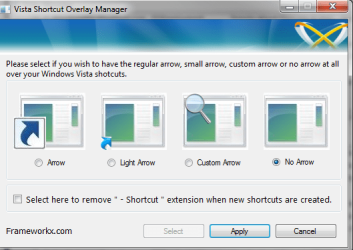
There's also a simple freeware program out there from Frameworkx at Vista Shortcut Overlay Remover 1.3 free download. Windows Vista Shortcut Overlay Remover, aka FxVisor, allows you to remove, enable or change/customize the explorer shortcut overlay arrow which is added to shortcuts by default:

Frameworkx.png

Hope that helps...
 

My Computer My Computer

At a glance

Windows 7 Ultimate
OS
Windows 7 Ultimate
if tweak UI works in windows 7 then it has an option to remove the arrow from it. why does the arrow on icons bother you anyway?
 

My Computer My Computer

At a glance

windows 7 enterprise x64Intel core 2 quad Q6600Corsair Dual Channel TWINX 4096MB PC6400 DDR2...XFX Geforce 8800GTS 512MB Alpha Dog edition
Computer Manufacturer/Model Number
Self built
OS
windows 7 enterprise x64
CPU
Intel core 2 quad Q6600
Motherboard
Asus P5N-E SLI
Memory
Corsair Dual Channel TWINX 4096MB PC6400 DDR2 800MHz Memory
Graphics Card(s)
XFX Geforce 8800GTS 512MB Alpha Dog edition
Sound Card
HT Omega Striker 7.1
Monitor(s) Displays
samsung Syncmaster 941bw 19" widescreen LCD
Hard Drives
Western Digital Caviar 1TB Black edition (internal)
PSU
Thermaltake tough power 600W PSU
Case
Thermaltake Matrix mid-tower case
Cooling
Stock
Ah who doesn't love seeing an ancient thread dug up. Its like looking into a bit of history. :)
 

My Computer My Computer

At a glance

Windows 7 Ultimate, OS X 10.7, Ubuntu 11.04Intel E6750 @ 3.80GHz2x2GB & 2x1GB (6GB) OCZ Reaper 1066MHz @ 1080MHzEVGA nVidia GTX 260 896mb (216 Core) FTW Edition
Computer Manufacturer/Model Number
Custom | Whitebox
OS
Windows 7 Ultimate, OS X 10.7, Ubuntu 11.04
CPU
Intel E6750 @ 3.80GHz
Motherboard
Gigabyte GA-EP45-UD3L (Revision 1.1)
Memory
2x2GB & 2x1GB (6GB) OCZ Reaper 1066MHz @ 1080MHz
Graphics Card(s)
EVGA nVidia GTX 260 896mb (216 Core) FTW Edition
Sound Card
Realtek ALC888
Monitor(s) Displays
21" VIZIO TV
Screen Resolution
1680x1050 @ 60Hz
Hard Drives
Western Digital WD6401AALS - 640GB
Hitachi HDP725016GLA380 - 160GB
PSU
Corsair 750W
Case
NZXT Nemesis Elite
Cooling
Thermaltake SpinQ
Keyboard
Logitech Wireless S520
Mouse
Logitech Wireless S520 - Microsoft Wireless Arc Mouse
Internet Speed
Download: 20mbps, Upload: 3mbps
I know this is 6 months later, but thought I would post the solution here as it took me a while to find it myself. To get the special IE shortcut back that has the functionality that you are looking for take a look at either of following two links. These registry entries recreate what we have had in the past.

http://superuser.com/questions/102334/where-to-find-internet-explorer-in-windows-7
http://www.howtogeek.com/howto/15206/how-to-restore-the-real-internet-explorer-desktop-icon-in-windows-7/

-Jared
 

My Computer My Computer

At a glance

64-bit Windows 7 and 10 Ent, 8.1 Pro WMC
OS
64-bit Windows 7 and 10 Ent, 8.1 Pro WMC
the Answer is so simple.....we have to creat the new Icon for windows 7 threw regestry edit ;)

Windows Registry Editor Version 5.00
[-HKEY_CLASSES_ROOT\CLSID\{871C5380-42A0-1069-A2EA-08002B30301D}]
[HKEY_CLASSES_ROOT\CLSID\{871C5380-42A0-1069-A2EA-08002B30301D}]
@="Internet Explorer"
"InfoTip"="@C:\\Windows\\System32\\ieframe.dll,-881"
[HKEY_CLASSES_ROOT\CLSID\{871C5380-42A0-1069-A2EA-08002B30301D}\DefaultIcon]
@="C:\\Windows\\System32\\ieframe.dll,-190"
[HKEY_CLASSES_ROOT\CLSID\{871C5380-42A0-1069-A2EA-08002B30301D}\InProcServer32]
@="C:\\Windows\\System32\\ieframe.dll"
"ThreadingModel"="Apartment"
[HKEY_CLASSES_ROOT\CLSID\{871C5380-42A0-1069-A2EA-08002B30301D}\shell]
@="OpenHomePage"
[HKEY_CLASSES_ROOT\CLSID\{871C5380-42A0-1069-A2EA-08002B30301D}\shell\NoAddOns]
@="Start Without Add-ons"
[HKEY_CLASSES_ROOT\CLSID\{871C5380-42A0-1069-A2EA-08002B30301D}\shell\NoAddOns\Command]
@="\"C:\\Program Files\\Internet Explorer\\iexplore.exe\" -extoff"
[HKEY_CLASSES_ROOT\CLSID\{871C5380-42A0-1069-A2EA-08002B30301D}\shell\OpenHomePage]
@="Open &Home Page"
[HKEY_CLASSES_ROOT\CLSID\{871C5380-42A0-1069-A2EA-08002B30301D}\shell\OpenHomePage\Command]
@="\"C:\\Program Files\\Internet Explorer\\iexplore.exe\""
[HKEY_CLASSES_ROOT\CLSID\{871C5380-42A0-1069-A2EA-08002B30301D}\shell\Properties]
@="P&roperties"
"Position"="bottom"
[HKEY_CLASSES_ROOT\CLSID\{871C5380-42A0-1069-A2EA-08002B30301D}\shell\Properties\command]
@="control.exe inetcpl.cpl"
[HKEY_CLASSES_ROOT\CLSID\{871C5380-42A0-1069-A2EA-08002B30301D}\Shellex\ContextMenuHandlers\ieframe]
@="{871C5380-42A0-1069-A2EA-08002B30309D}"
[HKEY_CLASSES_ROOT\CLSID\{871C5380-42A0-1069-A2EA-08002B30301D}\Shellex\MayChangeDefaultMenu]
@=""
[HKEY_CLASSES_ROOT\CLSID\{871C5380-42A0-1069-A2EA-08002B30301D}\ShellFolder]
@="C:\\Windows\\System32\\ieframe.dll,-190"
"HideAsDeletePerUser"=""
"Attributes"=dword:00000024
"HideFolderVerbs"=""
"WantsParseDisplayName"=""
"HideOnDesktopPerUser"=""
[HKEY_LOCAL_MACHINE\SOFTWARE\Microsoft\Windows\CurrentVersion\Explorer\Desktop\NameSpace\{871C5380-42A0-1069-A2EA-08002B30301D}]


Copy this code to a file and save it as AddIcon.reg
run it then refresh the desktop and enjoy the original Icon for internet Explorer in Windows 7 just like the previous version of windows

i will attach the file ;).....enjoy
 

Attachments

My Computer My Computer

At a glance

windows 7 32
OS
windows 7 32
Back
Top