How can I change the file path for the WMP playlists I had modified.

fredrok46

New member
Local time
2:41 PM
Messages
33
My external drive just died. Unfortunately, I had all my music playlists stored on it so now of course WMP can't find them. I have backups in other locations so that is not a problem. My question is, do I have to manually type and repoint every playlist individually to my new location? It seems I should be able to simply change the drive letter in the old file path to a new one? The Windows Music Library Locations folder (WMP/File/Manage Libraries/Music) does not offer that option on the context menu. It shows the file path to my playlists on the dead external drive but won't let me rename it. There must be an easier way to make the change but I can't figure it out.
 

My Computer My Computer

At a glance

Windows 7 x64Intel(R) Core(TM)2 Quad CPU Q66008.00 GBNVIDIA GeForce 9800 GTX/9800 GTX+
Computer Manufacturer/Model Number
HP Pavilion Media Center m8430f Desktop PC
OS
Windows 7 x64
CPU
Intel(R) Core(TM)2 Quad CPU Q6600
Motherboard
Asus IPIBL-LB
Memory
8.00 GB
Graphics Card(s)
NVIDIA GeForce 9800 GTX/9800 GTX+
Monitor(s) Displays
Samsung SyncMaster T260HD
Screen Resolution
1900X1200
Hard Drives
Hitachi 700GB HDS721075KLA330
PSU
BFG GX5500

My Computer My Computer

At a glance

Win-7-Pro64bit 7-H-Prem-64biti7-5930K 2nd i9-9940x both water blocked VRM'...Trident-z 3200C14 2nd Trident-z 3600C16EVGA 1080ti ftw3 2nd Titan Xp both water blocked
Computer type
PC/Desktop
Computer Manufacturer/Model Number
Custom assembled by me :}
OS
Win-7-Pro64bit 7-H-Prem-64bit
CPU
i7-5930K 2nd i9-9940x both water blocked VRM's too
Motherboard
ASUS SABERTOOTH X99 2nd ASUS x299 Apex
Memory
Trident-z 3200C14 2nd Trident-z 3600C16
Graphics Card(s)
EVGA 1080ti ftw3 2nd Titan Xp both water blocked
Sound Card
Built-in Realtek
Monitor(s) Displays
1-AOC G2460PG 24"G-Sync 144Hz/ 2nd 1-ASUS VG248QE 24" 144Hz
Screen Resolution
1920 x 1080 144Hz
Hard Drives
2-Samsung M.2 Evo & Evo Plus
2-Samsung 850 EVO 500GB SSD's/ 3-2.5 W.D. Black 1tb-&3-1tb/3-3.5 WD Black 1tb hdd's
PSU
EVGA SuperNOVA 1000-P2 2nd 1200-P2
Case
2-Corsair Obsidian Series 450D Black ATX Mid Tower
Cooling
Custom water loops
Keyboard
Logitech G710+/ 2nd Logitech G910
Mouse
2-RedDragon M901 Perdition 16400 dpi Gaming mouse = wired
Internet Speed
Comcast Ping 19ms 89.31mbps download speed 6.12mbps upload
Antivirus
Malwarebytes Pro/ Superantispyware Pro
Browser
FireFox & Pale moon
Other Info
2nd ASUS X299 Apex/Intel i9-9940x with Custom water loop/7H-Prem-x64/Corsair 450D case/Ram Trident-z 3600C16 4x8gb / Samsung970Evo plus 500gb SSD/Dual ssd EZ swap evo/PSU EVGA SuperNova 1200w-P2 80+Platinum/GPU Titan Xp /8-ML-140 on push-pull on 2-280GTX rads
Fredrock;

I hope this is worth a mention: although I've never had a complete fail that resulted in losing my playlists (usually stored under the standard My Documents/My Music setup) or my media files (usually on an external USB drive), but I have needed to migrate said music files more than a few times (general upkeep, or obtaining a new piece of equipment more suited to the job) and I find that with both WMP and Winamp (M3U) playlists, you can open them (or at least the ones I've done it with) in a text editor (I use the 'purple Notepad', called Metapad) and do a mass replace of the directory's location (as a piece of text) with the new directory, as in:

Path to be replaced: "D:\My Music"
Path to replace it with: "F:\My Music"

I use the "" quotes to delineate the path 'name'; it's unnecessary to use them in the process of doing that. Metapad will change every instance of the original path 'name' and replace it with the new one. You can even set it to be really picky about upper/lower case letters, or to replace one instance at a time. I've done this at least a half dozen times, and as long as you can pull a given playlist into a text editor with the paths clearly visible, it'll work (and for me has worked).

Cheers!

-Worker.
 

My Computer My Computer

At a glance

Windows 7 Ultimate x64Intel Core i7-4820K Quad-Core 3.70GHz32GB (4 x 8GB) GSkills 'Ripjaws'EVGA nVidia 770GTX 4GB VRAM x 2 (SLI)
Computer type
PC/Desktop
Computer Manufacturer/Model Number
Cyberpower 'Black Pearl' (Custom Build)
OS
Windows 7 Ultimate x64
CPU
Intel Core i7-4820K Quad-Core 3.70GHz
Motherboard
ASUS P9X79 LE Intel x79 Chipset 3-Way SLI (2 used)
Memory
32GB (4 x 8GB) GSkills 'Ripjaws'
Graphics Card(s)
EVGA nVidia 770GTX 4GB VRAM x 2 (SLI)
Sound Card
7.1 Channel Onboard (Motherboard Standard)
Monitor(s) Displays
ASUS 29" LED Flatscreen (2017)
Screen Resolution
1920x1080p (Maximum Desktop & Screen Resolution)
Hard Drives
1 x 128GB Corsair SSD (6.0Gbp/s Transfer) (Boot Drive)
1 x 4TB SATA-III 6.0Gb/s Western Digital (Data Drive)
PSU
1,000W AZZA Titan Single PSU (Stock)
Case
Cooler Master HAF-X Gaming Full Tower Case
Cooling
Corsair 28mm Sink & Radiators x 2 (Custom Installation Mod)
Keyboard
Repurposed Dell Multimedia Keyboard & AZZA Backup
Mouse
AZZA Gaming Mouse (Stock)
Internet Speed
50MB Down (Practical 7MBps Down) 10MB Up Fiber ADSL (2018)
Antivirus
Custom Coded Suite
Browser
Firefox 61 (2018) Chrome 71 (2018, possibly to be retired)
Other Info
Custom Picture (drawn by me :)) on the case's metal side.
My2 cents wroth if you want to try it - personally I have used it on many occasions on "dead" drives.


BOOTABLE UBUNTU

Make a bootable Ubuntu disk http://www.ubuntu.com/download

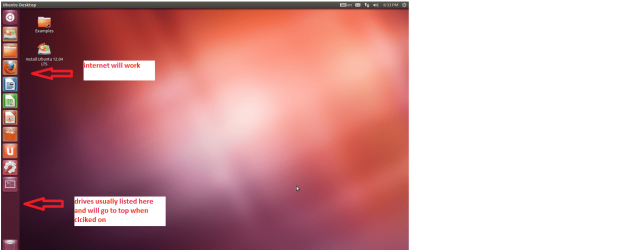
Set the BIOS to boot from the optical when the machine boots it will show you a screen with TRY or INSTALL> select TRY

When it is finished - it takes very little time you will get a screen like in the pic .

Open the drive you want > User and dig down until you get to the WLM settings you may be able to copy / paste the material you want doing this.

I am not sure if it will but I have recovered tons of data etc using this method both on "dead" or just plain drives that you cannot get data from using Windows.
PS I did this for a WLM but same applies to getting any data for any source your libraries should be a breeze.
 

Attachments

  • Ubuntu screen.PNG
    Ubuntu screen.PNG
    123.3 KB · Views: 1

My Computer My Computer

At a glance

Desk1 7 Home Prem / Desk2 10 Pro / Main lap A...Desk1 i5 3750K / Laptop i7 GTX 860M / Desk2 i...Desk1 8GB (1866) / Desk2 16GB (1333) / Laptop...Desk 1& 2NVidia GTX 650 & Laptops on board Intel
Computer type
PC/Desktop
Computer Manufacturer/Model Number
Own build (new) Desk1 / Asus ROG Win 7 / Desk2 1st build
OS
Desk1 7 Home Prem / Desk2 10 Pro / Main lap Asus ROG 10 Pro 2 laptop Toshiba 7 Pro Asus P2520 7 & 10
CPU
Desk1 i5 3750K / Laptop i7 GTX 860M / Desk2 i5 2500
Motherboard
Desk1 Asus P877-V / Desk2 Gigabyte H67 UD3H / Laptop ?
Memory
Desk1 8GB (1866) / Desk2 16GB (1333) / Laptop 8Gb DDR3
Graphics Card(s)
Desk 1& 2NVidia GTX 650 & Laptops on board Intel
Sound Card
Desk 1 & 2 -XONAR DG Realtek High Def audio Laptop
Monitor(s) Displays
Desk 1 Benq HD 2450 / Desk2 Philips 24" / Laptop 17.5"
Screen Resolution
1920x1080 D1 & D2 & Laptop 1
Hard Drives
Desk1 Samsung 120GB 830 SSD
Asus ROG 256GB 850 Pro SSD
Desk2 Samsung 840 256 SSD
Toshiba 120GB EVO
PSU
Desk 1 Corsair HX 1050/ Laptop ? / Desk 2 Corsair HX 650
Case
Desk 1 Cooler HAF XM ? Toshiba laptop / Desk2 Coolermaster
Cooling
Fans on all Desk1 -2 Desk2 - all Coolermasters 5 Laptop ?
Keyboard
Desk 1 MS Sidewinder X6 Desk 2 MS Sidewinder X 4
Mouse
Desk 1&2 - Gigabyte MS 900 gamer - laptop - Logitec wireless
Internet Speed
ADSL2+
Other Info
One other Desktop (tester) and spare Toshba laptop both with SSD's
Running Kaspersky 2016 ISS on all machines config'd identically
Logitec audio stereo systems on each machine (x3)
Canon MG5250MFC
Router/modem TP-Link running WPA2SK
Worker's method worked perfectly on all of my wpl files.
 

My Computer My Computer

At a glance

Windows 7 Professional 64 bitIntel Core i7-4770k CPU @3.50Hgz32 GBNVIDIA GeForce GTX 650
Computer type
PC/Desktop
Computer Manufacturer/Model Number
Velocity Edge Z55
OS
Windows 7 Professional 64 bit
CPU
Intel Core i7-4770k CPU @3.50Hgz
Motherboard
ASUSTeK COMPUTER INC. Z87-A Rev 1.xx
Memory
32 GB
Graphics Card(s)
NVIDIA GeForce GTX 650
Hard Drives
Samsung SSD 840 EVO 500GB [Hard drive]
TOSHIBA DT01ACA200 [Hard drive] (2000.40 GB)
Antivirus
Trend Micro - Common Client Version 18.00
Browser
Waterfox 27.0.1

My Computer My Computer

At a glance

Desk1 7 Home Prem / Desk2 10 Pro / Main lap A...Desk1 i5 3750K / Laptop i7 GTX 860M / Desk2 i...Desk1 8GB (1866) / Desk2 16GB (1333) / Laptop...Desk 1& 2NVidia GTX 650 & Laptops on board Intel
Computer type
PC/Desktop
Computer Manufacturer/Model Number
Own build (new) Desk1 / Asus ROG Win 7 / Desk2 1st build
OS
Desk1 7 Home Prem / Desk2 10 Pro / Main lap Asus ROG 10 Pro 2 laptop Toshiba 7 Pro Asus P2520 7 & 10
CPU
Desk1 i5 3750K / Laptop i7 GTX 860M / Desk2 i5 2500
Motherboard
Desk1 Asus P877-V / Desk2 Gigabyte H67 UD3H / Laptop ?
Memory
Desk1 8GB (1866) / Desk2 16GB (1333) / Laptop 8Gb DDR3
Graphics Card(s)
Desk 1& 2NVidia GTX 650 & Laptops on board Intel
Sound Card
Desk 1 & 2 -XONAR DG Realtek High Def audio Laptop
Monitor(s) Displays
Desk 1 Benq HD 2450 / Desk2 Philips 24" / Laptop 17.5"
Screen Resolution
1920x1080 D1 & D2 & Laptop 1
Hard Drives
Desk1 Samsung 120GB 830 SSD
Asus ROG 256GB 850 Pro SSD
Desk2 Samsung 840 256 SSD
Toshiba 120GB EVO
PSU
Desk 1 Corsair HX 1050/ Laptop ? / Desk 2 Corsair HX 650
Case
Desk 1 Cooler HAF XM ? Toshiba laptop / Desk2 Coolermaster
Cooling
Fans on all Desk1 -2 Desk2 - all Coolermasters 5 Laptop ?
Keyboard
Desk 1 MS Sidewinder X6 Desk 2 MS Sidewinder X 4
Mouse
Desk 1&2 - Gigabyte MS 900 gamer - laptop - Logitec wireless
Internet Speed
ADSL2+
Other Info
One other Desktop (tester) and spare Toshba laptop both with SSD's
Running Kaspersky 2016 ISS on all machines config'd identically
Logitec audio stereo systems on each machine (x3)
Canon MG5250MFC
Router/modem TP-Link running WPA2SK
Back
Top