Solved How can I clean Install using and iso

Fix

New member
Local time
11:57 AM
Messages
29
I would like to do a clean install of windows 7 Home Premium (build 7601 Service pack 1)

I have downloaded the Iso X17-58997 (windows 7 x64)

How can I do a clean install using that Iso, I can only use dvd. My usb and external hd don't work?

Do I need to download a utilities?
Can that Iso go straight onto a dvd or does it need to be changed in some way?

what is the procedure including format of my hard drive before clean install using iso thats on dvd ?

http://download.cnet.com/Windows-7-...600.html?spi=3c3c0adb76762e02426b347d1bb7bac1

This is the tool I use for making iso usable to boot from ?

How do I know if have the right Iso file?
 

My Computer My Computer

Computer Manufacturer/Model Number
Acer Aspire 5738G
OS
Windows 7 Home Premium x64 (6.1,build 7601) Service Pack 1
CPU
Intel(R) Core(TM)2 Duo CPU T6600 @ 2.2GHz
Memory
Installed RAM 4090MB
Graphics Card(s)
ATI Mobility Radeon HD 4570 512MB
Sound Card
ATI HDMI Audio Realtek
Monitor(s) Displays
Generic PnP monitor 1366 x 768 (32bit) (60Hz)
Keyboard
Standard PS/2 Keyboard
Mouse
Logitech Mx 518 Optical Gaming Mouse
My Computer My Computer

Computer Manufacturer/Model Number
* BFK Customs *
OS
W 7 64-bit Ultimate
CPU
Intel Q9550 Yorkfield
Motherboard
ASUS P5Q Pro
Memory
8GB Dominator 8500C5D
Graphics Card(s)
ATI : XFX 5870
Sound Card
Realtek HD Audio 7-1
Monitor(s) Displays
1x 47" LCD HDMI & 3x 26" LCD HDMI
Screen Resolution
1920x1080P & 1920x1200
Hard Drives
1x 80GB Intel X25-M G2 SSD : 1x 500GB & 1x 640GB WD Caviar Black(s)
PSU
Corsair 620HX
Case
Cooler Master RC-690
Cooling
Tuniq Tower 120, 2x 140mm and 3x 120mm case fans
Keyboard
Microsoft 500
Mouse
Razer Diamondback 3G
Internet Speed
14 Mb/s
Other Info
1x Koutech 3Gb/s SATA HDD Hot Swap Rack
You clean install from the burned CD in the same way you would clean install from a Windows CD you bought at a store---boot from it and follow the prompts.

The ISO you burn should be for the same version as your Product Key, whatever that may be.

Your system specs say you have Windows 7 Home Premium 64 bit. The X17-58997 that you downloaded is for Home Premium 64 bit, so you downloaded the correct version-----assuming your Product Key is for that version.

You don't need any utilities other than being able to burn a DVD.

You don't have to format before installing. Formatting is done during the install by Windows automatically. As I recall, formatting is not even mentioned as you go through the installation process.

Disconnect any other hard drives you may have.

You have an Acer PC. I think they include some sort of recovery partition, which you would probably want to keep. Don't delete that partition if you want to keep recovery intact, although I'm not positive the recovery partition would work after a clean install to C.
 

My Computer My Computer

Computer type
PC/Desktop
Computer Manufacturer/Model Number
Ignatz Special; 4 speed manual gearbox; factory air conditioning; one of one
OS
Windows 7 Home Premium SP1, 64-bit
CPU
Intel Skylake i5-6600K, not overclocked
Motherboard
AsRock Z170M Extreme 4, micro ATX
Memory
8 GB HyperX DDR4-2666 (2 x 4 GB)
Graphics Card(s)
none; graphics are integrated on CPU
Sound Card
onboard: Realtek ALC1150; external: USB Behringer UF0-202
Monitor(s) Displays
Dell S2340M 23 inch IPS
Screen Resolution
1600 x 900
Hard Drives
System: Crucial MX100 series SSD, 128 GB;
Data: Samsung Spinpoint 103SJ, 1 TB;
Backup: WD Caviar Green WD30EZRX-00D8PB0, 3 TB
PSU
Rosewill SilentNight 500 watt fanless, semi-modular
Case
Antec Solo II
Cooling
Noctua NH-U12S; Noctua F12 intake, Noctua S12A exhaust
Keyboard
Microsoft 200 6JH-00001 USB
Mouse
Dell or Microsoft optical wired; USB
Antivirus
Microsoft Security Essentials and Malwarebytes Premium
Browser
Pale Moon
Other Info
All fans PWM; speeds at idle: CPU circa 500 rpm; intake circa 600 rpm; exhaust circa 600 rpm; CPU temps 27 idle and 47 C load in a warm room (27 C/81 F) when running Intel Extreme Tuning Utility stress test.
Thankyou both for your replies, I have downloaded imgburn and will burn at 4x.

I just have one other question, will a clean install fix problems like BSOD ?
 

My Computer My Computer

Computer Manufacturer/Model Number
Acer Aspire 5738G
OS
Windows 7 Home Premium x64 (6.1,build 7601) Service Pack 1
CPU
Intel(R) Core(TM)2 Duo CPU T6600 @ 2.2GHz
Memory
Installed RAM 4090MB
Graphics Card(s)
ATI Mobility Radeon HD 4570 512MB
Sound Card
ATI HDMI Audio Realtek
Monitor(s) Displays
Generic PnP monitor 1366 x 768 (32bit) (60Hz)
Keyboard
Standard PS/2 Keyboard
Mouse
Logitech Mx 518 Optical Gaming Mouse
I just have one other question, will a clean install fix problems like BSOD ?

Not necessarily.

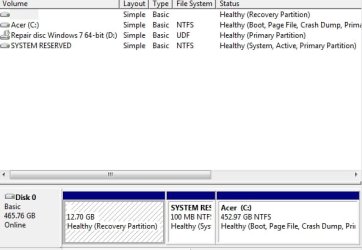
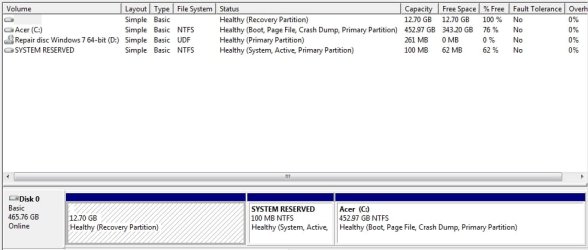
Post a screen shot of your current Windows Disk Management so we can get a look at your current partitions. Better safe than sorry.
 

My Computer My Computer

Computer type
PC/Desktop
Computer Manufacturer/Model Number
Ignatz Special; 4 speed manual gearbox; factory air conditioning; one of one
OS
Windows 7 Home Premium SP1, 64-bit
CPU
Intel Skylake i5-6600K, not overclocked
Motherboard
AsRock Z170M Extreme 4, micro ATX
Memory
8 GB HyperX DDR4-2666 (2 x 4 GB)
Graphics Card(s)
none; graphics are integrated on CPU
Sound Card
onboard: Realtek ALC1150; external: USB Behringer UF0-202
Monitor(s) Displays
Dell S2340M 23 inch IPS
Screen Resolution
1600 x 900
Hard Drives
System: Crucial MX100 series SSD, 128 GB;
Data: Samsung Spinpoint 103SJ, 1 TB;
Backup: WD Caviar Green WD30EZRX-00D8PB0, 3 TB
PSU
Rosewill SilentNight 500 watt fanless, semi-modular
Case
Antec Solo II
Cooling
Noctua NH-U12S; Noctua F12 intake, Noctua S12A exhaust
Keyboard
Microsoft 200 6JH-00001 USB
Mouse
Dell or Microsoft optical wired; USB
Antivirus
Microsoft Security Essentials and Malwarebytes Premium
Browser
Pale Moon
Other Info
All fans PWM; speeds at idle: CPU circa 500 rpm; intake circa 600 rpm; exhaust circa 600 rpm; CPU temps 27 idle and 47 C load in a warm room (27 C/81 F) when running Intel Extreme Tuning Utility stress test.
Screenshot

Here is Partition screenshot
 

Attachments

  • partitions.jpg
    partitions.jpg
    28.6 KB · Views: 19
  • partitions 2.jpg
    partitions 2.jpg
    45 KB · Views: 15

My Computer My Computer

Computer Manufacturer/Model Number
Acer Aspire 5738G
OS
Windows 7 Home Premium x64 (6.1,build 7601) Service Pack 1
CPU
Intel(R) Core(TM)2 Duo CPU T6600 @ 2.2GHz
Memory
Installed RAM 4090MB
Graphics Card(s)
ATI Mobility Radeon HD 4570 512MB
Sound Card
ATI HDMI Audio Realtek
Monitor(s) Displays
Generic PnP monitor 1366 x 768 (32bit) (60Hz)
Keyboard
Standard PS/2 Keyboard
Mouse
Logitech Mx 518 Optical Gaming Mouse
Is D a DVD drive of some type?

I see it in the upper portion of your pic, but not in the lower graphical portion.

Other than that, I don't see anything unusual. I've seen some Acers that had the primary drive split up into 2 large partitons of approximately equal size, but luckily you don't have that.

During the clean reinstall, I would delete C when given the opportunity---it will then be re-created as the reinstall continues.

I am not certain if your recovery partition will still work after the clean install. You might want to make a set of recovery discs that would serve the same purpose, in case the recovery partition is disabled by the clean install.
 

My Computer My Computer

Computer type
PC/Desktop
Computer Manufacturer/Model Number
Ignatz Special; 4 speed manual gearbox; factory air conditioning; one of one
OS
Windows 7 Home Premium SP1, 64-bit
CPU
Intel Skylake i5-6600K, not overclocked
Motherboard
AsRock Z170M Extreme 4, micro ATX
Memory
8 GB HyperX DDR4-2666 (2 x 4 GB)
Graphics Card(s)
none; graphics are integrated on CPU
Sound Card
onboard: Realtek ALC1150; external: USB Behringer UF0-202
Monitor(s) Displays
Dell S2340M 23 inch IPS
Screen Resolution
1600 x 900
Hard Drives
System: Crucial MX100 series SSD, 128 GB;
Data: Samsung Spinpoint 103SJ, 1 TB;
Backup: WD Caviar Green WD30EZRX-00D8PB0, 3 TB
PSU
Rosewill SilentNight 500 watt fanless, semi-modular
Case
Antec Solo II
Cooling
Noctua NH-U12S; Noctua F12 intake, Noctua S12A exhaust
Keyboard
Microsoft 200 6JH-00001 USB
Mouse
Dell or Microsoft optical wired; USB
Antivirus
Microsoft Security Essentials and Malwarebytes Premium
Browser
Pale Moon
Other Info
All fans PWM; speeds at idle: CPU circa 500 rpm; intake circa 600 rpm; exhaust circa 600 rpm; CPU temps 27 idle and 47 C load in a warm room (27 C/81 F) when running Intel Extreme Tuning Utility stress test.
There is a CD is the drive

I am glad to hear that my partitions are not too ugly :)

There is a repair cd I created in the D drive, because im actually having troubles with BSOD 0x0000006b

I am going to try put this iso onto dvd, and create recovery disc :eek:

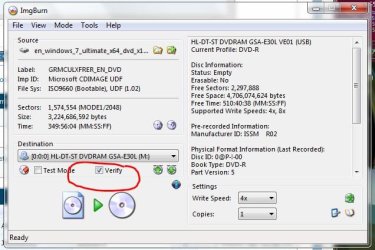
First reply by "Bare Foot Kid says use a verify, do i burn then verify and both read 4x and write 4x ?
 

My Computer My Computer

Computer Manufacturer/Model Number
Acer Aspire 5738G
OS
Windows 7 Home Premium x64 (6.1,build 7601) Service Pack 1
CPU
Intel(R) Core(TM)2 Duo CPU T6600 @ 2.2GHz
Memory
Installed RAM 4090MB
Graphics Card(s)
ATI Mobility Radeon HD 4570 512MB
Sound Card
ATI HDMI Audio Realtek
Monitor(s) Displays
Generic PnP monitor 1366 x 768 (32bit) (60Hz)
Keyboard
Standard PS/2 Keyboard
Mouse
Logitech Mx 518 Optical Gaming Mouse
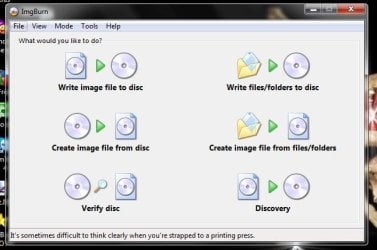
Just follow the steps in ImgBurn
 

Attachments

  • ImgBurn.JPG
    ImgBurn.JPG
    40.3 KB · Views: 9
  • ImgBurn_Verify.JPG
    ImgBurn_Verify.JPG
    54.5 KB · Views: 9

My Computer My Computer

Computer type
PC/Desktop
Computer Manufacturer/Model Number
Built them myself, Science Experiments !
OS
Win7 Enterprise, Win7 x86 (Ult 7600), Win7 x64 Ult 7600, TechNet RTM on AMD x64 (2.8Ghz)
CPU
AMD fx8350 4ghz, AMD-32 2400mhz, AMD-64 3200mhz, AMDx64 2.8G
Motherboard
SIS 755, ECS-K8M890M-M (Ult 7600), GigaByte & others
Memory
2gb, 4gb on the Ult 7600, 4gb on Technet RTM, 32gb on FX8350
Graphics Card(s)
Draw my own Graphics, several nVidia cards
Sound Card
on motherboard
Monitor(s) Displays
19" flat scr, 28" I-Inc widescr,22" Emprex Widescr, 23" Acer
Screen Resolution
1280 x 1024, 1440 x 900, 1920 x 1080
Hard Drives
6 pata Ide HD's & 2 Sata HD's
added 80gb external on Ult 7600 computer,
numerous extra 1tb, 2TB, 3Tb SATA HD's
A collection of ext HD Docks w/ HDs
PSU
430w, 550w, 600w, 700, 800, etc
Case
All Generic Full Towers
Cooling
Open Air & a few fans, some w/ colored LEDs
Keyboard
Compaq & Dell recycled from GoodWill
Mouse
Made in China Optical Wired Mouse
Internet Speed
Fast Cable InterNet
Antivirus
AVG Free on 24 different Desktops, NO Problems!
Browser
IE 8 is preferred, but use FireFox sometimes
Other Info
Linksys Routers, switches, & Hubs
Too Many USB Flash Drives to count, Biggest is 64GB !
Eight computers in my home network.
Sixteen computers at my business network.
Linked via TeamViewer !
Lots of old used spare computer parts everywhere!
Follow the steps in Clean Reinstall - Factory OEM Windows 7. Everything is included in the link including the Best Practices to get a perfect reinstall based on thousands helped with here.

In your case with an Acer Aspire you'll want to delete all partitions during install since Recovery won't run after a Clean Reinstall anyway. So make your Recovery disks first.
 
I have successfully installed, I did not delete any partitions I just installed onto the C drive. I read somewhere that I can delete the partitions later. I was not comfortable deleting partitions as I was not sure the install disc would even work.

I now have new problems, the first is I cannot activate Windows for some reason.

I used a product key decrypt method to get my key off the previous state. I tried to activate that key with no success, I also have one of those product key stickers on bottom of my laptop(Only found this out after) also no success with that key either.

I have had this computers hard drive fixed in the past with new install on it so I am not sure what key was last used on it.

Apparently I can ring Microsoft to get my Windows Key, thats all good only I don't have a phone. Will ring if absolutely necessary.

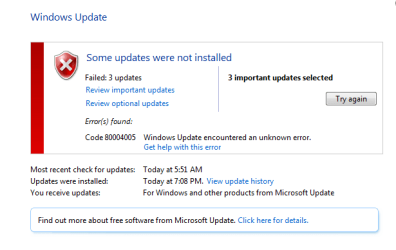
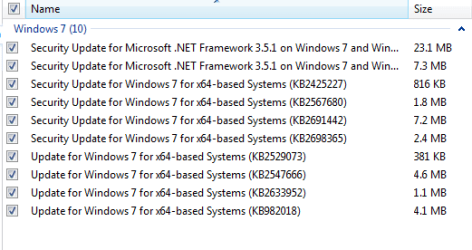
The other problem I am having is some windows updates will not install,
 

Attachments

  • Windows updates.PNG
    Windows updates.PNG
    5.6 KB · Views: 1
  • install fails.PNG
    install fails.PNG
    7.2 KB · Views: 1
  • failed update error.PNG
    failed update error.PNG
    10 KB · Views: 3

My Computer My Computer

Computer Manufacturer/Model Number
Acer Aspire 5738G
OS
Windows 7 Home Premium x64 (6.1,build 7601) Service Pack 1
CPU
Intel(R) Core(TM)2 Duo CPU T6600 @ 2.2GHz
Memory
Installed RAM 4090MB
Graphics Card(s)
ATI Mobility Radeon HD 4570 512MB
Sound Card
ATI HDMI Audio Realtek
Monitor(s) Displays
Generic PnP monitor 1366 x 768 (32bit) (60Hz)
Keyboard
Standard PS/2 Keyboard
Mouse
Logitech Mx 518 Optical Gaming Mouse
If this is preinstalled Windows 7 then the key you read will not work as it is the offline factory activation key.

Did you install the exact licensed version as appears on the COA sticker which appears in the tutorial I linked? Then activation will work when you type in the correct characters exactly.

I hope you followed the other steps to get a perfect install, but somehow doubt it from what you say.

Just keep restarting to cycle those updates through. Some may require using the Shutdown button if an ! appears on it.
 
Unfortunately for me I did not get your message until after I had already reinstalled windows, I had to get something done quick because my computer was becoming worse every time I booted.

Sounds like I will have to download this new Iso and do a install of that ?

Thank-you for your reply I will work on getting the correct Iso and do another install

Hopefully all goes well this time round :)
 

My Computer My Computer

Computer Manufacturer/Model Number
Acer Aspire 5738G
OS
Windows 7 Home Premium x64 (6.1,build 7601) Service Pack 1
CPU
Intel(R) Core(TM)2 Duo CPU T6600 @ 2.2GHz
Memory
Installed RAM 4090MB
Graphics Card(s)
ATI Mobility Radeon HD 4570 512MB
Sound Card
ATI HDMI Audio Realtek
Monitor(s) Displays
Generic PnP monitor 1366 x 768 (32bit) (60Hz)
Keyboard
Standard PS/2 Keyboard
Mouse
Logitech Mx 518 Optical Gaming Mouse
Do you know if the sticker on the bottom of the PC is legitimate?

The 25 character Product Key on that sticker will be valid for a certain version of Windows--whatever version the PC had when shipped from the factory. You need to download and burn the ISO for that certain version, not some other version. For instance "Windows 7 Home Premium 64-bit English" or whatever it may have been.

You need to download the ISO from mydigitallife.info, not some other location.
 

My Computer My Computer

Computer type
PC/Desktop
Computer Manufacturer/Model Number
Ignatz Special; 4 speed manual gearbox; factory air conditioning; one of one
OS
Windows 7 Home Premium SP1, 64-bit
CPU
Intel Skylake i5-6600K, not overclocked
Motherboard
AsRock Z170M Extreme 4, micro ATX
Memory
8 GB HyperX DDR4-2666 (2 x 4 GB)
Graphics Card(s)
none; graphics are integrated on CPU
Sound Card
onboard: Realtek ALC1150; external: USB Behringer UF0-202
Monitor(s) Displays
Dell S2340M 23 inch IPS
Screen Resolution
1600 x 900
Hard Drives
System: Crucial MX100 series SSD, 128 GB;
Data: Samsung Spinpoint 103SJ, 1 TB;
Backup: WD Caviar Green WD30EZRX-00D8PB0, 3 TB
PSU
Rosewill SilentNight 500 watt fanless, semi-modular
Case
Antec Solo II
Cooling
Noctua NH-U12S; Noctua F12 intake, Noctua S12A exhaust
Keyboard
Microsoft 200 6JH-00001 USB
Mouse
Dell or Microsoft optical wired; USB
Antivirus
Microsoft Security Essentials and Malwarebytes Premium
Browser
Pale Moon
Other Info
All fans PWM; speeds at idle: CPU circa 500 rpm; intake circa 600 rpm; exhaust circa 600 rpm; CPU temps 27 idle and 47 C load in a warm room (27 C/81 F) when running Intel Extreme Tuning Utility stress test.
Do you know if the sticker on the bottom of the PC is legitimate?

The 25 character Product Key on that sticker will be valid for a certain version of Windows--whatever version the PC had when shipped from the factory. You need to download and burn the ISO for that certain version, not some other version. For instance "Windows 7 Home Premium 64-bit English" or whatever it may have been.

You need to download the ISO from mydigitallife.info, not some other location.


Hello Fix, have a look at the tutorial linked below for some info you may find useful.


My Computer My Computer

Computer Manufacturer/Model Number
* BFK Customs *
OS
W 7 64-bit Ultimate
CPU
Intel Q9550 Yorkfield
Motherboard
ASUS P5Q Pro
Memory
8GB Dominator 8500C5D
Graphics Card(s)
ATI : XFX 5870
Sound Card
Realtek HD Audio 7-1
Monitor(s) Displays
1x 47" LCD HDMI & 3x 26" LCD HDMI
Screen Resolution
1920x1080P & 1920x1200
Hard Drives
1x 80GB Intel X25-M G2 SSD : 1x 500GB & 1x 640GB WD Caviar Black(s)
PSU
Corsair 620HX
Case
Cooler Master RC-690
Cooling
Tuniq Tower 120, 2x 140mm and 3x 120mm case fans
Keyboard
Microsoft 500
Mouse
Razer Diamondback 3G
Internet Speed
14 Mb/s
Other Info
1x Koutech 3Gb/s SATA HDD Hot Swap Rack
I brought the Laptop totally legit from a trusted big company so im sure my sticker is legit

The sticker is 2005 and my installation is 2009, im 100% sure my version was x64 Windows 7 Home premium. this version is just that. Is there different year versions, I have the correct version as far as I can tell.

could this be a simple as when i installed I put US instead of Uk or something ?

If i create a universal disc then will that work ?

Can I download a specific windows build eg 6.1,build 7601 ?

If I leave the current installation as is and ring Microsoft and expain will they activate it or somehow my windows x64 Home premium is different to windows x64 Home premium and it will not activate
 

My Computer My Computer

Computer Manufacturer/Model Number
Acer Aspire 5738G
OS
Windows 7 Home Premium x64 (6.1,build 7601) Service Pack 1
CPU
Intel(R) Core(TM)2 Duo CPU T6600 @ 2.2GHz
Memory
Installed RAM 4090MB
Graphics Card(s)
ATI Mobility Radeon HD 4570 512MB
Sound Card
ATI HDMI Audio Realtek
Monitor(s) Displays
Generic PnP monitor 1366 x 768 (32bit) (60Hz)
Keyboard
Standard PS/2 Keyboard
Mouse
Logitech Mx 518 Optical Gaming Mouse
No there are not "Year" versions, have a look at the link below, at least you will have the correct version for the install; Windows 7 activation keys are version-specific not bit-rate-specific.


My Computer My Computer

Computer Manufacturer/Model Number
* BFK Customs *
OS
W 7 64-bit Ultimate
CPU
Intel Q9550 Yorkfield
Motherboard
ASUS P5Q Pro
Memory
8GB Dominator 8500C5D
Graphics Card(s)
ATI : XFX 5870
Sound Card
Realtek HD Audio 7-1
Monitor(s) Displays
1x 47" LCD HDMI & 3x 26" LCD HDMI
Screen Resolution
1920x1080P & 1920x1200
Hard Drives
1x 80GB Intel X25-M G2 SSD : 1x 500GB & 1x 640GB WD Caviar Black(s)
PSU
Corsair 620HX
Case
Cooler Master RC-690
Cooling
Tuniq Tower 120, 2x 140mm and 3x 120mm case fans
Keyboard
Microsoft 500
Mouse
Razer Diamondback 3G
Internet Speed
14 Mb/s
Other Info
1x Koutech 3Gb/s SATA HDD Hot Swap Rack
Could you give me the correct iso download link ?

Because I lost that with the installation and only have it on dvd as I couldn't use usb's and external hard drive, I now can with this fresh install.
 

My Computer My Computer

Computer Manufacturer/Model Number
Acer Aspire 5738G
OS
Windows 7 Home Premium x64 (6.1,build 7601) Service Pack 1
CPU
Intel(R) Core(TM)2 Duo CPU T6600 @ 2.2GHz
Memory
Installed RAM 4090MB
Graphics Card(s)
ATI Mobility Radeon HD 4570 512MB
Sound Card
ATI HDMI Audio Realtek
Monitor(s) Displays
Generic PnP monitor 1366 x 768 (32bit) (60Hz)
Keyboard
Standard PS/2 Keyboard
Mouse
Logitech Mx 518 Optical Gaming Mouse
You said you downloaded ISO X17-58997.

From where?

See post 14 for the correct location.
 

My Computer My Computer

Computer type
PC/Desktop
Computer Manufacturer/Model Number
Ignatz Special; 4 speed manual gearbox; factory air conditioning; one of one
OS
Windows 7 Home Premium SP1, 64-bit
CPU
Intel Skylake i5-6600K, not overclocked
Motherboard
AsRock Z170M Extreme 4, micro ATX
Memory
8 GB HyperX DDR4-2666 (2 x 4 GB)
Graphics Card(s)
none; graphics are integrated on CPU
Sound Card
onboard: Realtek ALC1150; external: USB Behringer UF0-202
Monitor(s) Displays
Dell S2340M 23 inch IPS
Screen Resolution
1600 x 900
Hard Drives
System: Crucial MX100 series SSD, 128 GB;
Data: Samsung Spinpoint 103SJ, 1 TB;
Backup: WD Caviar Green WD30EZRX-00D8PB0, 3 TB
PSU
Rosewill SilentNight 500 watt fanless, semi-modular
Case
Antec Solo II
Cooling
Noctua NH-U12S; Noctua F12 intake, Noctua S12A exhaust
Keyboard
Microsoft 200 6JH-00001 USB
Mouse
Dell or Microsoft optical wired; USB
Antivirus
Microsoft Security Essentials and Malwarebytes Premium
Browser
Pale Moon
Other Info
All fans PWM; speeds at idle: CPU circa 500 rpm; intake circa 600 rpm; exhaust circa 600 rpm; CPU temps 27 idle and 47 C load in a warm room (27 C/81 F) when running Intel Extreme Tuning Utility stress test.
I have an installation disc that I created and used to install the windows im currently running, the iso file i downloaded was lost on install. My usb's and external hd would not read on my old version, i had bsod problems. Lost all data except from some personal data that i saved to a cd/r

I have LInex open suse, xp sp2, windows pro 64 bit all on my external.

I just found on my external a disc image file "KB3AIK_EN 1,469,992 KB thats smaller than the one stated to download would this be the one ?
 

My Computer My Computer

Computer Manufacturer/Model Number
Acer Aspire 5738G
OS
Windows 7 Home Premium x64 (6.1,build 7601) Service Pack 1
CPU
Intel(R) Core(TM)2 Duo CPU T6600 @ 2.2GHz
Memory
Installed RAM 4090MB
Graphics Card(s)
ATI Mobility Radeon HD 4570 512MB
Sound Card
ATI HDMI Audio Realtek
Monitor(s) Displays
Generic PnP monitor 1366 x 768 (32bit) (60Hz)
Keyboard
Standard PS/2 Keyboard
Mouse
Logitech Mx 518 Optical Gaming Mouse
Back
Top