I have my taskbar set up to use small buttons and Never Combine task bar buttons. I can drag separate programs to move them around on the task bar, but the problem comes when I'm running multiple of one program or multiple folders or that such. Visually, on the task bar they are joined end to end, where other programs have just a bit of space between them. When I try and drag these to move them around they move the entire block. I don't see any way to rearrange these blocks or move individual windows of that program.
If it helps at all, I'm specifically talking about World of Warcraft windows. They changed something in the patch so they behave like this now. Prior to yesterday they were completely separate programs and I could drag each individually to a position on the taskbar. But now they appear as a solid block on the task bar and I can't rearrange them. I can move all three WoW windows together, but I can't just move the left most one to the right side or vice versa.
Here's a picture of my task bar with what I hope are helpful labels to describe what I'm talking about. What I want is for the two WoW windows on the right there to be separate programs and able to move around independently instead of being joined as a single block like that.
There is no way that I know of to separate that kind of button. I'm afraid the only way is probably if Blizzard changes it again. Whatever they did is now causing Windows to see those two buttons as two windows/instances of the same program, which means it will automatically join them together, and I don't think you can prevent/undo that.
My Computer
At a glance
Windows 7 Home Premium x64Intel Core i7-2600 @3.40GHz8.00GB DDR3NVIDIA GeForce GTX 555 w/1.0GB RAM
There are a few tweaks I still have to refind in the tutorials for see each open window separated and the program shortcut pinned remain available for opening even another. The option for seeing open windows as a menu is also another guide available again in the tutorial section.
W7 Ultimate x64/W10 Pro x64/W11 Pro Triple Bo...AMD Phenom II X4 975 Deneb 3.6ghz - 965 2nd r...Kingston Hyper X DDR3 1600 1.5v 16gb - Hyper ...MSI HD Radeon 5750 1gb - MSI HD Radeon 6450 o...
Computer type
PC/Desktop
Computer Manufacturer/Model Number
Custom builds = 2
OS
W7 Ultimate x64/W10 Pro x64/W11 Pro Triple Boot - Main PC W7 Remote PC Micro ATX W7 Pro x64/W11 Pro
CPU
AMD Phenom II X4 975 Deneb 3.6ghz - 965 2nd remote pc
Motherboard
Gigabyte GA-790XTA-UD4-Gigabyte GA-880GM-D2H remote pc
Memory
Kingston Hyper X DDR3 1600 1.5v 16gb - Hyper X Fury 8gb 2nd
Graphics Card(s)
MSI HD Radeon 5750 1gb - MSI HD Radeon 6450 on mini tower
Sound Card
Creative Labs X-Fi Xtreme Audio P - Realtek onooard 2nd case
Monitor(s) Displays
ASUS VW199T-P 19" HP 2082a Main-HP 2082a 20" remote pc
Screen Resolution
Asus 1440x900 - HP 1600x900
Hard Drives
WD Black 1TB HD per OS W7, W10, and pending W11 presently on 500gb OS Drive - Pending Triple 1TB HDs for Spanned Storage/backup volume
Single 2TB external USB enclosure, single 1TB System 7 Host/Boot drive, Pending 8TB external HD for system image b
PSU
Corsair 750TX - primary / Corsair CX600 - second
Case
Antec 900-2 - SSD compatible / NZXT Vulcan mini tower
Welcome to Seven Forums Shockone. This may well serve you:
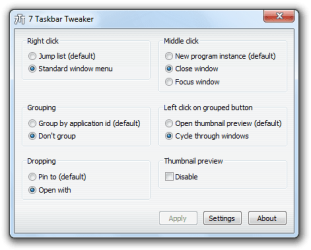
7 Taskbar Tweaker
This programs enables you to tweak your Windows 7 taskbar.
Features:
- Show standard window menu on right click instead of jump list.
- Close or focus a window on middle click instead of running a new instance.
- Disable grouping of windows by file path or application id.
- Cycle through windows of a grouped button on left click instead of showing a thumbnails preview.
- Open with while dropping a file on a taskbar button instead of pinning.
- Disable thumbnail previews.
Tested on Windows 7 RTM 7600 Ultimate only.
Available for x86 and x64 systems.
W7 Ultimate x64/W10 Pro x64/W11 Pro Triple Bo...AMD Phenom II X4 975 Deneb 3.6ghz - 965 2nd r...Kingston Hyper X DDR3 1600 1.5v 16gb - Hyper ...MSI HD Radeon 5750 1gb - MSI HD Radeon 6450 o...
Computer type
PC/Desktop
Computer Manufacturer/Model Number
Custom builds = 2
OS
W7 Ultimate x64/W10 Pro x64/W11 Pro Triple Boot - Main PC W7 Remote PC Micro ATX W7 Pro x64/W11 Pro
CPU
AMD Phenom II X4 975 Deneb 3.6ghz - 965 2nd remote pc
Motherboard
Gigabyte GA-790XTA-UD4-Gigabyte GA-880GM-D2H remote pc
Memory
Kingston Hyper X DDR3 1600 1.5v 16gb - Hyper X Fury 8gb 2nd
Graphics Card(s)
MSI HD Radeon 5750 1gb - MSI HD Radeon 6450 on mini tower
Sound Card
Creative Labs X-Fi Xtreme Audio P - Realtek onooard 2nd case
Monitor(s) Displays
ASUS VW199T-P 19" HP 2082a Main-HP 2082a 20" remote pc
Screen Resolution
Asus 1440x900 - HP 1600x900
Hard Drives
WD Black 1TB HD per OS W7, W10, and pending W11 presently on 500gb OS Drive - Pending Triple 1TB HDs for Spanned Storage/backup volume
Single 2TB external USB enclosure, single 1TB System 7 Host/Boot drive, Pending 8TB external HD for system image b
PSU
Corsair 750TX - primary / Corsair CX600 - second
Case
Antec 900-2 - SSD compatible / NZXT Vulcan mini tower
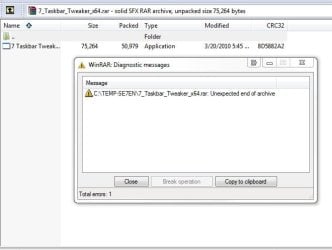
It must be something with the ISP or protection inplace since I just tried another download actually #8 and it saw the same thing. At least you got a working copy however! Better for you there!
W7 Ultimate x64/W10 Pro x64/W11 Pro Triple Bo...AMD Phenom II X4 975 Deneb 3.6ghz - 965 2nd r...Kingston Hyper X DDR3 1600 1.5v 16gb - Hyper ...MSI HD Radeon 5750 1gb - MSI HD Radeon 6450 o...
Computer type
PC/Desktop
Computer Manufacturer/Model Number
Custom builds = 2
OS
W7 Ultimate x64/W10 Pro x64/W11 Pro Triple Boot - Main PC W7 Remote PC Micro ATX W7 Pro x64/W11 Pro
CPU
AMD Phenom II X4 975 Deneb 3.6ghz - 965 2nd remote pc
Motherboard
Gigabyte GA-790XTA-UD4-Gigabyte GA-880GM-D2H remote pc
Memory
Kingston Hyper X DDR3 1600 1.5v 16gb - Hyper X Fury 8gb 2nd
Graphics Card(s)
MSI HD Radeon 5750 1gb - MSI HD Radeon 6450 on mini tower
Sound Card
Creative Labs X-Fi Xtreme Audio P - Realtek onooard 2nd case
Monitor(s) Displays
ASUS VW199T-P 19" HP 2082a Main-HP 2082a 20" remote pc
Screen Resolution
Asus 1440x900 - HP 1600x900
Hard Drives
WD Black 1TB HD per OS W7, W10, and pending W11 presently on 500gb OS Drive - Pending Triple 1TB HDs for Spanned Storage/backup volume
Single 2TB external USB enclosure, single 1TB System 7 Host/Boot drive, Pending 8TB external HD for system image b
PSU
Corsair 750TX - primary / Corsair CX600 - second
Case
Antec 900-2 - SSD compatible / NZXT Vulcan mini tower
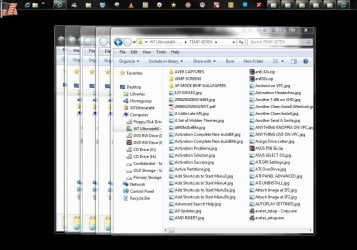
You found a winner this time! A Guy I still remember something on this idea in one of the guides however where you would see duplicate icons for each window or app open. I was also trying to find the same thing in the tutorial section however to see the same effect as you can see in the image here at work.
W7 Ultimate x64/W10 Pro x64/W11 Pro Triple Bo...AMD Phenom II X4 975 Deneb 3.6ghz - 965 2nd r...Kingston Hyper X DDR3 1600 1.5v 16gb - Hyper ...MSI HD Radeon 5750 1gb - MSI HD Radeon 6450 o...
Computer type
PC/Desktop
Computer Manufacturer/Model Number
Custom builds = 2
OS
W7 Ultimate x64/W10 Pro x64/W11 Pro Triple Boot - Main PC W7 Remote PC Micro ATX W7 Pro x64/W11 Pro
CPU
AMD Phenom II X4 975 Deneb 3.6ghz - 965 2nd remote pc
Motherboard
Gigabyte GA-790XTA-UD4-Gigabyte GA-880GM-D2H remote pc
Memory
Kingston Hyper X DDR3 1600 1.5v 16gb - Hyper X Fury 8gb 2nd
Graphics Card(s)
MSI HD Radeon 5750 1gb - MSI HD Radeon 6450 on mini tower
Sound Card
Creative Labs X-Fi Xtreme Audio P - Realtek onooard 2nd case
Monitor(s) Displays
ASUS VW199T-P 19" HP 2082a Main-HP 2082a 20" remote pc
Screen Resolution
Asus 1440x900 - HP 1600x900
Hard Drives
WD Black 1TB HD per OS W7, W10, and pending W11 presently on 500gb OS Drive - Pending Triple 1TB HDs for Spanned Storage/backup volume
Single 2TB external USB enclosure, single 1TB System 7 Host/Boot drive, Pending 8TB external HD for system image b
PSU
Corsair 750TX - primary / Corsair CX600 - second
Case
Antec 900-2 - SSD compatible / NZXT Vulcan mini tower



 The last here shows how to avoid an over crowded taskbar by adding a new toolbar.