How can I configure a UEFI motherboard for MBR instead of GPT?

marisa69

New member
Local time
11:12 AM
Messages
6
My new upgrade box (with no OS) has a EUFI motherboard.

I just did a test install of W7 (on an old HDD) and it ended up with GPT partitioning.

I don't want that, I want MBR. (And if you don't mind, I don't want to get into a discussion about WHY I want to do this. Thank you).

Does anyone know (and can explain in words of no more than two syllables to this old girl) which settings in UEFI I need to change?

I already have an idea it might be something to do with 'Secure Boot', and maybe 'CSM', but the complexities of UEFI are very confusing.

Thank you very much :-)
 

My Computer My Computer

At a glance

W7 64-bit
Computer type
PC/Desktop
Computer Manufacturer/Model Number
Custom build
OS
W7 64-bit

My Computer My Computer

At a glance

Windows 10 Pro x64Intel Core i7 6700KGSkill TridentZ RGB 16GB 3600 16-16-16-36EVGA GTX 980 Ti SC x2
Computer type
PC/Desktop
Computer Manufacturer/Model Number
Skylake Special #666
OS
Windows 10 Pro x64
CPU
Intel Core i7 6700K
Motherboard
Asus Sabertooth Z170 Mark 1
Memory
GSkill TridentZ RGB 16GB 3600 16-16-16-36
Graphics Card(s)
EVGA GTX 980 Ti SC x2
Sound Card
Realtek High Definition
Monitor(s) Displays
AOC G2460PG
Screen Resolution
1920 x 1080 144Hz
Hard Drives
Samsung 860 Pro 256GB, Seagate Barracuda 4TB x2
PSU
EVGA 1000 P2, EVGA White Custom Braided Cables
Case
Corsair Vengeance C70 Gunmetal Black
Cooling
Corsair H100i v2, Corsair ML120 x2, Thermal Grizzly Kryonaut
Keyboard
Logitech G910 Orion Spectrum
Mouse
Logitech G700s
Internet Speed
Verizon Fios Quantum Gateway 75/75
Antivirus
Windows Defender, Malwarebytes Free 3.8.3
Browser
Chrome
Other Info
Corsair SP120 x4, LG Blu-ray Drive, Durabrand HT-395 100 Watt Dolby Digital Amp, Corsair H2100 Wireless 7.1 Headset
AddRAM, I think there might be a bit more required than just changing Boot to 'Legacy' or 'Legacy + UEFI'.

For example, see this link:
Code:
https://technet.microsoft.com/en-us/library/hh825112.aspx
"To use BIOS-compatibility mode, check for options in the firmware menus to disable UEFI SecureBoot features."
"If you install Windows by using Windows Setup or the Windows installation DVD, use a preformatted hard drive on your destination PCs. Use the GPT file format for UEFI mode, or the MBR file format for BIOS mode."

"UEFI: To prevent Windows Setup or Windows PE from booting in BIOS mode, remove the bootmgr file on the root of the media.
BIOS: To prevent Windows Setup or Windows PE from booting in UEFI mode, remove the efi folder on the root of the media."

Also, someone on Tom's Hardware said:
"...if you mount a disk that's already been formatted in MBR, the OS install will be MBR."

Which was also said above in the first link
 

My Computer My Computer

At a glance

Win7 Ultimate SP1Intel Core i5 9400 Coffee Lake 14nm16G DDR4NVidia GeForce GTX 960
Computer type
PC/Desktop
Computer Manufacturer/Model Number
My build
OS
Win7 Ultimate SP1
CPU
Intel Core i5 9400 Coffee Lake 14nm
Motherboard
Asus Prime H310M-E R2.0 (LGA1151)
Memory
16G DDR4
Graphics Card(s)
NVidia GeForce GTX 960
Sound Card
Realtek High Definition Audio (mobo)
Monitor(s) Displays
Asus PA248 24" 16:10 format
Screen Resolution
1920x1200@59Hz
Hard Drives
1863GB Seagate ST2000DM
3726GB Seagate ST4000DM
1863GB Seagate ST2000DM
6TB Seagate
465GB NVMe Samsung SSD 970
PSU
750G2
Case
Tower
Cooling
Standard
Keyboard
USB
Mouse
USB
Internet Speed
920Mbs/480Mbs
Antivirus
Malwarebytes
Browser
Firefox

My Computer My Computer

At a glance

Windows 7/8/10 UEFI/GPT system
Computer type
PC/Desktop
OS
Windows 7/8/10 UEFI/GPT system
Nipax, it would be nice if it were that easy.

If you read my first post again, you'll see that installing to an empty, unallocated hard drive was exactly what I did.

And the partition ended up GPT.
 

My Computer My Computer

At a glance

W7 64-bit
Computer type
PC/Desktop
Computer Manufacturer/Model Number
Custom build
OS
W7 64-bit
Hi,
What size is the hdd ?
What is the mother board ?
Use the link above my signature to fill in your system spec's page

I doubt secure boot has anything to do with the issue you seemed to have installed without any issue except the hdd format.
Which points to a larger than normal sized hdd you installed windows on and you possibly made a smaller partition to install windows on :/
 

My Computer My Computer

At a glance

Win-7-Pro64bit 7-H-Prem-64biti7-5930K 2nd i9-9940x both water blocked VRM'...Trident-z 3200C14 2nd Trident-z 3600C16EVGA 1080ti ftw3 2nd Titan Xp both water blocked
Computer type
PC/Desktop
Computer Manufacturer/Model Number
Custom assembled by me :}
OS
Win-7-Pro64bit 7-H-Prem-64bit
CPU
i7-5930K 2nd i9-9940x both water blocked VRM's too
Motherboard
ASUS SABERTOOTH X99 2nd ASUS x299 Apex
Memory
Trident-z 3200C14 2nd Trident-z 3600C16
Graphics Card(s)
EVGA 1080ti ftw3 2nd Titan Xp both water blocked
Sound Card
Built-in Realtek
Monitor(s) Displays
1-AOC G2460PG 24"G-Sync 144Hz/ 2nd 1-ASUS VG248QE 24" 144Hz
Screen Resolution
1920 x 1080 144Hz
Hard Drives
2-Samsung M.2 Evo & Evo Plus
2-Samsung 850 EVO 500GB SSD's/ 3-2.5 W.D. Black 1tb-&3-1tb/3-3.5 WD Black 1tb hdd's
PSU
EVGA SuperNOVA 1000-P2 2nd 1200-P2
Case
2-Corsair Obsidian Series 450D Black ATX Mid Tower
Cooling
Custom water loops
Keyboard
Logitech G710+/ 2nd Logitech G910
Mouse
2-RedDragon M901 Perdition 16400 dpi Gaming mouse = wired
Internet Speed
Comcast Ping 19ms 89.31mbps download speed 6.12mbps upload
Antivirus
Malwarebytes Pro/ Superantispyware Pro
Browser
FireFox & Pale moon
Other Info
2nd ASUS X299 Apex/Intel i9-9940x with Custom water loop/7H-Prem-x64/Corsair 450D case/Ram Trident-z 3600C16 4x8gb / Samsung970Evo plus 500gb SSD/Dual ssd EZ swap evo/PSU EVGA SuperNova 1200w-P2 80+Platinum/GPU Titan Xp /8-ML-140 on push-pull on 2-280GTX rads
TrashZone, the drive was a 120GB SATA that had been bare-metal cleaned with WipeDrive Pro 3.02.

Nipax, that's exactly my question, "How do you select GPT or MBR when installing Windows 7/8/10". Except I have no interest in Windows 8 or 10. Windows 7 will do me nicely until 2020, at which time I'll think again.
 

My Computer My Computer

At a glance

W7 64-bit
Computer type
PC/Desktop
Computer Manufacturer/Model Number
Custom build
OS
W7 64-bit
I can't see how any of that tenforums stuff applies here
Is this a samsung computer or drive ?
Obviously this program to wipe the drive did not do such a good job there's no reason a 120gb drive would be gpt.
 

My Computer My Computer

At a glance

Win-7-Pro64bit 7-H-Prem-64biti7-5930K 2nd i9-9940x both water blocked VRM'...Trident-z 3200C14 2nd Trident-z 3600C16EVGA 1080ti ftw3 2nd Titan Xp both water blocked
Computer type
PC/Desktop
Computer Manufacturer/Model Number
Custom assembled by me :}
OS
Win-7-Pro64bit 7-H-Prem-64bit
CPU
i7-5930K 2nd i9-9940x both water blocked VRM's too
Motherboard
ASUS SABERTOOTH X99 2nd ASUS x299 Apex
Memory
Trident-z 3200C14 2nd Trident-z 3600C16
Graphics Card(s)
EVGA 1080ti ftw3 2nd Titan Xp both water blocked
Sound Card
Built-in Realtek
Monitor(s) Displays
1-AOC G2460PG 24"G-Sync 144Hz/ 2nd 1-ASUS VG248QE 24" 144Hz
Screen Resolution
1920 x 1080 144Hz
Hard Drives
2-Samsung M.2 Evo & Evo Plus
2-Samsung 850 EVO 500GB SSD's/ 3-2.5 W.D. Black 1tb-&3-1tb/3-3.5 WD Black 1tb hdd's
PSU
EVGA SuperNOVA 1000-P2 2nd 1200-P2
Case
2-Corsair Obsidian Series 450D Black ATX Mid Tower
Cooling
Custom water loops
Keyboard
Logitech G710+/ 2nd Logitech G910
Mouse
2-RedDragon M901 Perdition 16400 dpi Gaming mouse = wired
Internet Speed
Comcast Ping 19ms 89.31mbps download speed 6.12mbps upload
Antivirus
Malwarebytes Pro/ Superantispyware Pro
Browser
FireFox & Pale moon
Other Info
2nd ASUS X299 Apex/Intel i9-9940x with Custom water loop/7H-Prem-x64/Corsair 450D case/Ram Trident-z 3600C16 4x8gb / Samsung970Evo plus 500gb SSD/Dual ssd EZ swap evo/PSU EVGA SuperNova 1200w-P2 80+Platinum/GPU Titan Xp /8-ML-140 on push-pull on 2-280GTX rads

My Computer My Computer

At a glance

Linux Mint / XP / Win7 Home, Pro, Ultimate / ...
Computer type
PC/Desktop
Computer Manufacturer/Model Number
(7 different computers booting up to 10 systems)
OS
Linux Mint / XP / Win7 Home, Pro, Ultimate / Win8.1 / Win10
Other Info
Four desktops, two laptops, one notebook and one tablet
You might also use a live Linux disk (Puppy Linux, Mint Linux, etc.) and use it to create an MBR formatted hard drive then fresh install Windows to it.

Regards,
GEWB
 

My Computer My Computer

At a glance

Linux Mint / XP / Win7 Home, Pro, Ultimate / ...
Computer type
PC/Desktop
Computer Manufacturer/Model Number
(7 different computers booting up to 10 systems)
OS
Linux Mint / XP / Win7 Home, Pro, Ultimate / Win8.1 / Win10
Other Info
Four desktops, two laptops, one notebook and one tablet
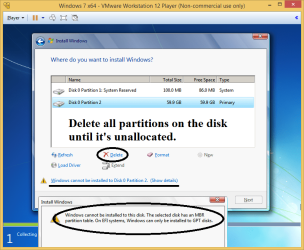
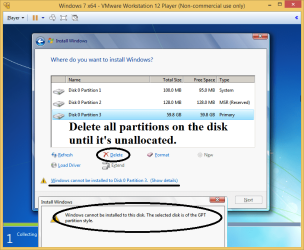
How to convert disk from MBR to GPT or GPT to MBR if you do not want to keep the existing partition style.

Convert MBR to GPT:
1. Boot from the Windows 7/8/10 USB/DVD in UEFI mode.
2. Delete all partitions on the disk until it's unallocated.

Convert disk from MBR to GPT or GPT to MBR 1.png

Convert GPT to MBR:
1. Boot from the Windows 7/8/10 USB/DVD in Legacy BIOS mode.
2. Delete all partitions on the disk until it's unallocated.

Convert disk from MBR to GPT or GPT to MBR 2.png

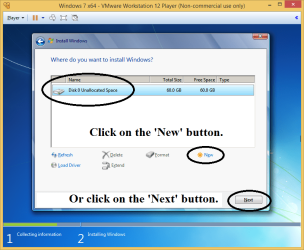
Installing to the unallocated space and letting Windows create the partition table and partitions works with either Legacy BIOS or UEFI boot mode.

On an MBR disk, Windows 7/8/10 setup will create a System Reserved partition and a primary Windows partition.

On a GPT disk, Windows 7/8/10 setup will create a Recovery partition (not in Windows 7), an EFI System partition, a Microsoft Reserved partition (won't show in Disk Management), and a primary Windows partition.

Convert disk from MBR to GPT or GPT to MBR 3.png
 
Last edited:

My Computer My Computer

At a glance

Windows 7/8/10 UEFI/GPT system
Computer type
PC/Desktop
OS
Windows 7/8/10 UEFI/GPT system
Great post, Nipax, clear, succinct, makes sense.

I'll save the page for future reference.

Well done :-)
 

My Computer My Computer

At a glance

Win7 Ultimate SP1Intel Core i5 9400 Coffee Lake 14nm16G DDR4NVidia GeForce GTX 960
Computer type
PC/Desktop
Computer Manufacturer/Model Number
My build
OS
Win7 Ultimate SP1
CPU
Intel Core i5 9400 Coffee Lake 14nm
Motherboard
Asus Prime H310M-E R2.0 (LGA1151)
Memory
16G DDR4
Graphics Card(s)
NVidia GeForce GTX 960
Sound Card
Realtek High Definition Audio (mobo)
Monitor(s) Displays
Asus PA248 24" 16:10 format
Screen Resolution
1920x1200@59Hz
Hard Drives
1863GB Seagate ST2000DM
3726GB Seagate ST4000DM
1863GB Seagate ST2000DM
6TB Seagate
465GB NVMe Samsung SSD 970
PSU
750G2
Case
Tower
Cooling
Standard
Keyboard
USB
Mouse
USB
Internet Speed
920Mbs/480Mbs
Antivirus
Malwarebytes
Browser
Firefox
Yep good post indeed but it also confirms the wipe program used did a crappy job at wiping the disk :/
If the bios is set to uefi only though could indeed be the issue.
 

My Computer My Computer

At a glance

Win-7-Pro64bit 7-H-Prem-64biti7-5930K 2nd i9-9940x both water blocked VRM'...Trident-z 3200C14 2nd Trident-z 3600C16EVGA 1080ti ftw3 2nd Titan Xp both water blocked
Computer type
PC/Desktop
Computer Manufacturer/Model Number
Custom assembled by me :}
OS
Win-7-Pro64bit 7-H-Prem-64bit
CPU
i7-5930K 2nd i9-9940x both water blocked VRM's too
Motherboard
ASUS SABERTOOTH X99 2nd ASUS x299 Apex
Memory
Trident-z 3200C14 2nd Trident-z 3600C16
Graphics Card(s)
EVGA 1080ti ftw3 2nd Titan Xp both water blocked
Sound Card
Built-in Realtek
Monitor(s) Displays
1-AOC G2460PG 24"G-Sync 144Hz/ 2nd 1-ASUS VG248QE 24" 144Hz
Screen Resolution
1920 x 1080 144Hz
Hard Drives
2-Samsung M.2 Evo & Evo Plus
2-Samsung 850 EVO 500GB SSD's/ 3-2.5 W.D. Black 1tb-&3-1tb/3-3.5 WD Black 1tb hdd's
PSU
EVGA SuperNOVA 1000-P2 2nd 1200-P2
Case
2-Corsair Obsidian Series 450D Black ATX Mid Tower
Cooling
Custom water loops
Keyboard
Logitech G710+/ 2nd Logitech G910
Mouse
2-RedDragon M901 Perdition 16400 dpi Gaming mouse = wired
Internet Speed
Comcast Ping 19ms 89.31mbps download speed 6.12mbps upload
Antivirus
Malwarebytes Pro/ Superantispyware Pro
Browser
FireFox & Pale moon
Other Info
2nd ASUS X299 Apex/Intel i9-9940x with Custom water loop/7H-Prem-x64/Corsair 450D case/Ram Trident-z 3600C16 4x8gb / Samsung970Evo plus 500gb SSD/Dual ssd EZ swap evo/PSU EVGA SuperNova 1200w-P2 80+Platinum/GPU Titan Xp /8-ML-140 on push-pull on 2-280GTX rads
Thank you, Nipax, I think your information has answered my question.

And thank you everyone else who made POSITIVE contributions ;)

Happy Hogmanay!
 

My Computer My Computer

At a glance

W7 64-bit
Computer type
PC/Desktop
Computer Manufacturer/Model Number
Custom build
OS
W7 64-bit
Back
Top