How can I customize the icon for an Windows Exploer Context Menu item?

nuspieds

New member
Member
Local time
8:27 PM
Messages
53
Hi,

My question does not pertain to a custom context menu item; I already know how to customize the icons for those.

Rather, my question is concerning apps that I install which automatically set themselves up in the Windows Explorer context menu via, for example, HKCR\*\shellex\ContextMenuHandlers.

Today I installed EmEditor and now there is a Windows Context Menu item for it but it doesn't have an icon like the WinZip item, for example.

Where can I go to edit/customize the icon for EmEditor or even WinZip and similar applications, if I want to change the icon?

Please let me know if you have any ideas.

Thanks!
 

My Computer My Computer

At a glance

Windows 7 Ultimate x64
OS
Windows 7 Ultimate x64

My Computer My Computer

At a glance

Win 10 Pro x64Intel I5-2500K @3.3GHz16GB G.Skill Ripjaws X (4x4GB)EVGA GeForce 750 Ti SC 2GB
Computer type
PC/Desktop
Computer Manufacturer/Model Number
Self Built
OS
Win 10 Pro x64
CPU
Intel I5-2500K @3.3GHz
Motherboard
Asrock P67 Extreme4
Memory
16GB G.Skill Ripjaws X (4x4GB)
Graphics Card(s)
EVGA GeForce 750 Ti SC 2GB
Sound Card
ASUS Xonar DG 5.1 Channels 24-bit 96KHz PCI Interface Sound
Monitor(s) Displays
auria eq2367
Screen Resolution
1920 x 1080
Hard Drives
250GB Samsung 850 EVO SSD
1TB WD Blue
1TB Hitachi
PSU
SeaSonic X 650W 80 Plus Gold
Case
Corsair Obsidian 750D
Cooling
Corsair H60, Three 140mm case fans
Keyboard
Logitech Wireless Keyboard K520
Mouse
Logitech Wireless Mouse M310
Internet Speed
Wave Broadband ~ 100 dn 5 up
Antivirus
Windows Defender, Malwarebytes Premium
Browser
Edge, IE11, Chrome
Other Info
Laptop specs: HP g7-1365dx /
CPU: AMD A6-3420M APU with Radeon(tm) HD Graphics /
RAM: Crucial 8Gb (2x4Gb) /
SSD: Crucial M4-CT128M4SSD2 ATA Device/ FW 000F /
GFX: AMD Radeon HD 6520G /
OS: Windows 10 Pro x64
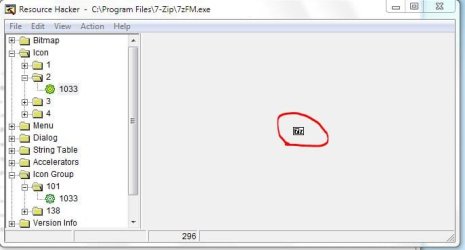
I don't have either program but with all programs that show those icons here (7zip, Winrar, Avast etc) the icon is compiled into the EXE.
Capture.JPG
The used format is 16x16 with 16 colors.

If my theory is correct and those programs miss said icon format for whatever reason, you could try the following:

Get a hold of the icon in question, GetIcoFX IcoFX - The Free Icon Editor
make sure you add the missing format and save the new multi format-icon
Now open the exe in Reshacker and replace the appropriate Icon Group..save, reload and see if it worked;)

-DG

I assume Derekimo's version would be the way to go :D
 

My Computer My Computer

At a glance

Windows 7 Ultimate x86DualCore AMD Athlon 64 X2, 2600 MHz 5200+Samsung 2GB DDR2Onboard NVIDIA GeForce 6150SE nForce 430
Computer Manufacturer/Model Number
HP m8000n
OS
Windows 7 Ultimate x86
CPU
DualCore AMD Athlon 64 X2, 2600 MHz 5200+
Motherboard
Asus M2N68-LA (Narra)
Memory
Samsung 2GB DDR2
Graphics Card(s)
Onboard NVIDIA GeForce 6150SE nForce 430
Sound Card
Onboard nVIDIA nForce 6100-430 (MCP61P)
Monitor(s) Displays
Westinghouse 19" LED
Screen Resolution
1280x1024
Hard Drives
SATA II Seagate Barracuda 500GB
USB II WD Elements 500GB
USB II WD My Book 1TB
USB II WD My Book 2TB
PSU
Stock (HP)
Case
Stock (HP)
Cooling
Stock
Keyboard
Logitech Classic KB 200
Mouse
Standard HP opticle USB mouse

No, I'm not. That pertains to a custom menu item, which I already know how to do.

The issue is with an installed application, such as WinZip, which automatically adds itself to the context menu. WinZip nicely adds its icon to the menu item whereas for EmEditor, they didn't put one.

In either case, whether the application included its icon or whether it did not, I want to be able to change/specify my own icon for the menu item, just like I can do for my own custom menu items.
 

My Computer My Computer

At a glance

Windows 7 Ultimate x64
OS
Windows 7 Ultimate x64
I don't have either program but with all programs that show those icons here (7zip, Winrar, Avast etc) the icon is compiled into the EXE.

EmEditor has its icon inside its .exe and the icon shows up on the desktop and start menus fine.

See my reply above...the specific challenge is about specifiying/customizing the icon for menu items which where added automatically by installed applications. Specifying the icon for manual/custom menu items is a breeze, but it's how to do it for the ones created by installed applications that's proving to be a challenge.
 

My Computer My Computer

At a glance

Windows 7 Ultimate x64
OS
Windows 7 Ultimate x64
Clearly if it's not the icon inside the EXE ther's got to be some entry in the registry similar to derekimo's suggestion. (which are injected during installation with some scripting)
There are not many more choices, ya know :D
And since I don't own either program I can't help you here, sorry
But at least you know where to look

-DG
 

My Computer My Computer

At a glance

Windows 7 Ultimate x86DualCore AMD Athlon 64 X2, 2600 MHz 5200+Samsung 2GB DDR2Onboard NVIDIA GeForce 6150SE nForce 430
Computer Manufacturer/Model Number
HP m8000n
OS
Windows 7 Ultimate x86
CPU
DualCore AMD Athlon 64 X2, 2600 MHz 5200+
Motherboard
Asus M2N68-LA (Narra)
Memory
Samsung 2GB DDR2
Graphics Card(s)
Onboard NVIDIA GeForce 6150SE nForce 430
Sound Card
Onboard nVIDIA nForce 6100-430 (MCP61P)
Monitor(s) Displays
Westinghouse 19" LED
Screen Resolution
1280x1024
Hard Drives
SATA II Seagate Barracuda 500GB
USB II WD Elements 500GB
USB II WD My Book 1TB
USB II WD My Book 2TB
PSU
Stock (HP)
Case
Stock (HP)
Cooling
Stock
Keyboard
Logitech Classic KB 200
Mouse
Standard HP opticle USB mouse
Back
Top