
kayan morshed
New member
- Local time
- 11:44 AM
- Messages
- 1
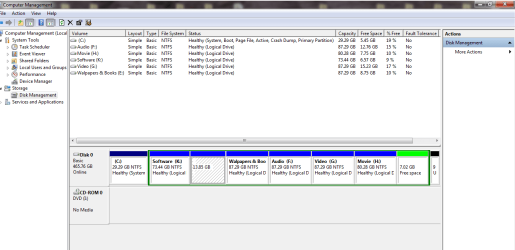
I made a disk shrinking another disk or volume (Software  D)). After shrinking I changed the drive letter of disk Software from D to K and the newly formed disk (the shrinked one) into Local Disk D. The newly formed disk was shown in Disk segment when I go to Disk Management but not in Volume segment. Besides, the newly formed disk has no drive letter. I can't fromat the certain drive or delete the volume.
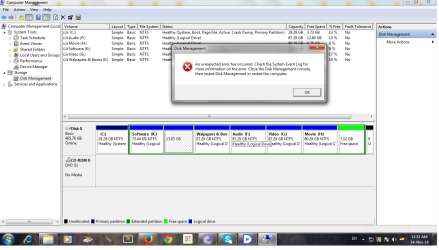
When I prompt to delete or format, there shows a message:
"An unexpected error has occurred. Check the System Event Log for more info on the error. Close the Disk Management console, then restart Disk Management or restart computet."
Can I regain my space? Please help.
D)). After shrinking I changed the drive letter of disk Software from D to K and the newly formed disk (the shrinked one) into Local Disk D. The newly formed disk was shown in Disk segment when I go to Disk Management but not in Volume segment. Besides, the newly formed disk has no drive letter. I can't fromat the certain drive or delete the volume.When I prompt to delete or format, there shows a message:
"An unexpected error has occurred. Check the System Event Log for more info on the error. Close the Disk Management console, then restart Disk Management or restart computet."
Can I regain my space? Please help.
Attachments
My Computer
- Computer type
- PC/Desktop
- OS
- Windows 7 Ultimate x86
- CPU
- Intel Dual Core 2.7GHz
- Memory
- 3 GB
- Hard Drives
- 500 GB
