Solved How can I delete or eject non-existing drives?

technoFrank

New member
Member
Local time
8:35 AM
Messages
14
Hi,

Can someone help me to delete or eject drives which physically no where to be found? When I go to disk management I can see bunch of removable media but there's no removable media inserted in my PC. When I plug my USB my USB drive letter will become J because the F,G,H and I were already assigned to these removable media, I already removed drive letters to the removable media but nothing happens. Please see attached image file of my disk management.

Capture.JPG

Thanks.
 

My Computer My Computer

Computer type
PC/Desktop
OS
Windows 7 Professional x64
CPU
Intel Core i5-3340 CPU @3.10 GHz 3.30GHz
Motherboard
Gigabyte Technology Co. LTD. H61M-S2PT
Memory
4 GB DDR3
Graphics Card(s)
Intel HD Graphics
Antivirus
ESET Endpoint Antivirus
I did a small experiment ;).

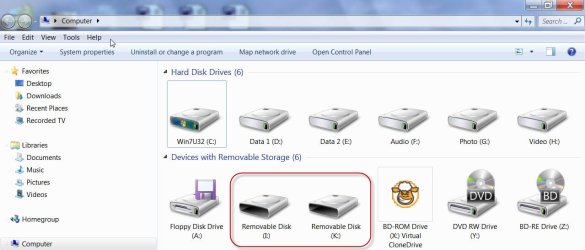
I connected my Transcend Card Reader TS-RDP8K to my desktop.

I get two brand-new drives I and K in "My Computer" :)

04-08-2014 08-01-04.jpg

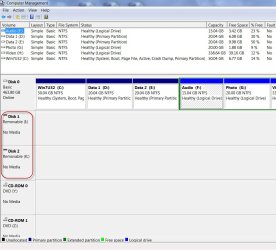
These also show up in Computer Management Disk Map ( - but not in the list above the map).

04-08-2014 08-04-23.jpg

I think you get the idea now.:)

All the same, periodically do a drive cleanup as suggested in this post http://www.sevenforums.com/hardware...-although-usb-mouse-keyboard.html#post2821973

That will remove all non-present devices and drive letters associated with those and release them.

( If your card Reader is in-built those cannot be removed unless you disable the Card Reader in Device Manager. Do you want to do that?????)
 
Last edited:

My Computer My Computer

OS
Windows 7 Home Premium 32 bit

My Computer My Computer

Computer type
PC/Desktop
Computer Manufacturer/Model Number
Self built custom
OS
64-bit Windows 11 Pro for Workstations
CPU
Intel i7-8700K OC'd to 5 GHz
Motherboard
ASUS ROG Maximus XI Formula Z390
Memory
64 GB (4x16GB) G.SKILL TridentZ RGB DDR4 3600 MHz
Graphics Card(s)
ASUS ROG-STRIX-GTX1080TI-O11G-GAMING
Sound Card
Integrated
Monitor(s) Displays
2 x Samsung Odyssey G7 27"
Screen Resolution
2560x1440
Hard Drives
1TB Samsung 990 PRO M.2,
4TB Samsung 990 PRO PRO M.2,
TerraMaster F8 SSD Plus NAS
PSU
Seasonic Prime Titanium 850W
Case
Thermaltake Core P3
Cooling
Corsair Hydro H115i
Keyboard
Logitech wireless K800
Mouse
Logitech MX Master 4
Internet Speed
2 Gb/s Download and 100 Mb/s Upload
Antivirus
Malwarebyte Anti-Malware Premium
Browser
Google Chrome
Other Info
Logitech Z625 speaker system,
Logitech BRIO 4K Pro webcam,
HP Color LaserJet Pro MFP M477fdn,
APC SMART-UPS RT 1000 XL - SURT1000XLI,
Galaxy S23 Plus phone
^:thumbsup:. Yep, you can hide empty drives as Brink indicated but cannot delete or eject those, unless you remove the external card reader or disable the internal card reader.

And if you remove the drive letters going into Disk Management as you seem to have done, next time you insert a card you won't see it in My computer, unless you go into Disk Management and assign a drive letter.

So either you hide them or leave them alone.:) It is enough if you know that it is your card reader.
 

My Computer My Computer

OS
Windows 7 Home Premium 32 bit
Thanks Brink and Jumanji, it appears that i have 4 SD card port in my new PC that I did not notice. hahaha. But why windows showing the drives even they are not used? It supposed to act like a USB port that it wont show in disk management unless being used. Anyways thanks for your help.
 

My Computer My Computer

Computer type
PC/Desktop
OS
Windows 7 Professional x64
CPU
Intel Core i5-3340 CPU @3.10 GHz 3.30GHz
Motherboard
Gigabyte Technology Co. LTD. H61M-S2PT
Memory
4 GB DDR3
Graphics Card(s)
Intel HD Graphics
Antivirus
ESET Endpoint Antivirus
Glad we could. :)

Yeah, it just depends on what the setting I posted was set on. Some people like to see all drives empty or not, while others only want to see the drive if not empty.
 

My Computer My Computer

Computer type
PC/Desktop
Computer Manufacturer/Model Number
Self built custom
OS
64-bit Windows 11 Pro for Workstations
CPU
Intel i7-8700K OC'd to 5 GHz
Motherboard
ASUS ROG Maximus XI Formula Z390
Memory
64 GB (4x16GB) G.SKILL TridentZ RGB DDR4 3600 MHz
Graphics Card(s)
ASUS ROG-STRIX-GTX1080TI-O11G-GAMING
Sound Card
Integrated
Monitor(s) Displays
2 x Samsung Odyssey G7 27"
Screen Resolution
2560x1440
Hard Drives
1TB Samsung 990 PRO M.2,
4TB Samsung 990 PRO PRO M.2,
TerraMaster F8 SSD Plus NAS
PSU
Seasonic Prime Titanium 850W
Case
Thermaltake Core P3
Cooling
Corsair Hydro H115i
Keyboard
Logitech wireless K800
Mouse
Logitech MX Master 4
Internet Speed
2 Gb/s Download and 100 Mb/s Upload
Antivirus
Malwarebyte Anti-Malware Premium
Browser
Google Chrome
Other Info
Logitech Z625 speaker system,
Logitech BRIO 4K Pro webcam,
HP Color LaserJet Pro MFP M477fdn,
APC SMART-UPS RT 1000 XL - SURT1000XLI,
Galaxy S23 Plus phone
Back
Top