
how can i delete this evtx file?

drugo

New member
Member
VIP
Local time
3:18 PM
Messages
476
hi
i have uninstalled i guess 1 year or more this program SyncBackPro
but i have noticed that in my even there is still this event
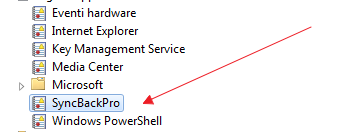
Kppy6ub.png


it's located here %SystemRoot%\System32\Winevt\Logs\SyncBackPro.evtx

how can i get rid of this file?
is there a command like to delete it?

i tried to stop the service Windows Event Log but i got an error message ,i need to stop the Task Scheduler (that i can't do it)

thanks
 

My Computer

Computer type
PC/Desktop
OS
windows 7 ultimate 64bit
It's probably because it is in use or you don't have permission (not the owner).

I also have Linux on my computer, so when this kind of thing happens, I delete it under Linux.
You should have a Linux boot able USB flash disk (2G). You have a complete OS on a USB flash disk. Very helpful in emergency.
lubuntu | lightweight, fast, easier
 

My Computers

System One System Two

  • Computer type
    PC/Desktop
    Computer Manufacturer/Model Number
    custom build
    OS
    Windows 7 HP 64
    CPU
    i5 6600K - 800MHz to 4200MHz
    Motherboard
    GA-Z170-HD3P
    Memory
    4+4G GSkill DDR4 3000
    Graphics Card(s)
    IG - Intel 530
    Monitor(s) Displays
    Samsung 226BW
    Screen Resolution
    1680x1050
    Hard Drives
    (1) -1 SM951 – 128GB M.2 AHCI PCIe SSD drive for Windows 7 and Lubuntu
    (2) -1 WD SATA 3 - 1T for Data
    (3) -1 WD SATA 3 - 1T for backup
    PSU
    Thermaltake 450W TR2 gold
    Keyboard
    Old and good Chicony mechanical keyboard
    Mouse
    Logitech mX performance - 9 buttons (had to disable some)
    Internet Speed
    500Mb/s
    Browser
    Firefox 64
    Other Info
    TinyWall firewall
  • Computer type
    Laptop
    System Manufacturer/Model Number
    Asus Q550LF
    OS
    Windows 7 Pro
    CPU
    i7-4500U 800MHz to 3.0GHz
    Motherboard
    Asus Q550LF
    Memory
    (4+4)G DDR3 1600
    Graphics Card(s)
    IG intel 4400 + NVIDIA GeForce GT 745M
    Sound Card
    Realtek
    Monitor(s) Displays
    LG Display LP156WF4-SPH1
    Screen Resolution
    1920 x 1080
    Hard Drives
    BX500 120G SSD for Windows and programs +
    1T HDD for data
    Internet Speed
    500 Mb/s
    Browser
    Firefox
    Other Info
    TinyWall firewall
It's probably because it is in use or you don't have permission (not the owner).

I also have Linux on my computer, so when this kind of thing happens, I delete it under Linux.
You should have a Linux boot able USB flash disk (2G). You have a complete OS on a USB flash disk. Very helpful in emergency.
lubuntu | lightweight, fast, easier
hi
i will try a dibsto linux
or delete from here
HKEY_LOCAL_MACHINE\SYSTEM\CurrentControlSet\Services\EventLog
stop Windows Event Log and delete them
thanks i will keep you posted ;)
 
Last edited:

My Computer

Computer type
PC/Desktop
OS
windows 7 ultimate 64bit
Back
Top