How Can I Determine The Location of The Page File In My Computer?

CAG43

New member
Local time
2:02 PM
Messages
28
I am planning to do a clean install in my Windows 7 HP 32 bit desktop computer and as part of the process, would like to know how to determine the location of the page file and how to make it contiguous.
I would like to be able to increase its size but do not know how to find the location of the setting.

Also, should I update Windows before or after the clean install and would it be better to make it automatic or manually.

Lastly, should I put the firewall up first?

CAG43
 

My Computer My Computer

At a glance

Windows 7 Professional 64-bit SP1Intel Core i5-2520M [email protected]4GB 2 - 2GB Samsung 1333MHzIntel HD Graphics 3000 ver. 9.17.10.3347
Computer type
Laptop
Computer Manufacturer/Model Number
HP 8460p
OS
Windows 7 Professional 64-bit SP1
CPU
Intel Core i5-2520M [email protected]
Motherboard
161C KBC ver 97.4E
Memory
4GB 2 - 2GB Samsung 1333MHz
Graphics Card(s)
Intel HD Graphics 3000 ver. 9.17.10.3347
Hard Drives
Intel SSDSA2M160G2GC-149.05GB
If you're going to use Windows Firewall, it should be automatically running - unless you have a 3rd party firewall installed.
Unless you are going to "lock in" a size for the page file, which resides on the root directory of what is often called "c drive", the OS partition, I don't know how to make the pagefile stay contiguous, let's see what others have to input.
 

My Computer My Computer

At a glance

Windows 7 Professional 64-bitDesktop i5; Acers i5 & i7desktop 16GB; 1 Acer 8GB & 1 Acer 16GB
Computer type
PC/Desktop
Computer Manufacturer/Model Number
Antec desktop; Acer Aspire laptops
OS
Windows 7 Professional 64-bit
CPU
Desktop i5; Acers i5 & i7
Memory
desktop 16GB; 1 Acer 8GB & 1 Acer 16GB
Hard Drives
1TB split into 2 equal partitions [OS and data] usable by RJS
Internet Speed
AT&T DSL
Browser
FF, GChrome, msIE
Other Info
Windows 7 Firewall, Emsisoft AM/AV, MSE [scan-only], SpywareBlaster, Ruiware/BillP combine
I don't see how you're going to update windows BEFORE a clean install. So, do it after. Make sure you have all the drivers for your machine before you format the disk though, or you will regret it.

The firewall is enabled by default, on both Windows, and likely your router as well.

To change the size of your page file:

  1. Open start menu
  2. Right click My Computer and open Properties
  3. Open advanced system settings, and go to the advanced tab
  4. Open performance settings, and go to advanced tab
Should be able to manually configure the size of the page file from there
 

My Computer My Computer

At a glance

Windows 7 Ultimate x643rd Generation i58GB GDDR3
Computer type
PC/Desktop
Computer Manufacturer/Model Number
Gateway
OS
Windows 7 Ultimate x64
CPU
3rd Generation i5
Memory
8GB GDDR3
Hard Drives
Samsung 840 Evo 250GB
Antivirus
None
Browser
Firefox Extended Support Release
With a SSD does it really matter about the page file ?
Art.
 

My Computer My Computer

At a glance

Win7 sp1 Pro 64bit / XP sp2 Pro (games only)Intel Core 2 Duo E8400 @ 3.00GHz8.00 GB Dual-Channel DDR2 @ 400MHz (5-5-5-18)1024MB GeForce GTX 560
Computer type
PC/Desktop
Computer Manufacturer/Model Number
Home built
OS
Win7 sp1 Pro 64bit / XP sp2 Pro (games only)
CPU
Intel Core 2 Duo E8400 @ 3.00GHz
Motherboard
Intel Corporation DP35DP (CPU1)
Memory
8.00 GB Dual-Channel DDR2 @ 400MHz (5-5-5-18)
Graphics Card(s)
1024MB GeForce GTX 560
Sound Card
NVIDIA High Definition Audio
Monitor(s) Displays
SyncMaster (2048x1152@60Hz)
Hard Drives
240GB Sandisc Extreme Pro SSD
244GB Seagate ST3250410AS
488GB Seagate ST500DM002-1BD142
931GB Western Digital WDC WD1003FZEX
PSU
Corsair 720
Case
ATX
Keyboard
HID Keyboard Device Logitech
Mouse
HID-compliant mouse Microsoft
Other Info
TSSTcorp CDDVDW SH-S223L

HL-DT-ST BD-RE BH12LS35
With a SSD does it really matter about the page file ?
Art.
Depends on thee amount of physical RAM you have - With computers that have 8GB or more it's probably unnecessary. In fact, if you have a standard HDD, you're disk speeds will improve with the lack of a page file. Some applications may still require a page file if you lack sufficient amount of memory. Like adobe cs6
 

My Computer My Computer

At a glance

Windows 7 Ultimate x643rd Generation i58GB GDDR3
Computer type
PC/Desktop
Computer Manufacturer/Model Number
Gateway
OS
Windows 7 Ultimate x64
CPU
3rd Generation i5
Memory
8GB GDDR3
Hard Drives
Samsung 840 Evo 250GB
Antivirus
None
Browser
Firefox Extended Support Release
I was not questioning if P-F is needed, the question was for the OP's original entry regarding location. I am fully aware of the need for a P-F as I have a video edit program that won't do even the smallest work without a page file.
Art.
 

My Computer My Computer

At a glance

Win7 sp1 Pro 64bit / XP sp2 Pro (games only)Intel Core 2 Duo E8400 @ 3.00GHz8.00 GB Dual-Channel DDR2 @ 400MHz (5-5-5-18)1024MB GeForce GTX 560
Computer type
PC/Desktop
Computer Manufacturer/Model Number
Home built
OS
Win7 sp1 Pro 64bit / XP sp2 Pro (games only)
CPU
Intel Core 2 Duo E8400 @ 3.00GHz
Motherboard
Intel Corporation DP35DP (CPU1)
Memory
8.00 GB Dual-Channel DDR2 @ 400MHz (5-5-5-18)
Graphics Card(s)
1024MB GeForce GTX 560
Sound Card
NVIDIA High Definition Audio
Monitor(s) Displays
SyncMaster (2048x1152@60Hz)
Hard Drives
240GB Sandisc Extreme Pro SSD
244GB Seagate ST3250410AS
488GB Seagate ST500DM002-1BD142
931GB Western Digital WDC WD1003FZEX
PSU
Corsair 720
Case
ATX
Keyboard
HID Keyboard Device Logitech
Mouse
HID-compliant mouse Microsoft
Other Info
TSSTcorp CDDVDW SH-S223L

HL-DT-ST BD-RE BH12LS35
In a system with more than one drive it is best to physically disconnect those you are not going to install the OS on. This ensures that all partitions will be on the desired drive. It also avoids the possibility of accidentally installing the OS on a data drive, particularly bad if it contains data. People have done this, and not just novices either. All it takes is a moments carelessness and it is done.

Regarding pagefile location:
With a conventional drive it is often said that the pagefile should be at the beginning of the drive as this maximizes transfer rate. The thing is that transfer rate is the least important of hard drive parameters for pagefile performance. This maximizes performance of something that doesn't matter at the expense of something that does, seek time. You would really want the pagefile near your most often used files. You can't really know that and pagefile location isn't normally controllable anyway. Let Windows put it where it wishes. None of this matters at all with an SSD.

If you have an SSD that is where the pagefile should be. SSD performance characteristics are an almost perfect match for typical pagefile usage patterns. The performance characteristics of a conventional drive could hardly be more wrong. Don't be concerned with limited writes of an SSD. It takes a lot of work to kill an SSD with excessive writes and they usually die for unrelated causes. Or more likely it is replaced because it is too small.

Even with a conventional drive having the pagefile contiguous matters little. It won't impact performance unless the number of fragments are truly huge, thousands. That won't happen unless you are desperately short on disk space. And with an SSD even that won't matter. If the pagefile is initially contiguous it will stay that way, even after extended heavy use.

Bottom line is just install the OS without regards to pagefile considerations. Unless you have a specific need to do otherwise and you understand what you are doing just leave it on system managed, the default setting. Otherwise you are just making things more complicated for no gain. Most attempts at optimizing the pagefile are a waste of time.
 

My Computer My Computer

At a glance

Windows 7 Pro 64 bitXeon W35208 GBNvidia Geforce 210
Computer type
PC/Desktop
Computer Manufacturer/Model Number
HP
OS
Windows 7 Pro 64 bit
CPU
Xeon W3520
Memory
8 GB
Graphics Card(s)
Nvidia Geforce 210
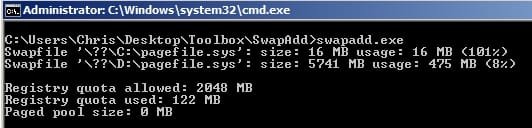
You can see where the pagefile is using:

Start > Run then type sysdm.cpl press Enter. Advanced Tab > Performace > Settings > Advance Tab > Virtual Memory > Change

Or you can use swapadd utility available here:

Tools and utilities for Windows

From my machine:

Swapadd.jpg

Virtual Memory.jpg

Anyway ignore the pagefile swap as everyone says that it doesn't work unless moved to another drive but I find it works okay for me using a RAMdisk.

Basically you can make your pagefile a fixed size if you want to but I don't believe you can make it contiguous as it shrinks and grows in size anyway.

Should be okay if you stick to using system managed size.
 

My Computer My Computer

At a glance

Microsoft Windows 7 Home Premium 64-bit 7601 ...AMD C-60 APU with Radeon(tm) HD Graphics4.00 GBAMD Radeon HD 6290 Graphics
Computer type
Laptop
Computer Manufacturer/Model Number
ASUS
OS
Microsoft Windows 7 Home Premium 64-bit 7601 Multiprocessor Free Service Pack 1
CPU
AMD C-60 APU with Radeon(tm) HD Graphics
Motherboard
ASUSTeK COMPUTER INC. X501U
Memory
4.00 GB
Graphics Card(s)
AMD Radeon HD 6290 Graphics
Sound Card
(1) AMD High Definition Audio Device (2) Realtek High Defi
Screen Resolution
1366 x 768 x 32 bits (4294967296 colors) @ 60 Hz
Hard Drives
Hitachi HTS545050A7E380 SATA Disk Device
Antivirus
Comodo CIS & FW, SecureAplus App Whitelisting, Threatfire
Browser
Cyberfox 64bit, Opera 64bit, Airfox
Other Info
Spy-The-Spy, HitmanPro.Alert, Norton Connect Safe, MJRegWatcher, BitDefender TrafficLight, Voodoo Shield, Zemana AntiMalware
Just for the record, programs like Photoshop, Illustrator and all the Corel suite cry like babies if they don't see a paging file... I have 16 Gigs of RAM in my newest laptop which I rarely pass over 25% or 35% usage, even having a virtual machine open I never use more than 50% (That is, having Photoshop, VMware Player -with a Windows 7 SP1 Machine, 2 gigs-, Clips Studio Paint and Firefox -playing a stream-, open at the same time)

But... even having plenty of RAM, I found that Photoshop starts behaving oddly and lagging if it doesn't find a paging file... so I had to set one of 2 gigs just for the program to not start acting weirdly...
 

My Computer My Computer

At a glance

Microsoft Windows 7 Home Premium SP1 64-bit B...AMD Athlon 64 X2 5200+ Dual Core CPU @ 2.7 Gh...2x2 GB DDR2 PC-5300 (667 Mhz) Kingston ValueRAMXFX ATI Radeon HD 4350 GPU (512 MB + 512 MB HM)
Computer type
PC/Desktop
Computer Manufacturer/Model Number
Assembled Desktop PC
OS
Microsoft Windows 7 Home Premium SP1 64-bit Build 7600
CPU
AMD Athlon 64 X2 5200+ Dual Core CPU @ 2.7 Ghz (Brisbane)
Motherboard
PCChips A13G+ v3.0
Memory
2x2 GB DDR2 PC-5300 (667 Mhz) Kingston ValueRAM
Graphics Card(s)
XFX ATI Radeon HD 4350 GPU (512 MB + 512 MB HM)
Sound Card
Realtek High Definition Audio Driver ALC660 @ MCP61S
Monitor(s) Displays
HP S2031 20" LED HD Widescreen Display Monitor
Screen Resolution
1600 x 900 px
Hard Drives
Maxtor Diamond Max 10 (160 GB, 7200 RPM, SATA-II Hard Disk)
Western Digital Scorpion Blue (250 GB, 5400 RPM, SATA-II External Hard Disk - Personal Data)
Toshiba MQ01ABD050 (500 GB, 5400 RPM, SATA-II External Hard Disk - Software & ISOs)
PSU
Pixxo Transformer 850W 80+ Certification PSU
Case
Compaq 5BW353 Case
Cooling
Many solutions, see other info...
Keyboard
Green Leaf (Mitzu) Standard Keyboard
Mouse
Microsoft USB Lasser Pointing Device
Internet Speed
10 MB
Antivirus
Avast Antivirus Free
Browser
Firefox, Chrome, Internet Explorer
Other Info
Windows Experience Index Result: 3.8 of 7.9.

Cooling solutions:
- AVC @ 2000/5000 RPM Copper Heatpipes (For Athlon 64 X2 6000+ CPU used in an Athlon 64 X2 5200+)
- Rear Fan 80 mm @ 2700 RPM for heat extraction
- Manhatan Chipset Cooler @ 4700/7200 RPM (For nVidia Chipset in MoBo)
- Foxconn @ 2500 RPM (Old Pentium III heatsink fan) in XFX ATI Radeon HD 4350
You can make it contiguous by defining the initial size=maxsize.
Note I did not put it on my C drive which was SSD, but had issues with BSOD and windows did not save log file because pagefile must be on boot disk and at least size of ram. Thus i moved to C drive and made 17 mb initial =max.
 

My Computer My Computer

At a glance

windows 7 64biti7-2600k8gb680tx in sli
Computer type
PC/Desktop
Computer Manufacturer/Model Number
custom build
OS
windows 7 64bit
CPU
i7-2600k
Motherboard
Asus p8z77-v deluxe
Memory
8gb
Graphics Card(s)
680tx in sli
Hard Drives
samsung 840 ssd 240 Gb and seagate 2Tb (data) and WD Red 2TB (backup)
Antivirus
Norton 360
Browser
Chrome and firefox
Back
Top