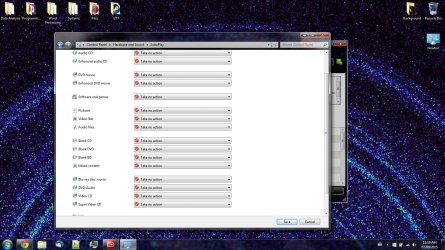
I am EXTREMELY annoyed after using W7Pro for few years and everytime I plug in a USB HDD, flashdrive, DVD or etc. Windows prompting me asking me for actions.
I even tried to use the GODMODE to disable it but no luck.
Hi,
You will always get that prompt if you don't disconnect the drive properly
Mostly win-8-8.1 & 10 will cause it because of fast start/ really fake shut down features that are mostly Hibernation.
Personally in window 7 and earlier I would completely shut down then disconnect a external or internal drive or use safely remove device which doesn't always list external drives.
My Computer
At a glance
Win-7-Pro64bit 7-H-Prem-64biti7-5930K 2nd i9-9940x both water blocked VRM'...Trident-z 3200C14 2nd Trident-z 3600C16EVGA 1080ti ftw3 2nd Titan Xp both water blocked
Computer type
PC/Desktop
Computer Manufacturer/Model Number
Custom assembled by me :}
OS
Win-7-Pro64bit 7-H-Prem-64bit
CPU
i7-5930K 2nd i9-9940x both water blocked VRM's too
2nd ASUS X299 Apex/Intel i9-9940x with Custom water loop/7H-Prem-x64/Corsair 450D case/Ram Trident-z 3600C16 4x8gb / Samsung970Evo plus 500gb SSD/Dual ssd EZ swap evo/PSU EVGA SuperNova 1200w-P2 80+Platinum/GPU Titan Xp /8-ML-140 on push-pull on 2-280GTX rads
Hi
I can't remember where the setting in Linux is but look for auto mounting of drives and disable it.
My Computer
At a glance
Win-7-Pro64bit 7-H-Prem-64biti7-5930K 2nd i9-9940x both water blocked VRM'...Trident-z 3200C14 2nd Trident-z 3600C16EVGA 1080ti ftw3 2nd Titan Xp both water blocked
Computer type
PC/Desktop
Computer Manufacturer/Model Number
Custom assembled by me :}
OS
Win-7-Pro64bit 7-H-Prem-64bit
CPU
i7-5930K 2nd i9-9940x both water blocked VRM's too
2nd ASUS X299 Apex/Intel i9-9940x with Custom water loop/7H-Prem-x64/Corsair 450D case/Ram Trident-z 3600C16 4x8gb / Samsung970Evo plus 500gb SSD/Dual ssd EZ swap evo/PSU EVGA SuperNova 1200w-P2 80+Platinum/GPU Titan Xp /8-ML-140 on push-pull on 2-280GTX rads
for scan and fix, linux, depending on distro, by default, it doesn't prompt me anything. I actually prefer and allow it to show me on my "alert" because it doesn't show up in the middle of the screen and active, because if it were in the middle (as in Windows 7) I end up clicking on something/pressing enter without knowing it. I once "fixed" and entire 500GB of data of a back up HDD, needless to say, I was grumpy re-downloading everything from cloud servers.
the external HDD, ALL except Linux-only drive has been formatted to NTFS. Linux-only drive is ext4, this MAKES SURE that windows does not recognize it(this is preferred for me).
The "Big Name" Linux Distros (Ubuntu, Linux Mint, etc.) normally have no issues with NTFS. Note
The NTFS performance in Linux Distros is often slower than on Windows.
Linux will apparently run on many different types of file systems.
Ubuntu and LM normally use EXT (my friend has experimented with other file systems, like BTRFS).
If a Linux Distro doesn't support NTFS, you can download some software to "embed" it.
My Computer
At a glance
W7 Ultimate SP1, LM19.2 MATE, W10 Home 1703, ...AMD Phenom II x6 1100T, 3.3 GHz12GB DDR3 1333 G-Skill (4GB x 2), G-Skill (2G...NVIDIA GeForce GTX 660
Computer type
PC/Desktop
Computer Manufacturer/Model Number
n/a
OS
W7 Ultimate SP1, LM19.2 MATE, W10 Home 1703, W10 Pro 1703 VM, #All 64 bit
CPU
AMD Phenom II x6 1100T, 3.3 GHz
Motherboard
ASUS M4A88T-M/USB3 (AM3)
Memory
12GB DDR3 1333 G-Skill (4GB x 2), G-Skill (2GB x 2)
Graphics Card(s)
NVIDIA GeForce GTX 660
Sound Card
Realtek?
Monitor(s) Displays
Samsung S23B350
Screen Resolution
1920x1080
Hard Drives
WD Green 2TB (SATA), WD Green 3TB (SATA), WD Blue 4TB (SATA), WD Blue 6TB (SATA)