How can I disable media center?

rdavila09

New member
Local time
12:24 PM
Messages
12
I need help, how can I disable windows media center when every time I click on some thing the blue windows media center screen comes up? Ive tried to go through the "control panel" "programs and features" and "turn windows features on or off" and every time i click on it it send me back to the blue screen. This is really annoying can some one please help me!!!
 

My Computer My Computer

At a glance

windows 7 ultimate
OS
windows 7 ultimate
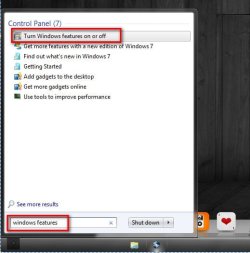
Type "windows features" in the search box of the start menu, and click the resulting link.
1.jpg

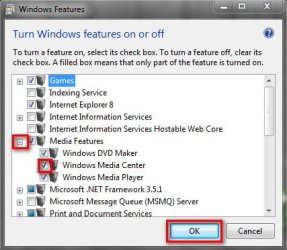
Now, expand media features, uncheck media center, ok.
2.jpg

Let us know if it works or not.
 

My Computer My Computer

At a glance

Microsoft Windows 10 Pro Insider Preview 64-bitIntel(R) Core(TM) i3-4130 CPU @ 3.40GHzCorsair Vengence 4GB x2 (8.00GB Dual-Channel ...2047MB GeForce GTS 450 (ZOTAC International)
Computer type
PC/Desktop
Computer Manufacturer/Model Number
Self Assembled
OS
Microsoft Windows 10 Pro Insider Preview 64-bit
CPU
Intel(R) Core(TM) i3-4130 CPU @ 3.40GHz
Motherboard
Gigabyte Technology Co., Ltd. B85M-D3H
Memory
Corsair Vengence 4GB x2 (8.00GB Dual-Channel DDR3 @ 798MHz)
Graphics Card(s)
2047MB GeForce GTS 450 (ZOTAC International)
Sound Card
Onboard (Realtek High Definition Audio)
Monitor(s) Displays
LG Flatron E2040T
Screen Resolution
1600x900
Hard Drives
Western Digital 1 TB
Seagate 500 GB
PSU
Corsair VS550
Case
Cooler Master K380
Cooling
Cooler Master Seidon 120V Plus
Keyboard
Logitech MK260r
Mouse
Logitech MK260r
Internet Speed
PMPL Broadband
Antivirus
Windows Defender + MBAM
Browser
Firefox
Other Info
Dell Studio 15" Laptop
no it still does the same thing after clicking on the "turn windows features on or off" it still sends me to the blue screen
 

My Computer My Computer

At a glance

windows 7 ultimate
OS
windows 7 ultimate
Sorry if I sound dumb but do you mean BSOD? "Blue/Black Screen Of Death" or the Windows Media Center Blue screen?
 

My Computer My Computer

At a glance

Windows 10 Home 64BitIntel Core i5 10400 @ 2.90GHz8.00GB Single-Channel Unknown @ 1329MHz (16-2...
Computer type
PC/Desktop
Computer Manufacturer/Model Number
Self assembled
OS
Windows 10 Home 64Bit
CPU
Intel Core i5 10400 @ 2.90GHz
Motherboard
Intel Corporation DG41WV (PROCESSOR)
Memory
8.00GB Single-Channel Unknown @ 1329MHz (16-20-20-38)
Sound Card
Realtek High Definition Audio
Monitor(s) Displays
DELL E170S
Screen Resolution
1280x1024 pixels
Hard Drives
931GB TOSHIBA DT01ACA100 (SATA)
238GB TEAM TM8PS7256G (SATA SSD)
Case
Nothing Fancy
Cooling
Fans
Keyboard
A4 Tech Co LTD
Mouse
A4 Tech Co Ltd/Logitech
Internet Speed
25 Mbps
Are the media files like videos and musics opening with media center at double click, and that you dont want ?

Right click on the media file , choose properties in the context menu. Then, look at the resulting window , search for "opens with" and click the change button beside it.

Now change it to your desired program, apply and ok.
 

My Computer My Computer

At a glance

Microsoft Windows 10 Pro Insider Preview 64-bitIntel(R) Core(TM) i3-4130 CPU @ 3.40GHzCorsair Vengence 4GB x2 (8.00GB Dual-Channel ...2047MB GeForce GTS 450 (ZOTAC International)
Computer type
PC/Desktop
Computer Manufacturer/Model Number
Self Assembled
OS
Microsoft Windows 10 Pro Insider Preview 64-bit
CPU
Intel(R) Core(TM) i3-4130 CPU @ 3.40GHz
Motherboard
Gigabyte Technology Co., Ltd. B85M-D3H
Memory
Corsair Vengence 4GB x2 (8.00GB Dual-Channel DDR3 @ 798MHz)
Graphics Card(s)
2047MB GeForce GTS 450 (ZOTAC International)
Sound Card
Onboard (Realtek High Definition Audio)
Monitor(s) Displays
LG Flatron E2040T
Screen Resolution
1600x900
Hard Drives
Western Digital 1 TB
Seagate 500 GB
PSU
Corsair VS550
Case
Cooler Master K380
Cooling
Cooler Master Seidon 120V Plus
Keyboard
Logitech MK260r
Mouse
Logitech MK260r
Internet Speed
PMPL Broadband
Antivirus
Windows Defender + MBAM
Browser
Firefox
Other Info
Dell Studio 15" Laptop
Sorry if I sound dumb but do you mean BSOD? "Blue/Black Screen Of Death" or the Windows Media Center Blue screen?

I had to look up what the BSOD was and no its not that its just the screen for the media center.
 

My Computer My Computer

At a glance

windows 7 ultimate
OS
windows 7 ultimate
Are the media files like videos and musics opening with media center at double click, and that you dont want ?

Right click on the media file , choose properties in the context menu. Then, look at the resulting window , search for "opens with" and click the change button beside it.

Now change it to your desired program, apply and ok.

Ive tried it and no luck
 

My Computer My Computer

At a glance

windows 7 ultimate
OS
windows 7 ultimate
Sorry if I sound dumb but do you mean BSOD? "Blue/Black Screen Of Death" or the Windows Media Center Blue screen?

I had to look up what the BSOD was and no its not that its just the screen for the media center.

Okay. Have you tried ending its task from task manager and then try turning off from control panel?

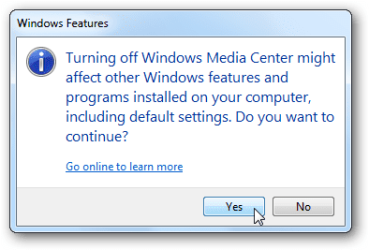
Also have you clicked yes when this confirmation dialogue comes?
 

Attachments

  • 13diswmc.png
    13diswmc.png
    9 KB · Views: 5

My Computer My Computer

At a glance

Windows 10 Home 64BitIntel Core i5 10400 @ 2.90GHz8.00GB Single-Channel Unknown @ 1329MHz (16-2...
Computer type
PC/Desktop
Computer Manufacturer/Model Number
Self assembled
OS
Windows 10 Home 64Bit
CPU
Intel Core i5 10400 @ 2.90GHz
Motherboard
Intel Corporation DG41WV (PROCESSOR)
Memory
8.00GB Single-Channel Unknown @ 1329MHz (16-20-20-38)
Sound Card
Realtek High Definition Audio
Monitor(s) Displays
DELL E170S
Screen Resolution
1280x1024 pixels
Hard Drives
931GB TOSHIBA DT01ACA100 (SATA)
238GB TEAM TM8PS7256G (SATA SSD)
Case
Nothing Fancy
Cooling
Fans
Keyboard
A4 Tech Co LTD
Mouse
A4 Tech Co Ltd/Logitech
Internet Speed
25 Mbps

My Computer My Computer

At a glance

windows 7 ultimate
OS
windows 7 ultimate

My Computer My Computer

At a glance

Windows 10 Home 64BitIntel Core i5 10400 @ 2.90GHz8.00GB Single-Channel Unknown @ 1329MHz (16-2...
Computer type
PC/Desktop
Computer Manufacturer/Model Number
Self assembled
OS
Windows 10 Home 64Bit
CPU
Intel Core i5 10400 @ 2.90GHz
Motherboard
Intel Corporation DG41WV (PROCESSOR)
Memory
8.00GB Single-Channel Unknown @ 1329MHz (16-20-20-38)
Sound Card
Realtek High Definition Audio
Monitor(s) Displays
DELL E170S
Screen Resolution
1280x1024 pixels
Hard Drives
931GB TOSHIBA DT01ACA100 (SATA)
238GB TEAM TM8PS7256G (SATA SSD)
Case
Nothing Fancy
Cooling
Fans
Keyboard
A4 Tech Co LTD
Mouse
A4 Tech Co Ltd/Logitech
Internet Speed
25 Mbps
rdavila09, Arc has given you the correct fix in THIS POST.

you can also use the 'Default Programs' / 'Set your default programs' interface from the startmenu to achieve this globally instead of for individual files as Arc suggests. Click on Windows Media Player and choose, 'Set this program as default'
 

My Computer My Computer

At a glance

Windows 7 Ultimate 64biti7 2600k16GB (4x4) corsair vengeanceIntel HD3000 iGPU / AMD HD6870 1024MB
Computer Manufacturer/Model Number
Selfbuilt
OS
Windows 7 Ultimate 64bit
CPU
i7 2600k
Motherboard
asus P8Z68-V LE
Memory
16GB (4x4) corsair vengeance
Graphics Card(s)
Intel HD3000 iGPU / AMD HD6870 1024MB
Sound Card
bitstreamed to an Onkyo 609
Monitor(s) Displays
Asus VE278 27" LED / Bravia EX7 60" LED
Screen Resolution
native 1080p x2
Hard Drives
4x 2TB int. + 2x 2TB external and a SSD for the boot drive.
PSU
650w Antec
Case
NZXT tempest evo
Cooling
air/stock
Keyboard
Dell
Mouse
logitech m505
Internet Speed
dual: cable/blackberry tether for travel use
Other Info
BD re-writer //
asus notebook G73Jw
Hello rdavila09, please elaborate the issue a bit. I am guessing that when you are double clicking any of your media files, it is opening with media center automatically. Right ?

And, you tried this method : http://www.sevenforums.com/tutorials/12196-open-change-default-program.html ; which didn't work. Right ?

If so, follow it : http://www.sevenforums.com/tutorials/19449-default-file-type-associations-restore.html , and inform us the results.

rdavila09, Arc has given you the correct fix in THIS POST.

you can also use the 'Default Programs' / 'Set your default programs' interface from the startmenu to achieve this.
Click on Windows Media Player and choose, 'Set this program as default'
Thanks for supporting it, Shark007 . I also believe that it is the right fix, if followed properly.
 

My Computer My Computer

At a glance

Microsoft Windows 10 Pro Insider Preview 64-bitIntel(R) Core(TM) i3-4130 CPU @ 3.40GHzCorsair Vengence 4GB x2 (8.00GB Dual-Channel ...2047MB GeForce GTS 450 (ZOTAC International)
Computer type
PC/Desktop
Computer Manufacturer/Model Number
Self Assembled
OS
Microsoft Windows 10 Pro Insider Preview 64-bit
CPU
Intel(R) Core(TM) i3-4130 CPU @ 3.40GHz
Motherboard
Gigabyte Technology Co., Ltd. B85M-D3H
Memory
Corsair Vengence 4GB x2 (8.00GB Dual-Channel DDR3 @ 798MHz)
Graphics Card(s)
2047MB GeForce GTS 450 (ZOTAC International)
Sound Card
Onboard (Realtek High Definition Audio)
Monitor(s) Displays
LG Flatron E2040T
Screen Resolution
1600x900
Hard Drives
Western Digital 1 TB
Seagate 500 GB
PSU
Corsair VS550
Case
Cooler Master K380
Cooling
Cooler Master Seidon 120V Plus
Keyboard
Logitech MK260r
Mouse
Logitech MK260r
Internet Speed
PMPL Broadband
Antivirus
Windows Defender + MBAM
Browser
Firefox
Other Info
Dell Studio 15" Laptop
Sorry if I sound dumb but do you mean BSOD? "Blue/Black Screen Of Death" or the Windows Media Center Blue screen?

I had to look up what the BSOD was and no its not that its just the screen for the media center.

Okay. Have you tried ending its task from task manager and then try turning off from control panel?

Also have you clicked yes when this confirmation dialogue comes?

thats the thing I cant even get to this screen
 

My Computer My Computer

At a glance

windows 7 ultimate
OS
windows 7 ultimate

My Computer My Computer

At a glance

Windows 10 Home 64BitIntel Core i5 10400 @ 2.90GHz8.00GB Single-Channel Unknown @ 1329MHz (16-2...
Computer type
PC/Desktop
Computer Manufacturer/Model Number
Self assembled
OS
Windows 10 Home 64Bit
CPU
Intel Core i5 10400 @ 2.90GHz
Motherboard
Intel Corporation DG41WV (PROCESSOR)
Memory
8.00GB Single-Channel Unknown @ 1329MHz (16-20-20-38)
Sound Card
Realtek High Definition Audio
Monitor(s) Displays
DELL E170S
Screen Resolution
1280x1024 pixels
Hard Drives
931GB TOSHIBA DT01ACA100 (SATA)
238GB TEAM TM8PS7256G (SATA SSD)
Case
Nothing Fancy
Cooling
Fans
Keyboard
A4 Tech Co LTD
Mouse
A4 Tech Co Ltd/Logitech
Internet Speed
25 Mbps
Are the media files like videos and musics opening with media center at double click, and that you dont want ?

Right click on the media file , choose properties in the context menu. Then, look at the resulting window , search for "opens with" and click the change button beside it.

Now change it to your desired program, apply and ok.

thats the thing most of my icons on my desktop including firefox and explore changed to WMC, i'll take a pic of the screen and post it after work. but like I said almost anything I click on bring up the WMC screen
 

My Computer My Computer

At a glance

windows 7 ultimate
OS
windows 7 ultimate
rdavila09, Arc has given you the correct fix in THIS POST.

you can also use the 'Default Programs' / 'Set your default programs' interface from the startmenu to achieve this globally instead of for individual files as Arc suggests. Click on Windows Media Player and choose, 'Set this program as default'

I'll try this after work
 

My Computer My Computer

At a glance

windows 7 ultimate
OS
windows 7 ultimate
thats the thing most of my icons on my desktop including firefox and explore changed to WMC, i'll take a pic of the screen and post it after work. but like I said almost anything I click on bring up the WMC screen
Now it is clear .

Not the programs, but the exe files too. Really a tough situation. As an inbuilt service, you cannot uninstall Media Center, but disabling media center will not fix your issue. Try these steps one by one.


  1. Try http://www.sevenforums.com/tutorials/1538-sfc-scannow-command-system-file-checker.html first. If failed,
  2. Try a http://www.sevenforums.com/tutorials/700-system-restore.html to an earlier date that the problem started to occur, and see if it is fixed.
  3. If not, Try a http://www.sevenforums.com/tutorials/3413-repair-install.html?ltr=R .
 

My Computer My Computer

At a glance

Microsoft Windows 10 Pro Insider Preview 64-bitIntel(R) Core(TM) i3-4130 CPU @ 3.40GHzCorsair Vengence 4GB x2 (8.00GB Dual-Channel ...2047MB GeForce GTS 450 (ZOTAC International)
Computer type
PC/Desktop
Computer Manufacturer/Model Number
Self Assembled
OS
Microsoft Windows 10 Pro Insider Preview 64-bit
CPU
Intel(R) Core(TM) i3-4130 CPU @ 3.40GHz
Motherboard
Gigabyte Technology Co., Ltd. B85M-D3H
Memory
Corsair Vengence 4GB x2 (8.00GB Dual-Channel DDR3 @ 798MHz)
Graphics Card(s)
2047MB GeForce GTS 450 (ZOTAC International)
Sound Card
Onboard (Realtek High Definition Audio)
Monitor(s) Displays
LG Flatron E2040T
Screen Resolution
1600x900
Hard Drives
Western Digital 1 TB
Seagate 500 GB
PSU
Corsair VS550
Case
Cooler Master K380
Cooling
Cooler Master Seidon 120V Plus
Keyboard
Logitech MK260r
Mouse
Logitech MK260r
Internet Speed
PMPL Broadband
Antivirus
Windows Defender + MBAM
Browser
Firefox
Other Info
Dell Studio 15" Laptop
thats the thing most of my icons on my desktop including firefox and explore changed to WMC, i'll take a pic of the screen and post it after work. but like I said almost anything I click on bring up the WMC screen
Now it is clear .

Not the programs, but the exe files too. Really a tough situation. As an inbuilt service, you cannot uninstall Media Center, but disabling media center will not fix your issue. Try these steps one by one.


  1. Try http://www.sevenforums.com/tutorials/1538-sfc-scannow-command-system-file-checker.html first. If failed,
  2. Try a http://www.sevenforums.com/tutorials/700-system-restore.html to an earlier date that the problem started to occur, and see if it is fixed.
  3. If not, Try a http://www.sevenforums.com/tutorials/3413-repair-install.html?ltr=R .

Ive actually tried the 2nd one but there were no previous backups so i couldnt do that one and Ill try the 1st one after work and worst case ill do the 3rd one
 

My Computer My Computer

At a glance

windows 7 ultimate
OS
windows 7 ultimate
thanks for all of the help i really appreciate it, i'll let you guys know how it goes
 

My Computer My Computer

At a glance

windows 7 ultimate
OS
windows 7 ultimate
Back
Top