How can I disable Windows from detecting my HD6870 as a sound device?

Aray

New member
Local time
12:22 AM
Messages
6
Location
Sweden
First, I would like to say hi. Lovely forum, lovely theme, and pretty pleasing on the eyes.

Second, I lol'd when I read
To comply with the ridiculous EU e-privacy laws you accept that this site uses cookies as set out in our Privacy and cookie policy.
:p

My problem is, pretty much, the mouthy thread title. I recently got rid of my Audigy SE soundcard (poor driver support, mediocre soundcard, etc) and am using my motherboard's onboard. It's functioning perfectly, all set up and everything, but everytime I reboot my computer, it (my motherboard) will (as my motherboard's BIOS tells it to, I cannot change this) disable the onboard sound device completely and only detect my graphics card as a sound device.

I uninstalled the AMD Audio drivers through Catalyst but Windows 7, being rather clever, picks my graphics card up as a sound device anyway. To fix the problem I either simply restart my computer again (what's the point of an SSD if you have to reboot twice anyway?) and have a 80% chance that my onboard is detected again or I go into device manager, uninstall device, and the next boot up is fine. I tried using a group policy but Windows 7 still managed to sneak around.

The problem is, of course, that after the next boot it will install itself and so the vicious cycle continues. I tried google but none of it seemed to apply to me.

TL;DR noob summery:
how 2 disable win7 auto installing devices???

Relevant specs:

Gigabyte X48-DQ6 (Latest BIOS, Realtek ALC889A codec) - The source of the problem really, in the BIOS the bit about the Azalia codec only mentions "Auto" or "Disabled". Auto means it will enable itself if no other sound devices were detected and disabled means...well...you know.

XFX HD6870 etc, using Cat.12.6.

Windows 7 Pro 64bit
 

My Computer My Computer

At a glance

Windows 7 Pro 64bitIntel Q9450 @ 3.4ghz2x2GB Corsair DominatorXFX HD6870 1GB
OS
Windows 7 Pro 64bit
CPU
Intel Q9450 @ 3.4ghz
Motherboard
Gigabyte X48-DQ6 F8D Bios
Memory
2x2GB Corsair Dominator
Graphics Card(s)
XFX HD6870 1GB
Sound Card
Onboard
Monitor(s) Displays
Dell U2311H
Screen Resolution
1920x1080
Hard Drives
Samsung SSD 830 256GB (o/s,etc)
WD GP 500GB (storage)
PSU
Corsair 750W TX
Case
Silverstone Raven RV02
Mouse
MX518
Internet Speed
100/10
Hello,

The only way I know of disabling the video card's audio portion is by going into Device Manager and setting it as disabled.

This happened to me when I found out that displayPort sends audio and video ala HDMI over the same wire on my HTPC.

So, right-click 'Computer' in the 'Start' menu, click 'Manage', then go into 'Device Manager' on the left and drill down to the 'Sound, video and game controllers' option on the right. Expand it by clicking the '+', then right-click the audio device you want to disable and click 'Disable'.

I would reboot the computer and test things out to make sure the video side is still working.
 

My Computer My Computer

At a glance

Windows 7 Enterprise 64bitIntel Core i5 2.67MHz Quad Core4GBnVidia NVS 3100M
Computer type
PC/Desktop
Computer Manufacturer/Model Number
Dell Latitude E6410
OS
Windows 7 Enterprise 64bit
CPU
Intel Core i5 2.67MHz Quad Core
Memory
4GB
Graphics Card(s)
nVidia NVS 3100M
Sound Card
Built-in
Monitor(s) Displays
Built-in
Hard Drives
1 x 250GB
Should have mentioned I tried that before. :(
 

My Computer My Computer

At a glance

Windows 7 Pro 64bitIntel Q9450 @ 3.4ghz2x2GB Corsair DominatorXFX HD6870 1GB
OS
Windows 7 Pro 64bit
CPU
Intel Q9450 @ 3.4ghz
Motherboard
Gigabyte X48-DQ6 F8D Bios
Memory
2x2GB Corsair Dominator
Graphics Card(s)
XFX HD6870 1GB
Sound Card
Onboard
Monitor(s) Displays
Dell U2311H
Screen Resolution
1920x1080
Hard Drives
Samsung SSD 830 256GB (o/s,etc)
WD GP 500GB (storage)
PSU
Corsair 750W TX
Case
Silverstone Raven RV02
Mouse
MX518
Internet Speed
100/10
Bump, more annoying than ever nowadays. Have to restart 4-5 times before I get lucky and it picks up my onboard soud before it thinks my gfx card is the sound device to use.

Would be swell if I could just have Windows completely ignore the audio aspect of the gfx card. Tried everything I could find on google but no luck.
 

My Computer My Computer

At a glance

Windows 7 Pro 64bitIntel Q9450 @ 3.4ghz2x2GB Corsair DominatorXFX HD6870 1GB
OS
Windows 7 Pro 64bit
CPU
Intel Q9450 @ 3.4ghz
Motherboard
Gigabyte X48-DQ6 F8D Bios
Memory
2x2GB Corsair Dominator
Graphics Card(s)
XFX HD6870 1GB
Sound Card
Onboard
Monitor(s) Displays
Dell U2311H
Screen Resolution
1920x1080
Hard Drives
Samsung SSD 830 256GB (o/s,etc)
WD GP 500GB (storage)
PSU
Corsair 750W TX
Case
Silverstone Raven RV02
Mouse
MX518
Internet Speed
100/10
This may or may not help but it cost nothing.
Start Orb and type in sound and go to Change Sound Card Settings. In my computers there is the choices I have. Pick one with a right click and make it default. Right click again and select test. If it's working you will hear its test.
 

My Computer My Computer

At a glance

Windows 10 Pro. 64/ version 1709 Windows 7 Pr...Intel i7-6800K @ 4.3Corsair Platinum 16 gig @2400EVGA GTX 1070 OC
Computer type
PC/Desktop
Computer Manufacturer/Model Number
Home made Desktop
OS
Windows 10 Pro. 64/ version 1709 Windows 7 Pro/64
CPU
Intel i7-6800K @ 4.3
Motherboard
ASUS X-99 Deluxe II
Memory
Corsair Platinum 16 gig @2400
Graphics Card(s)
EVGA GTX 1070 OC
Monitor(s) Displays
Asus 27" LED LCD/VE278Q
Screen Resolution
1920-1080 or 1280-720 HDMI
Hard Drives
INTEL SSD 730-240 Gb Sata 3.0/
PSU
EVGA Platium 1200W
Case
Phanteks Luxe Tempered Glass 8 fans/ one radiator
Cooling
XSPC/ Water Cooled CPU
Keyboard
Das 4 Professional
Mouse
Logitech M705/MX Anywhere 2-S
Internet Speed
100 mbits
Antivirus
Microsoft Security Essentials/ Malwarebytes Premium 3.0/ SAS
Browser
I.E. 11 default/Firefox/ ISP Time Warner Cable/Spectrum
Other Info
LG BluRay Burner/
Sound system-KLipsch-THX/
Icy Dock ssd Hot Swap bays.
Problem is that my motherboard will completely ignore the fact that it has onboard sound because it thinks my GFX card is the sound card. I've uninstalled the GFX card's audio drivers, disabled the device, uninstalled the device in device manager, and even tried a few group policy settings but non works.

If I could just get Windows 7 to completely disregard and not install my GFX card's audio aspects it would be swell.
 

My Computer My Computer

At a glance

Windows 7 Pro 64bitIntel Q9450 @ 3.4ghz2x2GB Corsair DominatorXFX HD6870 1GB
OS
Windows 7 Pro 64bit
CPU
Intel Q9450 @ 3.4ghz
Motherboard
Gigabyte X48-DQ6 F8D Bios
Memory
2x2GB Corsair Dominator
Graphics Card(s)
XFX HD6870 1GB
Sound Card
Onboard
Monitor(s) Displays
Dell U2311H
Screen Resolution
1920x1080
Hard Drives
Samsung SSD 830 256GB (o/s,etc)
WD GP 500GB (storage)
PSU
Corsair 750W TX
Case
Silverstone Raven RV02
Mouse
MX518
Internet Speed
100/10
Problem is that my motherboard will completely ignore the fact that it has onboard sound because it thinks my GFX card is the sound card. I've uninstalled the GFX card's audio drivers, disabled the device, uninstalled the device in device manager, and even tried a few group policy settings but non works.

If I could just get Windows 7 to completely disregard and not install my GFX card's audio aspects it would be swell.

First of all, to disable automatic installation of drivers by windows - have a look here.

Secondly, have you tried moving the videocard to another PCI/PCIe slot on the motherboard?
Might be the port is somewhat damaged causing the conflicting discovery of it being sound the one time, videocard the next.
 

My Computer My Computer

At a glance

Windows 7 Pro x64i7-3770k16Gb (4x4Gb) RipjawsEVGA GTX 670 FTW
Computer Manufacturer/Model Number
self-made
OS
Windows 7 Pro x64
CPU
i7-3770k
Motherboard
Asus P8z77-V Deluxe
Memory
16Gb (4x4Gb) Ripjaws
Graphics Card(s)
EVGA GTX 670 FTW
Sound Card
on-board sound
Monitor(s) Displays
Samsungs 2233RZ, C226XW, P2770
Hard Drives
3x Crucial SSD M4 256Gb
PSU
Aerocool 800 Watt
Case
Aerocool Strike X
Cooling
lots of airfans
As long as you use the hdmi I think you are stuck with it, you can simply disable it in playback devices and the system will use the next audio device in line. I actually jump between my hdmi audio and system audio all the time. Just by toggling them from there.
 

My Computer My Computer

At a glance

Windows 7 x64Intel i7 2600kG.skill Ripjaw 16gigs @ 1866Nvidia gtx580 (evga)
Computer Manufacturer/Model Number
Insane hobo technologies. ;-)
OS
Windows 7 x64
CPU
Intel i7 2600k
Motherboard
Asrock z68 extreme 4 gen 3
Memory
G.skill Ripjaw 16gigs @ 1866
Graphics Card(s)
Nvidia gtx580 (evga)
Sound Card
Integrated HD audio + hdmi
Monitor(s) Displays
24" ASUS widescreen + 42" insignia
Screen Resolution
1080p (1920x1080)
Hard Drives
128 Samsung 830
256 Samsung 840
3 x 1tb storage drive (various)
1 western digital 1tb (eSATA)
1 Seagate 1tb (eSATA)
PSU
1 kilowatt SLI/Crossfire rated Silverstone modular
Case
NZXT Phantom + additional 220 fan
Cooling
Zalmann
Keyboard
Microsoft wireless 3000 (v2)
Mouse
MS - wireless 5000 (bluetrack)
Internet Speed
depends on if you ask me or my provider.
Other Info
The above information is provided as is, and the author assumes no responsibility for issues it may cause with your sanity or fanboyism.
Problem is that my motherboard will completely ignore the fact that it has onboard sound because it thinks my GFX card is the sound card. I've uninstalled the GFX card's audio drivers, disabled the device, uninstalled the device in device manager, and even tried a few group policy settings but non works.

If I could just get Windows 7 to completely disregard and not install my GFX card's audio aspects it would be swell.

First of all, to disable automatic installation of drivers by windows - have a look here.

Secondly, have you tried moving the videocard to another PCI/PCIe slot on the motherboard?
Might be the port is somewhat damaged causing the conflicting discovery of it being sound the one time, videocard the next.

I'll check it out. It's not really damage so much as the motherboard doing what it's told when booting (if it detects another sound device, which is the GFX card, it is to completely disable the onboard sound).

edit- erm, already tried that first bit. >_<

As long as you use the hdmi I think you are stuck with it, you can simply disable it in playback devices and the system will use the next audio device in line. I actually jump between my hdmi audio and system audio all the time. Just by toggling them from there.

I'm not using HDMI, only DVI. :(
 

My Computer My Computer

At a glance

Windows 7 Pro 64bitIntel Q9450 @ 3.4ghz2x2GB Corsair DominatorXFX HD6870 1GB
OS
Windows 7 Pro 64bit
CPU
Intel Q9450 @ 3.4ghz
Motherboard
Gigabyte X48-DQ6 F8D Bios
Memory
2x2GB Corsair Dominator
Graphics Card(s)
XFX HD6870 1GB
Sound Card
Onboard
Monitor(s) Displays
Dell U2311H
Screen Resolution
1920x1080
Hard Drives
Samsung SSD 830 256GB (o/s,etc)
WD GP 500GB (storage)
PSU
Corsair 750W TX
Case
Silverstone Raven RV02
Mouse
MX518
Internet Speed
100/10
Here is the problem, its not Windows. Its the motherboard and the BIOS. You can run around in Windows all day looking for a solution when you should be in the BIOS as that is causing the issue at hand. Nothing in Windows itself will change that. Windows can handle multiple audio devices there is no problem there. However, the BIOS is disabling its built in sound BEFORE Windows even boots up.

Software cannot overcome limitations of hardware.
 

My Computer My Computer

At a glance

Windows 10 Pro (x64)Intel Core i7-3930K (3.2GHz - 4.5GHz)4x Samsung 4GB PC3-12800 DDR3 (16GB 1600MHz)Nvidia Geforce GTX 690
Computer type
PC/Desktop
Computer Manufacturer/Model Number
Alienware Aurora ALX R4
OS
Windows 10 Pro (x64)
CPU
Intel Core i7-3930K (3.2GHz - 4.5GHz)
Motherboard
Alienware Aurora-R4 x79
Memory
4x Samsung 4GB PC3-12800 DDR3 (16GB 1600MHz)
Graphics Card(s)
Nvidia Geforce GTX 690
Sound Card
SteelSeries Siberia Elite
Monitor(s) Displays
Dell UltraSharp U3011
Screen Resolution
2560x1600
Hard Drives
Samsung 850 Pro 256 GB, Seagate 1TB Desktop Hybrid HDD, 2x Western Digital 4TB Green HDD
PSU
875W Some Dell PSU <.<
Case
Alienware Aurora ALX
Cooling
Custom Liquid Cooling (EK CPU & GPU blocks) dual EK 480RAD
Keyboard
Logitech G710+ Mechanical
Mouse
Logitech G700s
Internet Speed
Verizon Fios (50 mbps average)
Other Info
Server: Intel NUC D54250WYK: i5-4250U, 16GB, 256 GB mSATA, Windows Server 2012 R2
Gigabyte X48-DQ6 (Latest BIOS, Realtek ALC889A codec) - The source of the problem really, in the BIOS the bit about the Azalia codec only mentions "Auto" or "Disabled". Auto means it will enable itself if no other sound devices were detected and disabled means...well...you know.

Which basically means you are chasing your tail with everything you are doing in Windows, as none of it will have any affect on the bios settings. I have a feeling that when the onboard does decide to work after a restart is that it is detected and initialized by the bios before it sees the video card.

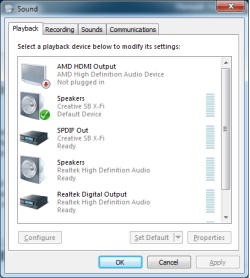
It doesn't help that Gigabyte went the stupid route and only gave auto and disabled for the onboard options. This is what you can do when the motherboard/computer (HP is also famous for this setting) when it does have the option to enable instead of auto,

3xaudio.png

and I use all 3 (one at a time) depending on what I want to do; the X-Fi is used with headphones for gaming, onboard for listening to music, and the HDMI/TV for movies and the odd game on my 40" TV.

You can try what is mentioned here,

http://www.sevenforums.com/sound-au...new-videocard-installation-4.html#post2050474

by Mordor2112, If that doesn't work then unfortunately unless Gigabyte can be convinced to release a bios update that adds the enabled option, the only really viable way around it is to use a sound card.
 

My Computer My Computer

At a glance

Win 7 Ultimate x64FX-8350 @ 4.6 GHz so farADATA XPG V1 Series Black 8GB DDR3 1600Sapphire R9 270x Dual-X
Computer type
PC/Desktop
Computer Manufacturer/Model Number
Me
OS
Win 7 Ultimate x64
CPU
FX-8350 @ 4.6 GHz so far
Motherboard
Asus M5A97 EVO
Memory
ADATA XPG V1 Series Black 8GB DDR3 1600
Graphics Card(s)
Sapphire R9 270x Dual-X
Sound Card
Xonar DGX w/ Corsair Vengence 1300
Monitor(s) Displays
Acer S232HL Abid
Screen Resolution
1920x1080
Hard Drives
120 GB OCZ Vertex 3
500 GB Seagate 7200.12
PSU
Antec Earthwatts 650W Green
Case
Antec Three Hundred
Cooling
Cooler Master 212 EVO
Keyboard
Logitech G510
Mouse
Logitech G500s
Internet Speed
35000/3000
I'll look into that stormy, thanks.

Here is the problem, its not Windows. Its the motherboard and the BIOS. You can run around in Windows all day looking for a solution when you should be in the BIOS as that is causing the issue at hand. Nothing in Windows itself will change that. Windows can handle multiple audio devices there is no problem there. However, the BIOS is disabling its built in sound BEFORE Windows even boots up.

Software cannot overcome limitations of hardware.

I think you may actually be right, I'm really not sure. My first restart will always be with my onboard disabled. I then restart a few times and it'll just randomly work. I was just hoping there was a way for Windows to completely disregard the installation of my GFX card as "High Definition Audio Device" (which I tried using that group policy setting to no avail).
 

My Computer My Computer

At a glance

Windows 7 Pro 64bitIntel Q9450 @ 3.4ghz2x2GB Corsair DominatorXFX HD6870 1GB
OS
Windows 7 Pro 64bit
CPU
Intel Q9450 @ 3.4ghz
Motherboard
Gigabyte X48-DQ6 F8D Bios
Memory
2x2GB Corsair Dominator
Graphics Card(s)
XFX HD6870 1GB
Sound Card
Onboard
Monitor(s) Displays
Dell U2311H
Screen Resolution
1920x1080
Hard Drives
Samsung SSD 830 256GB (o/s,etc)
WD GP 500GB (storage)
PSU
Corsair 750W TX
Case
Silverstone Raven RV02
Mouse
MX518
Internet Speed
100/10
Back
Top