How can i extend my primary partition?

When I choose the partition where to install Windows, can I extend my C then? Without losing any data from D?
 

My Computer My Computer

At a glance

windows 7
OS
windows 7
Sorry, no. I believe you would have to completely repartition the HD in order to do that and all data would be lost.

Gary
 

My Computer My Computer

At a glance

Vista Ult 64 bit Seven Ult RTM x64Intel Core2 Quad Q6600 2.40 gigahertzCrucial Ballistix 4x2GB PC2 6400NVIDIA GeForce 8600 GTS 256 MB
Computer Manufacturer/Model Number
Dell XPS420
OS
Vista Ult 64 bit Seven Ult RTM x64
CPU
Intel Core2 Quad Q6600 2.40 gigahertz
Memory
Crucial Ballistix 4x2GB PC2 6400
Graphics Card(s)
NVIDIA GeForce 8600 GTS 256 MB
Sound Card
Creative SB X-Fi audio
Monitor(s) Displays
HP w2207 + HPvs15
Screen Resolution
1680x1050 + 1024x768
Hard Drives
2-WD5000AAKS-500 GB
WD5000AAV-500 GB external
Keyboard
Microsoft Comfort Curve
Mouse
MX Revolution
Other Info
Wacom Intuos 2 Graphics Tablet
Experience Index=5.5
Hi,

Thanks Gary. That's curious.

On my system, Disk Management has never allowed me to resize the Extended partition - the logical partitions within the Extended partition can be resized, but not the actual Extended container itself.

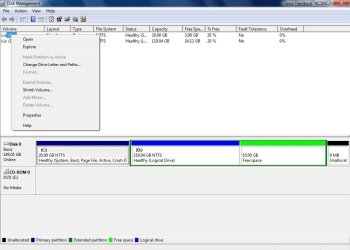
You can see from this screenshot, that beckhamstef tried it earlier in this thread and got the same result.

The Dark green rectangle - The Extended partition - stays exactly where it is - the partition within it shrinks.


It is easy to miss that - the thin dark green lines of the Extended container are much less obvious than the thick garish light green bar on the free space within it.


Z22009-01-21_155057.jpg


The Extended partition on my system was created using the DiskPart command , perhaps beckhamstef's was too. Do you know how to resize that extended container with Diskpart ?


SIW2
 
Last edited:

My Computers My Computers

  • At a glance

    7 X64i5 84002x8gb 3200mhz
    Computer type
    PC/Desktop
    OS
    7 X64
    CPU
    i5 8400
    Motherboard
    gigabyte b365m ds3h
    Memory
    2x8gb 3200mhz
    Hard Drives
    various
    PSU
    pure power 11 400w cm
    Case
    Coolermaster
    Cooling
    cryorig m9i
  • At a glance

    7x64g54008gb ddr4 2400
    Computer type
    PC/Desktop
    OS
    7x64
    CPU
    g5400
    Motherboard
    ga b365m ds3h
    Memory
    8gb ddr4 2400
    PSU
    xfx pro 450w
Hi beckhamstef,

You have a couple of options.

Use a 3rd party tool to convert the Extended partition (dark green )
into a Primary partition (dark blue - like the other one ) - should be able to do it without data loss.

Then use that same partition program to move the data on that new Primary to the higher addresses , i.e. to the right of it, leaving free space on the left , into which C can be extended.

The Paragon Partition Manager, for example, has a Redistribute free space option which does just that - you would need to convert it Primary before doing so.

There's a lot of data to move - could take an hour or more to move it safely - with any of these operations it is important not to interrupt them.


Alternatively, copy what's on the Extended partition to an external HD - use an imaging program , like this excellent free one

Macrium Reflect Free Edition - Free software downloads and reviews - CNET Download.com

Then just use Disk management to delete the partitions within the Extended container, then the delete the container itself and resize your C. Disk management can then make another (smaller ) D partition as a Primary.

Then replace the data from the external HD.

Did you check out the links I gave earlier - the one at the bottom of that post ?


You may like to get the 30 day trial of the Paragon - I do not know what the limitations are on then trial product - got to be worth getting it to see if it will do the job - worth trying both the program , and the recovery cd ( this is a bootable partition manager ) download

Partition Manager - download demo


Hope it helps

SIW2
 

My Computers My Computers

  • At a glance

    7 X64i5 84002x8gb 3200mhz
    Computer type
    PC/Desktop
    OS
    7 X64
    CPU
    i5 8400
    Motherboard
    gigabyte b365m ds3h
    Memory
    2x8gb 3200mhz
    Hard Drives
    various
    PSU
    pure power 11 400w cm
    Case
    Coolermaster
    Cooling
    cryorig m9i
  • At a glance

    7x64g54008gb ddr4 2400
    Computer type
    PC/Desktop
    OS
    7x64
    CPU
    g5400
    Motherboard
    ga b365m ds3h
    Memory
    8gb ddr4 2400
    PSU
    xfx pro 450w
Hi,

Thanks Gary. That's curious.

On my system, Disk Management has never allowed me to resize the Extended partition - the logical partitions within the Extended partition can be resized, but not the actual Extended container itself.

You can see from this screenshot, that beckhamstef tried it earlier in this thread and got the same result.

The Dark green rectangle - The Extended partition - stays exactly where it is - the partition within it shrinks.


It is easy to miss that - the thin dark green lines of the Extended container are much less obvious than the thick garish light green bar on the free space within it.SIW2

Yes, that's what happened on mine also as you can't have 5 partitions on on HD. All you have is unallocated space that can be turned into another partition within the extended space. Sorry for the confusion.

Gary
 

My Computer My Computer

At a glance

Vista Ult 64 bit Seven Ult RTM x64Intel Core2 Quad Q6600 2.40 gigahertzCrucial Ballistix 4x2GB PC2 6400NVIDIA GeForce 8600 GTS 256 MB
Computer Manufacturer/Model Number
Dell XPS420
OS
Vista Ult 64 bit Seven Ult RTM x64
CPU
Intel Core2 Quad Q6600 2.40 gigahertz
Memory
Crucial Ballistix 4x2GB PC2 6400
Graphics Card(s)
NVIDIA GeForce 8600 GTS 256 MB
Sound Card
Creative SB X-Fi audio
Monitor(s) Displays
HP w2207 + HPvs15
Screen Resolution
1680x1050 + 1024x768
Hard Drives
2-WD5000AAKS-500 GB
WD5000AAV-500 GB external
Keyboard
Microsoft Comfort Curve
Mouse
MX Revolution
Other Info
Wacom Intuos 2 Graphics Tablet
Experience Index=5.5
I was hoping you had found a way to resize the extended partition boundaries without resorting to 3rd party apps.

I have good partitioning apps, so no problem for me - just curious.

We're getting a lot of these kind of questions now people are wanting to dual boot 7. Sadly, not much in the way of free apps. for x64 .:(

SIW2
 

My Computers My Computers

  • At a glance

    7 X64i5 84002x8gb 3200mhz
    Computer type
    PC/Desktop
    OS
    7 X64
    CPU
    i5 8400
    Motherboard
    gigabyte b365m ds3h
    Memory
    2x8gb 3200mhz
    Hard Drives
    various
    PSU
    pure power 11 400w cm
    Case
    Coolermaster
    Cooling
    cryorig m9i
  • At a glance

    7x64g54008gb ddr4 2400
    Computer type
    PC/Desktop
    OS
    7x64
    CPU
    g5400
    Motherboard
    ga b365m ds3h
    Memory
    8gb ddr4 2400
    PSU
    xfx pro 450w
To extend the partition in disk management would it have to be configured as a Dynamic disk?
 

My Computer My Computer

At a glance

WinXP
OS
WinXP
Trying out this... will post if it works or not

Well, it's all in the title :). How can i extend it? It seems i can extend only my secondary one. I must not be getting something... Help!

In trying to resize my own Windows 7 Ultimate install partition, I came up with this trick in my head. Just now testing if it works:

The partition just to the right of your OS install partition is your data partition. This data partition has less than half of its entire partition size occupied by data (ie. if its's 150 GB large, 75 GB or more of it can be shrunk - at least after a good defrag).

Out of this new allocated space (75 GB to the right of the data drive) I now create a new NTFS formatted data drive.

I move my 75 or less GB of data from the original Data partition (now in the middle of the Device managers illustration) to the new partition (in the right side of the Device managers illustration).

I then will delete the middle partition, hopefully leaving me allocated space right next to my OS install partition, thus being able to expand this from 40 GB to around 70-75 GB - and then expand my data drive once more to its maximum possible size using up the rest of the allocated space in the middle of the Device managers illustration.

I'm in the proces of moving this data, it will take time (an hour or more) but then the results should be in...

Please excuse my poor english, but it isn't my first language :-)

Ingwersen
 

My Computer My Computer

At a glance

Windows 7 Ultimate
OS
Windows 7 Ultimate
That should work fine if your data partition is a Primary.

It's easier to use a partition manager - there are now some very good free ones that work very well on 64 bit: Partition Wizard Free Home Edition
 

My Computers My Computers

  • At a glance

    7 X64i5 84002x8gb 3200mhz
    Computer type
    PC/Desktop
    OS
    7 X64
    CPU
    i5 8400
    Motherboard
    gigabyte b365m ds3h
    Memory
    2x8gb 3200mhz
    Hard Drives
    various
    PSU
    pure power 11 400w cm
    Case
    Coolermaster
    Cooling
    cryorig m9i
  • At a glance

    7x64g54008gb ddr4 2400
    Computer type
    PC/Desktop
    OS
    7x64
    CPU
    g5400
    Motherboard
    ga b365m ds3h
    Memory
    8gb ddr4 2400
    PSU
    xfx pro 450w
That should work fine if your data partition is a Primary.

It's easier to use a partition manager - there are now some very good free ones that work very well on 64 bit: Partition Wizard Free Home Edition


It is a primary and it does work (!)... - though it takes some moving files around a couple of times. But someone in here asked if it could be done with no third party tool/application - so I decided to try, since I had to do it anyways :-)

But it is surely easier with a partition manager :-)

Ingwersen
 

My Computer My Computer

At a glance

Windows 7 Ultimate
OS
Windows 7 Ultimate
LOL - well done for giving it a go.

The question
someone in here asked if it could be done with no third party tool/application
related to an Extended partition, not a Primary.

The Op wanted to incorporate free space inside an Extended partition into the Primary partition on the left of it - without deleting the Extended partition.

As far as I know, it can't be done with windows tools.
 

My Computers My Computers

  • At a glance

    7 X64i5 84002x8gb 3200mhz
    Computer type
    PC/Desktop
    OS
    7 X64
    CPU
    i5 8400
    Motherboard
    gigabyte b365m ds3h
    Memory
    2x8gb 3200mhz
    Hard Drives
    various
    PSU
    pure power 11 400w cm
    Case
    Coolermaster
    Cooling
    cryorig m9i
  • At a glance

    7x64g54008gb ddr4 2400
    Computer type
    PC/Desktop
    OS
    7x64
    CPU
    g5400
    Motherboard
    ga b365m ds3h
    Memory
    8gb ddr4 2400
    PSU
    xfx pro 450w
Back
Top