How can I get a 64 bit version of WMP back onto the Start menu?

Gums

New member
Power User
Local time
4:19 PM
Messages
106
Pretty straightforward. I used to have the 64 bit version of WMP 12 on the Start menu and the 32 bit version on the taskbar. Now I have 32 bit versions in both locations. I need a 64 bit version to play some (but not all) of my music files. Thanks!
 

My Computer My Computer

At a glance

Windows 7 64 bit
OS
Windows 7 64 bit
Are you sure you had both 32 & 64 bit WMP on the same computer? I'm not sure if that is possible but I'll take your word for it. Check in "C:\Program Files\Windows Media Player" for the 64-bit version and "C:\Program Files (x86)\Windows Media Player" for the 32-bit version. Look thru the folder to find wmplayer.exe, right-click and select "Pin to Start Menu".

Both 32-bit and 64-bit versions should be able to play the same music files. Most likely one version has some codecs installed that the other doesn't.

In order to avoid chasing down codecs for different media formats, many people use VLC as their media player which includes codecs for pretty much any media format.

 

My Computer My Computer

At a glance

W10 Pro desktop, W11 laptop, W11 Pro tablet (...3.7Ghz 8700K i7, i7-11800H, i7-1065G716G desktop, 16G laptop, 4G tabletAMD Radeon RX580, RTX 3060, Intel Iris Plus
Computer type
PC/Desktop
Computer Manufacturer/Model Number
Home Built desktop, Dell G15 5511 Gaming laptop,MS Surface Pro 7 tablet
OS
W10 Pro desktop, W11 laptop, W11 Pro tablet (all 64-bit)
CPU
3.7Ghz 8700K i7, i7-11800H, i7-1065G7
Motherboard
ASUS TUF Z370-Pro Gaming in desktop
Memory
16G desktop, 16G laptop, 4G tablet
Graphics Card(s)
AMD Radeon RX580, RTX 3060, Intel Iris Plus
Sound Card
High Definition Audio (Built-in to mobo)
Monitor(s) Displays
Samsung U32J59 32" (2x), 15.6", 12"
Screen Resolution
3840x2160, 3840x2160, 1920x1080, 2160x1440
Hard Drives
500G SSD for OS; 2T, 10T & 15T HDDs for Data on Desktop, 1TB SSD laptop, 128G SSD tablet.
PSU
Corsair CX 750M
Case
Antec 100
Cooling
CM 212+
Keyboard
IBM Model M - used continuously since 1986
Mouse
Microsoft Pro IntelliMouse
Internet Speed
400M down 8M up
Antivirus
Windows Defender
Browser
FireFox
Other Info
Built my first computer (8Mhz 8088cpu, 640K RAM, 20MB HDD, 2 360K floppy drives) in 1985 and have been building them for myself, relatives and friends ever since.
Yep. I got both. I figured it out after quite a bit of trial and error. Just like you said, one is under C:>Program Files>Window Media Player> and the other is in C:>Program Files(x86)>Windows Media Player. I had to remove and pin both of these several times in order to get it to work. I'm not sure of the correct sequence of removing and pinning, but it took a bit of doing. Sometimes I'd get 32 bit versions in both places and the next it would be all 64. It's working now. I do have VLC as well as foobar2000 and even a version of Jaangle. Sometimes I just reach for wmp. I dunno that's just me being me I guess. Thanks for your help!
 

My Computer My Computer

At a glance

Windows 7 64 bit
OS
Windows 7 64 bit
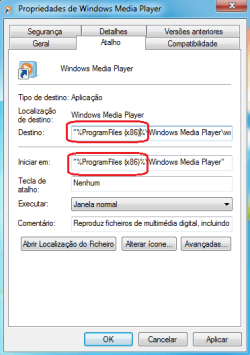
just go into shortcut properties and remove the "(x86)" as show in the pic.
 

Attachments

  • wmp1.png
    wmp1.png
    5.9 KB · Views: 12
  • wmp2.png
    wmp2.png
    14.6 KB · Views: 12

My Computer My Computer

At a glance

Windows 7 Professional x64AMD A8-6410 APU with AMD Radeon R51x 4GB DDR3L 1600Mhz CL11 PC3LAMD Radeon R7 M260 2GB
Computer type
Laptop
Computer Manufacturer/Model Number
HP
OS
Windows 7 Professional x64
CPU
AMD A8-6410 APU with AMD Radeon R5
Motherboard
Pavillion 15-P053NP
Memory
1x 4GB DDR3L 1600Mhz CL11 PC3L
Graphics Card(s)
AMD Radeon R7 M260 2GB
Sound Card
Beats Audio
Screen Resolution
1366x768
Hard Drives
SSD 128GB Toshiba Q Series PRO
HDD 500GB Seagate Momentus 7mm
Mouse
Microsoft Wireless Mobile Mouse 3500
Internet Speed
4G/LTE 150mbps
Antivirus
MSE+Malwarebytes
Browser
Chrome
Back
Top