Solved How can I get sound output from sound card when streaming video?

greenwizard

New member
Power User
Local time
9:28 AM
Messages
56
I get sound from the mic of course.but I would like to get sound straight from the sound card too when I want to.I don't know exact model,but it's a realtek HD on board sound card.Acer 5551 series laptop
 

My Computer My Computer

At a glance

window 7 64b SP1AMD P320 2.1ghzATI radeon HD 4250
Computer Manufacturer/Model Number
Acer aspire 5551-2036
OS
window 7 64b SP1
CPU
AMD P320 2.1ghz
Graphics Card(s)
ATI radeon HD 4250
Screen Resolution
1024x768 native
Hard Drives
320gb hitachi
Hello green,

You get sound from your microphone? I don't think I am understanding. Sound should come from your sound card. You plug the speakers into the back of the computer and into the sound card (green jack). The mic receives sound. My mic is USB so it doesn't use any jack other than the USB port, but if you use the sound card, it goes into the purple jack

Do you have the audio driver installed? This should be right: http://support.acer.com/product/default.aspx?modelId=2192
 

My Computer My Computer

At a glance

Microsoft Windows 8.1 Pro 64-bitIntel(R) Core(TM) i3-4130 CPU @ 3.40GHz8.00 GBNone
Computer type
PC/Desktop
Computer Manufacturer/Model Number
Custom Asus Build
OS
Microsoft Windows 8.1 Pro 64-bit
CPU
Intel(R) Core(TM) i3-4130 CPU @ 3.40GHz
Motherboard
B85M-E
Memory
8.00 GB
Graphics Card(s)
None
Sound Card
Realtek High Definition Audio
Monitor(s) Displays
Asus 23.6" Monitor
Screen Resolution
1920 x 1080 x 32 bits (4294967296 colors) @ 60 Hz
Hard Drives
INTEL SSDSC2BW180A4
Samsung SSD 840 PRO Series
PSU
Seasonic S12II-380Bronze
Case
Lian Li
Cooling
Fan, Passive
Keyboard
Logitech K120
Mouse
Microsoft Touch Mouse
Internet Speed
4ms Ping, 19.0 Mbps Download, 19.0 Mbps Upload
Antivirus
Eset Endpoint
Browser
Internet Explorer, Chrome
Was kinda in a hurry.I meant my mic receives sound in my room.My sound driver is fine.I got a mic built in my laptop,it works fine.What I want to do is get the sound to work directly off the sound card,not just pick the sound up from the mic when I key in on chat etc.
 

My Computer My Computer

At a glance

window 7 64b SP1AMD P320 2.1ghzATI radeon HD 4250
Computer Manufacturer/Model Number
Acer aspire 5551-2036
OS
window 7 64b SP1
CPU
AMD P320 2.1ghz
Graphics Card(s)
ATI radeon HD 4250
Screen Resolution
1024x768 native
Hard Drives
320gb hitachi
What I want to do is get the sound to work directly off the sound card,not just pick the sound up from the mic when I key in on chat etc.
Ah, I must be daft, but I still am not fully understanding. Do you want the sound card to act as a microphone? Or do you want to use your sound card and connect the mic to it? Or do you want the mic to work without having to "key in"... Details for this one, please. Very specific. :o

Um... or do you want to be able to hear from the sound card (to the speakers) what goes into the mic? heh....
 

My Computer My Computer

At a glance

Microsoft Windows 8.1 Pro 64-bitIntel(R) Core(TM) i3-4130 CPU @ 3.40GHz8.00 GBNone
Computer type
PC/Desktop
Computer Manufacturer/Model Number
Custom Asus Build
OS
Microsoft Windows 8.1 Pro 64-bit
CPU
Intel(R) Core(TM) i3-4130 CPU @ 3.40GHz
Motherboard
B85M-E
Memory
8.00 GB
Graphics Card(s)
None
Sound Card
Realtek High Definition Audio
Monitor(s) Displays
Asus 23.6" Monitor
Screen Resolution
1920 x 1080 x 32 bits (4294967296 colors) @ 60 Hz
Hard Drives
INTEL SSDSC2BW180A4
Samsung SSD 840 PRO Series
PSU
Seasonic S12II-380Bronze
Case
Lian Li
Cooling
Fan, Passive
Keyboard
Logitech K120
Mouse
Microsoft Touch Mouse
Internet Speed
4ms Ping, 19.0 Mbps Download, 19.0 Mbps Upload
Antivirus
Eset Endpoint
Browser
Internet Explorer, Chrome

My Computer My Computer

At a glance

window 7 64b SP1AMD P320 2.1ghzATI radeon HD 4250
Computer Manufacturer/Model Number
Acer aspire 5551-2036
OS
window 7 64b SP1
CPU
AMD P320 2.1ghz
Graphics Card(s)
ATI radeon HD 4250
Screen Resolution
1024x768 native
Hard Drives
320gb hitachi
? :confused:

Please elaborate on what you're trying to accomplish.
 

My Computer My Computer

At a glance

Windows 7 Pro-x64i7-2600 3.4GHz - 3.8GHz Turbo8Gb - 2x4GB, Muskin 991770 PC3-1333Integrated Intel HD 2000
Computer type
PC/Desktop
Computer Manufacturer/Model Number
Built 2/11/2011
OS
Windows 7 Pro-x64
CPU
i7-2600 3.4GHz - 3.8GHz Turbo
Motherboard
Intel DH67BL-B3
Memory
8Gb - 2x4GB, Muskin 991770 PC3-1333
Graphics Card(s)
Integrated Intel HD 2000
Sound Card
Integrated Intel 10.1 HD, RealTek ALC892
Monitor(s) Displays
Asus LCD VH222H, Haier HL24XSL2a
Screen Resolution
1920x1080, 1920x1080
Hard Drives
Crucial SSD C300-128Gb,
Western Digital WD5002AALX - 500Gb,
Western Digital WD7501AALS - 750Gb
PSU
Seasonic 650W 80+ Gold Modular
Case
Rosewill Defender
Cooling
Stock CPU, Four 120mm case fans, PCH fan added
Keyboard
Logitech EX100 Y-RBH94 Wireless
Mouse
Logitech EX100 M-RCE95 Wireless
Internet Speed
3.0/1.5 Mbs
Antivirus
Microsoft Security Essentials
Browser
Microsoft Internet Explorer 11
Other Info
Antec Veris Premier-Multimedia IR Station,
Cyber Accoustics-3602 Speakers,
AFT XM-5U Card Reader,
Hauppauge TV-HVR-2250,
Sony LX300 USB Turntable
? :confused:

Please elaborate on what you're trying to accomplish.
Sorry for the confusion guys:o.
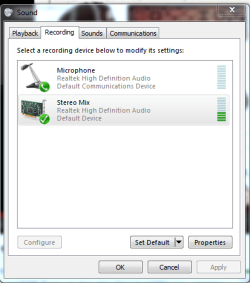
I had to go to sound,recording devices,right click,tick show disabled devices,exit,go back to sound,recording devices,right click stero mix & enable it :doh:.Learned something new today:)
 

Attachments

  • sc mic.PNG
    sc mic.PNG
    17.2 KB · Views: 10

My Computer My Computer

At a glance

window 7 64b SP1AMD P320 2.1ghzATI radeon HD 4250
Computer Manufacturer/Model Number
Acer aspire 5551-2036
OS
window 7 64b SP1
CPU
AMD P320 2.1ghz
Graphics Card(s)
ATI radeon HD 4250
Screen Resolution
1024x768 native
Hard Drives
320gb hitachi
Ah, now I getcha. You mean recording pc sounds, yes you found it. I thought somehow you meant ambient sounds that would somehow be picked up by the card o.0

Absurd, I know. Sorry for getting all confused. Glad you got it sorted
 

My Computer My Computer

At a glance

Microsoft Windows 8.1 Pro 64-bitIntel(R) Core(TM) i3-4130 CPU @ 3.40GHz8.00 GBNone
Computer type
PC/Desktop
Computer Manufacturer/Model Number
Custom Asus Build
OS
Microsoft Windows 8.1 Pro 64-bit
CPU
Intel(R) Core(TM) i3-4130 CPU @ 3.40GHz
Motherboard
B85M-E
Memory
8.00 GB
Graphics Card(s)
None
Sound Card
Realtek High Definition Audio
Monitor(s) Displays
Asus 23.6" Monitor
Screen Resolution
1920 x 1080 x 32 bits (4294967296 colors) @ 60 Hz
Hard Drives
INTEL SSDSC2BW180A4
Samsung SSD 840 PRO Series
PSU
Seasonic S12II-380Bronze
Case
Lian Li
Cooling
Fan, Passive
Keyboard
Logitech K120
Mouse
Microsoft Touch Mouse
Internet Speed
4ms Ping, 19.0 Mbps Download, 19.0 Mbps Upload
Antivirus
Eset Endpoint
Browser
Internet Explorer, Chrome
Back
Top