How can I improve this..?

Kris340

New member
Local time
3:16 PM
Messages
16
WirelessStatus.jpg


I have a linksys router in the other room... my internet goes on and off. Is there anything that I can do to tweak it up a little without having to pay?

And also.. whenever my wireless goes down I usually have to restart my laptop to get it connected again.
 
Last edited:

My Computer

Computer Manufacturer/Model Number
Toshiba
OS
Windows 7 Home Premium 64Bit
Hard Drives
320 GB
Hi Kris,

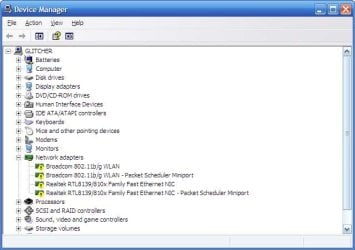
If you open up Device Manager is there any devices with a yellow exclaimation mark next to them?

temp2ps.jpg

Is so then try removing/uninstalling the device, rebooting then Windows will re-install the drivers.

If not then you might want to re-boot your router.
   Tip
Normally to reboot just switch the machine off, locate a small hole and press a pen into it for 5-10 seconds then power on the machine. For more information please consult your router documentation.

   Note
If your ISP has sent update data to the router it can cause connectivity issues that would seem to be caused by your computer/laptop and normally a re-boot fixes these isues


OS
 

My Computer

Computer Manufacturer/Model Number
Compaq Desktop
OS
Windows 7 Ultimate x64
CPU
AMD Sempron Dual Core
Memory
3GB
Graphics Card(s)
NVIDIA GeForce 6150SE nForce 430
Screen Resolution
1024x768
Hard Drives
150GB Sata

My Computer

Computer Manufacturer/Model Number
Alienware AREA-51 M17x
OS
windows 7 ultimate 64bit
CPU
Intel Core2 Extreme x9000 2.8GHZ
Motherboard
Asus P965 Intel chipset
Memory
4Gig
Graphics Card(s)
2 NVidia GeForce 8800M GTX (SLi)
Sound Card
onboard
Monitor(s) Displays
17in. built-in, 47in JVC LCD
Screen Resolution
1080p
Hard Drives
2 250Gig Hitachi (RAID 0) @ 7200RPM
Case
17in. laptop
Mouse
touchpad, Logitech Anywhere Mouse cordless laser
Internet Speed
cable

My Computer

Computer Manufacturer/Model Number
Compaq Desktop
OS
Windows 7 Ultimate x64
CPU
AMD Sempron Dual Core
Memory
3GB
Graphics Card(s)
NVIDIA GeForce 6150SE nForce 430
Screen Resolution
1024x768
Hard Drives
150GB Sata
maybe its my screen (or my eyes). to me it looks like only the first two bars are filled (green).
and the description is pretty vague.
 

My Computer

Computer Manufacturer/Model Number
Alienware AREA-51 M17x
OS
windows 7 ultimate 64bit
CPU
Intel Core2 Extreme x9000 2.8GHZ
Motherboard
Asus P965 Intel chipset
Memory
4Gig
Graphics Card(s)
2 NVidia GeForce 8800M GTX (SLi)
Sound Card
onboard
Monitor(s) Displays
17in. built-in, 47in JVC LCD
Screen Resolution
1080p
Hard Drives
2 250Gig Hitachi (RAID 0) @ 7200RPM
Case
17in. laptop
Mouse
touchpad, Logitech Anywhere Mouse cordless laser
Internet Speed
cable
maybe its my screen (or my eyes). to me it looks like only the first two bars are filled (green).
and the description is pretty vague.

All green and yes, quite vague but we'll see when the OP comes back online :)
 

My Computer

Computer Manufacturer/Model Number
Compaq Desktop
OS
Windows 7 Ultimate x64
CPU
AMD Sempron Dual Core
Memory
3GB
Graphics Card(s)
NVIDIA GeForce 6150SE nForce 430
Screen Resolution
1024x768
Hard Drives
150GB Sata
WirelessStatus.jpg


I have a linksys router in the other room... my internet goes on and off. Is there anything that I can do to tweak it up a little without having to pay?

And also.. whenever my wireless goes down I usually have to restart my laptop to get it connected again.

Looking at your signal strength and speed I'd say you were using wireless G for this connection which tends to max out around 54Mbps.

Because your getting the best possible signal and speed that G has to offer have you considered the possibilty that the wireless channel you are using is also being used by one of your neighbors? This will cause endless problems with connections dropping for no apparent reason.

You might try using this free program from Xirrus called the wifi inspector which will show you which channels are being used in your area. You can then choose a channel that isn't being used in your area and change channel using your routers control panel.
Xirrus: The Leader in High Performance Wi-Fi - Advanced IT Wi-Fi Networking Tools
 

My Computer

Computer type
PC/Desktop
Computer Manufacturer/Model Number
Home built
OS
Windows 7 Ult, Windows 8.1 Pro,
CPU
Q9650-4.275GHz, E8600 4.5GHz, E6750-3.8GHz
Motherboard
Evga 780i FTW
Memory
G.Skill PC2 9600 1200Mhz 5 5 5 15 2T
Graphics Card(s)
GTX480
Sound Card
Asus Xonar D2
Monitor(s) Displays
HannsG
Screen Resolution
1680X1050
Hard Drives
GSkill Phoenix Pro 120GB SSD
PSU
ThermalTake Toughpower 1000Watt modular
Case
ThermalTake XaserV
Cooling
Xigmatek S1283
Keyboard
Logitech G15
Mouse
Logitech G9
Internet Speed
T1
Looking at your signal strength and speed I'd say you were using wireless G for this connection which tends to max out around 54Mbps.

Because your getting the best possible signal and speed that G has to offer have you considered the possibilty that the wireless channel you are using is also being used by one of your neighbors? This will cause endless problems with connections dropping for no apparent reason.

You might try using this free program from Xirrus called the wifi inspector which will show you which channels are being used in your area. You can then choose a channel that isn't being used in your area and change channel using your routers control panel.
Xirrus: The Leader in High Performance Wi-Fi - Advanced IT Wi-Fi Networking Tools

I gave the program a try.. but how do I see and choose the different channels?

Orbital- I looked at my network drives in device manager and they were all green, no exclamation marks. But i'll try uninstalling them to see if that does anything.
 
Last edited:

My Computer

Computer Manufacturer/Model Number
Toshiba
OS
Windows 7 Home Premium 64Bit
Hard Drives
320 GB
to change channels, you need to access the router. it should be listed in "network and sharing center" in control panel.
once you find its icon, right-click it and select "view device webpage". leave "user name" blank, and type "admin" for password. (no quotes).
while your in there you may as well update the firmware if there is a newer version. there should be a link to the website.
 

My Computer

Computer Manufacturer/Model Number
Alienware AREA-51 M17x
OS
windows 7 ultimate 64bit
CPU
Intel Core2 Extreme x9000 2.8GHZ
Motherboard
Asus P965 Intel chipset
Memory
4Gig
Graphics Card(s)
2 NVidia GeForce 8800M GTX (SLi)
Sound Card
onboard
Monitor(s) Displays
17in. built-in, 47in JVC LCD
Screen Resolution
1080p
Hard Drives
2 250Gig Hitachi (RAID 0) @ 7200RPM
Case
17in. laptop
Mouse
touchpad, Logitech Anywhere Mouse cordless laser
Internet Speed
cable
Looking at your signal strength and speed I'd say you were using wireless G for this connection which tends to max out around 54Mbps.

Because your getting the best possible signal and speed that G has to offer have you considered the possibilty that the wireless channel you are using is also being used by one of your neighbors? This will cause endless problems with connections dropping for no apparent reason.

You might try using this free program from Xirrus called the wifi inspector which will show you which channels are being used in your area. You can then choose a channel that isn't being used in your area and change channel using your routers control panel.
Xirrus: The Leader in High Performance Wi-Fi - Advanced IT Wi-Fi Networking Tools

I gave the program a try.. but how do I see and choose the different channels?

Orbital- I looked at my network drives in device manager and they were all green, no exclamation marks. But i'll try uninstalling them to see if that does anything.

After you have looked over the Xirrus wifi inspector you should be able to determine which channels aren't being used in your area, choose one from channel 1-11 which ever one isn't being used should work well for you.

I prefer using channels higher up in range like 7-10 as channel 11 is usually used by someone else because it's default for many routers.

Then you would need to access your routers set up page. For your linksys router type 192.168.1.1 into your browsers URL and hit enter. Navigate to the manual wireless set up page and chance the channel to one that isn't being used and save the set up.
 

My Computer

Computer type
PC/Desktop
Computer Manufacturer/Model Number
Home built
OS
Windows 7 Ult, Windows 8.1 Pro,
CPU
Q9650-4.275GHz, E8600 4.5GHz, E6750-3.8GHz
Motherboard
Evga 780i FTW
Memory
G.Skill PC2 9600 1200Mhz 5 5 5 15 2T
Graphics Card(s)
GTX480
Sound Card
Asus Xonar D2
Monitor(s) Displays
HannsG
Screen Resolution
1680X1050
Hard Drives
GSkill Phoenix Pro 120GB SSD
PSU
ThermalTake Toughpower 1000Watt modular
Case
ThermalTake XaserV
Cooling
Xigmatek S1283
Keyboard
Logitech G15
Mouse
Logitech G9
Internet Speed
T1
Replace

Consider updating your router firmware or replace it.... try reinstalling your os first... it'll help for sure..
 

My Computer

Computer Manufacturer/Model Number
Dell Inspiron N5010
OS
Windows 7 Professional 32 Bit
CPU
Intel Core i3 M350
Memory
3GB
Graphics Card(s)
ATI Mobility Radeon HD 5470
Sound Card
ATI High Defenition Audio Device and IDT HD audio codec
Hard Drives
320 GB ATA
Case
Inspiron N5010
Back
Top