
Alf fromGermany
New member
- Local time
- 4:17 AM
- Messages
- 2
Hi guys,
I'm new here and I do hope I'm in the right forum ...
Can it be that I'm the only one with this problem in the whole wide world? Or am I just to daft to do a proper search? If the answers to these two questions are "no" and "yes": PLEASE give me a hint where I can find the answer!
But now to my "problem":
My problem is not really a problem but its a great deal of annoyance. When working with the Windows explorer, I first choose a folder and everything is fine:
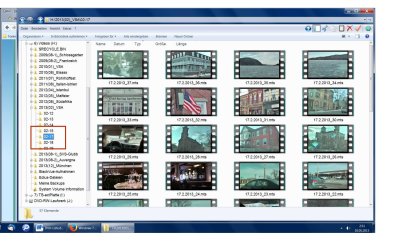 )
)
But as soon as I click in the right part of the window (on a file, that is), the folder "loses" its colour:
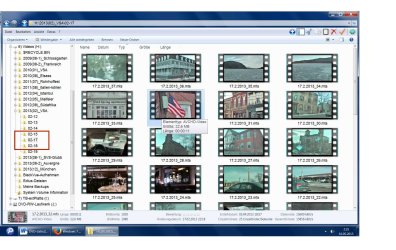 )
)
It becomes a very light gray that's almost indistinguishable from the white background. AND I DO NOT WANT THIS TO HAPPEN! Sorry for shouting, but this goes so on my nerves, you can't imagine!
How can that be prevented? All help will be greatly appreciated!
Have a good Sunday everybody
Alf
P.S.: I'm using 'Classic Explorer' (alongside 'Classic Start Menu'); but even in this very cute program I found no solution ...
I'm new here and I do hope I'm in the right forum ...
Can it be that I'm the only one with this problem in the whole wide world? Or am I just to daft to do a proper search? If the answers to these two questions are "no" and "yes": PLEASE give me a hint where I can find the answer!
But now to my "problem":
My problem is not really a problem but its a great deal of annoyance. When working with the Windows explorer, I first choose a folder and everything is fine:
)But as soon as I click in the right part of the window (on a file, that is), the folder "loses" its colour:
)It becomes a very light gray that's almost indistinguishable from the white background. AND I DO NOT WANT THIS TO HAPPEN! Sorry for shouting, but this goes so on my nerves, you can't imagine!
How can that be prevented? All help will be greatly appreciated!
Have a good Sunday everybody
Alf
P.S.: I'm using 'Classic Explorer' (alongside 'Classic Start Menu'); but even in this very cute program I found no solution ...
My Computer
At a glance
Windows 7 HP 64bitIntel Core i7-3770K @ 3.50 GHz16.262 MBNVIDIA GeForce GTX 660
- Computer type
- PC/Desktop
- Computer Manufacturer/Model Number
- custom build
- OS
- Windows 7 HP 64bit
- CPU
- Intel Core i7-3770K @ 3.50 GHz
- Motherboard
- MSI Z77A-G45 (MS-7752)
- Memory
- 16.262 MB
- Graphics Card(s)
- NVIDIA GeForce GTX 660
- Sound Card
- Realtek High Definition Audio
- Monitor(s) Displays
- LG E2442, Fujitsu/Siemens
- Screen Resolution
- 1920x1080
- Hard Drives
- C: Samsung SSD 830 (256 GB)
D-H: Seagate ST2000DM001-9YN164 (2 TB)
I: External, Western Digital WD10EACS-22D6B1 (1 TB)
- PSU
- ?
- Case
- yes
- Cooling
- k.A.
- Keyboard
- Logitech Illuminated
- Mouse
- Gigabyte Ghost
- Internet Speed
- high
- Antivirus
- Eset NOD32
- Browser
- Firefox (Chrome, IE, Opera)


