
Greetings,
I have Win7 Ultimate x64 installed.
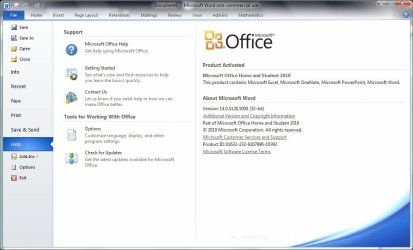
I also have MS Office 2010 installed. I installed it a while ago. Now I need to know if I have the x86 or x64 bit installed.
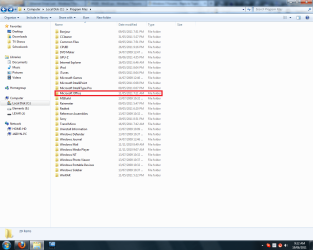
When I go to Computer/Local Disk C:/Progam Files/ or Program Files(x86), Microsoft Office is listed. In other words, its listed under BOTH in both the x86 and x64 maps.
I think that the x86 is installed by default but how can I know for sure which version is installed. It has been a while since I installed it and I have forgotten.
I have Win7 Ultimate x64 installed.
I also have MS Office 2010 installed. I installed it a while ago. Now I need to know if I have the x86 or x64 bit installed.
When I go to Computer/Local Disk C:/Progam Files/ or Program Files(x86), Microsoft Office is listed. In other words, its listed under BOTH in both the x86 and x64 maps.
I think that the x86 is installed by default but how can I know for sure which version is installed. It has been a while since I installed it and I have forgotten.
My Computer
- Computer Manufacturer/Model Number
- Deviantsystems
- OS
- Win7 Ultimate x64
- CPU
- Intel Core i7 950 (4x 3066 MHz with HT) Quad Core
- Motherboard
- Asus P6X58D-E
- Memory
- 6GB DDR3 1333Mhz
- Graphics Card(s)
- Nvidia GTS 450 (1024MB GDDR5 | DX 11)
- Sound Card
- Intel HD Audio via Realtek ALC889 with 8-channel support
- Monitor(s) Displays
- Sony Bravia 32"
- Screen Resolution
- 1080i, x1768x992
- Hard Drives
- 2x WD 1TB 7200 RPM Sata
- PSU
- OCZ ModXStream Pro 600W 80+
- Case
- Lian Li PC-7FN
- Cooling
- Processor cooling: Scythe Big Shuriken SCBSK-1000
- Keyboard
- Microsoft Ergonomic
- Mouse
- Logitec Trackball



 .
.