How can I make a bootable pendrive on Windows 7

Gils

New member
Local time
11:24 AM
Messages
4
Hi,

I don't really know if my post is in the right forum section, but here is the idea.
Since I installed windows 7 on my new laptop, a MSI Ex625, I encountered some problems.

- I have some buttons, one of them is used to choose the alimentation mode of the laptop. An other button used to put my laptop on the "cinema pro" mode which activates my subwoofer and improves the video quality.

- I can't install Quicktime anymore and use iTunes (but it is another problem).

So, I contacted the MSI support and they told me to install the drivers for my laptop from their original website. That operation done, nothing changed. So they asked me to make an upgrade of my BIOS.

The fact is that I never performed that before and I am still looking on how to boot from a pen drive in order to install the new version of the bios. Would anyone know how to make a bootable pendrive for win 7?

Any help is welcome.
Thank you for watching
 

My Computer My Computer

Computer Manufacturer/Model Number
MSI Ex625
OS
Win 7 Familial Edition
CPU
Intel Core 2 duo 2GHz
Motherboard
generic
Memory
4 Gb
Graphics Card(s)
Mobility radeon 4670
Last edited:

My Computer My Computer

Computer Manufacturer/Model Number
Custom (Self Build)
OS
Windows 7 Home Premium 64bit
CPU
Intel Core i7 2700k
Motherboard
eVGA P67 SLI
Memory
8GB Mushkin Redline Ridgebacks @1866
Graphics Card(s)
EVGA GTX570 SC
Sound Card
XiFi Titanium HD
Monitor(s) Displays
LG W2453V
Screen Resolution
1920x1080
Hard Drives
Intel 320 80GB -- Intel X25-V 40GB --WD Black 1TB x2 -- WD Blue 640GB
PSU
Seasonic x750
Case
Corsair 600T SE White
Cooling
eVGA Superclocked CPU Cooler
Keyboard
Saitek Cyborg
Antivirus
Kaspersky
Browser
IE
Other Info
LG BD/DVD
Thank you very much, gonna check this out right now.

Well here is the problem :
" If you have followed the guide above and have a working bootable USB pen drive then you can easily use it for say, flashing your bios....here's how."

The above article mentions how to create a floppy disk for xp, right. Since the HP program dosen't work on my machine, I'm still searching. And the USB explainations sounds to me a little weird.

When I tried once to flash I had this message :
" Pen drive without operating system
Remove pen drive and reboot."

There was only on the pen drive the files for the bios' flash.

So I guess that something is missing.
 
Last edited:

My Computer My Computer

Computer Manufacturer/Model Number
MSI Ex625
OS
Win 7 Familial Edition
CPU
Intel Core 2 duo 2GHz
Motherboard
generic
Memory
4 Gb
Graphics Card(s)
Mobility radeon 4670
You need to format and setup the USB with the boot files to make the USB bootable.

Edited previous post with a different guide that may be a bit clearer/easier to follow.
Its more up to date than 1st one I linked.

Once you get the USB made bootable, then place your bios files on it and boot.

The HP tool will work under Win7 64bit, and should be able to most, (almost all) USBs bootable. Theres a handful that are incompatable.
 
Last edited:

My Computer My Computer

Computer Manufacturer/Model Number
Custom (Self Build)
OS
Windows 7 Home Premium 64bit
CPU
Intel Core i7 2700k
Motherboard
eVGA P67 SLI
Memory
8GB Mushkin Redline Ridgebacks @1866
Graphics Card(s)
EVGA GTX570 SC
Sound Card
XiFi Titanium HD
Monitor(s) Displays
LG W2453V
Screen Resolution
1920x1080
Hard Drives
Intel 320 80GB -- Intel X25-V 40GB --WD Black 1TB x2 -- WD Blue 640GB
PSU
Seasonic x750
Case
Corsair 600T SE White
Cooling
eVGA Superclocked CPU Cooler
Keyboard
Saitek Cyborg
Antivirus
Kaspersky
Browser
IE
Other Info
LG BD/DVD
Well, the program provided on that website seems to work.
But when I choice the Bootfiles provided by the website mentionned above I get this error message :

"The user-supplied DOS system files are not compatible with FAT32".
By the way it is mentionned for windows vista... anything changes from vista to seven?
 

My Computer My Computer

Computer Manufacturer/Model Number
MSI Ex625
OS
Win 7 Familial Edition
CPU
Intel Core 2 duo 2GHz
Motherboard
generic
Memory
4 Gb
Graphics Card(s)
Mobility radeon 4670
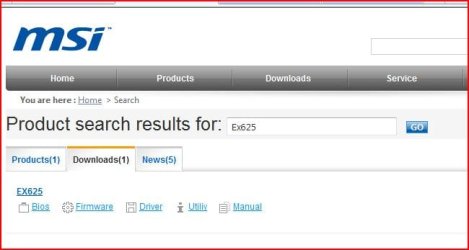
Use the BIOS Utilly on MSI web site.
 

Attachments

  • Capture2.JPG
    Capture2.JPG
    30 KB · Views: 100

My Computer My Computer

OS
ME/XP/Vista/Win7
Well I already tried to follow that track. Since there is no bios utility... It doesn't really help. The three only files contained in the utility file are 2 program updates for the camera and the system control manager which I already reinstalled a few days ago.

So i'm going to mount a virtual floppy drive then get the boot files back to copy them to the usb drive. I shall see if it works.
 

My Computer My Computer

Computer Manufacturer/Model Number
MSI Ex625
OS
Win 7 Familial Edition
CPU
Intel Core 2 duo 2GHz
Motherboard
generic
Memory
4 Gb
Graphics Card(s)
Mobility radeon 4670
You can format as NTFS and chack the box to make bootable

Then puit your bios on there. It should work just fine, specially if you ahve a larger PEN drive like a 4gb
 

My Computer My Computer

Computer Manufacturer/Model Number
Custom (Self Build)
OS
Windows 7 Home Premium 64bit
CPU
Intel Core i7 2700k
Motherboard
eVGA P67 SLI
Memory
8GB Mushkin Redline Ridgebacks @1866
Graphics Card(s)
EVGA GTX570 SC
Sound Card
XiFi Titanium HD
Monitor(s) Displays
LG W2453V
Screen Resolution
1920x1080
Hard Drives
Intel 320 80GB -- Intel X25-V 40GB --WD Black 1TB x2 -- WD Blue 640GB
PSU
Seasonic x750
Case
Corsair 600T SE White
Cooling
eVGA Superclocked CPU Cooler
Keyboard
Saitek Cyborg
Antivirus
Kaspersky
Browser
IE
Other Info
LG BD/DVD
Back
Top