
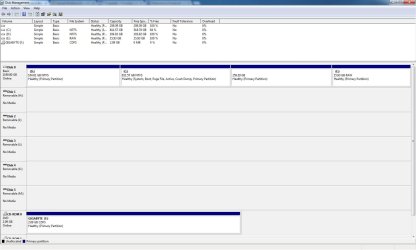
How can I merge the multiple Unused partitions in Disk Management ?

Win7Us3r

New member
Local time
4:39 PM
Messages
2
How Can I format and merge all the different partitions shown in the picture to make my active C: drive bigger ?
 

Attachments

  • Disk Management.jpg
    Disk Management.jpg
    94.5 KB · Views: 13

My Computer My Computer

At a glance

Windows 7 Ultimate x64 SP1AMD Phenom II X6 1090T 3.2GHz8GB DDR3 (4 x 2GB 240-Pin PC3 10600 Dual Chan...GIGABYTE GV-R6750C-1GI - AMD RADEON HD 6750
Computer type
PC/Desktop
Computer Manufacturer/Model Number
Custom Built
OS
Windows 7 Ultimate x64 SP1
CPU
AMD Phenom II X6 1090T 3.2GHz
Motherboard
Gigabyte GA-880-GA-UD3H
Memory
8GB DDR3 (4 x 2GB 240-Pin PC3 10600 Dual Channel)
Graphics Card(s)
GIGABYTE GV-R6750C-1GI - AMD RADEON HD 6750
Sound Card
Embedded 2/4/5.1/7.1-channel - ATI/AMD SB800/Hudson-1 HiDef
Monitor(s) Displays
Samsung SyncMaster T220HD (DVI)
Screen Resolution
1680x1050
Hard Drives
Western Digital 1TB WDC WD10EALX-009BA0 SCSI
PSU
Coolmax CU-700B Power Supply - 700-Watt, ATX, SLI-Ready, Thr
Case
SOYO CX-5959 (ATX Form Factor - Custom)
Keyboard
Logitech MX3200 Combo
Mouse
Logitech MX3200 Combo (Mouse Model: MX600)
Internet Speed
Not Sure
Antivirus
Prevx
Browser
Chrome & IE10
Other Info
Ultra ULT33069 Media Dashboard MD2
HP DVD Writer 1270d [Lightscribe / DVD(all)/ CD(all)]
TSSTcorp CD/DVDW TS-H552B
To delete all other partitions to end up with C in the preferred left-hand position, download free Partition Wizard bootable CD and burn to CD using Windows Image Burner.

Boot PW CD, rightclick each partition besides C to Delete, click OK after you delete each. Then click Apply.

Once all other partitions are gone, rightclick C to Resize, drag the left border all the way to the left edge of the HD, then adjust the right border to where you want it, click OK, then Apply. Partition Wizard Resize Partition - Video Help.

If you desire any other partitions, create them Logical which is best for data partitions: Partition Wizard Create Partition - Video Help

Have your Win7 DVD or System Repair Disk standing by as it is sometimes necessary to run Startup Repair when resizing on the boot sector. For this reason I'd also have your files and a Win7 backup image saved externally. But we've never had a failure using PW boot CD. You should have your files backed up anyway.
 
Thanks for the quick reply, ... Here's what PW is showing me (see attached Picture).
My C: Drive (811GB w/ my OS and visible in Disk Management) is not showing at all in PW and the only drive that it allows me to MOVE/RESIZE is D: (~104GB), all other options are grayed out. When I select the other listed partitions basically all the options are grayed out except for "properties". What do you think I should do ?
 

Attachments

  • PW Snapshot.jpg
    PW Snapshot.jpg
    84.9 KB · Views: 11

My Computer My Computer

At a glance

Windows 7 Ultimate x64 SP1AMD Phenom II X6 1090T 3.2GHz8GB DDR3 (4 x 2GB 240-Pin PC3 10600 Dual Chan...GIGABYTE GV-R6750C-1GI - AMD RADEON HD 6750
Computer type
PC/Desktop
Computer Manufacturer/Model Number
Custom Built
OS
Windows 7 Ultimate x64 SP1
CPU
AMD Phenom II X6 1090T 3.2GHz
Motherboard
Gigabyte GA-880-GA-UD3H
Memory
8GB DDR3 (4 x 2GB 240-Pin PC3 10600 Dual Channel)
Graphics Card(s)
GIGABYTE GV-R6750C-1GI - AMD RADEON HD 6750
Sound Card
Embedded 2/4/5.1/7.1-channel - ATI/AMD SB800/Hudson-1 HiDef
Monitor(s) Displays
Samsung SyncMaster T220HD (DVI)
Screen Resolution
1680x1050
Hard Drives
Western Digital 1TB WDC WD10EALX-009BA0 SCSI
PSU
Coolmax CU-700B Power Supply - 700-Watt, ATX, SLI-Ready, Thr
Case
SOYO CX-5959 (ATX Form Factor - Custom)
Keyboard
Logitech MX3200 Combo
Mouse
Logitech MX3200 Combo (Mouse Model: MX600)
Internet Speed
Not Sure
Antivirus
Prevx
Browser
Chrome & IE10
Other Info
Ultra ULT33069 Media Dashboard MD2
HP DVD Writer 1270d [Lightscribe / DVD(all)/ CD(all)]
TSSTcorp CD/DVDW TS-H552B
It says quite clearly in the steps I wrote out to use the Partition Wizard Boot CD. I even told you how to burn it.

You should be able to see the other partitions using it unless something is wrong with the disk - in which case I'd test it using PW Disk Surface Scan from same CD.

If you are not able to follow the steps then I'd just delete the last two partitions in Disk Mgmt to Extend C as you wish: Partition or Volume - Delete
Partition or Volume - Extend
 

My Computer My Computer

At a glance

Windows 10 Pro x64Intel Core i7 6700KGSkill TridentZ RGB 16GB 3600 16-16-16-36EVGA GTX 980 Ti SC x2
Computer type
PC/Desktop
Computer Manufacturer/Model Number
Skylake Special #666
OS
Windows 10 Pro x64
CPU
Intel Core i7 6700K
Motherboard
Asus Sabertooth Z170 Mark 1
Memory
GSkill TridentZ RGB 16GB 3600 16-16-16-36
Graphics Card(s)
EVGA GTX 980 Ti SC x2
Sound Card
Realtek High Definition
Monitor(s) Displays
AOC G2460PG
Screen Resolution
1920 x 1080 144Hz
Hard Drives
Samsung 860 Pro 256GB, Seagate Barracuda 4TB x2
PSU
EVGA 1000 P2, EVGA White Custom Braided Cables
Case
Corsair Vengeance C70 Gunmetal Black
Cooling
Corsair H100i v2, Corsair ML120 x2, Thermal Grizzly Kryonaut
Keyboard
Logitech G910 Orion Spectrum
Mouse
Logitech G700s
Internet Speed
Verizon Fios Quantum Gateway 75/75
Antivirus
Windows Defender, Malwarebytes Free 3.8.3
Browser
Chrome
Other Info
Corsair SP120 x4, LG Blu-ray Drive, Durabrand HT-395 100 Watt Dolby Digital Amp, Corsair H2100 Wireless 7.1 Headset
Back
Top