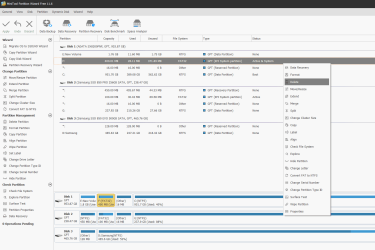
How can I remove an unused partition and merge with active primary ?

chiggah

New member
Local time
7:04 AM
Messages
10
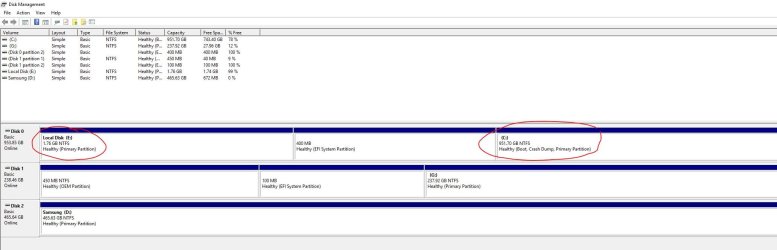
Long story short, I cloned my old SSD (Disk 1) into a new m.2 (Disk 0). Is GPT the right way to go ? Or MBR ?

But now I have ended up with a 1.76gb primary partition

I tried deleting it , and also extending my active one, but won't do anything

How can I get rid of this ? I normally prefer one drive without any partitions.

Also, now I have a F: drive which I suspect is the EFI System Partition (Disk 0). How can I remove that ?
 

Attachments
  • Capture1.JPG
    Capture1.JPG
    97.4 KB · Views: 7
  • Capture2.JPG
    Capture2.JPG
    22.2 KB · Views: 3

My Computer My Computer

At a glance

Windows 7 RTM
OS
Windows 7 RTM
There shouldn't be a problem with deleting it then move uefi and c to the left then grow c. You can't delete uefi as it's the boot partition you may find it simpler with free partition software
 

My Computer My Computer

At a glance

win 8 32 bit
Computer type
PC/Desktop
OS
win 8 32 bit
I used MiniTool for my cloning process. What do you mean by move uefi ?

Did you mean delete EFI as per my screenshot ? Is that safe ?

What about the 1.76gb E: drive ?
 

Attachments

  • Untitled.png
    Untitled.png
    50.9 KB · Views: 3

My Computer My Computer

At a glance

Windows 7 RTM
OS
Windows 7 RTM
Move means move not delete which would stop it booting
 

My Computer My Computer

At a glance

win 8 32 bit
Computer type
PC/Desktop
OS
win 8 32 bit

My Computer My Computer

At a glance

Win 10 x64, Linux Lite, Win 7 x64, BlackArch,...
Computer type
PC/Desktop
Computer Manufacturer/Model Number
HP Desktop & Compaq Laptop
OS
Win 10 x64, Linux Lite, Win 7 x64, BlackArch, & Kali
Hard Drives
Samsung 850 Pro 256Gb,
Hitachi HDD 1Tb,
Crucial MX SSD 250Gb
Segate 3Tb USB 3.0 Ext. Backup HDD
Internet Speed
150Mbps dn, 20Mbps up
Antivirus
Avast Free, Malwarebytes Anti-Exploit & Anti-Ransomware
Browser
Firefox, Chrome, Opera, & VPN
Back
Top