Solved How can I preserve the list "View Downloads" in IE when downgrading

JimN262

New member
Local time
7:23 AM
Messages
10
How can I preserve the list "View Downloads" in IE when downgrading

Hello,
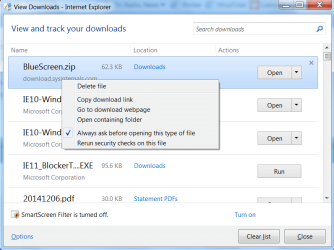
I'm someone who often needs to identify a file or its source by typing Cntrl-J and searching the list of downloaded files.

Well now I've finally had it with IE 11 and plan to uninstall it using the method described in http://www.sevenforums.com/tutorials/313358-internet-explorer-11-uninstall-windows-7-a.html (using Option 2, the FORFILES /P ... method) and "downgrade" to IE 10.

I know how to preserve my Favorites and cookies, and even history, though in a different format, but how can I preserve the list of downloaded files? Anyone know? I can't even figure out where it's stored. :banghead:(This is IE 11).
Thank you for you kind assistance,
 

My Computer My Computer

At a glance

Microsoft Windows10 Professional 64-bit Build...Intel(R) Core(TM) i5-4590 CPU @ 3.30GHz, 3301...8.00 GBNVIDIA GeForce GTX 560 Ti
Computer type
PC/Desktop
Computer Manufacturer/Model Number
Homebuilt
OS
Microsoft Windows10 Professional 64-bit Build 16299
CPU
Intel(R) Core(TM) i5-4590 CPU @ 3.30GHz, 3301 Mhz 4 Core
Motherboard
Asrock H97M Pro4
Memory
8.00 GB
Graphics Card(s)
NVIDIA GeForce GTX 560 Ti
Sound Card
(1) Webcam 200 (2) Realtek High Definition Audio (3) Int
Monitor(s) Displays
Samsung Syncmaster 24 inch
Screen Resolution
1600 x 900 x 32 bits (4294967296 colors) @ 60 Hz
Hard Drives
(1) WDC WD5000AAKS-00E4A0 ATA Device (2) WDC WD5000AAKX-00ERMA0 ATA Device (3) WDC WD10EZEX-08M2NA0 (4) WD 7500AAC External USB Device (5) WD My Passport Ultra USB Device
PSU
Corsair 500W
Case
Corsair 100R
Cooling
Stock
Keyboard
Logitech K120
Mouse
Logitech M110
Internet Speed
20Mbps
Antivirus
Malwarebytes, Windows Defender
Browser
Edge, Chrome, Firefox
Hi and welcome to SevenForums,
I don't believe you need to use Option 2 but that's up to you
Uninstalling the ie11 update in the conventional way should work fine,
If you don't want it back alter your windows update settings to Check for updates but let me choose when to download and install them,
Then simply uninstall ie11 and Hide it when it appears,
Recheck for updates and other versions will appear,

If you saved the downloads the default destination is the Downloads folder it doesn't matter if Ctrl+J shows them or not,
Click Start and Downloads everything should be there even if you uninstall ie11,
Cheers.
 

My Computer My Computer

At a glance

Win-7-Pro64bit 7-H-Prem-64biti7-5930K 2nd i9-9940x both water blocked VRM'...Trident-z 3200C14 2nd Trident-z 3600C16EVGA 1080ti ftw3 2nd Titan Xp both water blocked
Computer type
PC/Desktop
Computer Manufacturer/Model Number
Custom assembled by me :}
OS
Win-7-Pro64bit 7-H-Prem-64bit
CPU
i7-5930K 2nd i9-9940x both water blocked VRM's too
Motherboard
ASUS SABERTOOTH X99 2nd ASUS x299 Apex
Memory
Trident-z 3200C14 2nd Trident-z 3600C16
Graphics Card(s)
EVGA 1080ti ftw3 2nd Titan Xp both water blocked
Sound Card
Built-in Realtek
Monitor(s) Displays
1-AOC G2460PG 24"G-Sync 144Hz/ 2nd 1-ASUS VG248QE 24" 144Hz
Screen Resolution
1920 x 1080 144Hz
Hard Drives
2-Samsung M.2 Evo & Evo Plus
2-Samsung 850 EVO 500GB SSD's/ 3-2.5 W.D. Black 1tb-&3-1tb/3-3.5 WD Black 1tb hdd's
PSU
EVGA SuperNOVA 1000-P2 2nd 1200-P2
Case
2-Corsair Obsidian Series 450D Black ATX Mid Tower
Cooling
Custom water loops
Keyboard
Logitech G710+/ 2nd Logitech G910
Mouse
2-RedDragon M901 Perdition 16400 dpi Gaming mouse = wired
Internet Speed
Comcast Ping 19ms 89.31mbps download speed 6.12mbps upload
Antivirus
Malwarebytes Pro/ Superantispyware Pro
Browser
FireFox & Pale moon
Other Info
2nd ASUS X299 Apex/Intel i9-9940x with Custom water loop/7H-Prem-x64/Corsair 450D case/Ram Trident-z 3600C16 4x8gb / Samsung970Evo plus 500gb SSD/Dual ssd EZ swap evo/PSU EVGA SuperNova 1200w-P2 80+Platinum/GPU Titan Xp /8-ML-140 on push-pull on 2-280GTX rads
Hi and Thanks for the quick reply. I can't find Internet Explorer 11 in Programs and features, and so I cannot simply follow option 1 and uninstall it.

I know the Downloaded Files are still there, but the Ctrl+J View shows the download page and link as well. That is the information that would be lost.

Screenshot - 1_16_2015 , 10_09_17 AM.png
 

My Computer My Computer

At a glance

Microsoft Windows10 Professional 64-bit Build...Intel(R) Core(TM) i5-4590 CPU @ 3.30GHz, 3301...8.00 GBNVIDIA GeForce GTX 560 Ti
Computer type
PC/Desktop
Computer Manufacturer/Model Number
Homebuilt
OS
Microsoft Windows10 Professional 64-bit Build 16299
CPU
Intel(R) Core(TM) i5-4590 CPU @ 3.30GHz, 3301 Mhz 4 Core
Motherboard
Asrock H97M Pro4
Memory
8.00 GB
Graphics Card(s)
NVIDIA GeForce GTX 560 Ti
Sound Card
(1) Webcam 200 (2) Realtek High Definition Audio (3) Int
Monitor(s) Displays
Samsung Syncmaster 24 inch
Screen Resolution
1600 x 900 x 32 bits (4294967296 colors) @ 60 Hz
Hard Drives
(1) WDC WD5000AAKS-00E4A0 ATA Device (2) WDC WD5000AAKX-00ERMA0 ATA Device (3) WDC WD10EZEX-08M2NA0 (4) WD 7500AAC External USB Device (5) WD My Passport Ultra USB Device
PSU
Corsair 500W
Case
Corsair 100R
Cooling
Stock
Keyboard
Logitech K120
Mouse
Logitech M110
Internet Speed
20Mbps
Antivirus
Malwarebytes, Windows Defender
Browser
Edge, Chrome, Firefox
Hi,
Yep that would be lost unfortunately I was thinking the info would be in the properties of the zip folder or after extracting all in that folder properties :/
You could get in the habit of adding a descriptive tag to them after you download them ?
Cheers.

Owe if you look at the top left of programs and features View installed updates you'll find ie11 there.
 

My Computer My Computer

At a glance

Win-7-Pro64bit 7-H-Prem-64biti7-5930K 2nd i9-9940x both water blocked VRM'...Trident-z 3200C14 2nd Trident-z 3600C16EVGA 1080ti ftw3 2nd Titan Xp both water blocked
Computer type
PC/Desktop
Computer Manufacturer/Model Number
Custom assembled by me :}
OS
Win-7-Pro64bit 7-H-Prem-64bit
CPU
i7-5930K 2nd i9-9940x both water blocked VRM's too
Motherboard
ASUS SABERTOOTH X99 2nd ASUS x299 Apex
Memory
Trident-z 3200C14 2nd Trident-z 3600C16
Graphics Card(s)
EVGA 1080ti ftw3 2nd Titan Xp both water blocked
Sound Card
Built-in Realtek
Monitor(s) Displays
1-AOC G2460PG 24"G-Sync 144Hz/ 2nd 1-ASUS VG248QE 24" 144Hz
Screen Resolution
1920 x 1080 144Hz
Hard Drives
2-Samsung M.2 Evo & Evo Plus
2-Samsung 850 EVO 500GB SSD's/ 3-2.5 W.D. Black 1tb-&3-1tb/3-3.5 WD Black 1tb hdd's
PSU
EVGA SuperNOVA 1000-P2 2nd 1200-P2
Case
2-Corsair Obsidian Series 450D Black ATX Mid Tower
Cooling
Custom water loops
Keyboard
Logitech G710+/ 2nd Logitech G910
Mouse
2-RedDragon M901 Perdition 16400 dpi Gaming mouse = wired
Internet Speed
Comcast Ping 19ms 89.31mbps download speed 6.12mbps upload
Antivirus
Malwarebytes Pro/ Superantispyware Pro
Browser
FireFox & Pale moon
Other Info
2nd ASUS X299 Apex/Intel i9-9940x with Custom water loop/7H-Prem-x64/Corsair 450D case/Ram Trident-z 3600C16 4x8gb / Samsung970Evo plus 500gb SSD/Dual ssd EZ swap evo/PSU EVGA SuperNova 1200w-P2 80+Platinum/GPU Titan Xp /8-ML-140 on push-pull on 2-280GTX rads
I did use View installed Updates but IE 11 just wasn't there. I used two other tools that are supposed to list updates and neither found it. The incantation in option 2 worked beautifully, though. After a reboot, I had IE 10; with no extra effort on my part, my favorites were there, and the infamous Cntrl+J Downloads list WAS THERE! I was worried for no reason. It could be the similarity between 10 and 11. I don't know if cookies made it (I suppose they should...) but I have a file to import them if needed.

The main thing that went south was my Lexmark Printer Software! I think this was partly my own fault, re-installing it incorrectly at first. The printer software was one of two reasons for the downgrade (Lexmark said as a last resort if the queue kept getting stuck, go back to IE 10...); the other was some backup scripts that write to the clipboard by creating an IE ActiveX object. This fails in 11 but works in 10.

What a day! Thanks for your help!
 

My Computer My Computer

At a glance

Microsoft Windows10 Professional 64-bit Build...Intel(R) Core(TM) i5-4590 CPU @ 3.30GHz, 3301...8.00 GBNVIDIA GeForce GTX 560 Ti
Computer type
PC/Desktop
Computer Manufacturer/Model Number
Homebuilt
OS
Microsoft Windows10 Professional 64-bit Build 16299
CPU
Intel(R) Core(TM) i5-4590 CPU @ 3.30GHz, 3301 Mhz 4 Core
Motherboard
Asrock H97M Pro4
Memory
8.00 GB
Graphics Card(s)
NVIDIA GeForce GTX 560 Ti
Sound Card
(1) Webcam 200 (2) Realtek High Definition Audio (3) Int
Monitor(s) Displays
Samsung Syncmaster 24 inch
Screen Resolution
1600 x 900 x 32 bits (4294967296 colors) @ 60 Hz
Hard Drives
(1) WDC WD5000AAKS-00E4A0 ATA Device (2) WDC WD5000AAKX-00ERMA0 ATA Device (3) WDC WD10EZEX-08M2NA0 (4) WD 7500AAC External USB Device (5) WD My Passport Ultra USB Device
PSU
Corsair 500W
Case
Corsair 100R
Cooling
Stock
Keyboard
Logitech K120
Mouse
Logitech M110
Internet Speed
20Mbps
Antivirus
Malwarebytes, Windows Defender
Browser
Edge, Chrome, Firefox
I really didn't think your download history would be removed but wasn't 100% sure,
As long as you don't delete it with Ctrl+Shift+Delete it should stay technically,

Some times you would need to restart your computer then recheck for updates and prior versions will appear,
Option 2 is good too :)
Thanks for the update,
Cheers.
 

My Computer My Computer

At a glance

Win-7-Pro64bit 7-H-Prem-64biti7-5930K 2nd i9-9940x both water blocked VRM'...Trident-z 3200C14 2nd Trident-z 3600C16EVGA 1080ti ftw3 2nd Titan Xp both water blocked
Computer type
PC/Desktop
Computer Manufacturer/Model Number
Custom assembled by me :}
OS
Win-7-Pro64bit 7-H-Prem-64bit
CPU
i7-5930K 2nd i9-9940x both water blocked VRM's too
Motherboard
ASUS SABERTOOTH X99 2nd ASUS x299 Apex
Memory
Trident-z 3200C14 2nd Trident-z 3600C16
Graphics Card(s)
EVGA 1080ti ftw3 2nd Titan Xp both water blocked
Sound Card
Built-in Realtek
Monitor(s) Displays
1-AOC G2460PG 24"G-Sync 144Hz/ 2nd 1-ASUS VG248QE 24" 144Hz
Screen Resolution
1920 x 1080 144Hz
Hard Drives
2-Samsung M.2 Evo & Evo Plus
2-Samsung 850 EVO 500GB SSD's/ 3-2.5 W.D. Black 1tb-&3-1tb/3-3.5 WD Black 1tb hdd's
PSU
EVGA SuperNOVA 1000-P2 2nd 1200-P2
Case
2-Corsair Obsidian Series 450D Black ATX Mid Tower
Cooling
Custom water loops
Keyboard
Logitech G710+/ 2nd Logitech G910
Mouse
2-RedDragon M901 Perdition 16400 dpi Gaming mouse = wired
Internet Speed
Comcast Ping 19ms 89.31mbps download speed 6.12mbps upload
Antivirus
Malwarebytes Pro/ Superantispyware Pro
Browser
FireFox & Pale moon
Other Info
2nd ASUS X299 Apex/Intel i9-9940x with Custom water loop/7H-Prem-x64/Corsair 450D case/Ram Trident-z 3600C16 4x8gb / Samsung970Evo plus 500gb SSD/Dual ssd EZ swap evo/PSU EVGA SuperNova 1200w-P2 80+Platinum/GPU Titan Xp /8-ML-140 on push-pull on 2-280GTX rads
Back
Top