Solved How can I remove a DUPLICATE entry in BootMenu

MrBillinaSmart

New member
Local time
4:37 PM
Messages
5
Location
Toronto
I have a duplicate entry in my BootMenu.
I have seen other topics here that are close to my situation, but this one is a bit different.

Orig, I had an ASUS MoBo, and a Win7 on my primary drive.
I reduced the size of the primary partition and split the drive into two partitions,
I purchased a newer AsRock MoBo and installed new win7 on the new empty partition.
So now I have 3 partitions SysRes, Asus Win7, AsrockWin7. good
I have 2 entries in the BootMenu, and can switch back n forth. good
I did not want to remove the old partition until I had everything on the new one set OK.

Well, at some unknown point/repair/fix/update, I noticed the BootMenu had 3 entries, 1 Asus, and 2 AsRock. Never thought much about it as all still went where they were supposed to, but there was an extra AsRock.

FastForward a couple months, and I am ready to remove the Asus OS.
I delete the Asus partition, and add the empty space to the Asrock Partition.
BootMenu now has no Asus boot entry, great !
But there is still a mystery duplicate AsRock.on the BootMenu ... it is time to clean out if I can.

The BootMenu image shows they look identical.And they operate the same.
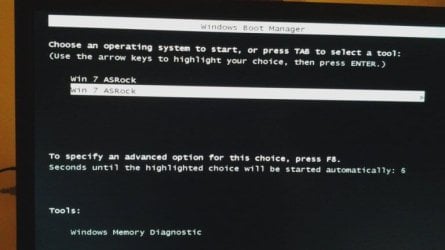
Win7Dup-BootMenu.jpg

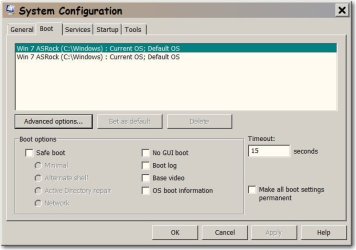
The MsConfig/Boot util shows 2 entries, both CURRENT, and no DELETE available.
Win7Dup-MSCONFIGgui.jpg

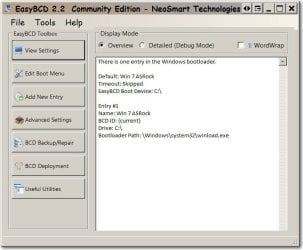
The EasyBCD GUI utility says there is 1 entry in the bootloader.
Win7Dup-BCDgui.jpg

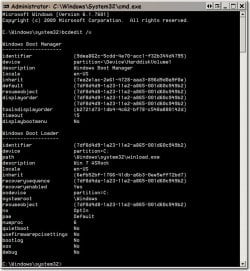
The EasyBCD CMD utility says there is 1 entry in the bootloader.
Win7Dup-BCDcmd.jpg

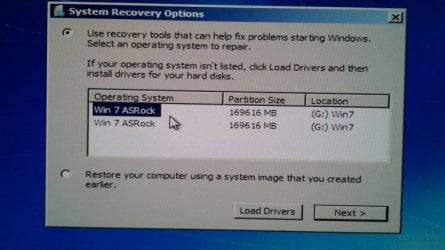
I thought about the Win7 CD System repair utility, and it shows 2 entries, and they both test OK.
Win7Dup-sro.jpg

So where is the extra OS data/record that M$ insists on showing ?
Is there ANY way to get rid of this without an total re-init ?
 

My Computer

Computer type
PC/Desktop
Computer Manufacturer/Model Number
self
OS
Win7 Pro 64
CPU
AMD X6 1090T
Motherboard
ASROCK 990FX
Memory
4G
Graphics Card(s)
Saphire HD4870
Hard Drives
Seagate 200Gb (OS)
WestDig 1Tb x4
Antivirus
M$
Browser
FF v42
UIs Delete available if you select the 2nd entry in msconfig boot tab?
 

My Computer

Computer type
PC/Desktop
Computer Manufacturer/Model Number
Lenovo IdeaCenter 450
OS
Windows 10 Pro X64
CPU
Intel Quad Core i7-4770 @ 3.4Ghz
Memory
16.0GB PC3-12800 DDR3 SDRAM 1600 MHz
Graphics Card(s)
Intel Integrated HD Graphics
Sound Card
Realtek HD Audio
Monitor(s) Displays
HP 22" LCD
Screen Resolution
1680 x 1050
Hard Drives
250GB Samsung EVO SATA-3 SSD
2TB Seagate ST2000DM001 SATA-2
1.5TB Seagate ST3150041AS SATA
Keyboard
Dell USB
Mouse
Lenovo USB
Internet Speed
Cable via Road Runner 3MB Upload, 30MB Download
Antivirus
Windows Defender, MBAM Pro, MBAE
Browser
Seamonkey
Other Info
UEFI/GPT
PLDS DVD-RW DH16AERSH
UIs Delete available if you select the 2nd entry in msconfig boot tab?

No, DELETE is not available on either entry.
I imagine it should not, as they are BOTH labeled as CURRENT
 

My Computer

Computer type
PC/Desktop
Computer Manufacturer/Model Number
self
OS
Win7 Pro 64
CPU
AMD X6 1090T
Motherboard
ASROCK 990FX
Memory
4G
Graphics Card(s)
Saphire HD4870
Hard Drives
Seagate 200Gb (OS)
WestDig 1Tb x4
Antivirus
M$
Browser
FF v42
UIs Delete available if you select the 2nd entry in msconfig boot tab?

No, DELETE is not available on either entry.
I imagine it should not, as they are BOTH labeled as CURRENT

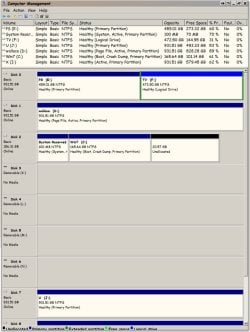
Please post a screen shot of your Disc Management. See this tutorial on how to do that.

http://www.sevenforums.com/tutorials/274797-disk-management-post-screen-capture-image.html

Then see this tutorial on how to upload the screen shot.

http://www.sevenforums.com/tutorials/9733-screenshots-files-upload-post-seven-forums.html
 

My Computer

Computer type
PC/Desktop
Computer Manufacturer/Model Number
Self built using existing case
OS
Windows 7 Home Premium 64 bit sp1
CPU
Intel i5 3570 3.4Ghz Ivy Bridge SKT 1155 quad core
Motherboard
Gigabyte Z77-HD3 SKT 1155 2xSata 3, 4x USB 3.0
Memory
G-Skill Rip Jaws 16Gb (8x2) DDR3 -1600 PC3 12800 CL 10 red
Graphics Card(s)
Gigabyte NVIDIA GT610 1Gb DDR3 810/1200 PCI-E 2.0 Silent
Sound Card
NVIDIA High Definition & Realtech High Definition Audio
Monitor(s) Displays
2 x Philips 226V4L 16:9 aspect ratio
Screen Resolution
1920 x 1080 HD
Hard Drives
Samsung 840 Pro 256gb SSD, SATA 3.
Hitachi Touro Portable 1tb, USB 3.0 HDD used for image b/ups.
PSU
Corsair VS450
Case
Codeng
Cooling
PSU fan & CPU fan
Keyboard
Logitech
Mouse
Logitech Wireless trackball M570
Internet Speed
Wireless 3G. 3mg down & 550kb up.
Antivirus
Bitdefender Internet Security 2020
Browser
Opera (Current Version) & Firefox
Other Info
MS Office 2013 Pro. Davis weather station software. MGE Nova 600 avr UPS.

My Computer

Computer type
PC/Desktop
Computer Manufacturer/Model Number
self
OS
Win7 Pro 64
CPU
AMD X6 1090T
Motherboard
ASROCK 990FX
Memory
4G
Graphics Card(s)
Saphire HD4870
Hard Drives
Seagate 200Gb (OS)
WestDig 1Tb x4
Antivirus
M$
Browser
FF v42
well ... I fixed it
by accident , or by fluke
we'll never know what was really wrong

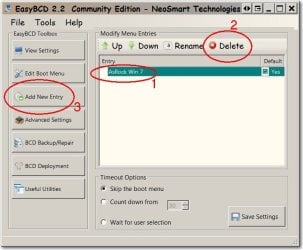
I gave EasyBCD another go ... a different tact

1. selected the one boot listing that was present
2. deleted it
3. added a new entry

SHOT1668.jpg

looked the same to me
but after reboot ... windows now "BELIEVES" that there is only one entry

Windows is happy
I am happy
 

My Computer

Computer type
PC/Desktop
Computer Manufacturer/Model Number
self
OS
Win7 Pro 64
CPU
AMD X6 1090T
Motherboard
ASROCK 990FX
Memory
4G
Graphics Card(s)
Saphire HD4870
Hard Drives
Seagate 200Gb (OS)
WestDig 1Tb x4
Antivirus
M$
Browser
FF v42
Could you post anther Disk Management so we can compare.
The first picture shows 2 active partitions. One on disk #1 and another one on disk #2.
 

My Computer

Computer type
PC/Desktop
Computer Manufacturer/Model Number
Home made Desktop
OS
Windows 10 Pro. 64/ version 1709 Windows 7 Pro/64
CPU
Intel i7-6800K @ 4.3
Motherboard
ASUS X-99 Deluxe II
Memory
Corsair Platinum 16 gig @2400
Graphics Card(s)
EVGA GTX 1070 OC
Monitor(s) Displays
Asus 27" LED LCD/VE278Q
Screen Resolution
1920-1080 or 1280-720 HDMI
Hard Drives
INTEL SSD 730-240 Gb Sata 3.0/
PSU
EVGA Platium 1200W
Case
Phanteks Luxe Tempered Glass 8 fans/ one radiator
Cooling
XSPC/ Water Cooled CPU
Keyboard
Das 4 Professional
Mouse
Logitech M705/MX Anywhere 2-S
Internet Speed
100 mbits
Antivirus
Microsoft Security Essentials/ Malwarebytes Premium 3.0/ SAS
Browser
I.E. 11 default/Firefox/ ISP Time Warner Cable/Spectrum
Other Info
LG BluRay Burner/
Sound system-KLipsch-THX/
Icy Dock ssd Hot Swap bays.
Could you post anther Disk Management so we can compare.
The first picture shows 2 active partitions. One on disk #1 and another one on disk #2.

3 actives actually, yes, disk1 had an Ubuntu installation on it until last year

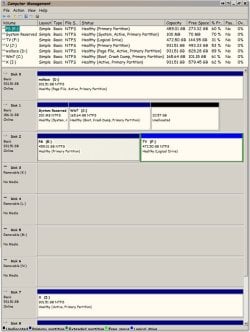
Here is the new DM
Looks exactly the same except that C: has 0.05 more free space
and it has flipped the order of the disks, disk 1 is now disk 0

wtf ?!
Win7Dup-DiskMgmt-after.jpg
 

My Computer

Computer type
PC/Desktop
Computer Manufacturer/Model Number
self
OS
Win7 Pro 64
CPU
AMD X6 1090T
Motherboard
ASROCK 990FX
Memory
4G
Graphics Card(s)
Saphire HD4870
Hard Drives
Seagate 200Gb (OS)
WestDig 1Tb x4
Antivirus
M$
Browser
FF v42
I see this is marked solved, is it ?

Tell everyone what you did to resolve the issue.
 

My Computer

Computer type
PC/Desktop
Computer Manufacturer/Model Number
Skylake Special #666
OS
Windows 10 Pro x64
CPU
Intel Core i7 6700K
Motherboard
Asus Sabertooth Z170 Mark 1
Memory
GSkill TridentZ RGB 16GB 3600 16-16-16-36
Graphics Card(s)
EVGA GTX 980 Ti SC x2
Sound Card
Realtek High Definition
Monitor(s) Displays
AOC G2460PG
Screen Resolution
1920 x 1080 144Hz
Hard Drives
Samsung 860 Pro 256GB, Seagate Barracuda 4TB x2
PSU
EVGA 1000 P2, EVGA White Custom Braided Cables
Case
Corsair Vengeance C70 Gunmetal Black
Cooling
Corsair H100i v2, Corsair ML120 x2, Thermal Grizzly Kryonaut
Keyboard
Logitech G910 Orion Spectrum
Mouse
Logitech G700s
Internet Speed
Verizon Fios Quantum Gateway 75/75
Antivirus
Windows Defender, Malwarebytes Free 3.8.3
Browser
Chrome
Other Info
Corsair SP120 x4, LG Blu-ray Drive, Durabrand HT-395 100 Watt Dolby Digital Amp, Corsair H2100 Wireless 7.1 Headset
Tell everyone what you did to resolve the issue.

Post #6 seems to cover that,

well ... I fixed it
by accident , or by fluke
we'll never know what was really wrong

I gave EasyBCD another go ... a different tact

1. selected the one boot listing that was present
2. deleted it
3. added a new entry

376461-how-can-i-remove-duplicate-entry-bootmenu-shot1668.jpg


looked the same to me
but after reboot ... windows now "BELIEVES" that there is only one entry

Windows is happy
I am happy
 

My Computer

Computer type
PC/Desktop
Computer Manufacturer/Model Number
Self Built
OS
Win 10 Pro x64
CPU
Intel I5-2500K @3.3GHz
Motherboard
Asrock P67 Extreme4
Memory
16GB G.Skill Ripjaws X (4x4GB)
Graphics Card(s)
EVGA GeForce 750 Ti SC 2GB
Sound Card
ASUS Xonar DG 5.1 Channels 24-bit 96KHz PCI Interface Sound
Monitor(s) Displays
auria eq2367
Screen Resolution
1920 x 1080
Hard Drives
250GB Samsung 850 EVO SSD
1TB WD Blue
1TB Hitachi
PSU
SeaSonic X 650W 80 Plus Gold
Case
Corsair Obsidian 750D
Cooling
Corsair H60, Three 140mm case fans
Keyboard
Logitech Wireless Keyboard K520
Mouse
Logitech Wireless Mouse M310
Internet Speed
Wave Broadband ~ 100 dn 5 up
Antivirus
Windows Defender, Malwarebytes Premium
Browser
Edge, IE11, Chrome
Other Info
Laptop specs: HP g7-1365dx /
CPU: AMD A6-3420M APU with Radeon(tm) HD Graphics /
RAM: Crucial 8Gb (2x4Gb) /
SSD: Crucial M4-CT128M4SSD2 ATA Device/ FW 000F /
GFX: AMD Radeon HD 6520G /
OS: Windows 10 Pro x64
OK Thanks Derek, blurred vision again or maybe it was lack of sleep :o
 

My Computer

Computer type
PC/Desktop
Computer Manufacturer/Model Number
Skylake Special #666
OS
Windows 10 Pro x64
CPU
Intel Core i7 6700K
Motherboard
Asus Sabertooth Z170 Mark 1
Memory
GSkill TridentZ RGB 16GB 3600 16-16-16-36
Graphics Card(s)
EVGA GTX 980 Ti SC x2
Sound Card
Realtek High Definition
Monitor(s) Displays
AOC G2460PG
Screen Resolution
1920 x 1080 144Hz
Hard Drives
Samsung 860 Pro 256GB, Seagate Barracuda 4TB x2
PSU
EVGA 1000 P2, EVGA White Custom Braided Cables
Case
Corsair Vengeance C70 Gunmetal Black
Cooling
Corsair H100i v2, Corsair ML120 x2, Thermal Grizzly Kryonaut
Keyboard
Logitech G910 Orion Spectrum
Mouse
Logitech G700s
Internet Speed
Verizon Fios Quantum Gateway 75/75
Antivirus
Windows Defender, Malwarebytes Free 3.8.3
Browser
Chrome
Other Info
Corsair SP120 x4, LG Blu-ray Drive, Durabrand HT-395 100 Watt Dolby Digital Amp, Corsair H2100 Wireless 7.1 Headset
Back
Top