Hi everyone, I use Firefox as my default browser, and over time my favorites have changed some. My question is, can i replace the old favorites in IE7 with the current ones I have on Firefox? I tried importing them thinking they would overwrite the old ones, but it did not seem to work. So, if anyone can refer me to a tutorial, or can help me figure this out, it would be greatly appreciated!
My Computer
At a glance
Windows 7 professional 64 bitAMD Athlon(tm) II X2 220 Processor3GBNVIDIA GeForce 6150SE nForce 430
Computer type
PC/Desktop
Computer Manufacturer/Model Number
HP 505B B2C02UT Business Desktop
OS
Windows 7 professional 64 bit
CPU
AMD Athlon(tm) II X2 220 Processor
Motherboard
PEGATRON (2A99)
Memory
3GB
Graphics Card(s)
NVIDIA GeForce 6150SE nForce 430
Sound Card
Realtek ALC662 High Definition Audio (OEM)
Monitor(s) Displays
OEM Dell CRT
Screen Resolution
N/A
Hard Drives
(1) NCQ Smart IV 500GB Hard Drive - 7,200RPM - SATA 3.0Gb/s
If you don't want any of the favorites in IE7, then you could just delete them in the "C:\Users\(user-name)\Favorites" folder, then use the tutorial below to import your bookmarks from Firefox into IE7.
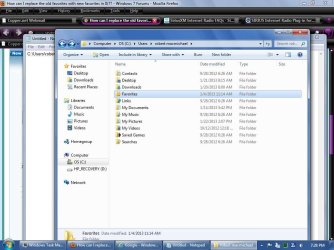
Ok Brink, do you mean to actually delete the whole favorites folder, not the contents IN the folder? See my screenshot, the one highlighted in blue. Then just reimport them as if i had a new PC and have never done it before? (sorry I so tupid ) Thanks!!
Attachments
SP32-20130123-192834.jpg
87.3 KB
· Views: 7
My Computer
At a glance
Windows 7 professional 64 bitAMD Athlon(tm) II X2 220 Processor3GBNVIDIA GeForce 6150SE nForce 430
Computer type
PC/Desktop
Computer Manufacturer/Model Number
HP 505B B2C02UT Business Desktop
OS
Windows 7 professional 64 bit
CPU
AMD Athlon(tm) II X2 220 Processor
Motherboard
PEGATRON (2A99)
Memory
3GB
Graphics Card(s)
NVIDIA GeForce 6150SE nForce 430
Sound Card
Realtek ALC662 High Definition Audio (OEM)
Monitor(s) Displays
OEM Dell CRT
Screen Resolution
N/A
Hard Drives
(1) NCQ Smart IV 500GB Hard Drive - 7,200RPM - SATA 3.0Gb/s


 as my default browser, and over time my favorites have changed some. My question is, can i replace the old favorites in IE7 with the current ones I have on Firefox? I tried importing them thinking they would overwrite the old ones, but it did not seem to work. So, if anyone can refer me to a tutorial, or can help me figure this out, it would be greatly appreciated!

 ) Thanks!!