Solved How can i set my NVIDIA GT 525M as primary display

hoangnnm

New member
Local time
2:51 PM
Messages
16
Hi all, i have Dell inspiron n5110.

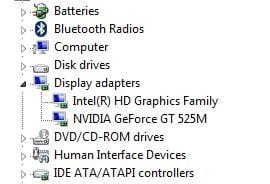
My drivers :
display3.JPG

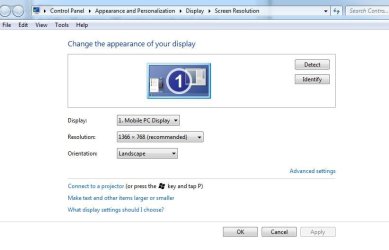
When i click Screen resolution :
display.JPG

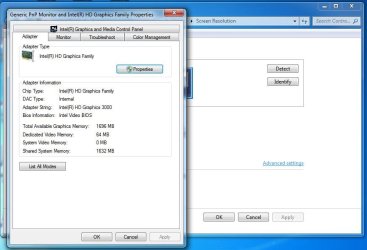
and it's using the integrated Intel instead of the Geforce 525M :
display2.JPG

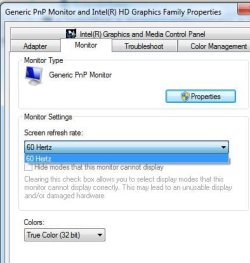
So i can not change the "screen refresh rate" to 75hz :
display4.JPG

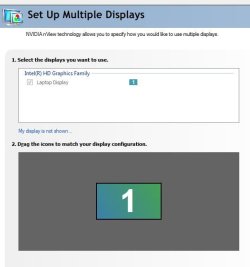
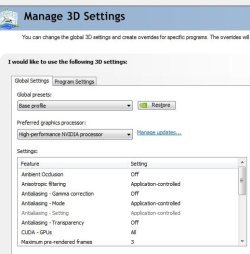
I tried to set the option in the Nvidia Control Panel but got no luck :
nvidia1.JPG

nvidia2.JPG

Hope you can help !

Thanks for reading !
 

My Computer My Computer

At a glance

Windows 7 Ultimate x64
OS
Windows 7 Ultimate x64

My Computer My Computer

At a glance

Windows 7 Ultimate SP1 64-BitIntel Core i7 870 @ 2.93GHz8Gb Dual-Channel DDR3 @ 664MHznVidia GeForce GTX 460 1024MB dedicated RAM
Computer Manufacturer/Model Number
HP Pavilion Elite 495UK
OS
Windows 7 Ultimate SP1 64-Bit
CPU
Intel Core i7 870 @ 2.93GHz
Motherboard
MSI 2A9C (CPU1)
Memory
8Gb Dual-Channel DDR3 @ 664MHz
Graphics Card(s)
nVidia GeForce GTX 460 1024MB dedicated RAM
Sound Card
Realtek HD Audio
Monitor(s) Displays
HP2310i
Screen Resolution
1920 x 1080
Hard Drives
1x1954GB Hitachi HDS22020ALA 330 (RAID), 1x1954GB Hitachi External for backup and storage
PSU
460W
Case
HP Elite
Cooling
Air cooled
Keyboard
Logitech K750 solar-powered keyboard
Mouse
Logitech Wireless M180 mouse
Internet Speed
2Mb
Other Info
Pure Avanti Flow Internet Radio with iPod Dock, 64Gb iPod, HP USB Speakers, Sony MDR-V500 Headphones, Sony Vaio F-Series Laptop
What you have is a discrete video chip rather than a graphics card.

Have a look at this thread on the issue.

http://www.sevenforums.com/graphic-cards/209336-windows-not-using-my-nvidia-geforce.html

You might also want to check with Dell Support as you're likely to get some answers - the consensus seems to be that you need to download the drivers from Dell and reinstall them.

Hi seavixen32, thanks for you reply.
The link you gave above was my issue too if you notice :)
 

My Computer My Computer

At a glance

Windows 7 Ultimate x64
OS
Windows 7 Ultimate x64
Yes, that's why I posted it.

Have you read through it?
 

My Computer My Computer

At a glance

Windows 7 Ultimate SP1 64-BitIntel Core i7 870 @ 2.93GHz8Gb Dual-Channel DDR3 @ 664MHznVidia GeForce GTX 460 1024MB dedicated RAM
Computer Manufacturer/Model Number
HP Pavilion Elite 495UK
OS
Windows 7 Ultimate SP1 64-Bit
CPU
Intel Core i7 870 @ 2.93GHz
Motherboard
MSI 2A9C (CPU1)
Memory
8Gb Dual-Channel DDR3 @ 664MHz
Graphics Card(s)
nVidia GeForce GTX 460 1024MB dedicated RAM
Sound Card
Realtek HD Audio
Monitor(s) Displays
HP2310i
Screen Resolution
1920 x 1080
Hard Drives
1x1954GB Hitachi HDS22020ALA 330 (RAID), 1x1954GB Hitachi External for backup and storage
PSU
460W
Case
HP Elite
Cooling
Air cooled
Keyboard
Logitech K750 solar-powered keyboard
Mouse
Logitech Wireless M180 mouse
Internet Speed
2Mb
Other Info
Pure Avanti Flow Internet Radio with iPod Dock, 64Gb iPod, HP USB Speakers, Sony MDR-V500 Headphones, Sony Vaio F-Series Laptop
Yes, that's why I posted it.

Have you read through it?
Thanks for you fast reply again.
Yes, i have read it all and i still can not get the point.
By the way, i also don't really understand what you said here :
What you have is a discrete video chip rather than a graphics card.
 

My Computer My Computer

At a glance

Windows 7 Ultimate x64
OS
Windows 7 Ultimate x64
A graphics card is one that is fitted into a slot in the motherboard and can easily be changed.

A discrete video chip is not a graphics card. It is a microchip that is permanently hard wired and soldered to the motherboard.

You may need to go into your BIOS and disable the Intel graphics. Not sure about your computer, but you'll need to press something similar to either the DEL key or the F2 key at startup to access your BIOS settings.
 

My Computer My Computer

At a glance

Windows 7 Ultimate SP1 64-BitIntel Core i7 870 @ 2.93GHz8Gb Dual-Channel DDR3 @ 664MHznVidia GeForce GTX 460 1024MB dedicated RAM
Computer Manufacturer/Model Number
HP Pavilion Elite 495UK
OS
Windows 7 Ultimate SP1 64-Bit
CPU
Intel Core i7 870 @ 2.93GHz
Motherboard
MSI 2A9C (CPU1)
Memory
8Gb Dual-Channel DDR3 @ 664MHz
Graphics Card(s)
nVidia GeForce GTX 460 1024MB dedicated RAM
Sound Card
Realtek HD Audio
Monitor(s) Displays
HP2310i
Screen Resolution
1920 x 1080
Hard Drives
1x1954GB Hitachi HDS22020ALA 330 (RAID), 1x1954GB Hitachi External for backup and storage
PSU
460W
Case
HP Elite
Cooling
Air cooled
Keyboard
Logitech K750 solar-powered keyboard
Mouse
Logitech Wireless M180 mouse
Internet Speed
2Mb
Other Info
Pure Avanti Flow Internet Radio with iPod Dock, 64Gb iPod, HP USB Speakers, Sony MDR-V500 Headphones, Sony Vaio F-Series Laptop
A graphics card is one that is fitted into a slot in the motherboard and can easily be changed.

A discrete video chip is not a graphics card. It is a microchip that is permanently hard wired and soldered to the motherboard.

You may need to go into your BIOS and disable the Intel graphics. Not sure about your computer, but you'll need to press something similar to either the DEL key or the F2 key at startup to access your BIOS settings.

Thanks seavixen32.

I could not do that, there is no option to disable the onboard Intel in my Bios, you can aware of that if you have read the link you gave me.
 

My Computer My Computer

At a glance

Windows 7 Ultimate x64
OS
Windows 7 Ultimate x64
Are you sure the display can handle 75Hz at its native resolution? Looks like its using a generic driver for it as well which will leave you stuck at 60Hz regardless. Looking at the specs online it looks like its only rated to 60Hz.
If you are looking to have the nvidia gpu always take over set the windows power profile to Maximum Performance; it looks like you've done all you can through the nv control panel. Many have issues with these as they will default to intel if there is not much of a load on them to save battery
 

My Computer My Computer

At a glance

windows 8.1 Pro x64intel [email protected]2x8gb ripjaws x @2133asus r9-290@1100/1300
Computer type
PC/Desktop
Computer Manufacturer/Model Number
Elsa
OS
windows 8.1 Pro x64
CPU
intel [email protected]
Motherboard
msi mpower max ac
Memory
2x8gb ripjaws x @2133
Graphics Card(s)
asus r9-290@1100/1300
Sound Card
creative sbz
Monitor(s) Displays
dell u3011
Hard Drives
840 evo 250 & 8.5tb
PSU
evga supernova p2-1000
Case
corsair air 540
Cooling
corsair h100
Keyboard
logitech g710+
Mouse
logitech g502
Internet Speed
50/10
Antivirus
avg
Browser
firefox
Thanks for picking up on that Zahl, I did wonder about a refesh rate of 75 Mhz, 60 MHz seems to be the norm these days.
 

My Computer My Computer

At a glance

Windows 7 Ultimate SP1 64-BitIntel Core i7 870 @ 2.93GHz8Gb Dual-Channel DDR3 @ 664MHznVidia GeForce GTX 460 1024MB dedicated RAM
Computer Manufacturer/Model Number
HP Pavilion Elite 495UK
OS
Windows 7 Ultimate SP1 64-Bit
CPU
Intel Core i7 870 @ 2.93GHz
Motherboard
MSI 2A9C (CPU1)
Memory
8Gb Dual-Channel DDR3 @ 664MHz
Graphics Card(s)
nVidia GeForce GTX 460 1024MB dedicated RAM
Sound Card
Realtek HD Audio
Monitor(s) Displays
HP2310i
Screen Resolution
1920 x 1080
Hard Drives
1x1954GB Hitachi HDS22020ALA 330 (RAID), 1x1954GB Hitachi External for backup and storage
PSU
460W
Case
HP Elite
Cooling
Air cooled
Keyboard
Logitech K750 solar-powered keyboard
Mouse
Logitech Wireless M180 mouse
Internet Speed
2Mb
Other Info
Pure Avanti Flow Internet Radio with iPod Dock, 64Gb iPod, HP USB Speakers, Sony MDR-V500 Headphones, Sony Vaio F-Series Laptop
Bumping it up to 75 Hz isn't going to do anything for you on an LCD display. They don't flicker like a CRT does and don't need a high refresh rate. The pixel is either on or off. 60 Hz isn't going to give you a headache like it does on a CRT. ;)
 

My Computer My Computer

At a glance

Windows 10 Education 64 bitAMD Phenom II X4 980 Black Edition Deneb 3.7GHz8GB 4GBx2 Kingston PC10600 DDR3 1333 MemoryZotac NVIDIA Geforce GT640 2 Gig DDR3 PCIe
Computer type
PC/Desktop
Computer Manufacturer/Model Number
Home Built
OS
Windows 10 Education 64 bit
CPU
AMD Phenom II X4 980 Black Edition Deneb 3.7GHz
Motherboard
Asus M4N68T-M V2 µATX Motherboard
Memory
8GB 4GBx2 Kingston PC10600 DDR3 1333 Memory
Graphics Card(s)
Zotac NVIDIA Geforce GT640 2 Gig DDR3 PCIe
Sound Card
VIA VT1708s High Definition Audio 8-channel Onboard
Monitor(s) Displays
22" LG E2242 1080p and 2 19" I-INC AG191D
Screen Resolution
1280x1024 - 1920x1080 - 1280x1024
Hard Drives
Crucial M100 256 GB SSD and 500 GB WD Blue SATA
PSU
Thermaltake TR 620
Case
Power Up Black ATX Mid-Tower Case
Cooling
Stock heatsink and fan
Keyboard
Logitech Wireless K350 Wave
Mouse
Logitech Wireless M570 Trackman Wheel
Internet Speed
80 Mbps Down 30 Mbps Up
Antivirus
Windows Defender
Browser
Internet Explorer 11
Other Info
HP DVD1040e Lightscribe - External USB2
Bumping it up to 75 Hz isn't going to do anything for you on an LCD display. They don't flicker like a CRT does and don't need a high refresh rate. The pixel is either on or off. 60 Hz isn't going to give you a headache like it does on a CRT. ;)

Oh, i have been wondering about this for so long, coz i think the Hz on LCD acts like CRT does. Thanks for your information alphanumeric.

Thanks all for your quick respones and kindness.
 

My Computer My Computer

At a glance

Windows 7 Ultimate x64
OS
Windows 7 Ultimate x64

My Computer My Computer

At a glance

Windows 10 Education 64 bitAMD Phenom II X4 980 Black Edition Deneb 3.7GHz8GB 4GBx2 Kingston PC10600 DDR3 1333 MemoryZotac NVIDIA Geforce GT640 2 Gig DDR3 PCIe
Computer type
PC/Desktop
Computer Manufacturer/Model Number
Home Built
OS
Windows 10 Education 64 bit
CPU
AMD Phenom II X4 980 Black Edition Deneb 3.7GHz
Motherboard
Asus M4N68T-M V2 µATX Motherboard
Memory
8GB 4GBx2 Kingston PC10600 DDR3 1333 Memory
Graphics Card(s)
Zotac NVIDIA Geforce GT640 2 Gig DDR3 PCIe
Sound Card
VIA VT1708s High Definition Audio 8-channel Onboard
Monitor(s) Displays
22" LG E2242 1080p and 2 19" I-INC AG191D
Screen Resolution
1280x1024 - 1920x1080 - 1280x1024
Hard Drives
Crucial M100 256 GB SSD and 500 GB WD Blue SATA
PSU
Thermaltake TR 620
Case
Power Up Black ATX Mid-Tower Case
Cooling
Stock heatsink and fan
Keyboard
Logitech Wireless K350 Wave
Mouse
Logitech Wireless M570 Trackman Wheel
Internet Speed
80 Mbps Down 30 Mbps Up
Antivirus
Windows Defender
Browser
Internet Explorer 11
Other Info
HP DVD1040e Lightscribe - External USB2
Just to clarify things, your dell is equipped with 2 graphics cards, the intergrated intel card and the Nvidia card. This means it uses Nvidia Optimus technology.

Optimus technology means it uses the intergrated card normally but when a graphically intensive program, like a game, is opened, the Nvidia card kicks in.

However, to stop the display turning off and on to change the graphics cards, it reroutes the Nvidia image through the intel card. This means no matter what you do, under screen resolution, the intel card will always be displayed.

Read this to get an overview of Optimus. It's fairly old but the technology is still the same. Nvidia Optimus Review - Notebookcheck.net Reviews


EDIT - Some extra info - Even if you update your drivers to the latest ones from the Nvidia site, you will still have the same thing. I know this as I also have a Dell with an Nvidia GT525M graphics card in.

There isn't really much reason to disable Optimus. I know that many people hate it if you look online but I cannot work out why. The reason for optimus is to increase battery life by disabling the Nvidia chip when it is not required.

If you are a gamer, make sure your drivers are updated using the ones from the Nvidia site as these will offer Optimus improvments such as a wider range of automaticaly recognised games and performance imporvements. Even though ther are drivers listed on the Dell site for your PC, it doesn't matter if you update them from the Nvidia site as I have done that myself! Dell is just not up to date.

 

My Computer My Computer

At a glance

Windows 7 Home Premium 64bit (O.E.M)Intel Core i7 2630QM @2.00GHz6GB DDR3Intel Intergrated Graphics 3000, nVidia GT525...
Computer Manufacturer/Model Number
Dell XPS 15 L502x
OS
Windows 7 Home Premium 64bit (O.E.M)
CPU
Intel Core i7 2630QM @2.00GHz
Memory
6GB DDR3
Graphics Card(s)
Intel Intergrated Graphics 3000, nVidia GT525M (1GB)
Screen Resolution
1366x768
Hard Drives
750GB Seagate 7200rpm
Keyboard
Backlit Dell XPS 15 L502x Keyboard
Mouse
Microsoft Wireless Mobile Mouse 4000
Internet Speed
2.5 Mb/s down, 0.36 up
Hi all, i have Dell inspiron n5110.

My drivers :
View attachment 204142

When i click Screen resolution :
View attachment 204140

and it's using the integrated Intel instead of the Geforce 525M :
View attachment 204141

So i can not change the "screen refresh rate" to 75hz :
View attachment 204143

I tried to set the option in the Nvidia Control Panel but got no luck :
View attachment 204144

View attachment 204145

Hope you can help !

Thanks for reading !


I have the same problem last time and going to forums and threads on the internet. At last i found out that all you need to do is update your OEM software for your Dell GPU which you can easily do it just by going to Dell support centre on your computer and update your driver. once you do that, you open your Nvidia control panel and set it as administrator for the games you want your GPU to detect. The rest is history. Hope this helps.
 

My Computer My Computer

At a glance

Windows 7 Home Premium 64bit.Nvidia GT525M
OS
Windows 7 Home Premium 64bit.
Graphics Card(s)
Nvidia GT525M
I have the same issue (GeForce GT540M), no matter what i do it keeps my on-board card (Intel (R) HD Graphics 3000) as primary :confused:
I have no option in my bios to disable it....
 

My Computer My Computer

At a glance

MS Windows 7 Home Premium 64-bitIntel Core i7 870 @ 2.93GHz (Quad Core)12.0GB Dual-Channel DDR3 @ 664MHz (9-9-9-24)NVIDIA GeForce GTS 450
Computer Manufacturer/Model Number
Nova Data
OS
MS Windows 7 Home Premium 64-bit
CPU
Intel Core i7 870 @ 2.93GHz (Quad Core)
Motherboard
Intel Corporation DH55TC (XU1)
Memory
12.0GB Dual-Channel DDR3 @ 664MHz (9-9-9-24)
Graphics Card(s)
NVIDIA GeForce GTS 450
Sound Card
Realtek High Definition Audio (on board)
Monitor(s) Displays
Samsung
Hard Drives
1465GB Seagate ST31500341AS ATA Device
PSU
650W low noice
Back
Top