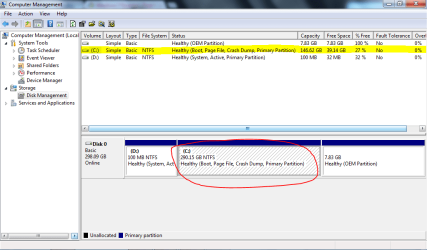
How can I solve hard disk problem?

ravenangel

New member
Local time
7:09 AM
Messages
1
Location
Asia
The one that highlighted is different from the one that i've circled. Can someone explain to me why is that happened? I'm searching for the 100^GB more. Originally the HDD contains 290GB. :confused:
 

Attachments

  • Capture.PNG
    Capture.PNG
    28.6 KB · Views: 51

My Computer

OS
Windows 7 Home Premium 32bit
Mouse
G-Shark
Hmm I haven't seen this. Doesn't make much sense, haha. Stupid question but have you tried rebooting?
 

My Computer

Computer type
PC/Desktop
OS
Windows 7 Pro 64 bit SP1
CPU
Intel Core i7 950 Quad OC'ed to 3.2 GHZ
Motherboard
ASRock X58
Memory
12GB DDR 3
Graphics Card(s)
Radeon HD 5870 1GB
Sound Card
Onboard
Monitor(s) Displays
23" Acer HD
Screen Resolution
1920x1080
Hard Drives
128GB SSD
PSU
700W
Case
Coolermaster
Antivirus
Avast Free
Browser
Firefox
You could run chkdsk on the C drive to see if it finds errors. In your run box, type:

chkdsk C: /F
 

My Computer

OS
Windows 7 Ultimate x64 SP1
CPU
Intel Core i7-2600
Motherboard
Gigabyte GA-P67A-UD3P-B3
Memory
12 GB Patriot Extreme DDR3-1333
Graphics Card(s)
Nvidia GTX 470
Monitor(s) Displays
Dell UltraSharp 2209WA
Hard Drives
OCZ Agility3 240 GB, WD5001AALS, WD7501AALS
PSU
OCZ ModStream 700W
Case
CoolerMaster HAF 912 Advanced
Cooling
CoolerMaster Hyper 212 Plus
Cross check the listings with free Partition Wizard bootable CD which will give the correct sizes when Disk Mgmt doesn't. It can also check the file system for you.
 
Back
Top