Solved How can I switch the names of my original C: drive ad its cloned copy?

wertuias

New member
Local time
10:05 PM
Messages
6
I apologize in advance for any misuse of technical terms; I don't have too much experience with the innards of hardware and operating systems.

So I recently bought a new, 1TB hard drive and using Clonezilla, cloned the contents of my original, smaller (160 GB) C: drive. This didn't go without hiccups (Clonezilla could be only booted in safe mode, and had to use the win7 recovery tool to boot the new drive), but now it seems to work: the files on the two drives are the same, and when I choose to boot the "recovered" OS, the command prompt displays "G:\Windows\system32> instead of C:\Windows\system32>, so I presume it's entire mechanism works from the new partition.

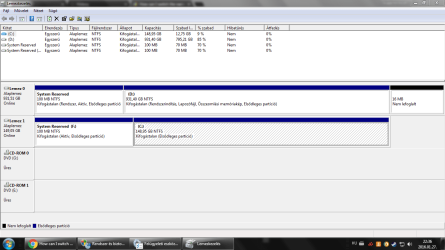
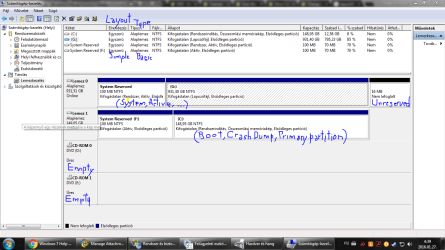
Here's a screenshot of Disk Management, taken while I was booted from the C: drive:
diskmanagement_004.PNG

(The lines under Állapot (=Status) are the following:
C: | Healthy (Boot, Crash Dump, Primary Partition)
G: | Healthy (Page File, Primary Partition)
System Reserved | Healthy (System, Active, Primary Partition)
System Reserved (F: ) | Healthy (System, Primary Partition)
)

Now, what I want to do is to rename the current G: partition (1TB) into C:, and the current C: partition (160 GB) into something else. Also, if possible, disable the booting from the smaller drive in order to skip the dual boot screen when starting the computer, but that would be just icing on the cake.

The problem is, most threads I read said that renaming the C: drive isn't possible without reinstalling Windows, and the one person who did have the same problem received a solution so vague, I dare not to use it for the fear of inadvertently wrecking my computer.

Any help would be greatly appreciated.
 

My Computer My Computer

At a glance

Windows 7 Ultimate x64AMD Athlon X4 750K16 GBAMD Radeon HD7850
Computer type
PC/Desktop
Computer Manufacturer/Model Number
custom build
OS
Windows 7 Ultimate x64
CPU
AMD Athlon X4 750K
Motherboard
ASRock FM2A55M-DGS R2.0
Memory
16 GB
Graphics Card(s)
AMD Radeon HD7850
Screen Resolution
1366 x 768
The other partition will always be a different letter then C.

You have to boot into it for it to show as C

Whichever drive you decide to keep, has to boot on it`s own.

Then you simply format the other drive, then create a new partition or partitions out of it, then assign it whatever letter/letters you want.

You say you are booted into the C drive, but you don`t specify if it`s Disk 0 or Disk 1, right now you have to be using Disk 1, because it`s showing as C

Boot into Disk 0, and it should show up as C and Disk 1 (the 160 GB drive) will have another letter.


You have to unplug Disk 1 to see if Disk 0 boots on its own before you do anything else.
 

My Computer My Computer

At a glance

Windows 10 Pro x64Intel Core i7 6700KGSkill TridentZ RGB 16GB 3600 16-16-16-36EVGA GTX 980 Ti SC x2
Computer type
PC/Desktop
Computer Manufacturer/Model Number
Skylake Special #666
OS
Windows 10 Pro x64
CPU
Intel Core i7 6700K
Motherboard
Asus Sabertooth Z170 Mark 1
Memory
GSkill TridentZ RGB 16GB 3600 16-16-16-36
Graphics Card(s)
EVGA GTX 980 Ti SC x2
Sound Card
Realtek High Definition
Monitor(s) Displays
AOC G2460PG
Screen Resolution
1920 x 1080 144Hz
Hard Drives
Samsung 860 Pro 256GB, Seagate Barracuda 4TB x2
PSU
EVGA 1000 P2, EVGA White Custom Braided Cables
Case
Corsair Vengeance C70 Gunmetal Black
Cooling
Corsair H100i v2, Corsair ML120 x2, Thermal Grizzly Kryonaut
Keyboard
Logitech G910 Orion Spectrum
Mouse
Logitech G700s
Internet Speed
Verizon Fios Quantum Gateway 75/75
Antivirus
Windows Defender, Malwarebytes Free 3.8.3
Browser
Chrome
Other Info
Corsair SP120 x4, LG Blu-ray Drive, Durabrand HT-395 100 Watt Dolby Digital Amp, Corsair H2100 Wireless 7.1 Headset
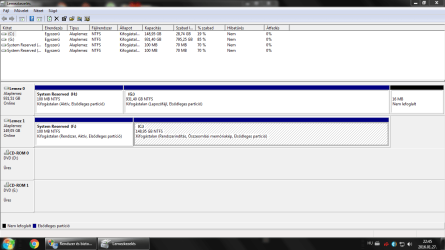
Okay, after some further testing, I realized that I mixed things up in my previous post. The screenshot I posted was actually from a booting from disk 0 (1TB). When I do that, the machine offers me a choice between loading the two available op system: "Windows 7" and "Windows 7 Ultimate (recovered)". The screenshot was from choosing the former. Choosing the latter results in this:

diskmanagement_005_WD_recov.PNG

While actually booting from disk 1 (160GB) doesn't offer a choice, just boots into this:

diskmanagement_006_S_nochoice.PNG

This left me even more confused.

I will try disconnecting disk 1, as soon as I can find a screwdriver.
 

My Computer My Computer

At a glance

Windows 7 Ultimate x64AMD Athlon X4 750K16 GBAMD Radeon HD7850
Computer type
PC/Desktop
Computer Manufacturer/Model Number
custom build
OS
Windows 7 Ultimate x64
CPU
AMD Athlon X4 750K
Motherboard
ASRock FM2A55M-DGS R2.0
Memory
16 GB
Graphics Card(s)
AMD Radeon HD7850
Screen Resolution
1366 x 768
C is always the partition from which you run. No fiddling with the letters will change that.
 

My Computer My Computer

At a glance

Vista, Windows7, Mint Mate, Zorin, Windows 8from 1.6GHz Duo to i7
Computer Manufacturer/Model Number
HP, Dell, Gateway, Toshiba - 4 laptops and 2 desktops
OS
Vista, Windows7, Mint Mate, Zorin, Windows 8
CPU
from 1.6GHz Duo to i7
Monitor(s) Displays
2x HP w2207
Hard Drives
5x HDD, 7x SSD, 12x Externals
Keyboard
with trackball - no mices
Mouse
Trackball mice
Internet Speed
DSL 6000
But he`s saying that when he boots into Disk 0 (931 GB) it shows as D, and still shows Disk 1 (160 GB) as C

I would`ve just kept windows on the 160 GB and used the 931 GB for storage.

160 GB is more then enough for windows and your programs.
 

My Computer My Computer

At a glance

Windows 10 Pro x64Intel Core i7 6700KGSkill TridentZ RGB 16GB 3600 16-16-16-36EVGA GTX 980 Ti SC x2
Computer type
PC/Desktop
Computer Manufacturer/Model Number
Skylake Special #666
OS
Windows 10 Pro x64
CPU
Intel Core i7 6700K
Motherboard
Asus Sabertooth Z170 Mark 1
Memory
GSkill TridentZ RGB 16GB 3600 16-16-16-36
Graphics Card(s)
EVGA GTX 980 Ti SC x2
Sound Card
Realtek High Definition
Monitor(s) Displays
AOC G2460PG
Screen Resolution
1920 x 1080 144Hz
Hard Drives
Samsung 860 Pro 256GB, Seagate Barracuda 4TB x2
PSU
EVGA 1000 P2, EVGA White Custom Braided Cables
Case
Corsair Vengeance C70 Gunmetal Black
Cooling
Corsair H100i v2, Corsair ML120 x2, Thermal Grizzly Kryonaut
Keyboard
Logitech G910 Orion Spectrum
Mouse
Logitech G700s
Internet Speed
Verizon Fios Quantum Gateway 75/75
Antivirus
Windows Defender, Malwarebytes Free 3.8.3
Browser
Chrome
Other Info
Corsair SP120 x4, LG Blu-ray Drive, Durabrand HT-395 100 Watt Dolby Digital Amp, Corsair H2100 Wireless 7.1 Headset
The reason I want to do this is that disk 1 is quite old, and I don't want to have anything important on it if (more like when) it fails.
 

My Computer My Computer

At a glance

Windows 7 Ultimate x64AMD Athlon X4 750K16 GBAMD Radeon HD7850
Computer type
PC/Desktop
Computer Manufacturer/Model Number
custom build
OS
Windows 7 Ultimate x64
CPU
AMD Athlon X4 750K
Motherboard
ASRock FM2A55M-DGS R2.0
Memory
16 GB
Graphics Card(s)
AMD Radeon HD7850
Screen Resolution
1366 x 768
I will try disconnecting disk 1, as soon as I can find a screwdriver.

You don't have to physically remove the disk drive.
If you disconnect either the sata (data) connector or the power connector for that drive, it will "remove" the drive from the PC.

You can disconnect the sata connector from either the drive or the motherboard, whatever is easiest.
You can PROBABLY only disconnect the power connector from the drive, that cable is probably wired into the the PSU.

Make sure everything is turned off before unplugging any cable !!!!

For the drive/partition letter issue, i would "nuke" the new drive, and create/restore an image using Macrium Reflect Imaging.

To me it sounds like the Clonezilla CLONE did something wrong.
I've used Macrium and Acronis imaging many times to "transfer/copy/move" my OS's to a new storage device.
 

My Computer My Computer

At a glance

Multi-Boot W7_Pro_x64 W8.1_Pro_x64 W10_Pro_x6...AMD Athlon II x4 6206GB GSkill DDR2 800AMD 4670 GPU + AMD 4200 IGP
Computer type
PC/Desktop
Computer Manufacturer/Model Number
home built
OS
Multi-Boot W7_Pro_x64 W8.1_Pro_x64 W10_Pro_x64 +Linux_VMs +Chromium_VM
CPU
AMD Athlon II x4 620
Motherboard
Gigabyte GA-MA785G-UD3H
Memory
6GB GSkill DDR2 800
Graphics Card(s)
AMD 4670 GPU + AMD 4200 IGP
Sound Card
on board Realtek ALC889A
Monitor(s) Displays
RCA 40" LCD TV, Insignia 32" LCD TV, HP 15" LCD monitor
Screen Resolution
1680 x 1050
Hard Drives
OCZ Vertex 3 120GB,
Samsung F3 1TB (3),
Several others - WD, Seagate, Hitachi, ...
PSU
Corsair 500 W
Case
Rosewill mid tower
Cooling
CM 90mm rifle
Keyboard
Gyration wireless, Logitech wireless, Dell USB wired
Mouse
Gyration wireless, Logitech wireless, V7 USB wired
Internet Speed
Spectrum - 100Mbps D / 10Mbps U
Antivirus
Avast, MBAM3, EMET, WinPatrol
Browser
Pale Moon, Firefox, IE
Other Info
2 multi-boot PC's
Mainly HTPC/Office/Gen purpose (no gaming).
Trendnet USB KVM.
LG DVD burner/Blue Ray Player.
Tray system for removable SATA backup drives.

Not currently OCd, under-volted.
I use Hybrid sleep, rarely re-boot or shutdown.

Hauppauge HD-PVR, Avermedia PCIe TV Tuner, Hauppauge PCI TV Tuner.
Okay, I tried to boot from disk 0 with disk 1 disconnected, and the OS sorta booted up... but the Desktop was just a blank blue slate, with no icons or taskbar. Now I'm going to make a new clone, this time using Macrium Reflect (the free version), and try to boot it first time without the other drive connected. Is there any tips or tricks I should be aware of?
 
Last edited:

My Computer My Computer

At a glance

Windows 7 Ultimate x64AMD Athlon X4 750K16 GBAMD Radeon HD7850
Computer type
PC/Desktop
Computer Manufacturer/Model Number
custom build
OS
Windows 7 Ultimate x64
CPU
AMD Athlon X4 750K
Motherboard
ASRock FM2A55M-DGS R2.0
Memory
16 GB
Graphics Card(s)
AMD Radeon HD7850
Screen Resolution
1366 x 768
My responses are in blue.

Okay, I tried to boot from disk 0 with disk 1 disconnected, and the OS sorta booted up... but the Desktop was just a blank blue slate, with no icons or taskbar.

I've seen that happen if multiple monitors are used or enabled and screen resolution is set to "Extend these displays".
Sometimes Windows is displaying the desktop/taskbar on a monitor that is not available.
The "quick-fix" is to change screen resolution to "Duplicate these displays", or turn on the other monitor
.

Now I'm going to make a new clone, this time using Macrium Reflect (the free version), and try to boot it first time without the other drive connected. Is there any tips or tricks I should be aware of?

I haven't used Cloning, I use Imaging.

The System/Active partition is where the boot-loader is stored.
The Boot partition is where Windows is installed and running from.

Each drive should have a System/Active partition, in your case this should be the System Reserved partition.
Each drive should be able to start Windows with the other drive disconnected, and the Windows (Boot) partition should always be . [/COLOR] [/QUOTE] I apologize, i can't read your Disk Management screen prints. I don't know the language :( :o
 

My Computer My Computer

At a glance

Multi-Boot W7_Pro_x64 W8.1_Pro_x64 W10_Pro_x6...AMD Athlon II x4 6206GB GSkill DDR2 800AMD 4670 GPU + AMD 4200 IGP
Computer type
PC/Desktop
Computer Manufacturer/Model Number
home built
OS
Multi-Boot W7_Pro_x64 W8.1_Pro_x64 W10_Pro_x64 +Linux_VMs +Chromium_VM
CPU
AMD Athlon II x4 620
Motherboard
Gigabyte GA-MA785G-UD3H
Memory
6GB GSkill DDR2 800
Graphics Card(s)
AMD 4670 GPU + AMD 4200 IGP
Sound Card
on board Realtek ALC889A
Monitor(s) Displays
RCA 40" LCD TV, Insignia 32" LCD TV, HP 15" LCD monitor
Screen Resolution
1680 x 1050
Hard Drives
OCZ Vertex 3 120GB,
Samsung F3 1TB (3),
Several others - WD, Seagate, Hitachi, ...
PSU
Corsair 500 W
Case
Rosewill mid tower
Cooling
CM 90mm rifle
Keyboard
Gyration wireless, Logitech wireless, Dell USB wired
Mouse
Gyration wireless, Logitech wireless, V7 USB wired
Internet Speed
Spectrum - 100Mbps D / 10Mbps U
Antivirus
Avast, MBAM3, EMET, WinPatrol
Browser
Pale Moon, Firefox, IE
Other Info
2 multi-boot PC's
Mainly HTPC/Office/Gen purpose (no gaming).
Trendnet USB KVM.
LG DVD burner/Blue Ray Player.
Tray system for removable SATA backup drives.

Not currently OCd, under-volted.
I use Hybrid sleep, rarely re-boot or shutdown.

Hauppauge HD-PVR, Avermedia PCIe TV Tuner, Hauppauge PCI TV Tuner.
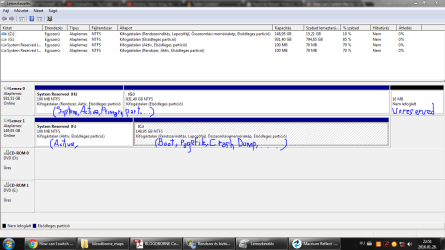
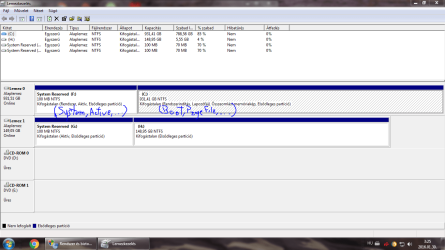
I added some subtitles:

diskmanagement_008_WD_orig.PNG

If I understand correctly, using an image would require a third drive where I could place the image file that I would later restore to disk 0. Or you just saying this to show that you have no experience with cloning?
 

My Computer My Computer

At a glance

Windows 7 Ultimate x64AMD Athlon X4 750K16 GBAMD Radeon HD7850
Computer type
PC/Desktop
Computer Manufacturer/Model Number
custom build
OS
Windows 7 Ultimate x64
CPU
AMD Athlon X4 750K
Motherboard
ASRock FM2A55M-DGS R2.0
Memory
16 GB
Graphics Card(s)
AMD Radeon HD7850
Screen Resolution
1366 x 768
In my experience cloning always gave me problems. Imaging seems to be more straight forward.
 

My Computer My Computer

At a glance

Vista, Windows7, Mint Mate, Zorin, Windows 8from 1.6GHz Duo to i7
Computer Manufacturer/Model Number
HP, Dell, Gateway, Toshiba - 4 laptops and 2 desktops
OS
Vista, Windows7, Mint Mate, Zorin, Windows 8
CPU
from 1.6GHz Duo to i7
Monitor(s) Displays
2x HP w2207
Hard Drives
5x HDD, 7x SSD, 12x Externals
Keyboard
with trackball - no mices
Mouse
Trackball mice
Internet Speed
DSL 6000
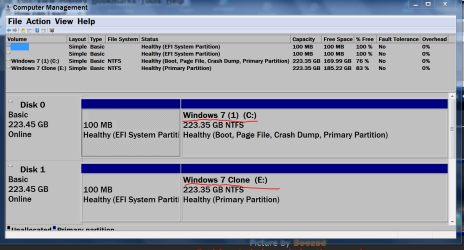
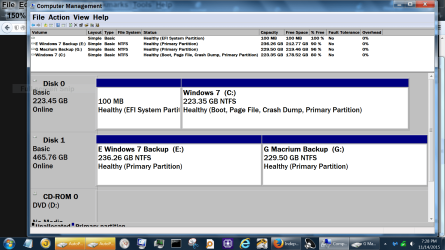
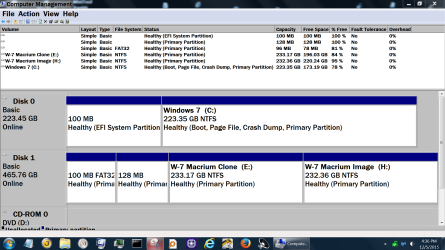
I use a image and a clone. So I don't get confused I change the name of each partition. This way now matter what partition letter they get or disk number they I know what is what.


Disk Management Jan 28.PNG
 

Attachments

  • Capture.PNGDisk management today.PNG
    Capture.PNGDisk management today.PNG
    115.6 KB · Views: 0
  • Disk Management Dec 5 2015.PNG
    Disk Management Dec 5 2015.PNG
    84.2 KB · Views: 0

My Computer My Computer

At a glance

Windows 10 Pro. 64/ version 1709 Windows 7 Pr...Intel i7-6800K @ 4.3Corsair Platinum 16 gig @2400EVGA GTX 1070 OC
Computer type
PC/Desktop
Computer Manufacturer/Model Number
Home made Desktop
OS
Windows 10 Pro. 64/ version 1709 Windows 7 Pro/64
CPU
Intel i7-6800K @ 4.3
Motherboard
ASUS X-99 Deluxe II
Memory
Corsair Platinum 16 gig @2400
Graphics Card(s)
EVGA GTX 1070 OC
Monitor(s) Displays
Asus 27" LED LCD/VE278Q
Screen Resolution
1920-1080 or 1280-720 HDMI
Hard Drives
INTEL SSD 730-240 Gb Sata 3.0/
PSU
EVGA Platium 1200W
Case
Phanteks Luxe Tempered Glass 8 fans/ one radiator
Cooling
XSPC/ Water Cooled CPU
Keyboard
Das 4 Professional
Mouse
Logitech M705/MX Anywhere 2-S
Internet Speed
100 mbits
Antivirus
Microsoft Security Essentials/ Malwarebytes Premium 3.0/ SAS
Browser
I.E. 11 default/Firefox/ ISP Time Warner Cable/Spectrum
Other Info
LG BluRay Burner/
Sound system-KLipsch-THX/
Icy Dock ssd Hot Swap bays.
You can't create a backup image on the same partition that you are imaging.

You can create a backup image on the same Hard Drive, but it must be saved to a different partition on that Hard Drive.
You could also save the backup image to a different Hard Drive, such as a USB external drive.

I do it both ways, i save backup images on multiple devices.

I played with cloning years ago, and it didn't work well for me, so i have no recent experience.

Your screen print (notes) in post #10 shows
- disk 0 is the Active/System partition, so that is where the boot-loader is used from to start Windows.
- disk 1 is the Boot partition, so that is where Windows is running from

You want the disk 0 [G] partition to be the Boot partition.
If you disconnect Disk 1 and a re-boot doesn't work, you probably only need to run Startup Repair to fix this.
http://www.sevenforums.com/tutorials/681-startup-repair.html
 

My Computer My Computer

At a glance

Multi-Boot W7_Pro_x64 W8.1_Pro_x64 W10_Pro_x6...AMD Athlon II x4 6206GB GSkill DDR2 800AMD 4670 GPU + AMD 4200 IGP
Computer type
PC/Desktop
Computer Manufacturer/Model Number
home built
OS
Multi-Boot W7_Pro_x64 W8.1_Pro_x64 W10_Pro_x64 +Linux_VMs +Chromium_VM
CPU
AMD Athlon II x4 620
Motherboard
Gigabyte GA-MA785G-UD3H
Memory
6GB GSkill DDR2 800
Graphics Card(s)
AMD 4670 GPU + AMD 4200 IGP
Sound Card
on board Realtek ALC889A
Monitor(s) Displays
RCA 40" LCD TV, Insignia 32" LCD TV, HP 15" LCD monitor
Screen Resolution
1680 x 1050
Hard Drives
OCZ Vertex 3 120GB,
Samsung F3 1TB (3),
Several others - WD, Seagate, Hitachi, ...
PSU
Corsair 500 W
Case
Rosewill mid tower
Cooling
CM 90mm rifle
Keyboard
Gyration wireless, Logitech wireless, Dell USB wired
Mouse
Gyration wireless, Logitech wireless, V7 USB wired
Internet Speed
Spectrum - 100Mbps D / 10Mbps U
Antivirus
Avast, MBAM3, EMET, WinPatrol
Browser
Pale Moon, Firefox, IE
Other Info
2 multi-boot PC's
Mainly HTPC/Office/Gen purpose (no gaming).
Trendnet USB KVM.
LG DVD burner/Blue Ray Player.
Tray system for removable SATA backup drives.

Not currently OCd, under-volted.
I use Hybrid sleep, rarely re-boot or shutdown.

Hauppauge HD-PVR, Avermedia PCIe TV Tuner, Hauppauge PCI TV Tuner.
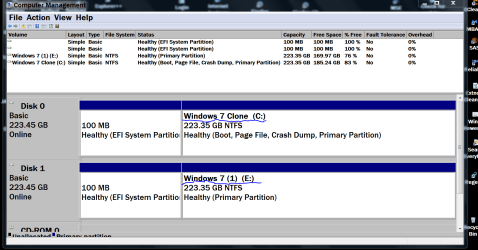
Now I'm on my Clone ssd and here is a Disk Management.

Disk management Boot Clone..PNG
 

My Computer My Computer

At a glance

Windows 10 Pro. 64/ version 1709 Windows 7 Pr...Intel i7-6800K @ 4.3Corsair Platinum 16 gig @2400EVGA GTX 1070 OC
Computer type
PC/Desktop
Computer Manufacturer/Model Number
Home made Desktop
OS
Windows 10 Pro. 64/ version 1709 Windows 7 Pro/64
CPU
Intel i7-6800K @ 4.3
Motherboard
ASUS X-99 Deluxe II
Memory
Corsair Platinum 16 gig @2400
Graphics Card(s)
EVGA GTX 1070 OC
Monitor(s) Displays
Asus 27" LED LCD/VE278Q
Screen Resolution
1920-1080 or 1280-720 HDMI
Hard Drives
INTEL SSD 730-240 Gb Sata 3.0/
PSU
EVGA Platium 1200W
Case
Phanteks Luxe Tempered Glass 8 fans/ one radiator
Cooling
XSPC/ Water Cooled CPU
Keyboard
Das 4 Professional
Mouse
Logitech M705/MX Anywhere 2-S
Internet Speed
100 mbits
Antivirus
Microsoft Security Essentials/ Malwarebytes Premium 3.0/ SAS
Browser
I.E. 11 default/Firefox/ ISP Time Warner Cable/Spectrum
Other Info
LG BluRay Burner/
Sound system-KLipsch-THX/
Icy Dock ssd Hot Swap bays.
Well, I finally given up on fixing the previous mess, and just made a new clone with Macrium. And it worked perfectly! (Wel, at least so far.) Here's a screenshot:

diskmanagement_010_WD_auto.PNG

Thanks for everyone's help, I'm incredibly grateful.
 

My Computer My Computer

At a glance

Windows 7 Ultimate x64AMD Athlon X4 750K16 GBAMD Radeon HD7850
Computer type
PC/Desktop
Computer Manufacturer/Model Number
custom build
OS
Windows 7 Ultimate x64
CPU
AMD Athlon X4 750K
Motherboard
ASRock FM2A55M-DGS R2.0
Memory
16 GB
Graphics Card(s)
AMD Radeon HD7850
Screen Resolution
1366 x 768
Now just rename them so you don't get them confused. Like post #14.
 

My Computer My Computer

At a glance

Windows 10 Pro. 64/ version 1709 Windows 7 Pr...Intel i7-6800K @ 4.3Corsair Platinum 16 gig @2400EVGA GTX 1070 OC
Computer type
PC/Desktop
Computer Manufacturer/Model Number
Home made Desktop
OS
Windows 10 Pro. 64/ version 1709 Windows 7 Pro/64
CPU
Intel i7-6800K @ 4.3
Motherboard
ASUS X-99 Deluxe II
Memory
Corsair Platinum 16 gig @2400
Graphics Card(s)
EVGA GTX 1070 OC
Monitor(s) Displays
Asus 27" LED LCD/VE278Q
Screen Resolution
1920-1080 or 1280-720 HDMI
Hard Drives
INTEL SSD 730-240 Gb Sata 3.0/
PSU
EVGA Platium 1200W
Case
Phanteks Luxe Tempered Glass 8 fans/ one radiator
Cooling
XSPC/ Water Cooled CPU
Keyboard
Das 4 Professional
Mouse
Logitech M705/MX Anywhere 2-S
Internet Speed
100 mbits
Antivirus
Microsoft Security Essentials/ Malwarebytes Premium 3.0/ SAS
Browser
I.E. 11 default/Firefox/ ISP Time Warner Cable/Spectrum
Other Info
LG BluRay Burner/
Sound system-KLipsch-THX/
Icy Dock ssd Hot Swap bays.
Back
Top