
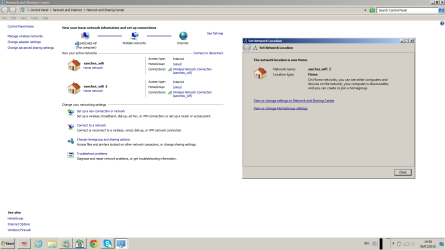
Hello guys,I just don't know what is happening to my wi fi connection.. Somehow,my original wi fi spot, of which I'd never had any kind of problem, had been doubled, I mean, my original wi fi connection's name is: "sanches_wifi", and out of the blue, my computer started to connect to a spot that is called ''sanches_wifi 2'', and also ''sanches_wifi 3".The problem is, I can only get real internet access when my computer connects to the original wi fi spot...I've tried everything to delete these fake spots...I eventually merged them in my original connection, but the only thing I got was an unstable connection, it would keep getting signal and then all of a sudden, it would stop and then it would go back live again.It's a stife for me to get my pc to connect to the original wi fi spot, sometimes when I disable the network connection (in the ''change adapter settings'' panel) and right after I enable it, I can get a normal connection.Anyway, here's a picture of the original connection with its ''double''.How can I get rid of these connections? Would it be a problem with my router?Thank you guys!
My Computer
At a glance
windows 7 home premium 64-bit (6.1,build 7601)
- Computer type
- PC/Desktop
- Computer Manufacturer/Model Number
- HP
- OS
- windows 7 home premium 64-bit (6.1,build 7601)
 nobody?


