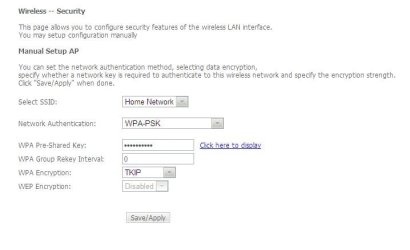
I think you can see the password by accessing your Modem/Router via the Default Gateway. The Gateway Address is generally 192.168.1.1.
You shall be asked for username and password at the entrance. This varies depending upon the Modem/Router Manufacture. It is generally "admin and admin" or "admin and password".
Once there you can either see the password right away or checking the Check-box below the Password Text-box on the WiFi Page.
Lastly if the Gateway Address or the Username and Password are different than what I have given then you can easily get the right ones from your Internet Service Provider.
My Computer
At a glance
Windows 7 Pro with SP1 32bit2 gigs of RAMIntel(R) 82845G/GL/GE/PE/GV Graphics Controller
Computer Manufacturer/Model Number
Custom Built
OS
Windows 7 Pro with SP1 32bit
Motherboard
Intel D845GVS1 X86-based PC
Memory
2 gigs of RAM
Graphics Card(s)
Intel(R) 82845G/GL/GE/PE/GV Graphics Controller
Sound Card
Realtek AC'97 Audio
Monitor(s) Displays
Samsung SyncMaster 931BF Black 19" LCD Monitor
Screen Resolution
1280X960
Hard Drives
1. SAMSUNG SP0822N ATA Device ~ 80 GigaBytes
2. Seagate FreeAgent Go USB Device ~ 500 GigaBytes
Somethings not right there, doesn't "Security Type: No authentication (Open)" mean there is no password? If thats correct, thats why its grayed out, there isn't one.
My Computer
At a glance
Windows 10 Education 64 bitAMD Phenom II X4 980 Black Edition Deneb 3.7GHz8GB 4GBx2 Kingston PC10600 DDR3 1333 MemoryZotac NVIDIA Geforce GT640 2 Gig DDR3 PCIe
Computer type
PC/Desktop
Computer Manufacturer/Model Number
Home Built
OS
Windows 10 Education 64 bit
CPU
AMD Phenom II X4 980 Black Edition Deneb 3.7GHz
Motherboard
Asus M4N68T-M V2 µATX Motherboard
Memory
8GB 4GBx2 Kingston PC10600 DDR3 1333 Memory
Graphics Card(s)
Zotac NVIDIA Geforce GT640 2 Gig DDR3 PCIe
Sound Card
VIA VT1708s High Definition Audio 8-channel Onboard
Somethings not right there, doesn't "Security Type: No authentication (Open)" mean there is no password? If thats correct, thats why its grayed out, there isn't one.
I know that it may be weird, but we've typed our OP just the way it is. If you like, we can attach a screenshot of the WiFi dialog window. We may be able to do it by next Saturday.
I think you can see the password by accessing your Modem/Router via the Default Gateway. The Gateway Address is generally 192.168.1.1.
You shall be asked for username and password at the entrance. This varies depending upon the Modem/Router Manufacture. It is generally "admin and admin" or "admin and password".
We're just wondering: If Windows 7 is saving the password on our computer, then surely there's a way for us to see that saved password. It doesn't seem necessary to have to go to the Modem/Router page (the gateway address).
When you say "check-box below the Password Text-box on the WiFi Page", do you mean the same page that my original post refers to? If so, that check box CANNOT be checked. This is why I wrote it is GREYED OUT.
Although I can't directly answer your query, it is easy enough to find out the password.
If your ISP provided you with your router, the wireless password should be on a sticker attached to the router.
Go to Control Panel>Network & Internet>Manage Wireless Networks and double-click your router icon then click the Security tab and enable Show Characters.
If a password was set that box wouldn't be grayed out. No authentication means no password. Are you sure your connected to your network and not somebody else's with the same SSID?
My Computer
At a glance
Windows 10 Education 64 bitAMD Phenom II X4 980 Black Edition Deneb 3.7GHz8GB 4GBx2 Kingston PC10600 DDR3 1333 MemoryZotac NVIDIA Geforce GT640 2 Gig DDR3 PCIe
Computer type
PC/Desktop
Computer Manufacturer/Model Number
Home Built
OS
Windows 10 Education 64 bit
CPU
AMD Phenom II X4 980 Black Edition Deneb 3.7GHz
Motherboard
Asus M4N68T-M V2 µATX Motherboard
Memory
8GB 4GBx2 Kingston PC10600 DDR3 1333 Memory
Graphics Card(s)
Zotac NVIDIA Geforce GT640 2 Gig DDR3 PCIe
Sound Card
VIA VT1708s High Definition Audio 8-channel Onboard
To cut the long story short here is the screenshot from my Router's WiFi page reached after entering through the Default Gateway.
This should make everything clear. Please remember that Modems/Routers from different manufacturers may have slightly different GUIs as I had said in my earlier post.
Last edited:
My Computer
At a glance
Windows 7 Pro with SP1 32bit2 gigs of RAMIntel(R) 82845G/GL/GE/PE/GV Graphics Controller
Computer Manufacturer/Model Number
Custom Built
OS
Windows 7 Pro with SP1 32bit
Motherboard
Intel D845GVS1 X86-based PC
Memory
2 gigs of RAM
Graphics Card(s)
Intel(R) 82845G/GL/GE/PE/GV Graphics Controller
Sound Card
Realtek AC'97 Audio
Monitor(s) Displays
Samsung SyncMaster 931BF Black 19" LCD Monitor
Screen Resolution
1280X960
Hard Drives
1. SAMSUNG SP0822N ATA Device ~ 80 GigaBytes
2. Seagate FreeAgent Go USB Device ~ 500 GigaBytes
Don't know why it's greyed out but accessing your Router's WiFi page is probably the best way but you can also try WirelessKeyView from a computer that's set correctly. There is a note about Windows 7 though towards the end of the page above the command line options, but it worked for me without problems.
I would also consider upgrading your Security Type to WPA2 AES or at least WPA if all your devices support it because these days WEP is hardly better than no security.
Somethings not right there, doesn't "Security Type: No authentication (Open)" mean there is no password? If thats correct, thats why its grayed out, there isn't one.