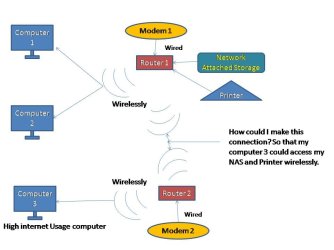
How could I link 2 routers wirelessly(lan)with 2 different connections

devower

New member
Local time
4:56 PM
Messages
32
I have 2 routers and 2 modems,

Computer 1 and and 2 are running on the same router as they have low internet usage.

Computer usually does large amount of downloading and streamings and requires a seperate connection as not to lag the browsing for computer 1 and 2.

How could I link router 1 and 2 together so that my computer 3 could deposit files that are downloaded over the internet through wireless lan into my NAS.

Needed this help so that I do not need to maually switch my internet access to the different routers.

Or are there any devices that can bridge 2 routers with 2 different network connections over the same lan network.

attachment.php
 

Attachments

  • 111.jpg
    111.jpg
    45 KB · Views: 797

My Computer My Computer

At a glance

Windows 7 Professional 32bitP88004 GBATI HD 4570
Computer Manufacturer/Model Number
ASUSTek / F6VE
OS
Windows 7 Professional 32bit
CPU
P8800
Motherboard
ASUS Notebook series
Memory
4 GB
Graphics Card(s)
ATI HD 4570
Monitor(s) Displays
ASUS
Hard Drives
ST9500325AS ATA
Hi devower,

If you want it all wireless, I'd suggest wireless Bridging. The second router must support DD-WRT.
Please see this Tutorial.
 

My Computer My Computer

At a glance

Win7 & Win8 64bitIntel i5
Computer Manufacturer/Model Number
Lenovo Desktop/Samsung Laptop
OS
Win7 & Win8 64bit
CPU
Intel i5
Internet Speed
Charter-20 Mbps
Antivirus
Avast
Browser
FF, IE9 and Chrome
Hi 2xg,

DD-WRT I suppose is One router with DHCP disabled and one enabled.

But what I wanted was to connect the 2 routers together with both router's DHCP server enabled.
 

My Computer My Computer

At a glance

Windows 7 Professional 32bitP88004 GBATI HD 4570
Computer Manufacturer/Model Number
ASUSTek / F6VE
OS
Windows 7 Professional 32bit
CPU
P8800
Motherboard
ASUS Notebook series
Memory
4 GB
Graphics Card(s)
ATI HD 4570
Monitor(s) Displays
ASUS
Hard Drives
ST9500325AS ATA
Since there are only a couple of computers involved, it will be a lot easier if you only have one broadband connection, meaning one router and one subnet if all computers are on the same location and distance is not an issue. Just subscribed and add more bandwidth from your ISP and setup QoS, also use a heavy duty Dual Band Wireless Router. I think this will be a more feasible solution for you.

On the other hand, if you want to go this route, having 2 diff broadbands and 2 diff locations and would like to share files, have a read on Site to Site VPN using OpenVPN, it can get a complicated though.

Edit: Not too make things complicated, I almost forgot, the good thing about the NAS is... you can remotely access this from anywhere. I'd go with my first suggestion. :)
 
Last edited:

My Computer My Computer

At a glance

Win7 & Win8 64bitIntel i5
Computer Manufacturer/Model Number
Lenovo Desktop/Samsung Laptop
OS
Win7 & Win8 64bit
CPU
Intel i5
Internet Speed
Charter-20 Mbps
Antivirus
Avast
Browser
FF, IE9 and Chrome
research 'Broadband Aggregator'...
 

My Computer My Computer

At a glance

Win7 Home Premium x64 W10Pro&HomeA12 9720p 4+8 TurionII M5206GB 8GBR7
Computer type
Laptop
Computer Manufacturer/Model Number
HP 17-ak0xx, dv7 3173nr
OS
Win7 Home Premium x64 W10Pro&Home
CPU
A12 9720p 4+8 TurionII M520
Motherboard
HP 3839
Memory
6GB 8GB
Graphics Card(s)
R7
Monitor(s) Displays
24" sa550
Screen Resolution
1600x900 1920x1080
Mouse
Logitechx2
Internet Speed
120Mb/s down 12up
Simplest thing to do, looking at the diagram and without asking all sorts of technical details, would be to use VPN tunnelling between the two routers - if they'll support it (on the assumption there are two routers because they're not situated adjacently).
 

My Computer My Computer

At a glance

W7 x64Intel Q9300 2.5Ghz Quad LGA775 (Would like Q9...4Gb OCZ Gold 1,333MhzPalit HD4850 O/C Sonic 512Mb DDR3, Dual DViD's
Computer Manufacturer/Model Number
Custom built machine
OS
W7 x64
CPU
Intel Q9300 2.5Ghz Quad LGA775 (Would like Q9650)
Motherboard
Gigabyte GA-EP45T-UD3R (F6 Bios)
Memory
4Gb OCZ Gold 1,333Mhz
Graphics Card(s)
Palit HD4850 O/C Sonic 512Mb DDR3, Dual DViD's
Sound Card
Azalia to twin Samson 50w Studio Monitors
Monitor(s) Displays
Twin Dell (E-IPS) U2311H 23.6" Screens
Screen Resolution
1920 x 1080 @ 60Hz
Hard Drives
Crucial M4 SSD, archives on twin Western Digital Caviar Black WD2002FAEX, 2TB, 7200rpm HDD's, Samsung Ritemaster CD/DVD Burner...
PSU
OCZ 600w
Case
Lian-Li PC8 acoustifoamed' aluminium tower
Cooling
Scythe 140mm Zipang
Keyboard
Cherry PS/2 custom model
Mouse
Lenovo USB laser "Thinkpad" Mouse
Internet Speed
ADSL2+ @14Mbps downstream & Cat6 Gigabit Ethernet
Antivirus
NOD32
Browser
Opera
Other Info
Silicon Dust HD Homerun Dual FTA (Ethernet) TV Tuners, Dray Tek Vigor 2850Vn router and 8x HP Gigabit Switch. Lian-Li CR26 Card Reader, Canon MF4430 iSensys laser printer/scanner.
Ahh I see, because I have 2 connections one Fibre and 1 Cable with different providers, thats why I am trying to use both connections assign to different devices and computers to maximise the usage.

VPN will greatly cause slowdown to the transfering of file (Limitation by providers), compared to lan.
Thats why I am trying to link both up since both routers are in the same location, great to have them in the same lan network, could speed things up.
 

My Computer My Computer

At a glance

Windows 7 Professional 32bitP88004 GBATI HD 4570
Computer Manufacturer/Model Number
ASUSTek / F6VE
OS
Windows 7 Professional 32bit
CPU
P8800
Motherboard
ASUS Notebook series
Memory
4 GB
Graphics Card(s)
ATI HD 4570
Monitor(s) Displays
ASUS
Hard Drives
ST9500325AS ATA
In Post# 4, pls read the first option for you, I think that would work great for you.
 

My Computer My Computer

At a glance

Win7 & Win8 64bitIntel i5
Computer Manufacturer/Model Number
Lenovo Desktop/Samsung Laptop
OS
Win7 & Win8 64bit
CPU
Intel i5
Internet Speed
Charter-20 Mbps
Antivirus
Avast
Browser
FF, IE9 and Chrome
Ahh I see, because I have 2 connections one Fibre and 1 Cable with different providers, thats why I am trying to use both connections assign to different devices and computers to maximise the usage.

Having that information changes things.

You don't even need two routers.

Go for a Dual WAN router that supports both your inbound connections.

Back it with switches/wifi repeaters as necessary.

Draytek, Billion, and Cisco, are most likely to have matching products.
 

My Computer My Computer

At a glance

W7 x64Intel Q9300 2.5Ghz Quad LGA775 (Would like Q9...4Gb OCZ Gold 1,333MhzPalit HD4850 O/C Sonic 512Mb DDR3, Dual DViD's
Computer Manufacturer/Model Number
Custom built machine
OS
W7 x64
CPU
Intel Q9300 2.5Ghz Quad LGA775 (Would like Q9650)
Motherboard
Gigabyte GA-EP45T-UD3R (F6 Bios)
Memory
4Gb OCZ Gold 1,333Mhz
Graphics Card(s)
Palit HD4850 O/C Sonic 512Mb DDR3, Dual DViD's
Sound Card
Azalia to twin Samson 50w Studio Monitors
Monitor(s) Displays
Twin Dell (E-IPS) U2311H 23.6" Screens
Screen Resolution
1920 x 1080 @ 60Hz
Hard Drives
Crucial M4 SSD, archives on twin Western Digital Caviar Black WD2002FAEX, 2TB, 7200rpm HDD's, Samsung Ritemaster CD/DVD Burner...
PSU
OCZ 600w
Case
Lian-Li PC8 acoustifoamed' aluminium tower
Cooling
Scythe 140mm Zipang
Keyboard
Cherry PS/2 custom model
Mouse
Lenovo USB laser "Thinkpad" Mouse
Internet Speed
ADSL2+ @14Mbps downstream & Cat6 Gigabit Ethernet
Antivirus
NOD32
Browser
Opera
Other Info
Silicon Dust HD Homerun Dual FTA (Ethernet) TV Tuners, Dray Tek Vigor 2850Vn router and 8x HP Gigabit Switch. Lian-Li CR26 Card Reader, Canon MF4430 iSensys laser printer/scanner.
Back
Top