How do change active to boot

ArmandoR

New member
Local time
1:13 PM
Messages
10
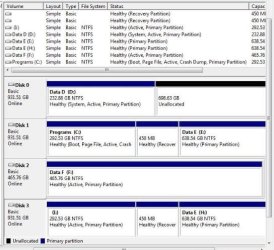
Disk 2 - C Drive is (original drive) - status Boot

Disk 4 - I Drive is (clone of Disk 2) - status Active

How do I make Disk 4 - I Drive - status Boot?

I want to replace Disk 2 with Disk 4

I replaced Disk 2 with Disk 4 and received an error 0xc000000e


Thanks in advance.
 

My Computer

Computer type
PC/Desktop
OS
Winows 7 Home Premium x64
Memory
6GB
Hard Drives
Western Digital 1TB 7200RPM
Antivirus
Norton
Browser
Chrome
Try running startup repair on Disk 4, you need to have the system files written on Disk 4.
 

My Computer

Computer type
PC/Desktop
Computer Manufacturer/Model Number
Skylake Special #666
OS
Windows 10 Pro x64
CPU
Intel Core i7 6700K
Motherboard
Asus Sabertooth Z170 Mark 1
Memory
GSkill TridentZ RGB 16GB 3600 16-16-16-36
Graphics Card(s)
EVGA GTX 980 Ti SC x2
Sound Card
Realtek High Definition
Monitor(s) Displays
AOC G2460PG
Screen Resolution
1920 x 1080 144Hz
Hard Drives
Samsung 860 Pro 256GB, Seagate Barracuda 4TB x2
PSU
EVGA 1000 P2, EVGA White Custom Braided Cables
Case
Corsair Vengeance C70 Gunmetal Black
Cooling
Corsair H100i v2, Corsair ML120 x2, Thermal Grizzly Kryonaut
Keyboard
Logitech G910 Orion Spectrum
Mouse
Logitech G700s
Internet Speed
Verizon Fios Quantum Gateway 75/75
Antivirus
Windows Defender, Malwarebytes Free 3.8.3
Browser
Chrome
Other Info
Corsair SP120 x4, LG Blu-ray Drive, Durabrand HT-395 100 Watt Dolby Digital Amp, Corsair H2100 Wireless 7.1 Headset
I initially tried to repair it with AOMEI boot repair. That didn't work.

When I tried to boot up from the Repair Disc Window 7 64bit I get to a screen that says Windows 7 Home Premium at the bottom and the screen just flickers non stop. It seems as though it's stuck there booting off the Repair CD.

The same thing happens when I try to boot up without the repair CD.
 

My Computer

Computer type
PC/Desktop
OS
Winows 7 Home Premium x64
Memory
6GB
Hard Drives
Western Digital 1TB 7200RPM
Antivirus
Norton
Browser
Chrome
Disk 1 (original drive) has C: and E: drives. The C: drive has: Boot, Pagefile, Active Crashdump, Primary Partition

Disk 3 (clone of Disk 1) has I: and H: drives. The I: drive has Active, Primary partition - It doesn't have the same characteristics as Disk 1. But, it's a clone. Why isn't it the exact same?

Disk 0 (Original Drive) had D: drive has System, Active, Primary Partition

When i used my repair disc it shows the D: drive with the System - File Size 0. How do i get the boot files on Disk 3 (clone drive)?

Also, my computer tried to bootup. But, as I stated in an earlier post the screen just flickers non-stop. I never got to the screen where you can login.

In another forum a person stated that it seems like my original boot process is:
BIOS-> Disk 0 ( D: ) -> BOOTMGR > \Boot\BCD -> Disk 1 ( C: ) ->c:\Windows\System32\WINLOAD.EXE->Windows

Any help or suggestions would be greatly appreciated. Should i reclone Disk 1 (original drive) on to my new HDD again?

Thanks in advance.
 

Attachments

  • Dsik Management-min.jpg
    Dsik Management-min.jpg
    42.2 KB · Views: 16

My Computer

Computer type
PC/Desktop
OS
Winows 7 Home Premium x64
Memory
6GB
Hard Drives
Western Digital 1TB 7200RPM
Antivirus
Norton
Browser
Chrome
Your layout is quite a mess, this is what happens when you don`t unplug all other drives when installing windows.

Your system files are on D and it`s marked Active, F is marked Active, and I is marked Active, all wrong.

Why is C labeled Programs ? Is that not the Windows drive ?
 

My Computer

Computer type
PC/Desktop
Computer Manufacturer/Model Number
Skylake Special #666
OS
Windows 10 Pro x64
CPU
Intel Core i7 6700K
Motherboard
Asus Sabertooth Z170 Mark 1
Memory
GSkill TridentZ RGB 16GB 3600 16-16-16-36
Graphics Card(s)
EVGA GTX 980 Ti SC x2
Sound Card
Realtek High Definition
Monitor(s) Displays
AOC G2460PG
Screen Resolution
1920 x 1080 144Hz
Hard Drives
Samsung 860 Pro 256GB, Seagate Barracuda 4TB x2
PSU
EVGA 1000 P2, EVGA White Custom Braided Cables
Case
Corsair Vengeance C70 Gunmetal Black
Cooling
Corsair H100i v2, Corsair ML120 x2, Thermal Grizzly Kryonaut
Keyboard
Logitech G910 Orion Spectrum
Mouse
Logitech G700s
Internet Speed
Verizon Fios Quantum Gateway 75/75
Antivirus
Windows Defender, Malwarebytes Free 3.8.3
Browser
Chrome
Other Info
Corsair SP120 x4, LG Blu-ray Drive, Durabrand HT-395 100 Watt Dolby Digital Amp, Corsair H2100 Wireless 7.1 Headset
I didn't do the install of Windows 7.

It was done by a tech service department at a computer store in 2009. They did a Windows 7 upgrade from XP. I didn't use this computer for several years. I'm trying to get Disk 1 (Original Drive) cloned.

All I did was try to clone Disk 1 (Original Drive).

Before I attempted to clone Disk 1 (Original Drive). I changed the label of several drives from New Volume to Data (drive letter). I wanted to keep track in case something went wrong.

I plugged in Disk 3 (clone drive of Disk 1) for the screen shot of all the hard drives.

Disk 3 (clone drive) does not bootup when I put it in and remove Disk 1 (Original Drive)
 

My Computer

Computer type
PC/Desktop
OS
Winows 7 Home Premium x64
Memory
6GB
Hard Drives
Western Digital 1TB 7200RPM
Antivirus
Norton
Browser
Chrome

My Computers

System One System Two

  • Computer type
    PC/Desktop
    OS
    7 X64
    CPU
    i5 8400
    Motherboard
    gigabyte b365m ds3h
    Memory
    2x8gb 3200mhz
    Hard Drives
    various
    PSU
    pure power 11 400w cm
    Case
    Coolermaster
    Cooling
    cryorig m9i
  • Computer type
    PC/Desktop
    OS
    7x64
    CPU
    g5400
    Motherboard
    ga b365m ds3h
    Memory
    8gb ddr4 2400
    PSU
    xfx pro 450w
Thank you. I will try that.
 

My Computer

Computer type
PC/Desktop
OS
Winows 7 Home Premium x64
Memory
6GB
Hard Drives
Western Digital 1TB 7200RPM
Antivirus
Norton
Browser
Chrome
Back
Top