Solved How do delete scenes from a mp4/mkv/etc while keeping the subtitles...

fahadhum

New member
Member
VIP
Local time
8:55 AM
Messages
201
Location
Doha Qatar
I have found a software that Deletes any scene i want from a movie & it worked like a charm.The problem is , when i drag and drop the SRT Subtitles file over the CONVERTED mp4/mkv file,the subtitles get out of order.It makes sense , i know...

So next thing i thought that i will use a software to hard-code SRT Subtitles in to the mp4 / mkv movie files & then use this software to Edit the scenes..

I saw this video on youtube of this guy explaining how to hard-code subtitles in to movie files using VLC.I followed his instructions.When i pressed START for conversion,my system started making a HUGE NOISE as if an Airplane is about to take off and the sound remains as long as the file is set on conversion , which takes around half an hour or so.

Now i have a gaming RIG and i can not bear that sound which could be damaging my Nvidia Gtx Graphics card and other hardware IN THE LONG RUN. Because i have like may be 200 or more movies & if you do the math.That means that for almost 200 times , my system would be running like that airplane and God knows what it will do to my Card :)

So,i am looking for a way to easily hard-code the subtitles and then Delete the scenes which i do not want....
What do i need to do....
 

My Computer My Computer

At a glance

Windows 7 Home Premium 64 biti716 GBNvidia GFORCE GTX 960 2 GB
Computer type
PC/Desktop
Computer Manufacturer/Model Number
Asus
OS
Windows 7 Home Premium 64 bit
CPU
i7
Motherboard
Gigabyte H97-D3H
Memory
16 GB
Graphics Card(s)
Nvidia GFORCE GTX 960 2 GB
Screen Resolution
1280*720
Cooling
CORSAIR Liquid Fan + One Built in FAN
Antivirus
Avast Free Anti Virus 2015
Browser
Google Chrome
I think you may be looking around the problem, your machine should not be making excessive noises and if it is then its likely something is wrong
My best guess is when you put the machine under stress (encoding video) your cooling system/fans will speed up to cope with the additional heat and that is where the noise is coming from

If I were you I would try to ascertain the source of the noise and look into replacing the worn component which will probably be a cooling fan of some description or the CPU cooler
 

My Computer My Computer

At a glance

Win7 Ultimate X64Intel i5 3570K8GB DDR3 1600Onboard
Computer type
PC/Desktop
Computer Manufacturer/Model Number
Pauly Special
OS
Win7 Ultimate X64
CPU
Intel i5 3570K
Motherboard
Gigabyte Z77X-DS3H
Memory
8GB DDR3 1600
Graphics Card(s)
Onboard
Sound Card
Onboard
Screen Resolution
1280x1024
Hard Drives
Samsung 840 Evo SSD (OS)
1TB Spinner (Data)
PSU
800W Arctic
Case
Cooler Master
Cooling
3x120mm Fans
Keyboard
MS Wireless
Mouse
MS Wireless
Internet Speed
20M
hmm

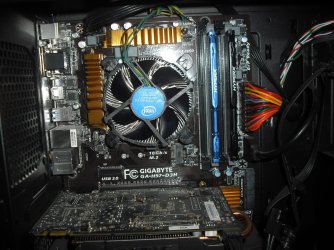
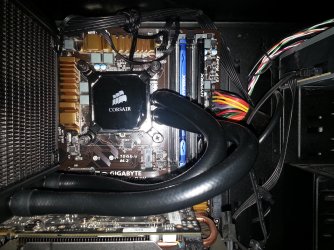
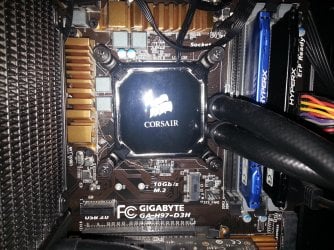
I see.I would like to give you some information regarding my RIG.I removed the Stock Intel FAN (Kindly See Picture # 1 ) and got a Liquid Cooling Fan by a company named CORSAIR (See Attached Picture # 2 & 3)

This was a suggestion made to me by the Guy whom i bought my assembled RIG from.I was having some heat issues initially and my RIG was lying below my computer table which was also a casue of the overheating but i thought , the stock Cooling fan also was the cause.So,for best results and not getting worried about overheating while gaming,i bought this CORSAIR Liquid Cooling fan.The Shop guy said that my RIG can have 3 fans in Total & with this Liquid CORSAIR Liquid Cooling fan installed,i wouldn't need an other fan according to him.

Also, I do not hear that HUGE Sound during gaming or during watching HD videos online on youtube or any other website. Yes,the sound starts to increase initially when a video or website is about to be opened but the sound quickly quiets down in a few seconds.
Also,During gaming,a slight voice can be heard which is nothing compared to that sound that came during that process of hard-cording Subtitles in to a movie file.

My System Specs are :

Processor > Intel(R) Core (TM) i7 - 4790 CPU @ 3.60GHz 3.60
RAM > 16 GB
System Type > 64 Bit Operating System
Graphics Card > Nvidia GTX 960 2 GB
 

Attachments

  • Picture # 1.JPG
    Picture # 1.JPG
    294.9 KB · Views: 0
  • Picture # 2.jpg
    Picture # 2.jpg
    870.5 KB · Views: 0
  • Picture # 3.jpg
    Picture # 3.jpg
    988.3 KB · Views: 0

My Computer My Computer

At a glance

Windows 7 Home Premium 64 biti716 GBNvidia GFORCE GTX 960 2 GB
Computer type
PC/Desktop
Computer Manufacturer/Model Number
Asus
OS
Windows 7 Home Premium 64 bit
CPU
i7
Motherboard
Gigabyte H97-D3H
Memory
16 GB
Graphics Card(s)
Nvidia GFORCE GTX 960 2 GB
Screen Resolution
1280*720
Cooling
CORSAIR Liquid Fan + One Built in FAN
Antivirus
Avast Free Anti Virus 2015
Browser
Google Chrome
I still think it would be good to determine where the noise is coming from.
The thing you should understand is that playing games uses a set amount of resources available on your machine but mostly stresses your gpu
Encoding video will push your cpu to near maximum as it will try to get the job done as fast as possible so its possible your rad fan is only spinning at full speed when processing your video files which is probably the noise you are hearing.

Try monitoring the temps of your machine and then start and video and see how they react
I am no cooling expert and have never had a liquid setup so am not sure about that but will see if any others have any input
 

My Computer My Computer

At a glance

Win7 Ultimate X64Intel i5 3570K8GB DDR3 1600Onboard
Computer type
PC/Desktop
Computer Manufacturer/Model Number
Pauly Special
OS
Win7 Ultimate X64
CPU
Intel i5 3570K
Motherboard
Gigabyte Z77X-DS3H
Memory
8GB DDR3 1600
Graphics Card(s)
Onboard
Sound Card
Onboard
Screen Resolution
1280x1024
Hard Drives
Samsung 840 Evo SSD (OS)
1TB Spinner (Data)
PSU
800W Arctic
Case
Cooler Master
Cooling
3x120mm Fans
Keyboard
MS Wireless
Mouse
MS Wireless
Internet Speed
20M
The stock fans that come with Corsair AIO coolers are very noisy in my opinion. When they are run full speed, like under video editing they will be very noisy.

On my Grandpa computer I use a H80i. I replace the fans with two Noctua fans push/pull and the noise went away. I run the fans at full speed all the time and they are quiet.

Amazon.com: noctua - Computers & Accessories: Electronics
 

My Computer My Computer

At a glance

Windows 10 Pro. 64/ version 1709 Windows 7 Pr...Intel i7-6800K @ 4.3Corsair Platinum 16 gig @2400EVGA GTX 1070 OC
Computer type
PC/Desktop
Computer Manufacturer/Model Number
Home made Desktop
OS
Windows 10 Pro. 64/ version 1709 Windows 7 Pro/64
CPU
Intel i7-6800K @ 4.3
Motherboard
ASUS X-99 Deluxe II
Memory
Corsair Platinum 16 gig @2400
Graphics Card(s)
EVGA GTX 1070 OC
Monitor(s) Displays
Asus 27" LED LCD/VE278Q
Screen Resolution
1920-1080 or 1280-720 HDMI
Hard Drives
INTEL SSD 730-240 Gb Sata 3.0/
PSU
EVGA Platium 1200W
Case
Phanteks Luxe Tempered Glass 8 fans/ one radiator
Cooling
XSPC/ Water Cooled CPU
Keyboard
Das 4 Professional
Mouse
Logitech M705/MX Anywhere 2-S
Internet Speed
100 mbits
Antivirus
Microsoft Security Essentials/ Malwarebytes Premium 3.0/ SAS
Browser
I.E. 11 default/Firefox/ ISP Time Warner Cable/Spectrum
Other Info
LG BluRay Burner/
Sound system-KLipsch-THX/
Icy Dock ssd Hot Swap bays.
Last edited:

My Computer My Computer

At a glance

W10 Pro x64, W7 Pro x64 in VMwarei7 2600K @ 4.4GHz8GB Mushkin @ 1600MHzNvidia GTX 750 Ti
Computer type
PC/Desktop
Computer Manufacturer/Model Number
self build
OS
W10 Pro x64, W7 Pro x64 in VMware
CPU
i7 2600K @ 4.4GHz
Motherboard
MSI Z68A-GD80
Memory
8GB Mushkin @ 1600MHz
Graphics Card(s)
Nvidia GTX 750 Ti
Monitor(s) Displays
27" Benq + 27" LG
Screen Resolution
1080p
Hard Drives
500GB 850 Evo SSD + 3 * 2TB Seagate
PSU
EVGA 650 GS modular
Case
Antec 300
Cooling
Seidon 120V v2
Internet Speed
62/18 Mbps
Antivirus
Defender (W10) + MSE (W7)
Browser
Firefox
Thank you ...

You can hard code subs on mp4 with Handbrake
https://handbrake.fr/

Avidemux set to copy does lossless mp4 edits, if the cuts are on an I-frame (other edits need recode)
Avidemux - Main Page

Thank you.I just installed and used Handbrake.It was very easy to use and i didn't heard a really loud noise during the convertion process.

However,i noticed that the Output file size has increased tremendously.The Movie File size that i used had a size of 1.59 GB.Where as the converted Movie File size was 2.51 GB.

Can't i convert the file and get the same file size or perhaps slightly more file size the original File... ?
 

My Computer My Computer

At a glance

Windows 7 Home Premium 64 biti716 GBNvidia GFORCE GTX 960 2 GB
Computer type
PC/Desktop
Computer Manufacturer/Model Number
Asus
OS
Windows 7 Home Premium 64 bit
CPU
i7
Motherboard
Gigabyte H97-D3H
Memory
16 GB
Graphics Card(s)
Nvidia GFORCE GTX 960 2 GB
Screen Resolution
1280*720
Cooling
CORSAIR Liquid Fan + One Built in FAN
Antivirus
Avast Free Anti Virus 2015
Browser
Google Chrome
Handbrake settings suggestions -

picture tab -
anamorphic none (ie square pixels), keep aspect ratio = output file has same pixel size

video tab -
quality to R = less compression (larger filesize), quality to L = more compression (smaller filesize)
or set bitrate - R click original file > properties > details > check bitrate > set new bitrate to same value
and 2 pass, turbo 1st pass

audio -
mixdown = stereo
 

My Computer My Computer

At a glance

W10 Pro x64, W7 Pro x64 in VMwarei7 2600K @ 4.4GHz8GB Mushkin @ 1600MHzNvidia GTX 750 Ti
Computer type
PC/Desktop
Computer Manufacturer/Model Number
self build
OS
W10 Pro x64, W7 Pro x64 in VMware
CPU
i7 2600K @ 4.4GHz
Motherboard
MSI Z68A-GD80
Memory
8GB Mushkin @ 1600MHz
Graphics Card(s)
Nvidia GTX 750 Ti
Monitor(s) Displays
27" Benq + 27" LG
Screen Resolution
1080p
Hard Drives
500GB 850 Evo SSD + 3 * 2TB Seagate
PSU
EVGA 650 GS modular
Case
Antec 300
Cooling
Seidon 120V v2
Internet Speed
62/18 Mbps
Antivirus
Defender (W10) + MSE (W7)
Browser
Firefox
Thanks ...

Handbrake settings suggestions -

picture tab -
anamorphic none (ie square pixels), keep aspect ratio = output file has same pixel size

video tab -
quality to R = less compression (larger filesize), quality to L = more compression (smaller filesize)
or set bitrate - R click original file > properties > details > check bitrate > set new bitrate to same value
and 2 pass, turbo 1st pass

audio -
mixdown = stereo

Will convert again with these settings & let you know....
 

My Computer My Computer

At a glance

Windows 7 Home Premium 64 biti716 GBNvidia GFORCE GTX 960 2 GB
Computer type
PC/Desktop
Computer Manufacturer/Model Number
Asus
OS
Windows 7 Home Premium 64 bit
CPU
i7
Motherboard
Gigabyte H97-D3H
Memory
16 GB
Graphics Card(s)
Nvidia GFORCE GTX 960 2 GB
Screen Resolution
1280*720
Cooling
CORSAIR Liquid Fan + One Built in FAN
Antivirus
Avast Free Anti Virus 2015
Browser
Google Chrome
fahadhum do you or do you not still have the noise?

Are you or are you not still concerned with the noise?
 

My Computer My Computer

At a glance

Windows 10 Pro. 64/ version 1709 Windows 7 Pr...Intel i7-6800K @ 4.3Corsair Platinum 16 gig @2400EVGA GTX 1070 OC
Computer type
PC/Desktop
Computer Manufacturer/Model Number
Home made Desktop
OS
Windows 10 Pro. 64/ version 1709 Windows 7 Pro/64
CPU
Intel i7-6800K @ 4.3
Motherboard
ASUS X-99 Deluxe II
Memory
Corsair Platinum 16 gig @2400
Graphics Card(s)
EVGA GTX 1070 OC
Monitor(s) Displays
Asus 27" LED LCD/VE278Q
Screen Resolution
1920-1080 or 1280-720 HDMI
Hard Drives
INTEL SSD 730-240 Gb Sata 3.0/
PSU
EVGA Platium 1200W
Case
Phanteks Luxe Tempered Glass 8 fans/ one radiator
Cooling
XSPC/ Water Cooled CPU
Keyboard
Das 4 Professional
Mouse
Logitech M705/MX Anywhere 2-S
Internet Speed
100 mbits
Antivirus
Microsoft Security Essentials/ Malwarebytes Premium 3.0/ SAS
Browser
I.E. 11 default/Firefox/ ISP Time Warner Cable/Spectrum
Other Info
LG BluRay Burner/
Sound system-KLipsch-THX/
Icy Dock ssd Hot Swap bays.
No...The noise is quiter this time....With Handbrake...

fahadhum do you or do you not still have the noise?

Are you or are you not still concerned with the noise?

The noise is no longer there.By using handbrake (as apposed to Hard-coding subtitles via VLC ) , A VERY LIGHT NOISE comes out which doesn't seems to be a problem.

Also,i just realized a few days earlier that i have not cleaned my RIG's inside , PROPERLY i.e v.i.a using a Compressed Air Can or similar.Which i plan to do tomorrow.

I bought my System in like , February & i tried to clean it using my own blown air :) or using some cloth.But of course , that is not enough.And there will be dust in many unreachable corners of the system.

I am really not that concerned after installing this Corsair FAN ..Trust me , the stock Fan was not good.good. Cuz my system's case was burning after i was done GAMING.But not anymore.May be , it is also due to the fact that i do not keep my system in a closed space.I am using my Mom's Table space just to give roam for my 32 inch LED LCD T.V which i can not use on the same computer table with my RIG :)
(Kindly see the attached Picture)
 

Attachments

  • 1.jpg
    1.jpg
    680 KB · Views: 1

My Computer My Computer

At a glance

Windows 7 Home Premium 64 biti716 GBNvidia GFORCE GTX 960 2 GB
Computer type
PC/Desktop
Computer Manufacturer/Model Number
Asus
OS
Windows 7 Home Premium 64 bit
CPU
i7
Motherboard
Gigabyte H97-D3H
Memory
16 GB
Graphics Card(s)
Nvidia GFORCE GTX 960 2 GB
Screen Resolution
1280*720
Cooling
CORSAIR Liquid Fan + One Built in FAN
Antivirus
Avast Free Anti Virus 2015
Browser
Google Chrome
Good news , This time....

Handbrake settings suggestions -

picture tab -
anamorphic none (ie square pixels), keep aspect ratio = output file has same pixel size

video tab -
quality to R = less compression (larger filesize), quality to L = more compression (smaller filesize)
or set bitrate - R click original file > properties > details > check bitrate > set new bitrate to same value
and 2 pass, turbo 1st pass

audio -
mixdown = stereo

Will convert again with these settings & let you know....

Well , after applying your settings.The results are satisfactory.As the Original File Size of the Movie File that i converted for testing was 1.35 GB & the resulting output Movie File size is 1.46 GB.

However ..huh ...I saw some drop in the video quality.I am the kind of guy who likes to keep things in a NEXT TO PERFECT QUALITY :) Call me weird.But that's how i am.

I noticed the drop and trust me , i can tell.The facial features of the actors in the movie as well as of the objects and things in the movie were choppy (slightly).

I then opened the original Movie File and i quickly noticed the difference....
 

My Computer My Computer

At a glance

Windows 7 Home Premium 64 biti716 GBNvidia GFORCE GTX 960 2 GB
Computer type
PC/Desktop
Computer Manufacturer/Model Number
Asus
OS
Windows 7 Home Premium 64 bit
CPU
i7
Motherboard
Gigabyte H97-D3H
Memory
16 GB
Graphics Card(s)
Nvidia GFORCE GTX 960 2 GB
Screen Resolution
1280*720
Cooling
CORSAIR Liquid Fan + One Built in FAN
Antivirus
Avast Free Anti Virus 2015
Browser
Google Chrome
Any video conversion will degrade quality to some degree - it's a fact of life. That's why (referring to Avidemux) I mentioned cutting a movie on the I-frames, because no recoding happens.

re: cleaning systems with 'compressed air can' - although commonly known as 'air duster', these aerosols contain liquid hydrocarbons (butane, propane etc) not air. If used upside down or at an angle, liquid may be squirted out which on evaporation causes freezing. This can cause condensation to form on mobo or components, resulting in a short circuit when the pc is powered up. Also the gas should not be inhaled. Air dusters are OK if used sensibly.
 

My Computer My Computer

At a glance

W10 Pro x64, W7 Pro x64 in VMwarei7 2600K @ 4.4GHz8GB Mushkin @ 1600MHzNvidia GTX 750 Ti
Computer type
PC/Desktop
Computer Manufacturer/Model Number
self build
OS
W10 Pro x64, W7 Pro x64 in VMware
CPU
i7 2600K @ 4.4GHz
Motherboard
MSI Z68A-GD80
Memory
8GB Mushkin @ 1600MHz
Graphics Card(s)
Nvidia GTX 750 Ti
Monitor(s) Displays
27" Benq + 27" LG
Screen Resolution
1080p
Hard Drives
500GB 850 Evo SSD + 3 * 2TB Seagate
PSU
EVGA 650 GS modular
Case
Antec 300
Cooling
Seidon 120V v2
Internet Speed
62/18 Mbps
Antivirus
Defender (W10) + MSE (W7)
Browser
Firefox
I agree.And i appreceate your help...I am grateful...

I have decided not to do hard-coding Subtitles.Since , the video quality will decrease.So,i might as well except my movies like this :)

I appreciate your help and your suggestions certainly proved to be useful.

Regarding the system cleaning thing,i was looking for an alternative to that fancy Compressed Air Can on YouTube.As i couldn't find it in the computer shops near my home & i would have to go to this Big Building with all of the computer shops and related equipment's.

.I thought,what if there are other ways to clean.So,i saw this guy on YouTbe cleaning his system using a STRAW and blowing air through it :)

It looked awesome.So,i tried it myself.And it was useful to , say up to 60%.As there were some hard to reach places (like there was this dusty fan) in my RIG where my own air wasn't penetrating enough.Plus,i don't know how to unscrew the hardware components and screwing them in again.So,i do not risk doing something bad by screwing and unscrewing.So,i pretty much cleaned my RIG.Not that it was really dusty.It's just that i have not cleaned my system thoroughly since i bought it which is like 7 months or so...

I may be trying and sorting out new ways to clean my RIG.Thank you for letting me know the hazards of a Compressed Air Can.If it could be harmful , why try it anyway.I love my RIG and i am not gonna risk damaging anything in it.So,lets see.I may find promising ways to clean the system in future...
 
Last edited:

My Computer My Computer

At a glance

Windows 7 Home Premium 64 biti716 GBNvidia GFORCE GTX 960 2 GB
Computer type
PC/Desktop
Computer Manufacturer/Model Number
Asus
OS
Windows 7 Home Premium 64 bit
CPU
i7
Motherboard
Gigabyte H97-D3H
Memory
16 GB
Graphics Card(s)
Nvidia GFORCE GTX 960 2 GB
Screen Resolution
1280*720
Cooling
CORSAIR Liquid Fan + One Built in FAN
Antivirus
Avast Free Anti Virus 2015
Browser
Google Chrome
I finally found a solution !!!

So,after much trial and error & using different Video Editing Software's such as HANDBRAKE , SMART CUTTER ..

I realized that FREE STUDIO MANAGER had the BEST RESULTS.And no only BEST , it is 100% accurate (in my opinion) when it comes to the final Edited Video file.

When i cut a 4 minutes (Approximately) scene from a movie (While keeping he ORIGINAL FORMAT option selected),the output file's size actually decreased and DID NOT MADE THE MOVIE FILE SIZE BIGGER unlike HANDBRAKE .Plus,their was NO DROP in Video Quality , like NONE (in my opinion)..

So, YAY :) However,now i have to rearrange the Subtitles of the whole movie file.It will not be easy..But at least , now i can delete the UNWANTED & SOMETIMES INAPPROPRIATE SCENES from any film that i want ..

Also, any process of ADDING / PREPARING a Movie file or CUTTING or SAVING the final video file does not take SO MANY MINUTES unlike what happened while using Handbrake..So,this is a SWEEEEET Solution.And,i got to know about this software by someone on seven forums.So,thanks to seven-forums for that as well :)

Thank you all for your suggestions and recommendations ....
 

My Computer My Computer

At a glance

Windows 7 Home Premium 64 biti716 GBNvidia GFORCE GTX 960 2 GB
Computer type
PC/Desktop
Computer Manufacturer/Model Number
Asus
OS
Windows 7 Home Premium 64 bit
CPU
i7
Motherboard
Gigabyte H97-D3H
Memory
16 GB
Graphics Card(s)
Nvidia GFORCE GTX 960 2 GB
Screen Resolution
1280*720
Cooling
CORSAIR Liquid Fan + One Built in FAN
Antivirus
Avast Free Anti Virus 2015
Browser
Google Chrome
Back
Top