How do I block Driver Software Installation?

kyle7even

New member
Local time
9:13 PM
Messages
9
Ok, I have spent a few days on this and I am about to take a sledge hammer to this laptop and just call it a day.

Laptop =Dell Insipron m5010
Windows 7 Home Premium

Now I have two Mice, both Microsoft.

Wired Comfort Mouse 4500
and
Wireless Mobile Mouse 3500.


I spent over an hour on the phone with Microsofts tech support and the guy solved nothing. The wired one is hopeless it seems.
We deleted all the drivers, re-installed the .inf, you name it.

Now the wireless one has a glimmer of hope.

If I plug it while the computer is off, it will work when I turn it on.
The problem occurs after about a minute of logging in, the Driver Software Installation kicks in and causes my computer to freeze.

It insists on installing, Microsoft Nano Transceiver 2.0.
I do not want this to install!

No matter what it comes up though.
If Win7 Home had gpedit I could just block it, but it doesn't
Thanks Microsoft
I disabled automatic update, so at least now when I unplug it stops trying and doesnt freeze the computer, but I still can't use the mouse.

If anyone has any ideas on how to completely block the Driver Software Installation thing, I would be forever grateful.
 

My Computer

OS
Home Premium x64
Sorry, I don't know the answer to your problem...probably someone else does, but if I were to take a sledge hammer to anything, it wouldn't be the laptop, but the mice.

The only reason that I'm posting this at all, is because it reminds me of a time, years ago, on a HP desktop problem, that HP handed me over to MS to solve. I called early in the morning, and spent the entire day, until the rep told me that it was closing time, and that someone would get back in touch with me in a couple of weeks. At that point, the computer had become completely unusable, and wouldn't even boot. Need I say that I returned to computer to where I bought it, and built one for myself, and I really resist calling tech support for MS or any other manufacturer. That is when I learned about forums such as this. They haven't solved all of my problems, but I have never found them a waste of time like I described. At first, I thought it was just my own ignorance that caused the problem, but later came to realize that it was just my ignorance that the rep took advantage of to spend the day on the time clock without really doing anything, except amusing himself by having me stand on my head.
 

My Computer

Computer Manufacturer/Model Number
DIY
OS
W7x64 Pro, SuSe 12.1/** W7 x64 Pro, XP MCE
CPU
Phenom II 1090T w/Noctua NH-D14 /**4400+ X2 w/CM Hyper TX 3
Motherboard
ASRock 890FX Deluxe 4/**A8N-SLI
Memory
2 x 2GB Patriot PGS34g1600LLKA/**4x1GB Corsair VS
Graphics Card(s)
EVGA GTX460 SC/**EVGA 8800GTS
Sound Card
Asus Xonar D2X/**Xonar D1
Monitor(s) Displays
Acer X233H, Dell E152FPc /**LG M237-WD
Screen Resolution
1920x1080 & 1024x768/**1980x1080
Hard Drives
WDC 2TB, 1.5TB, 1TB, 500GB,Seagate 500GB , Maxtor 80GB /**500GB Seagate & WDC 1TB Black
PSU
CM RS600 w/ APC BX1000G/**Antec 500 TP w/ APC BX1000
Case
HAF922/**Antec 1040IIB
Cooling
3x200mm, 1x140 and 1x120mm/**5x80mm fans
Keyboard
Logitech Media USB/**Saitek Eclipse
Mouse
Cordless Trackman Wheel/**Ditto
Internet Speed
3.3Mbps
Other Info
SB 560 5.1 w/ Sennheiser RS140/**Creative T20 speakers, Dvico FusionHDTV7 Gold RT, Cisco E3000, HP 5510V AIO, Linksys E3000, Belkin F5U237 hub and **F5D8055 adapter
(** = 2nd rig)
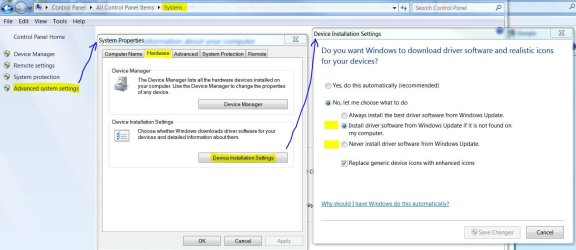
Check under System settings.
 

Attachments

  • Driver Updates.JPG
    Driver Updates.JPG
    105.9 KB · Views: 129

My Computer

Computer type
PC/Desktop
Computer Manufacturer/Model Number
Built 2/11/2011
OS
Windows 7 Pro-x64
CPU
i7-2600 3.4GHz - 3.8GHz Turbo
Motherboard
Intel DH67BL-B3
Memory
8Gb - 2x4GB, Muskin 991770 PC3-1333
Graphics Card(s)
Integrated Intel HD 2000
Sound Card
Integrated Intel 10.1 HD, RealTek ALC892
Monitor(s) Displays
Asus LCD VH222H, Haier HL24XSL2a
Screen Resolution
1920x1080, 1920x1080
Hard Drives
Crucial SSD C300-128Gb,
Western Digital WD5002AALX - 500Gb,
Western Digital WD7501AALS - 750Gb
PSU
Seasonic 650W 80+ Gold Modular
Case
Rosewill Defender
Cooling
Stock CPU, Four 120mm case fans, PCH fan added
Keyboard
Logitech EX100 Y-RBH94 Wireless
Mouse
Logitech EX100 M-RCE95 Wireless
Internet Speed
3.0/1.5 Mbs
Antivirus
Microsoft Security Essentials
Browser
Microsoft Internet Explorer 11
Other Info
Antec Veris Premier-Multimedia IR Station,
Cyber Accoustics-3602 Speakers,
AFT XM-5U Card Reader,
Hauppauge TV-HVR-2250,
Sony LX300 USB Turntable
I did tech support for a mobile software company. I know how that works.
Usually you are required to keep your call times to minimum that way you can assist more customers.
For us it was between 5-12 minutes. All day calls usually end up actually getting you in trouble.

I have never had a problem with either of these mice except on this computer... which is a dell.
Dell... the name says it all.

The comfort mouse 4500 actually replaced my Razor... thats how much I like it.
I'm just super frustrated, I wouldn't actually take a sledge to it, id throw it in a fire... when the batteries explode it's awesome.
 

My Computer

OS
Home Premium x64
Check under System settings.

I'll try that one, right now I have it on never.
The problem with that is it still allows for one to happen =(
either you use windows update, or it searches your computer

***
Didn't solve anything =(
 

My Computer

OS
Home Premium x64
Why don't you just let it install and disable it from running in services?
 

My Computer

Computer Manufacturer/Model Number
Home Made
OS
Windows 7 Home Premium x64
CPU
Intel 2500k @4.5ghz 66deg max P95/IBT
Motherboard
Gigabyte Z68A-D3-B3
Memory
8 Gigs Patriot Viper 2 Extreme @1600
Graphics Card(s)
EVGA GTX 580 3 GIG 35degrees idle
Sound Card
Nvidia HD audio via HDMI to 7.1 Receiver
Monitor(s) Displays
32" Olevia hdtv
Screen Resolution
1080p
Hard Drives
64gig SSD(OS/Apps)
250gig (Files and Dox)
1tb (imaging and backup)
PSU
Corsair vx550w
Case
Thermaltake V3 black
Cooling
CM 212+(push n pull) 4 case fans
Keyboard
Logitech wireless Combo, G13
Mouse
G300
Internet Speed
40mps
Other Info
Two others up and running; C2D E5200/MSI G41M-P26/Corsair XMS3 8gb/GTS 250 1gb and C2D E8200/xFx 750sli/8gb Corsair Dominator/2x EVGA 550ti
Working on; i2600 Build...
HP DV6
@Work I use a Lenovo 5536B8U + Lenovo U300s
Why don't you just let it install and disable it from running in services?

I tried, several times. It just wont install.... It keeps failing or the computer will freeze before it finishes.

If i plug it into one port it will trying installing it 3 times at once.... that always leads to the computer freezing.

If it would just install I wouldn't mind, but apparently this laptop wants nothing to do with it.

There has to be something wrong with the USB settings, but I can't figure out what.

***
Disabling it in services does nothing, it still runs... That really made me upset.
The service is disabled, yet it comes up any time I plug something in...
 

My Computer

OS
Home Premium x64
Have you tried installing it in Safe Mode as administrator?
 

My Computer

Computer Manufacturer/Model Number
DIY
OS
W7x64 Pro, SuSe 12.1/** W7 x64 Pro, XP MCE
CPU
Phenom II 1090T w/Noctua NH-D14 /**4400+ X2 w/CM Hyper TX 3
Motherboard
ASRock 890FX Deluxe 4/**A8N-SLI
Memory
2 x 2GB Patriot PGS34g1600LLKA/**4x1GB Corsair VS
Graphics Card(s)
EVGA GTX460 SC/**EVGA 8800GTS
Sound Card
Asus Xonar D2X/**Xonar D1
Monitor(s) Displays
Acer X233H, Dell E152FPc /**LG M237-WD
Screen Resolution
1920x1080 & 1024x768/**1980x1080
Hard Drives
WDC 2TB, 1.5TB, 1TB, 500GB,Seagate 500GB , Maxtor 80GB /**500GB Seagate & WDC 1TB Black
PSU
CM RS600 w/ APC BX1000G/**Antec 500 TP w/ APC BX1000
Case
HAF922/**Antec 1040IIB
Cooling
3x200mm, 1x140 and 1x120mm/**5x80mm fans
Keyboard
Logitech Media USB/**Saitek Eclipse
Mouse
Cordless Trackman Wheel/**Ditto
Internet Speed
3.3Mbps
Other Info
SB 560 5.1 w/ Sennheiser RS140/**Creative T20 speakers, Dvico FusionHDTV7 Gold RT, Cisco E3000, HP 5510V AIO, Linksys E3000, Belkin F5U237 hub and **F5D8055 adapter
(** = 2nd rig)
Have you tried installing it in Safe Mode as administrator?

I haven't done that. I'll try now. I don't see why that will make a difference as it is doing it anytime I plug any usb device in. But, worth a try. I'll report back in a few minutes
 

My Computer

OS
Home Premium x64
Just curious, have you checked the Dell webpage for your model to see what kind of hardware updates are available that you might've missed?
 

My Computer

OS
Windows 7 Ultimate x64
I only ask because you mentioned using these mice on other computers...are you certain that the driver that you are trying to use is for Windows 7 Home Premium?
 

My Computer

Computer Manufacturer/Model Number
DIY
OS
W7x64 Pro, SuSe 12.1/** W7 x64 Pro, XP MCE
CPU
Phenom II 1090T w/Noctua NH-D14 /**4400+ X2 w/CM Hyper TX 3
Motherboard
ASRock 890FX Deluxe 4/**A8N-SLI
Memory
2 x 2GB Patriot PGS34g1600LLKA/**4x1GB Corsair VS
Graphics Card(s)
EVGA GTX460 SC/**EVGA 8800GTS
Sound Card
Asus Xonar D2X/**Xonar D1
Monitor(s) Displays
Acer X233H, Dell E152FPc /**LG M237-WD
Screen Resolution
1920x1080 & 1024x768/**1980x1080
Hard Drives
WDC 2TB, 1.5TB, 1TB, 500GB,Seagate 500GB , Maxtor 80GB /**500GB Seagate & WDC 1TB Black
PSU
CM RS600 w/ APC BX1000G/**Antec 500 TP w/ APC BX1000
Case
HAF922/**Antec 1040IIB
Cooling
3x200mm, 1x140 and 1x120mm/**5x80mm fans
Keyboard
Logitech Media USB/**Saitek Eclipse
Mouse
Cordless Trackman Wheel/**Ditto
Internet Speed
3.3Mbps
Other Info
SB 560 5.1 w/ Sennheiser RS140/**Creative T20 speakers, Dvico FusionHDTV7 Gold RT, Cisco E3000, HP 5510V AIO, Linksys E3000, Belkin F5U237 hub and **F5D8055 adapter
(** = 2nd rig)
Froze in safe mode as well.

This literally happened over night sibbil.
Last week the mouse worked fine on this laptop.
I just plugged it into my netbook and it works fine on that one.
 

My Computer

OS
Home Premium x64
I only ask because you mentioned using these mice on other computers...are you certain that the driver that you are trying to use is for Windows 7 Home Premium?

I am not installing any drivers.

I am just plugging it in.

Getting screen shoots.
 

My Computer

OS
Home Premium x64
Have you tried installing it in Safe Mode as administrator?

I haven't done that. I'll try now. I don't see why that will make a difference as it is doing it anytime I plug any usb device in. But, worth a try. I'll report back in a few minutes

After reading this more closely, I realized that I had missed the part about the problem with plugging in ANY USB device. I had thought the problem was only with the mice. Have you checked in the Device Manager to make certain that USB is properly installed, and the hub that you are trying to use is not overloaded?
 

My Computer

Computer Manufacturer/Model Number
DIY
OS
W7x64 Pro, SuSe 12.1/** W7 x64 Pro, XP MCE
CPU
Phenom II 1090T w/Noctua NH-D14 /**4400+ X2 w/CM Hyper TX 3
Motherboard
ASRock 890FX Deluxe 4/**A8N-SLI
Memory
2 x 2GB Patriot PGS34g1600LLKA/**4x1GB Corsair VS
Graphics Card(s)
EVGA GTX460 SC/**EVGA 8800GTS
Sound Card
Asus Xonar D2X/**Xonar D1
Monitor(s) Displays
Acer X233H, Dell E152FPc /**LG M237-WD
Screen Resolution
1920x1080 & 1024x768/**1980x1080
Hard Drives
WDC 2TB, 1.5TB, 1TB, 500GB,Seagate 500GB , Maxtor 80GB /**500GB Seagate & WDC 1TB Black
PSU
CM RS600 w/ APC BX1000G/**Antec 500 TP w/ APC BX1000
Case
HAF922/**Antec 1040IIB
Cooling
3x200mm, 1x140 and 1x120mm/**5x80mm fans
Keyboard
Logitech Media USB/**Saitek Eclipse
Mouse
Cordless Trackman Wheel/**Ditto
Internet Speed
3.3Mbps
Other Info
SB 560 5.1 w/ Sennheiser RS140/**Creative T20 speakers, Dvico FusionHDTV7 Gold RT, Cisco E3000, HP 5510V AIO, Linksys E3000, Belkin F5U237 hub and **F5D8055 adapter
(** = 2nd rig)
I have no idea what is wrong with the USB drives nor do i know how to tell if they are ok.

I appreciate all that you guys are trying to offer in assistance, but again I think the solution will only come from what I originally asked for.

Blocking the Driver Software Installation.

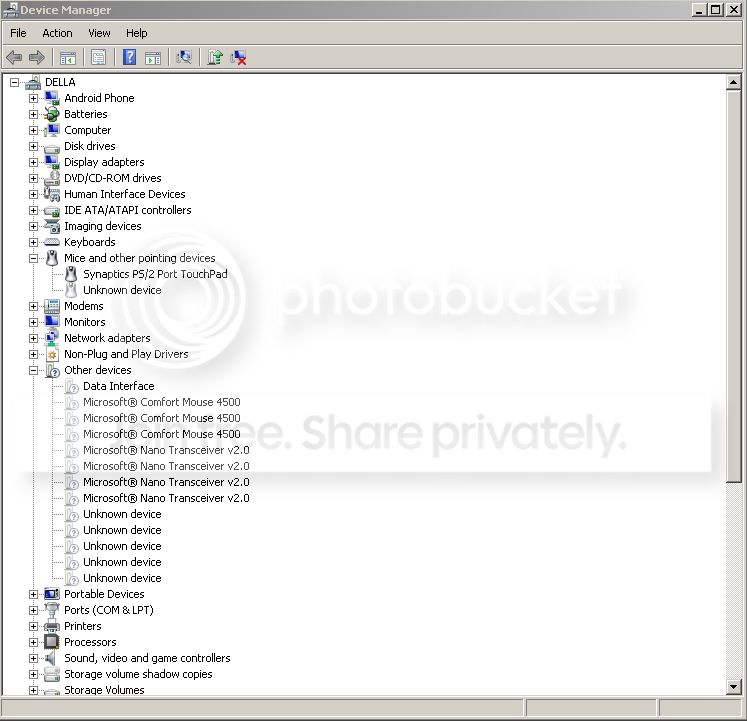
regardless here is a shot of what my device manager looks like and the drivers that are just duplicating and not installing.
DeviceManager.png
 

My Computer

OS
Home Premium x64
That screenshot is of no use, because you have to scroll down to the very bottom and expand the section labeled Universal Serial Bus Controllers. Once done, look for any items listed that have a ? or ! in front of it. Also select Properties for any item in the hub section and go to the power tab, and it will tell you how many ports it has and the amount of power being used.

Being a laptop, I have no idea of how many USB ports you have available, but if more than one, try using another.
 

My Computer

Computer Manufacturer/Model Number
DIY
OS
W7x64 Pro, SuSe 12.1/** W7 x64 Pro, XP MCE
CPU
Phenom II 1090T w/Noctua NH-D14 /**4400+ X2 w/CM Hyper TX 3
Motherboard
ASRock 890FX Deluxe 4/**A8N-SLI
Memory
2 x 2GB Patriot PGS34g1600LLKA/**4x1GB Corsair VS
Graphics Card(s)
EVGA GTX460 SC/**EVGA 8800GTS
Sound Card
Asus Xonar D2X/**Xonar D1
Monitor(s) Displays
Acer X233H, Dell E152FPc /**LG M237-WD
Screen Resolution
1920x1080 & 1024x768/**1980x1080
Hard Drives
WDC 2TB, 1.5TB, 1TB, 500GB,Seagate 500GB , Maxtor 80GB /**500GB Seagate & WDC 1TB Black
PSU
CM RS600 w/ APC BX1000G/**Antec 500 TP w/ APC BX1000
Case
HAF922/**Antec 1040IIB
Cooling
3x200mm, 1x140 and 1x120mm/**5x80mm fans
Keyboard
Logitech Media USB/**Saitek Eclipse
Mouse
Cordless Trackman Wheel/**Ditto
Internet Speed
3.3Mbps
Other Info
SB 560 5.1 w/ Sennheiser RS140/**Creative T20 speakers, Dvico FusionHDTV7 Gold RT, Cisco E3000, HP 5510V AIO, Linksys E3000, Belkin F5U237 hub and **F5D8055 adapter
(** = 2nd rig)
Back
Top