How do i block other user account from accessing my folders or files

SysEngineer

New member
Local time
4:10 PM
Messages
10
I am new to this forum. So kindly inform me if there is any format in asking queries. It would be helpful in my future queries.
I have an Administrator account. Now i want to create another user account so that others can use my laptop through that account. I want to restrict those users in accessing my documents,folders,files etc and limiting them to certain programs only. I guess this is what is called Setting 'Permissions'.
But i haven't yet understood the clear picture of this. Can anyone explain it in a simple manner and help me out in creating an user account with limited access to my hard drive C and D.
 

My Computer My Computer

At a glance

Windows 7 Home Premium SP1 64-bit
OS
Windows 7 Home Premium SP1 64-bit

My Computer My Computer

At a glance

Win 7 Pro 64-bitIntel i5 2.4 Ghz8GB DDR3Intel HD 3000
Computer type
Laptop
Computer Manufacturer/Model Number
Sony Vaio VPCEB47GM Laptop
OS
Win 7 Pro 64-bit
CPU
Intel i5 2.4 Ghz
Memory
8GB DDR3
Graphics Card(s)
Intel HD 3000
Sound Card
IDT High Definition
Monitor(s) Displays
15.6 WGXA Anti-Glare LED
Screen Resolution
1280x800
Hard Drives
640Gb 7200rpm
Antivirus
MSE
Browser
Opera (primary) with IE9 backup
I read the article provided in the link, but i find it difficult to understand.:(
I tried the way as described in the article, but i am not getting the solution for what i want.

All i want is that when i DENY the permission of a folder for a user account. That user should not be able to access it. But when asked for administrator password it should be able to open.

I have an account named 'X' which has administrative privileges. Now that i have turned the 'Guest' account on so that other users can log in through that account. But these users should not access or view my certain folders. So i tried as per the article. I created a folder 'TEST' and a sub folder in it. Now i tried to Deny its permission for Guest account. I went to its Properties-Security tab. There is a list of users or group names in which there are 'SYSTEM', 'Administrators', 'Authenticated Users', 'Users' and 'X'. Now i pressed the button 'EDIT" and added 'GUEST' account and DENIED all its permission. After applying these changes I logged out of 'X' and logged in 'GUEST' account.
Now when i try to open 'TEST' folder. Its saying you don't have permission to access. That's fine till now. But now i want is that the Guest user can access it with the administrative password of 'X'. So it asks to provide password. When i type it,its saying the permission is denied.

It means even a Guest user after entering the password of 'X' can't access it. I want this to be solved.

I know this might be confusing for you who read it because i am new and i am unaware of pointing my problem in a more clear way. If anyone has doubt please do ask me.
 

My Computer My Computer

At a glance

Windows 7 Home Premium SP1 64-bit
OS
Windows 7 Home Premium SP1 64-bit
Hi SysEngineer,
as you already have the Admin Account, password protect it. Do not store anything on C: drive, put all your files & docs into a personal folder made on D: drive and zip & password protect them, I recommend 7Zip.
As I don't know what type of account you intend using for other people, just remember some of the programs you install will work & be accessible to others users, some wont.
 

My Computer My Computer

At a glance

Win7 H.Prem. 32bit+SP1
Computer Manufacturer/Model Number
Look in my Signature.
OS
Win7 H.Prem. 32bit+SP1
But now i want is that the Guest user can access it with the administrative password of 'X'.

If I understand this correctly
- You want to protect files from access by the Guest account
- You want the Guest account to be able to access the files if they type in the password for the Administrator Account X

If that's correct, have you considered this...?
If you give the Guest (person) the password for the Admin account X, they could log in with the Admin account X
 

My Computer My Computer

At a glance

Multi-Boot W7_Pro_x64 W8.1_Pro_x64 W10_Pro_x6...AMD Athlon II x4 6206GB GSkill DDR2 800AMD 4670 GPU + AMD 4200 IGP
Computer type
PC/Desktop
Computer Manufacturer/Model Number
home built
OS
Multi-Boot W7_Pro_x64 W8.1_Pro_x64 W10_Pro_x64 +Linux_VMs +Chromium_VM
CPU
AMD Athlon II x4 620
Motherboard
Gigabyte GA-MA785G-UD3H
Memory
6GB GSkill DDR2 800
Graphics Card(s)
AMD 4670 GPU + AMD 4200 IGP
Sound Card
on board Realtek ALC889A
Monitor(s) Displays
RCA 40" LCD TV, Insignia 32" LCD TV, HP 15" LCD monitor
Screen Resolution
1680 x 1050
Hard Drives
OCZ Vertex 3 120GB,
Samsung F3 1TB (3),
Several others - WD, Seagate, Hitachi, ...
PSU
Corsair 500 W
Case
Rosewill mid tower
Cooling
CM 90mm rifle
Keyboard
Gyration wireless, Logitech wireless, Dell USB wired
Mouse
Gyration wireless, Logitech wireless, V7 USB wired
Internet Speed
Spectrum - 100Mbps D / 10Mbps U
Antivirus
Avast, MBAM3, EMET, WinPatrol
Browser
Pale Moon, Firefox, IE
Other Info
2 multi-boot PC's
Mainly HTPC/Office/Gen purpose (no gaming).
Trendnet USB KVM.
LG DVD burner/Blue Ray Player.
Tray system for removable SATA backup drives.

Not currently OCd, under-volted.
I use Hybrid sleep, rarely re-boot or shutdown.

Hauppauge HD-PVR, Avermedia PCIe TV Tuner, Hauppauge PCI TV Tuner.
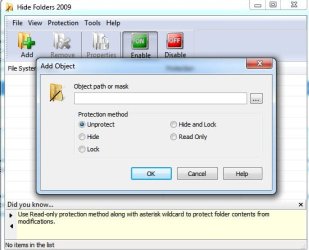
use Hide Folders2012 4.0.7.779 to do so
 

My Computer My Computer

At a glance

Windows 7 Ultimate x64core i7.
OS
Windows 7 Ultimate x64
CPU
core i7.
If I understand this correctly
- You want to protect files from access by the Guest account
- You want the Guest account to be able to access the files if they type in the password for the Administrator Account X

If that's correct, have you considered this...?
If you give the Guest (person) the password for the Admin account X, they could log in with the Admin account X[/QUOTE]


You are right, but if i give them the Admin account X password to them they can access my complete account right. I don't want that. All i want is as you mentioned above that when a guest logins through Guest account and when he wants to access a folder which is denied for his access, he must be able to access that particular folder only with the help of Admin account 'X' password. That is only for a particular instance. Not always.
 

My Computer My Computer

At a glance

Windows 7 Home Premium SP1 64-bit
OS
Windows 7 Home Premium SP1 64-bit
use Hide Folders2012 4.0.7.779 to do so


Hiding is not effective. I need more effective method. I know that denying access permissions will help me out. But i am not able to work it out. Finding it difficult to understand those permissions.
 

My Computer My Computer

At a glance

Windows 7 Home Premium SP1 64-bit
OS
Windows 7 Home Premium SP1 64-bit
use Hide Folders2012 4.0.7.779 to do so


Hiding is not effective. I need more effective method. I know that denying access permissions will help me out. But i am not able to work it out. Finding it difficult to understand those permissions.
it doesnt actually just hide it, you can lock your folder, hide, ..
 

Attachments

  • 12-25-2012 11-05-27 AM.jpg
    12-25-2012 11-05-27 AM.jpg
    33.2 KB · Views: 24

My Computer My Computer

At a glance

Windows 7 Ultimate x64core i7.
OS
Windows 7 Ultimate x64
CPU
core i7.
use Hide Folders2012 4.0.7.779 to do so

I am sorry i din't understand your earlier statement. You were talking about a software.:)..Thanks. Let me try that out. I thought the normal hiding in Windows. That is why i said it won't be effective. Anyways after seeing your screenshot i understood what you meant. Let me try out that.
 

My Computer My Computer

At a glance

Windows 7 Home Premium SP1 64-bit
OS
Windows 7 Home Premium SP1 64-bit
NONE OF THESE IS REQUIRED! Your files are allready protected when they are located within your user directory "C:\Users\[username]\" Only those with Administrative power could they gain access to your files. You do not have to do anything to get this setup, Windows does it BY DEFAULT.

When the time comes you need to give another account access to certain files, copy them into a location within "C:\Users\Public"
 

My Computer My Computer

At a glance

Windows 10 Pro (x64)Intel Core i7-3930K (3.2GHz - 4.5GHz)4x Samsung 4GB PC3-12800 DDR3 (16GB 1600MHz)Nvidia Geforce GTX 690
Computer type
PC/Desktop
Computer Manufacturer/Model Number
Alienware Aurora ALX R4
OS
Windows 10 Pro (x64)
CPU
Intel Core i7-3930K (3.2GHz - 4.5GHz)
Motherboard
Alienware Aurora-R4 x79
Memory
4x Samsung 4GB PC3-12800 DDR3 (16GB 1600MHz)
Graphics Card(s)
Nvidia Geforce GTX 690
Sound Card
SteelSeries Siberia Elite
Monitor(s) Displays
Dell UltraSharp U3011
Screen Resolution
2560x1600
Hard Drives
Samsung 850 Pro 256 GB, Seagate 1TB Desktop Hybrid HDD, 2x Western Digital 4TB Green HDD
PSU
875W Some Dell PSU <.<
Case
Alienware Aurora ALX
Cooling
Custom Liquid Cooling (EK CPU & GPU blocks) dual EK 480RAD
Keyboard
Logitech G710+ Mechanical
Mouse
Logitech G700s
Internet Speed
Verizon Fios (50 mbps average)
Other Info
Server: Intel NUC D54250WYK: i5-4250U, 16GB, 256 GB mSATA, Windows Server 2012 R2
NONE OF THESE IS REQUIRED! Your files are allready protected when they are located within your user directory "C:\Users\[username]\" Only those with Administrative power could they gain access to your files. You do not have to do anything to get this setup, Windows does it BY DEFAULT.

When the time comes you need to give another account access to certain files, copy them into a location within "C:\Users\Public"
why, when you can use this handy software...
what if the file size was about 30Gb! you cannt copy it that simple...
you should try that too guys
 

My Computer My Computer

At a glance

Windows 7 Ultimate x64core i7.
OS
Windows 7 Ultimate x64
CPU
core i7.
why, when you can use this handy software...
Because the software is unnecessary. And a trap. Ever fails and you can end up with corrupted files. Windows already handles user account isolation for files, no additional software or setup required.

what if the file size was about 30Gb! you cannt copy it that simple...
Then you move it which is instant. Either way, files that large are edge cases.
 

My Computer My Computer

At a glance

Windows 10 Pro (x64)Intel Core i7-3930K (3.2GHz - 4.5GHz)4x Samsung 4GB PC3-12800 DDR3 (16GB 1600MHz)Nvidia Geforce GTX 690
Computer type
PC/Desktop
Computer Manufacturer/Model Number
Alienware Aurora ALX R4
OS
Windows 10 Pro (x64)
CPU
Intel Core i7-3930K (3.2GHz - 4.5GHz)
Motherboard
Alienware Aurora-R4 x79
Memory
4x Samsung 4GB PC3-12800 DDR3 (16GB 1600MHz)
Graphics Card(s)
Nvidia Geforce GTX 690
Sound Card
SteelSeries Siberia Elite
Monitor(s) Displays
Dell UltraSharp U3011
Screen Resolution
2560x1600
Hard Drives
Samsung 850 Pro 256 GB, Seagate 1TB Desktop Hybrid HDD, 2x Western Digital 4TB Green HDD
PSU
875W Some Dell PSU <.<
Case
Alienware Aurora ALX
Cooling
Custom Liquid Cooling (EK CPU & GPU blocks) dual EK 480RAD
Keyboard
Logitech G710+ Mechanical
Mouse
Logitech G700s
Internet Speed
Verizon Fios (50 mbps average)
Other Info
Server: Intel NUC D54250WYK: i5-4250U, 16GB, 256 GB mSATA, Windows Server 2012 R2
I may be missing something obvious here, and showing my ignorance :o
but I wonder what the purpose of this request/requirement is? :confused:

The OP wants to protect access from some files, and then turn around and allow access to some of those files with a password from a common "Guest" account.

Why not just unprotect the files rather than require a password, move them, copy them, ...?

The OP hasn't responded in a while, so maybe this is another "no-show OP followup" ...
 

My Computer My Computer

At a glance

Multi-Boot W7_Pro_x64 W8.1_Pro_x64 W10_Pro_x6...AMD Athlon II x4 6206GB GSkill DDR2 800AMD 4670 GPU + AMD 4200 IGP
Computer type
PC/Desktop
Computer Manufacturer/Model Number
home built
OS
Multi-Boot W7_Pro_x64 W8.1_Pro_x64 W10_Pro_x64 +Linux_VMs +Chromium_VM
CPU
AMD Athlon II x4 620
Motherboard
Gigabyte GA-MA785G-UD3H
Memory
6GB GSkill DDR2 800
Graphics Card(s)
AMD 4670 GPU + AMD 4200 IGP
Sound Card
on board Realtek ALC889A
Monitor(s) Displays
RCA 40" LCD TV, Insignia 32" LCD TV, HP 15" LCD monitor
Screen Resolution
1680 x 1050
Hard Drives
OCZ Vertex 3 120GB,
Samsung F3 1TB (3),
Several others - WD, Seagate, Hitachi, ...
PSU
Corsair 500 W
Case
Rosewill mid tower
Cooling
CM 90mm rifle
Keyboard
Gyration wireless, Logitech wireless, Dell USB wired
Mouse
Gyration wireless, Logitech wireless, V7 USB wired
Internet Speed
Spectrum - 100Mbps D / 10Mbps U
Antivirus
Avast, MBAM3, EMET, WinPatrol
Browser
Pale Moon, Firefox, IE
Other Info
2 multi-boot PC's
Mainly HTPC/Office/Gen purpose (no gaming).
Trendnet USB KVM.
LG DVD burner/Blue Ray Player.
Tray system for removable SATA backup drives.

Not currently OCd, under-volted.
I use Hybrid sleep, rarely re-boot or shutdown.

Hauppauge HD-PVR, Avermedia PCIe TV Tuner, Hauppauge PCI TV Tuner.
NONE OF THESE IS REQUIRED! Your files are allready protected when they are located within your user directory "C:\Users\[username]\" Only those with Administrative power could they gain access to your files. You do not have to do anything to get this setup, Windows does it BY DEFAULT.

When the time comes you need to give another account access to certain files, copy them into a location within "C:\Users\Public"
why, when you can use this handy software...
what if the file size was about 30Gb! you cannt copy it that simple...
you should try that too guys
Not copy the file... just move it. Takes 1 sec
 

My Computer My Computer

At a glance

Microsoft Windows 7 Home Premium 64-bits 7601...Intel(R) Core(TM) i3 CPU M 370 @ 2.40GHz4,00 GBATI Mobility Radeon HD 5400 Series
Computer type
Laptop
Computer Manufacturer/Model Number
ACER ASPIRE 5742G
OS
Microsoft Windows 7 Home Premium 64-bits 7601 Multiprocessor Free Service Pack 1
CPU
Intel(R) Core(TM) i3 CPU M 370 @ 2.40GHz
Motherboard
Acer Aspire 5742G
Memory
4,00 GB
Graphics Card(s)
ATI Mobility Radeon HD 5400 Series
Sound Card
(1) AMD High Definition Audio Device (2) Realtek High Defi
Screen Resolution
1366 x 768 x 32 bits (4294967296 colors) @ 60 Hz
Hard Drives
WDC WD5000BEVT-22ZAT0
Unless the move is to a folder on a different Hard Drive ?
 

My Computer My Computer

At a glance

Multi-Boot W7_Pro_x64 W8.1_Pro_x64 W10_Pro_x6...AMD Athlon II x4 6206GB GSkill DDR2 800AMD 4670 GPU + AMD 4200 IGP
Computer type
PC/Desktop
Computer Manufacturer/Model Number
home built
OS
Multi-Boot W7_Pro_x64 W8.1_Pro_x64 W10_Pro_x64 +Linux_VMs +Chromium_VM
CPU
AMD Athlon II x4 620
Motherboard
Gigabyte GA-MA785G-UD3H
Memory
6GB GSkill DDR2 800
Graphics Card(s)
AMD 4670 GPU + AMD 4200 IGP
Sound Card
on board Realtek ALC889A
Monitor(s) Displays
RCA 40" LCD TV, Insignia 32" LCD TV, HP 15" LCD monitor
Screen Resolution
1680 x 1050
Hard Drives
OCZ Vertex 3 120GB,
Samsung F3 1TB (3),
Several others - WD, Seagate, Hitachi, ...
PSU
Corsair 500 W
Case
Rosewill mid tower
Cooling
CM 90mm rifle
Keyboard
Gyration wireless, Logitech wireless, Dell USB wired
Mouse
Gyration wireless, Logitech wireless, V7 USB wired
Internet Speed
Spectrum - 100Mbps D / 10Mbps U
Antivirus
Avast, MBAM3, EMET, WinPatrol
Browser
Pale Moon, Firefox, IE
Other Info
2 multi-boot PC's
Mainly HTPC/Office/Gen purpose (no gaming).
Trendnet USB KVM.
LG DVD burner/Blue Ray Player.
Tray system for removable SATA backup drives.

Not currently OCd, under-volted.
I use Hybrid sleep, rarely re-boot or shutdown.

Hauppauge HD-PVR, Avermedia PCIe TV Tuner, Hauppauge PCI TV Tuner.
Folder In Use

I keep getting the "Folder In Use" Error when i try to change the name and I'm not even logged into that account o.o
 

My Computer My Computer

At a glance

Windows 32 Bit
Computer type
PC/Desktop
OS
Windows 32 Bit
Hello StormyAngel8 and welcome to Seven Forums.

This is a very old thread, and your problem may be different than what this thread is about (post #1).
You would probably get better help creating your own new thread, and give as much detail info as you can about your problem.

hth,
David
 

My Computer My Computer

At a glance

Multi-Boot W7_Pro_x64 W8.1_Pro_x64 W10_Pro_x6...AMD Athlon II x4 6206GB GSkill DDR2 800AMD 4670 GPU + AMD 4200 IGP
Computer type
PC/Desktop
Computer Manufacturer/Model Number
home built
OS
Multi-Boot W7_Pro_x64 W8.1_Pro_x64 W10_Pro_x64 +Linux_VMs +Chromium_VM
CPU
AMD Athlon II x4 620
Motherboard
Gigabyte GA-MA785G-UD3H
Memory
6GB GSkill DDR2 800
Graphics Card(s)
AMD 4670 GPU + AMD 4200 IGP
Sound Card
on board Realtek ALC889A
Monitor(s) Displays
RCA 40" LCD TV, Insignia 32" LCD TV, HP 15" LCD monitor
Screen Resolution
1680 x 1050
Hard Drives
OCZ Vertex 3 120GB,
Samsung F3 1TB (3),
Several others - WD, Seagate, Hitachi, ...
PSU
Corsair 500 W
Case
Rosewill mid tower
Cooling
CM 90mm rifle
Keyboard
Gyration wireless, Logitech wireless, Dell USB wired
Mouse
Gyration wireless, Logitech wireless, V7 USB wired
Internet Speed
Spectrum - 100Mbps D / 10Mbps U
Antivirus
Avast, MBAM3, EMET, WinPatrol
Browser
Pale Moon, Firefox, IE
Other Info
2 multi-boot PC's
Mainly HTPC/Office/Gen purpose (no gaming).
Trendnet USB KVM.
LG DVD burner/Blue Ray Player.
Tray system for removable SATA backup drives.

Not currently OCd, under-volted.
I use Hybrid sleep, rarely re-boot or shutdown.

Hauppauge HD-PVR, Avermedia PCIe TV Tuner, Hauppauge PCI TV Tuner.
Back
Top