How do I change my audio jacks from under one playback device option?

downmecab

New member
Local time
6:33 AM
Messages
6
I just got a new computer a few days ago (Acer Aspire X3400) And I have my speakers plugged into the green audio jack in the back and my headphones plugged into the black audio jack in the front but they both come under speakers in my playback devices (as well as rear black port) and if both my speakers and headphones are plugged in sound only plays through my headphones but if I got to my realtek HD audio manager and disable front panel jack detection sound plays out of both, but I want it so sound comes out of my speakers and I can hear people in my skype call through my headphones, but for that my headphones and speakers need to be shown as different devices, just want to know if I can make if show different jack as different audio devices instead of sticking a few under one device. kthxbai <3
 

Attachments

  • Untitled.png
    Untitled.png
    28.5 KB · Views: 240

My Computer My Computer

At a glance

Windows 7 Home Premium 64 bitAMD Phenom II X6 1035T8GB DDR3Saphire Radeon HD 7750
Computer Manufacturer/Model Number
Acer Aspire AX3400
OS
Windows 7 Home Premium 64 bit
CPU
AMD Phenom II X6 1035T
Memory
8GB DDR3
Graphics Card(s)
Saphire Radeon HD 7750
Sound Card
Realtek
Is there any chance you can rewrite that and use more than 1 sentence to make it intelligible?

An occasional period would help. Maybe even some white space or multiple paragraphs.
 

My Computer My Computer

At a glance

Windows 7 Home Premium SP1, 64-bitIntel Skylake i5-6600K, not overclocked8 GB HyperX DDR4-2666 (2 x 4 GB)none; graphics are integrated on CPU
Computer type
PC/Desktop
Computer Manufacturer/Model Number
Ignatz Special; 4 speed manual gearbox; factory air conditioning; one of one
OS
Windows 7 Home Premium SP1, 64-bit
CPU
Intel Skylake i5-6600K, not overclocked
Motherboard
AsRock Z170M Extreme 4, micro ATX
Memory
8 GB HyperX DDR4-2666 (2 x 4 GB)
Graphics Card(s)
none; graphics are integrated on CPU
Sound Card
onboard: Realtek ALC1150; external: USB Behringer UF0-202
Monitor(s) Displays
Dell S2340M 23 inch IPS
Screen Resolution
1600 x 900
Hard Drives
System: Crucial MX100 series SSD, 128 GB;
Data: Samsung Spinpoint 103SJ, 1 TB;
Backup: WD Caviar Green WD30EZRX-00D8PB0, 3 TB
PSU
Rosewill SilentNight 500 watt fanless, semi-modular
Case
Antec Solo II
Cooling
Noctua NH-U12S; Noctua F12 intake, Noctua S12A exhaust
Keyboard
Microsoft 200 6JH-00001 USB
Mouse
Dell or Microsoft optical wired; USB
Antivirus
Microsoft Security Essentials and Malwarebytes Premium
Browser
Pale Moon
Other Info
All fans PWM; speeds at idle: CPU circa 500 rpm; intake circa 600 rpm; exhaust circa 600 rpm; CPU temps 27 idle and 47 C load in a warm room (27 C/81 F) when running Intel Extreme Tuning Utility stress test.
Sorry, it's almost 2am where I am and I've been at work all day. I just wanted to type what I wanted to ask and do something else.
 

My Computer My Computer

At a glance

Windows 7 Home Premium 64 bitAMD Phenom II X6 1035T8GB DDR3Saphire Radeon HD 7750
Computer Manufacturer/Model Number
Acer Aspire AX3400
OS
Windows 7 Home Premium 64 bit
CPU
AMD Phenom II X6 1035T
Memory
8GB DDR3
Graphics Card(s)
Saphire Radeon HD 7750
Sound Card
Realtek
You want to be able to have both your speakers and your headphones as ready to go default devices.

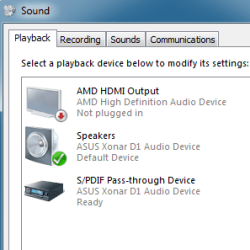
The only way I see to do that is to have your headphones connected to your SPDIF output. Looking at pictures of your computer, I see an SPDIF connector on the back, at least it looks to have one if that's only a flap/cover over the connector, and I believe it's an optical. But I don't know why you don't have an SPDIF Pass Through Device in your Playback Devices window, like below. Maybe you need to enable SPDIF in the BIOS.

Anyway, you would then get a mini-TOSLINK adapter at an electronics store and plug that into the SPDIF, then plug the headphones into it. Then in Playback Devices you can set the SPDIF as Default Communication Device and I think that will work.
 

Attachments

  • Playback devices.PNG
    Playback devices.PNG
    8.9 KB · Views: 964

My Computer My Computer

At a glance

Windows 10 Pro 64 bitCore i7 6700K Skylake 4.0GHzCorsair Vengeance LPX DDR4 32GB 3000MHzAsus Radeon RX480 Strix 8GB
Computer type
PC/Desktop
Computer Manufacturer/Model Number
Wordsworth 5000
OS
Windows 10 Pro 64 bit
CPU
Core i7 6700K Skylake 4.0GHz
Motherboard
Asus Z170 Pro
Memory
Corsair Vengeance LPX DDR4 32GB 3000MHz
Graphics Card(s)
Asus Radeon RX480 Strix 8GB
Sound Card
Asus Xonar DSX
Monitor(s) Displays
HP 2709m
Screen Resolution
1920x1080
Hard Drives
Intel 600p M.2 PCIe NVMe SSD 512GB; Intel 335 SSD 240GB ;Western Digital Caviar Black 1TB
PSU
Thermaltake Toughpower Grand Platinum 850W
Case
Lian Li PC-B70
Cooling
CPU-Noctua NH D15, GPU-Stock, Case-Noctua 2x140, 2x120
Keyboard
Microsoft Natural Ergo 4000
Mouse
Microsoft Wireless Optical 1000
Internet Speed
Cable
Other Info
HP bd 340,
HP bd 240,
Klipsch Promedia 5.1 THX
Okay, thanks heaps I shall get one as soon as I can, but just to be sure I need a optical Female to Mini Toslink 3.5mm Male Adapter right?
 

My Computer My Computer

At a glance

Windows 7 Home Premium 64 bitAMD Phenom II X6 1035T8GB DDR3Saphire Radeon HD 7750
Computer Manufacturer/Model Number
Acer Aspire AX3400
OS
Windows 7 Home Premium 64 bit
CPU
AMD Phenom II X6 1035T
Memory
8GB DDR3
Graphics Card(s)
Saphire Radeon HD 7750
Sound Card
Realtek
I left out the converter, like this. So you need the cable adaptor and the converter as shown then I think that would work in the way you want.

But do you have an SPDIF in the Playback options window? The graphic you have in the earlier post was not showing it and I don't know if you need to enable it in the BIOS or if you lack a driver.
 

My Computer My Computer

At a glance

Windows 10 Pro 64 bitCore i7 6700K Skylake 4.0GHzCorsair Vengeance LPX DDR4 32GB 3000MHzAsus Radeon RX480 Strix 8GB
Computer type
PC/Desktop
Computer Manufacturer/Model Number
Wordsworth 5000
OS
Windows 10 Pro 64 bit
CPU
Core i7 6700K Skylake 4.0GHz
Motherboard
Asus Z170 Pro
Memory
Corsair Vengeance LPX DDR4 32GB 3000MHz
Graphics Card(s)
Asus Radeon RX480 Strix 8GB
Sound Card
Asus Xonar DSX
Monitor(s) Displays
HP 2709m
Screen Resolution
1920x1080
Hard Drives
Intel 600p M.2 PCIe NVMe SSD 512GB; Intel 335 SSD 240GB ;Western Digital Caviar Black 1TB
PSU
Thermaltake Toughpower Grand Platinum 850W
Case
Lian Li PC-B70
Cooling
CPU-Noctua NH D15, GPU-Stock, Case-Noctua 2x140, 2x120
Keyboard
Microsoft Natural Ergo 4000
Mouse
Microsoft Wireless Optical 1000
Internet Speed
Cable
Other Info
HP bd 340,
HP bd 240,
Klipsch Promedia 5.1 THX
I've actually found out that I can have my xbox controller plugged into my computer and then my new headset that will be arriving soon into that and my problem will be solved :D
 

My Computer My Computer

At a glance

Windows 7 Home Premium 64 bitAMD Phenom II X6 1035T8GB DDR3Saphire Radeon HD 7750
Computer Manufacturer/Model Number
Acer Aspire AX3400
OS
Windows 7 Home Premium 64 bit
CPU
AMD Phenom II X6 1035T
Memory
8GB DDR3
Graphics Card(s)
Saphire Radeon HD 7750
Sound Card
Realtek
There you go. Always a good thing when you can solve a problem with what you have at hand.
 

My Computer My Computer

At a glance

Windows 10 Pro 64 bitCore i7 6700K Skylake 4.0GHzCorsair Vengeance LPX DDR4 32GB 3000MHzAsus Radeon RX480 Strix 8GB
Computer type
PC/Desktop
Computer Manufacturer/Model Number
Wordsworth 5000
OS
Windows 10 Pro 64 bit
CPU
Core i7 6700K Skylake 4.0GHz
Motherboard
Asus Z170 Pro
Memory
Corsair Vengeance LPX DDR4 32GB 3000MHz
Graphics Card(s)
Asus Radeon RX480 Strix 8GB
Sound Card
Asus Xonar DSX
Monitor(s) Displays
HP 2709m
Screen Resolution
1920x1080
Hard Drives
Intel 600p M.2 PCIe NVMe SSD 512GB; Intel 335 SSD 240GB ;Western Digital Caviar Black 1TB
PSU
Thermaltake Toughpower Grand Platinum 850W
Case
Lian Li PC-B70
Cooling
CPU-Noctua NH D15, GPU-Stock, Case-Noctua 2x140, 2x120
Keyboard
Microsoft Natural Ergo 4000
Mouse
Microsoft Wireless Optical 1000
Internet Speed
Cable
Other Info
HP bd 340,
HP bd 240,
Klipsch Promedia 5.1 THX
Back
Top