
how do i change my boot drive

boy wid no name

New member
Local time
2:02 PM
Messages
3
i had two hddrives. two windows in these drives. one having win7 x32 and the other win7 x64.

now the one having 32bit windows has jst stopped working. bt my boot drive was drive C of that hdd. now every time i try to install a new windows from a setup folder in my harddisk (dont have a bootable windows 7 dvd rite now) it stops, saying
""Windows setup cannot find a location to store temporary installation files. To install windows make sure that a partition on your boot disk has at least 812 MB of free space.
Error Code 0x80070490.""
i dont have a boot drive see. how can change my boot drive to any of the drives of my existing harddisk?
 

My Computer

OS
windows 7 ultimate x64

My Computer

Computer Manufacturer/Model Number
HP Pavilion Elite 495UK
OS
Windows 7 Ultimate SP1 64-Bit
CPU
Intel Core i7 870 @ 2.93GHz
Motherboard
MSI 2A9C (CPU1)
Memory
8Gb Dual-Channel DDR3 @ 664MHz
Graphics Card(s)
nVidia GeForce GTX 460 1024MB dedicated RAM
Sound Card
Realtek HD Audio
Monitor(s) Displays
HP2310i
Screen Resolution
1920 x 1080
Hard Drives
1x1954GB Hitachi HDS22020ALA 330 (RAID), 1x1954GB Hitachi External for backup and storage
PSU
460W
Case
HP Elite
Cooling
Air cooled
Keyboard
Logitech K750 solar-powered keyboard
Mouse
Logitech Wireless M180 mouse
Internet Speed
2Mb
Other Info
Pure Avanti Flow Internet Radio with iPod Dock, 64Gb iPod, HP USB Speakers, Sony MDR-V500 Headphones, Sony Vaio F-Series Laptop
Do you want to start Win7 on the remaining HD or clean install over it?

To start it mark C Active and run Startup Repair - Run 3 Separate Times.
Partition - Mark as Active (Method Two)
Make sure HD is set first to boot in BIOS setup, after DVD drive.

To install over it boot the DVD, choose Custom install, use Drive options to delete C, create a New partition there, Format and Install.
I would back up my data on the HD as it can sometimes disappear, and of course everything on C will be deleted.

Illustrated steps here: Clean Install Windows 7
 
He has no dvd to boot with.
 

My Computer

Computer type
PC/Desktop
Computer Manufacturer/Model Number
Skylake Special #666
OS
Windows 10 Pro x64
CPU
Intel Core i7 6700K
Motherboard
Asus Sabertooth Z170 Mark 1
Memory
GSkill TridentZ RGB 16GB 3600 16-16-16-36
Graphics Card(s)
EVGA GTX 980 Ti SC x2
Sound Card
Realtek High Definition
Monitor(s) Displays
AOC G2460PG
Screen Resolution
1920 x 1080 144Hz
Hard Drives
Samsung 860 Pro 256GB, Seagate Barracuda 4TB x2
PSU
EVGA 1000 P2, EVGA White Custom Braided Cables
Case
Corsair Vengeance C70 Gunmetal Black
Cooling
Corsair H100i v2, Corsair ML120 x2, Thermal Grizzly Kryonaut
Keyboard
Logitech G910 Orion Spectrum
Mouse
Logitech G700s
Internet Speed
Verizon Fios Quantum Gateway 75/75
Antivirus
Windows Defender, Malwarebytes Free 3.8.3
Browser
Chrome
Other Info
Corsair SP120 x4, LG Blu-ray Drive, Durabrand HT-395 100 Watt Dolby Digital Amp, Corsair H2100 Wireless 7.1 Headset
You said that you had 2 HDDs, but that picture only shows one and that HDD starts at I: (W7 64 bit?).
I assume that you actually want to install W7 on the other HDD (the one we can't see).

I'm not sure how you are going to install W7 without a DVD (or USB).
 

My Computer

Computer type
PC/Desktop
Computer Manufacturer/Model Number
n/a
OS
W7 Ultimate SP1, LM19.2 MATE, W10 Home 1703, W10 Pro 1703 VM, #All 64 bit
CPU
AMD Phenom II x6 1100T, 3.3 GHz
Motherboard
ASUS M4A88T-M/USB3 (AM3)
Memory
12GB DDR3 1333 G-Skill (4GB x 2), G-Skill (2GB x 2)
Graphics Card(s)
NVIDIA GeForce GTX 660
Sound Card
Realtek?
Monitor(s) Displays
Samsung S23B350
Screen Resolution
1920x1080
Hard Drives
WD Green 2TB (SATA), WD Green 3TB (SATA), WD Blue 4TB (SATA), WD Blue 6TB (SATA)
PSU
Cooler Master
Case
Antec GX300 Tower
Cooling
3x Antec TRICOOL 120mm Fans
Mouse
Wired Optical
Internet Speed
DSL
Antivirus
Avast
Browser
Pale Moon (64 bit)
Other Info
2018-12-27 Upgraded HDDs
2015-12-10 Upgraded case, graphics card, storage
2015-08-15 Upgraded motherboard & RAM
2015-07-15 Upgraded LM17.1 to LM17.2
Exactly where did you have W7 32 Bit installed ? Where is this other hard drive ? Did it die ? Is that what you meant by ( NOT WORKING ) that`s probly why you can`t boot to it. Where is C:

Greg can post you a link to download W7 and burn to dvd.
 

My Computer

Computer type
PC/Desktop
Computer Manufacturer/Model Number
Skylake Special #666
OS
Windows 10 Pro x64
CPU
Intel Core i7 6700K
Motherboard
Asus Sabertooth Z170 Mark 1
Memory
GSkill TridentZ RGB 16GB 3600 16-16-16-36
Graphics Card(s)
EVGA GTX 980 Ti SC x2
Sound Card
Realtek High Definition
Monitor(s) Displays
AOC G2460PG
Screen Resolution
1920 x 1080 144Hz
Hard Drives
Samsung 860 Pro 256GB, Seagate Barracuda 4TB x2
PSU
EVGA 1000 P2, EVGA White Custom Braided Cables
Case
Corsair Vengeance C70 Gunmetal Black
Cooling
Corsair H100i v2, Corsair ML120 x2, Thermal Grizzly Kryonaut
Keyboard
Logitech G910 Orion Spectrum
Mouse
Logitech G700s
Internet Speed
Verizon Fios Quantum Gateway 75/75
Antivirus
Windows Defender, Malwarebytes Free 3.8.3
Browser
Chrome
Other Info
Corsair SP120 x4, LG Blu-ray Drive, Durabrand HT-395 100 Watt Dolby Digital Amp, Corsair H2100 Wireless 7.1 Headset
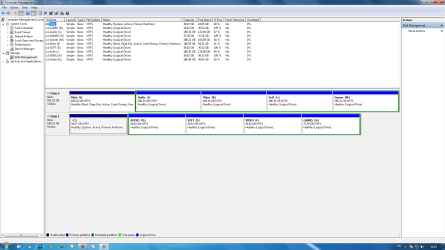
yes my other hard drive did die, WELL TEMPORARILY. now its back on. dont know how :confused:. i just want to make drive I my new boot drive. change it from C to I. the new disk management is given below.
.......................................................................................
DM2.png

........................................................................

i have 32 bit win 7 installed in my C drive. Now i tried specifying from BIOS to boot from 64 bit windows which is in drive I but everytime it says ""bootmgr"" is missing. but if i tell it to boot from 32 bit windows in drive C it boots ok. i gave higher priority level to the 1000 GB harddisk from BIOS and it again says bootmgr is missing.

Can i boot from I now?? and my windows is constantly showing me that the deadbeat harddisk is gonna die(!) again. so a fast reply would be helpful plz. :)
 

My Computer

OS
windows 7 ultimate x64
Do you have blank cds ? Download and make a Windows 7 Repair Disc 64 Bit. That is the HD you want to get booting, correct ? Try to download a pre service pack 1 version as the version with service pack 1 seems to be throwing up an incompatable version error message. Boot from that cd and it should find your I: partition. You may have to do it more then 1 time. I`ve done tests and sometime it takes 1 attempt other times it takes 2. Keep trying. Why don`t you unplug the C: hard drive b4 you try. Or just disable it through the BIOS.

Follow Gregs instructions.
 
Last edited:

My Computer

Computer type
PC/Desktop
Computer Manufacturer/Model Number
Skylake Special #666
OS
Windows 10 Pro x64
CPU
Intel Core i7 6700K
Motherboard
Asus Sabertooth Z170 Mark 1
Memory
GSkill TridentZ RGB 16GB 3600 16-16-16-36
Graphics Card(s)
EVGA GTX 980 Ti SC x2
Sound Card
Realtek High Definition
Monitor(s) Displays
AOC G2460PG
Screen Resolution
1920 x 1080 144Hz
Hard Drives
Samsung 860 Pro 256GB, Seagate Barracuda 4TB x2
PSU
EVGA 1000 P2, EVGA White Custom Braided Cables
Case
Corsair Vengeance C70 Gunmetal Black
Cooling
Corsair H100i v2, Corsair ML120 x2, Thermal Grizzly Kryonaut
Keyboard
Logitech G910 Orion Spectrum
Mouse
Logitech G700s
Internet Speed
Verizon Fios Quantum Gateway 75/75
Antivirus
Windows Defender, Malwarebytes Free 3.8.3
Browser
Chrome
Other Info
Corsair SP120 x4, LG Blu-ray Drive, Durabrand HT-395 100 Watt Dolby Digital Amp, Corsair H2100 Wireless 7.1 Headset
I gave you the steps to start the non-System HD here.
Unplug the other HD first:

Do you want to start Win7 on the remaining HD or clean install over it?

To start it mark C Active: Partition - Mark as Active (Method Two)

then boot into System Recovery Options to run Startup Repair - Run 3 Separate Times.

Make sure HD is set first to boot in BIOS setup, after DVD drive.

When Win7 on I starts, replug back in the other HD, set preferred one to boot in BIOS first (after DVD drive) then boot the secondary by tapping BIOS one-time Boot Menu key at boot.
 
Back
Top