How do I change opened app "brightness" in TaskBar

antonio1475

New member
Local time
9:33 AM
Messages
3
Hi, I want to change this selected/opened program brightness, as many themes do.

29p8b3s.jpg


I know it's not easy, I'm not looking for a "right click->Change brightness". No problem using ResourceHacker or anything (I spent 5 hours today in this forum tweaking my whole UI), I just can't find where to look for this specific thing, so any help will be much appreciated.

I'd like to make it for example plain semitransparent white, without brights or circled edges.

Thank you very much. :)
 

My Computer

OS
Windows 7 Ultimate x64 SP1
Welcome to the Seven Forums
The taskbar buttons are located in the aero.msstyles
image numbers
Horizontal
1014
1015
1016
1017

Vertical
1024
1025
1026
1027

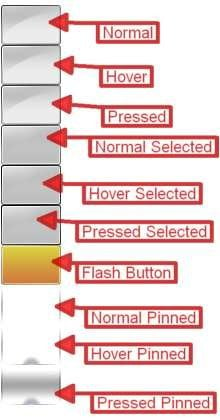
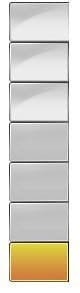
you will see two button styles one with 10 states and one was 7 states look at the screenshot I provided and it will tell you what state each image is the images with the 7 states are the same as the top 7 states in the images with 10 states.
Jerry
h.jpgv.jpg
TaskBand2_TaskItemButtonImage.pngTaskBand2_UncombinedTaskItemLeftImage.png
 

My Computer

Computer type
Laptop
Computer Manufacturer/Model Number
Sager NP9170
OS
Win 7 Pro x64 / Win 10 Pro
CPU
Intel(R) Core(TM) i7-3630QM CPU @ 2.40GHz
Motherboard
CLEVO P170EM
Memory
12 GB
Graphics Card(s)
(1) Intel(R) HD Graphics 4000 (2) NVIDIA GeForce GTX 675M
Sound Card
(1) Realtek High Definition Audio (2) Intel(R) Display Aud
Monitor(s) Displays
17.3
Screen Resolution
1920x1080
Hard Drives
(1) Samsung 860 EVO 500GB(OS) (1) Samsung 860 EVO 500GB(Data)
Keyboard
Backlite
Antivirus
MSE, Malwarebytes Pro
Browser
Firefox
Other Info
DESKTOP: Custom-built.
OS: Win 10 Pro x64.
CASE: Rosewill R5.
CPU: Intel I5 4670K CPU @ 3.40GHz.
CPU COOLER: Cool Master Hyper 212 EVO.
MOTHERBOARD: Asus Z87-A.
MEMORY: Kingston HyperX 2x4 GB.
GPU: Nvidia Geforce 650 TI.
PSU: Corsair TX750.
DRIVES: (1) Samsung 840 120 GB SSD (2) Western Digital blue 500 GB 7200 RPM.
You are really an expert. Thank you very much for your answer. Will do it in some hours.

Thanks! :)
 

My Computer

OS
Windows 7 Ultimate x64 SP1
You are really an expert. Thank you very much for your answer. Will do it in some hours.

Thanks! :)
You're Welcome let us know how it turns out.
If you need more help just ask.
Jerry
 

My Computer

Computer type
Laptop
Computer Manufacturer/Model Number
Sager NP9170
OS
Win 7 Pro x64 / Win 10 Pro
CPU
Intel(R) Core(TM) i7-3630QM CPU @ 2.40GHz
Motherboard
CLEVO P170EM
Memory
12 GB
Graphics Card(s)
(1) Intel(R) HD Graphics 4000 (2) NVIDIA GeForce GTX 675M
Sound Card
(1) Realtek High Definition Audio (2) Intel(R) Display Aud
Monitor(s) Displays
17.3
Screen Resolution
1920x1080
Hard Drives
(1) Samsung 860 EVO 500GB(OS) (1) Samsung 860 EVO 500GB(Data)
Keyboard
Backlite
Antivirus
MSE, Malwarebytes Pro
Browser
Firefox
Other Info
DESKTOP: Custom-built.
OS: Win 10 Pro x64.
CASE: Rosewill R5.
CPU: Intel I5 4670K CPU @ 3.40GHz.
CPU COOLER: Cool Master Hyper 212 EVO.
MOTHERBOARD: Asus Z87-A.
MEMORY: Kingston HyperX 2x4 GB.
GPU: Nvidia Geforce 650 TI.
PSU: Corsair TX750.
DRIVES: (1) Samsung 840 120 GB SSD (2) Western Digital blue 500 GB 7200 RPM.
Thank you. I hate myself for not doing this before!

Btw, in case it's useful for you, it wasn't 1014, 1015, 1016, 1017, but they were 1150, 1151, 1152 and 1153 (1160, 1161, 1162 and 1163 for horizontal). Not a problem at all, just looked a bit more (but at first I got scared when saw it wasn't there :p) (WP7 x64 SP1)

I've also made some other changes since this is really similar to Android theming (where I mostly do my theming). I'm loving this.

Thank you very much! :)
 

My Computer

OS
Windows 7 Ultimate x64 SP1
Thank you. I hate myself for not doing this before!

Btw, in case it's useful for you, it wasn't 1014, 1015, 1016, 1017, but they were 1150, 1151, 1152 and 1153 (1160, 1161, 1162 and 1163 for horizontal). Not a problem at all, just looked a bit more (but at first I got scared when saw it wasn't there :p) (WP7 x64 SP1)

I've also made some other changes since this is really similar to Android theming (where I mostly do my theming). I'm loving this.

Thank you very much! :)
It must have been a custom theme you are changing the #s I gave you is for default aero.
A theme made with Windows Style Builder the #s change.
Glad you got it.
Jerry
 

My Computer

Computer type
Laptop
Computer Manufacturer/Model Number
Sager NP9170
OS
Win 7 Pro x64 / Win 10 Pro
CPU
Intel(R) Core(TM) i7-3630QM CPU @ 2.40GHz
Motherboard
CLEVO P170EM
Memory
12 GB
Graphics Card(s)
(1) Intel(R) HD Graphics 4000 (2) NVIDIA GeForce GTX 675M
Sound Card
(1) Realtek High Definition Audio (2) Intel(R) Display Aud
Monitor(s) Displays
17.3
Screen Resolution
1920x1080
Hard Drives
(1) Samsung 860 EVO 500GB(OS) (1) Samsung 860 EVO 500GB(Data)
Keyboard
Backlite
Antivirus
MSE, Malwarebytes Pro
Browser
Firefox
Other Info
DESKTOP: Custom-built.
OS: Win 10 Pro x64.
CASE: Rosewill R5.
CPU: Intel I5 4670K CPU @ 3.40GHz.
CPU COOLER: Cool Master Hyper 212 EVO.
MOTHERBOARD: Asus Z87-A.
MEMORY: Kingston HyperX 2x4 GB.
GPU: Nvidia Geforce 650 TI.
PSU: Corsair TX750.
DRIVES: (1) Samsung 840 120 GB SSD (2) Western Digital blue 500 GB 7200 RPM.
Back
Top