How do i change primary HDD?

cr00mz

New member
Local time
7:22 PM
Messages
7
I need help in how to change which HDD is my primary.

I have 2 HDDs, one old (small) 465,76 GB HDD which i suspect might fail soon, and one new (big) 1863,02 GB HDD. What i want to do is install Windows 7 on the new HDD so that i can remove the old one. I installed Windows 7 on the new HDD without problems. Whenever i start the computer i get two options, like going in to safe mode

Windows 7
Windows 7

I suspect that this gives me the choice of which HDD to start with. So far i think it seems pretty easy.

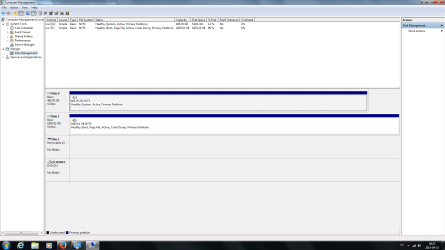
My problem comes when i enter the Disk Management program. Here is a picture

https://imageshack.com/i/exWjqF3Mp

The small HDD, has many more statuses assigned to it than the big. Does that mean that it is the primary one? If yes how can i change so that those statuses get over the big HDD.

Thanks in advance
 

My Computer

OS
Microsoft Windows 7 Home Premium 64-bit 7601 Multiprocessor Free Service Pack 1
CPU
Intel(R) Core(TM)2 Quad CPU Q9400 @ 2.66GHz
Motherboard
ASUSTeK Computer INC. P5Q SE2
Memory
4,00 GB
Graphics Card(s)
ATI Radeon HD 4800 Series
Sound Card
(1) AMD High Definition Audio Device (2) High Definition A
Monitor(s) Displays
BenQ G2220HD (Digital)
Screen Resolution
1920 x 1080 x 32 bits (4294967296 colors) @ 60 Hz
Hard Drives
(1) WDC WD5000AADS-00S9B0 ATA Device (2) Generic- Multi-Card USB Device
PSU
Corsair VX 550W PSU
Case
In-Win J649 ATX Midi Tower Black
Keyboard
Logitech
Mouse
Logitech MX518
Internet Speed
100 MBit/s
Please boot into the new installation to post back a screenshot of http://www.sevenforums.com/tutorials/274797-disk-management-post-screen-capture-image.html- this time attaching it with paper clip icon in reply box so we dont' have to go to another site and can see it here in your post.

If it boots as C then it was correctly installed from boot and not from the old OS so you can keep it. Since it is marked Active you can unplug the old HD, swap its cable to the new HD so it takes DISK0 position, then boot into the Win7 installation media to run http://www.sevenforums.com/tutorials/105541-startup-repair-run-3-separate-times.html until Win7 starts and the partiiton holds the System flag.

You can now plug back in the old HD to boot it if needed using the one-time BIOS Boot menu key, access its data to copy over, or just wipe it to get it cleanest with Diskpart Clean Command to repartition in Disk Mgmt.
 
hdd1.png

It seems to have worked a little, i think. the drives name is still E, but the System status is still attached to the C drive.
 

My Computer

OS
Microsoft Windows 7 Home Premium 64-bit 7601 Multiprocessor Free Service Pack 1
CPU
Intel(R) Core(TM)2 Quad CPU Q9400 @ 2.66GHz
Motherboard
ASUSTeK Computer INC. P5Q SE2
Memory
4,00 GB
Graphics Card(s)
ATI Radeon HD 4800 Series
Sound Card
(1) AMD High Definition Audio Device (2) High Definition A
Monitor(s) Displays
BenQ G2220HD (Digital)
Screen Resolution
1920 x 1080 x 32 bits (4294967296 colors) @ 60 Hz
Hard Drives
(1) WDC WD5000AADS-00S9B0 ATA Device (2) Generic- Multi-Card USB Device
PSU
Corsair VX 550W PSU
Case
In-Win J649 ATX Midi Tower Black
Keyboard
Logitech
Mouse
Logitech MX518
Internet Speed
100 MBit/s
This is because the Win7 installation media was run from the old drive which blocked the letter C from being assigned to the new Win7 as it always does when it is correctly installed from the booted media.

So your choices are to unplug the old Drive, swap its cable to the new one, boot the installation media to Clean Install Windows 7 l, deleting all partitions to create and format new.

Or if you want to try to put up with Win7 being on E you can unplug the old HD, swap its cable to E drive, boot into Installation Media to run http://www.sevenforums.com/tutorials/105541-startup-repair-run-3-separate-times.html to move the System flag to E.

Again, when you plug back in the old HD you can boot it using the one-time BIOS Boot menu key, access its data from E, or wipe it to repartition in Disk Mgmt.
 
I now did what you said and managed to get the system status on to the big HDD. is it now safe to remove the old HDD?
 
Last edited:

My Computer

OS
Microsoft Windows 7 Home Premium 64-bit 7601 Multiprocessor Free Service Pack 1
CPU
Intel(R) Core(TM)2 Quad CPU Q9400 @ 2.66GHz
Motherboard
ASUSTeK Computer INC. P5Q SE2
Memory
4,00 GB
Graphics Card(s)
ATI Radeon HD 4800 Series
Sound Card
(1) AMD High Definition Audio Device (2) High Definition A
Monitor(s) Displays
BenQ G2220HD (Digital)
Screen Resolution
1920 x 1080 x 32 bits (4294967296 colors) @ 60 Hz
Hard Drives
(1) WDC WD5000AADS-00S9B0 ATA Device (2) Generic- Multi-Card USB Device
PSU
Corsair VX 550W PSU
Case
In-Win J649 ATX Midi Tower Black
Keyboard
Logitech
Mouse
Logitech MX518
Internet Speed
100 MBit/s
Why would the old hard drive be plugged in if you followed the steps I gave you, which were to remove it and swap its cable to the new Hard drive. Did you miss that?

If the System Active labels are both now on the new HD then unplug the old one. swap its cable to the new one, and reboot to see if it will start. If not make sure the HD is set first HD to boot in BIOS setup. If that fails then boot the WIn7 disk to run http://www.sevenforums.com/tutorials/105541-startup-repair-run-3-separate-times.html
 
Yes sorry i must have missed that, I just swapped the cables. C to E and E to C.
 

My Computer

OS
Microsoft Windows 7 Home Premium 64-bit 7601 Multiprocessor Free Service Pack 1
CPU
Intel(R) Core(TM)2 Quad CPU Q9400 @ 2.66GHz
Motherboard
ASUSTeK Computer INC. P5Q SE2
Memory
4,00 GB
Graphics Card(s)
ATI Radeon HD 4800 Series
Sound Card
(1) AMD High Definition Audio Device (2) High Definition A
Monitor(s) Displays
BenQ G2220HD (Digital)
Screen Resolution
1920 x 1080 x 32 bits (4294967296 colors) @ 60 Hz
Hard Drives
(1) WDC WD5000AADS-00S9B0 ATA Device (2) Generic- Multi-Card USB Device
PSU
Corsair VX 550W PSU
Case
In-Win J649 ATX Midi Tower Black
Keyboard
Logitech
Mouse
Logitech MX518
Internet Speed
100 MBit/s
Back
Top