Solved How do I change the values in this rainmeter skin for another drives

b0bl335wa993r

Newbie
Local time
4:44 AM
Messages
101
;===========================================
; Rainmeter configuration file
;===========================================

[Rainmeter]
Author=minhtrimatrix
AppVersion=1.0
Update=1000

[Variables]
fontColor.Text=255, 255, 255, 160
bar.color=255, 255, 255, 50
graph.line1=255, 255, 255, 75
graph.line2=255, 255, 255, 37

FontName=Calibri
FontHeight=10
AntiAlias=1


[Mse_DriveAccess]
Measure=Plugin
Plugin=Plugins\PerfMon.dll
PerfMonObject=LogicalDisk
PerfMonCounter="Disk Bytes/sec"
PerfMonInstance="C:"

[Mse_TotalC]
Measure=FreeDiskSpace
Drive=C:
Total=1

[Mse_FreeC]
Measure=FreeDiskSpace
Drive=C:

[MeterRightLine]
Meter=IMAGE
X=0
Y=-3
W=110
H=110
ImageName=Disk.png
LeftMouseDownAction=!Execute ["C:\"]

[MeasureTotalSwap]
Measure=SwapMemory
Total=1

[MeasureUsedSwap]
Measure=SwapMemory

[MeasureFreeSwap]
Measure=SwapMemory
InvertMeasure=1

[HDD.txt]
Meter=STRING
X=120
Y=4
FontColor=255, 255, 255
FontSize=12
FontFace=#FontName#
StringStyle=normal
AntiAlias=1
Text="System HDD:"

[TotalSWAP.txt]
Meter=STRING
X=120
Y=22
FontColor=#fontColor.Text#
FontSize=#FontHeight#
FontFace=#FontName#
StringStyle=Italic
AntiAlias=1
Text="Total Swap:"

[TotalSWAP]
MeasureName=MeasureTotalSWAP
Meter=STRING
X=240
Y=0r
FontColor=255,255,255,255
FontSize=#FontHeight#
FontFace=#FontName#
StringAlign=RIGHT
AntiAlias=1
Text="%1B"
AutoScale=1

[aHDD.txt]
Meter=STRING
X=120
Y=38
FontColor=255, 255, 255
FontSize=11
FontFace=#FontName#
StringStyle=normal
AntiAlias=1
Text="Drive C:"

[1HDD.txt]
Meter=STRING
X=152
Y=52
FontColor=255, 255, 255,180
FontSize=10
FontFace=#FontName#
StringStyle=Italic
AntiAlias=1
Text="Total:"

[DriveCTotal]
MeasureName=Mse_TotalC
Meter=STRING
X=242
Y=52
FontColor=255, 255, 255
StringStyle=normal
StringAlign=right
Fontsize=10
Fontface=Calibri
Text="%1B"
AntiAlias=1
AutoScale=1

[2HDD.txt]
Meter=STRING
X=155
Y=66
FontColor=255, 255, 255,180
FontSize=10
FontFace=#FontName#
StringStyle=Italic
AntiAlias=1
Text="Free:"

[DriveCFree]
MeasureName=Mse_FreeC
Meter=STRING
X=242
Y=66
FontColor=255, 255, 255
StringStyle=normal
StringAlign=right
Fontsize=10
Fontface=calibri
Text="%1B"
AntiAlias=1
NumOfDecimals=2
AutoScale=1

[Rl_DriveAccess1]
Meter=Line
MeasureName=Mse_DriveAccess
X=147
Y=74
H=25
W=70
LineCount=1
LineColor=145, 255, 4, 100
AutoScale=1
AntiAlias=1


I want to know what are the changes I should make in this to enable it or clone for another drives. It has only for my C drive, I wanna make them for others.:)
 

My Computer My Computer

At a glance

Windows 7 Professional 32bitP6200 @ 2.13GHz2043 MBIntel HD graphics
Computer type
Laptop
Computer Manufacturer/Model Number
Acer 5733Z
OS
Windows 7 Professional 32bit
CPU
P6200 @ 2.13GHz
Memory
2043 MB
Graphics Card(s)
Intel HD graphics
Hard Drives
C: Total - 49899 MB; D: Total - 149999; E: Total - 149999 MB; F: Total - 123107 MB;
Antivirus
Microsoft Security Essentials, ESET NOD 32
Browser
Mozilla
Post a link to the skin and I will look at it.

Jerry
 

My Computer My Computer

At a glance

Win 7 Pro x64 / Win 10 ProIntel(R) Core(TM) i7-3630QM CPU @ 2.40GHz12 GB(1) Intel(R) HD Graphics 4000 (2) NVIDIA GeFo...
Computer type
Laptop
Computer Manufacturer/Model Number
Sager NP9170
OS
Win 7 Pro x64 / Win 10 Pro
CPU
Intel(R) Core(TM) i7-3630QM CPU @ 2.40GHz
Motherboard
CLEVO P170EM
Memory
12 GB
Graphics Card(s)
(1) Intel(R) HD Graphics 4000 (2) NVIDIA GeForce GTX 675M
Sound Card
(1) Realtek High Definition Audio (2) Intel(R) Display Aud
Monitor(s) Displays
17.3
Screen Resolution
1920x1080
Hard Drives
(1) Samsung 860 EVO 500GB(OS) (1) Samsung 860 EVO 500GB(Data)
Keyboard
Backlite
Antivirus
MSE, Malwarebytes Pro
Browser
Firefox
Other Info
DESKTOP: Custom-built.
OS: Win 10 Pro x64.
CASE: Rosewill R5.
CPU: Intel I5 4670K CPU @ 3.40GHz.
CPU COOLER: Cool Master Hyper 212 EVO.
MOTHERBOARD: Asus Z87-A.
MEMORY: Kingston HyperX 2x4 GB.
GPU: Nvidia Geforce 650 TI.
PSU: Corsair TX750.
DRIVES: (1) Samsung 840 120 GB SSD (2) Western Digital blue 500 GB 7200 RPM.

My Computer My Computer

At a glance

Windows 7 Professional 32bitP6200 @ 2.13GHz2043 MBIntel HD graphics
Computer type
Laptop
Computer Manufacturer/Model Number
Acer 5733Z
OS
Windows 7 Professional 32bit
CPU
P6200 @ 2.13GHz
Memory
2043 MB
Graphics Card(s)
Intel HD graphics
Hard Drives
C: Total - 49899 MB; D: Total - 149999; E: Total - 149999 MB; F: Total - 123107 MB;
Antivirus
Microsoft Security Essentials, ESET NOD 32
Browser
Mozilla
I cannot find a way to combine C and D into one skin but have found a way to use it.

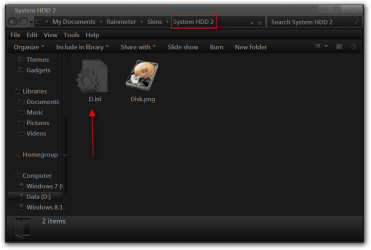
Everything I have highlighted in red which is basically anything with C can be changed to any drive letter. Also I made a copy of the original folder and renamed it to System HDD 2 and the renamed the C.ini to D.ini that way you can have it running for two different drives.
System HDD 2.png

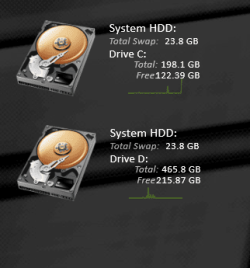
Below this is what I get when I run the original plus the second one I made.
Capture.PNG
;===========================================
; Rainmeter configuration file
;===========================================

[Rainmeter]
Author=minhtrimatrix
AppVersion=1.0
Update=1000

[Variables]
fontColor.Text=255, 255, 255, 160
bar.color=255, 255, 255, 50
graph.line1=255, 255, 255, 75
graph.line2=255, 255, 255, 37

FontName=Calibri
FontHeight=10
AntiAlias=1


[Mse_DriveAccess]
Measure=Plugin
Plugin=Plugins\PerfMon.dll
PerfMonObject=LogicalDisk
PerfMonCounter="Disk Bytes/sec"
PerfMonInstance="C:"

[Mse_TotalC]
Measure=FreeDiskSpace
Drive=C:
Total=1

[Mse_FreeC]
Measure=FreeDiskSpace
Drive=C:

[MeterRightLine]
Meter=IMAGE
X=0
Y=-3
W=110
H=110
ImageName=Disk.png
LeftMouseDownAction=!Execute ["C:\"]

[MeasureTotalSwap]
Measure=SwapMemory
Total=1

[MeasureUsedSwap]
Measure=SwapMemory

[MeasureFreeSwap]
Measure=SwapMemory
InvertMeasure=1

[HDD.txt]
Meter=STRING
X=120
Y=4
FontColor=255, 255, 255
FontSize=12
FontFace=#FontName#
StringStyle=normal
AntiAlias=1
Text="System HDD:"

[TotalSWAP.txt]
Meter=STRING
X=120
Y=22
FontColor=#fontColor.Text#
FontSize=#FontHeight#
FontFace=#FontName#
StringStyle=Italic
AntiAlias=1
Text="Total Swap:"

[TotalSWAP]
MeasureName=MeasureTotalSWAP
Meter=STRING
X=240
Y=0r
FontColor=255,255,255,255
FontSize=#FontHeight#
FontFace=#FontName#
StringAlign=RIGHT
AntiAlias=1
Text="%1B"
AutoScale=1

[aHDD.txt]
Meter=STRING
X=120
Y=38
FontColor=255, 255, 255
FontSize=11
FontFace=#FontName#
StringStyle=normal
AntiAlias=1
Text="Drive C:"

[1HDD.txt]
Meter=STRING
X=152
Y=52
FontColor=255, 255, 255,180
FontSize=10
FontFace=#FontName#
StringStyle=Italic
AntiAlias=1
Text="Total:"

[DriveCTotal]
MeasureName=Mse_TotalC
Meter=STRING
X=242
Y=52
FontColor=255, 255, 255
StringStyle=normal
StringAlign=right
Fontsize=10
Fontface=Calibri
Text="%1B"
AntiAlias=1
AutoScale=1

[2HDD.txt]
Meter=STRING
X=155
Y=66
FontColor=255, 255, 255,180
FontSize=10
FontFace=#FontName#
StringStyle=Italic
AntiAlias=1
Text="Free:"

[DriveCFree]
MeasureName=Mse_FreeC
Meter=STRING
X=242
Y=66
FontColor=255, 255, 255
StringStyle=normal
StringAlign=right
Fontsize=10
Fontface=calibri
Text="%1B"
AntiAlias=1
NumOfDecimals=2
AutoScale=1

[Rl_DriveAccess1]
Meter=Line
MeasureName=Mse_DriveAccess
X=147
Y=74
H=25
W=70
LineCount=1
LineColor=145, 255, 4, 100
AutoScale=1
AntiAlias=1
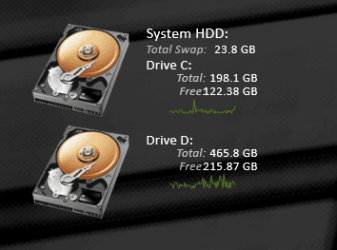
Here is a what I got after doing some additional editing to the second one removing the second System HDD and the second swap and moving the text up so it looks more like it's just one skin just as an example to show you what can be done.
Capture2.PNG
;===========================================
; Rainmeter configuration file
;===========================================

[Rainmeter]
Author=minhtrimatrix
AppVersion=1.0
Update=1000

[Variables]
fontColor.Text=255, 255, 255, 160
bar.color=255, 255, 255, 50
graph.line1=255, 255, 255, 75
graph.line2=255, 255, 255, 37

FontName=Calibri
FontHeight=10
AntiAlias=1


[Mse_DriveAccess]
Measure=Plugin
Plugin=Plugins\PerfMon.dll
PerfMonObject=LogicalDisk
PerfMonCounter="Disk Bytes/sec"
PerfMonInstance="D:"

[Mse_TotalD]
Measure=FreeDiskSpace
Drive=D:
Total=1

[Mse_FreeD]
Measure=FreeDiskSpace
Drive=D:

[MeterRightLine]
Meter=IMAGE
X=0
Y=-3
W=110
H=110
ImageName=Disk.png
LeftMouseDownAction=!Execute ["D:\"]


[HDD.txt]
Meter=STRING
X=120
Y=4
FontColor=255, 255, 255
FontSize=12
FontFace=#FontName#
StringStyle=normal
AntiAlias=1
Text=""


[aHDD.txt]
Meter=STRING
X=120
Y=10
FontColor=255, 255, 255
FontSize=11
FontFace=#FontName#
StringStyle=normal
AntiAlias=1
Text="Drive D:"

[1HDD.txt]
Meter=STRING
X=152
Y=24
FontColor=255, 255, 255,180
FontSize=10
FontFace=#FontName#
StringStyle=Italic
AntiAlias=1
Text="Total:"

[DriveCTotal]
MeasureName=Mse_TotalD
Meter=STRING
X=242
Y=24
FontColor=255, 255, 255
StringStyle=normal
StringAlign=right
Fontsize=10
Fontface=Calibri
Text="%1B"
AntiAlias=1
AutoScale=1

[2HDD.txt]
Meter=STRING
X=155
Y=38
FontColor=255, 255, 255,180
FontSize=10
FontFace=#FontName#
StringStyle=Italic
AntiAlias=1
Text="Free:"

[DriveCFree]
MeasureName=Mse_FreeD
Meter=STRING
X=242
Y=38
FontColor=255, 255, 255
StringStyle=normal
StringAlign=right
Fontsize=10
Fontface=calibri
Text="%1B"
AntiAlias=1
NumOfDecimals=2
AutoScale=1

[Rl_DriveAccess1]
Meter=Line
MeasureName=Mse_DriveAccess
X=147
Y=46
H=25
W=70
LineCount=1
LineColor=145, 255, 4, 100
AutoScale=1
AntiAlias=1
Jerry
 

My Computer My Computer

At a glance

Win 7 Pro x64 / Win 10 ProIntel(R) Core(TM) i7-3630QM CPU @ 2.40GHz12 GB(1) Intel(R) HD Graphics 4000 (2) NVIDIA GeFo...
Computer type
Laptop
Computer Manufacturer/Model Number
Sager NP9170
OS
Win 7 Pro x64 / Win 10 Pro
CPU
Intel(R) Core(TM) i7-3630QM CPU @ 2.40GHz
Motherboard
CLEVO P170EM
Memory
12 GB
Graphics Card(s)
(1) Intel(R) HD Graphics 4000 (2) NVIDIA GeForce GTX 675M
Sound Card
(1) Realtek High Definition Audio (2) Intel(R) Display Aud
Monitor(s) Displays
17.3
Screen Resolution
1920x1080
Hard Drives
(1) Samsung 860 EVO 500GB(OS) (1) Samsung 860 EVO 500GB(Data)
Keyboard
Backlite
Antivirus
MSE, Malwarebytes Pro
Browser
Firefox
Other Info
DESKTOP: Custom-built.
OS: Win 10 Pro x64.
CASE: Rosewill R5.
CPU: Intel I5 4670K CPU @ 3.40GHz.
CPU COOLER: Cool Master Hyper 212 EVO.
MOTHERBOARD: Asus Z87-A.
MEMORY: Kingston HyperX 2x4 GB.
GPU: Nvidia Geforce 650 TI.
PSU: Corsair TX750.
DRIVES: (1) Samsung 840 120 GB SSD (2) Western Digital blue 500 GB 7200 RPM.
I cannot find a way to combine C and D into one skin but have found a way to use it.

Everything I have highlighted in red which is basically anything with C can be changed to any drive letter. Also I made a copy of the original folder and renamed it to System HDD 2 and the renamed the C.ini to D.ini that way you can have it running for two different drives.
View attachment 308843

Below this is what I get when I run the original plus the second one I made.
View attachment 308844
;===========================================
; Rainmeter configuration file
;===========================================

[Rainmeter]
Author=minhtrimatrix
AppVersion=1.0
Update=1000

[Variables]
fontColor.Text=255, 255, 255, 160
bar.color=255, 255, 255, 50
graph.line1=255, 255, 255, 75
graph.line2=255, 255, 255, 37

FontName=Calibri
FontHeight=10
AntiAlias=1


[Mse_DriveAccess]
Measure=Plugin
Plugin=Plugins\PerfMon.dll
PerfMonObject=LogicalDisk
PerfMonCounter="Disk Bytes/sec"
PerfMonInstance="C:"

[Mse_TotalC]
Measure=FreeDiskSpace
Drive=C:
Total=1

[Mse_FreeC]
Measure=FreeDiskSpace
Drive=C:

[MeterRightLine]
Meter=IMAGE
X=0
Y=-3
W=110
H=110
ImageName=Disk.png
LeftMouseDownAction=!Execute ["C:\"]

[MeasureTotalSwap]
Measure=SwapMemory
Total=1

[MeasureUsedSwap]
Measure=SwapMemory

[MeasureFreeSwap]
Measure=SwapMemory
InvertMeasure=1

[HDD.txt]
Meter=STRING
X=120
Y=4
FontColor=255, 255, 255
FontSize=12
FontFace=#FontName#
StringStyle=normal
AntiAlias=1
Text="System HDD:"

[TotalSWAP.txt]
Meter=STRING
X=120
Y=22
FontColor=#fontColor.Text#
FontSize=#FontHeight#
FontFace=#FontName#
StringStyle=Italic
AntiAlias=1
Text="Total Swap:"

[TotalSWAP]
MeasureName=MeasureTotalSWAP
Meter=STRING
X=240
Y=0r
FontColor=255,255,255,255
FontSize=#FontHeight#
FontFace=#FontName#
StringAlign=RIGHT
AntiAlias=1
Text="%1B"
AutoScale=1

[aHDD.txt]
Meter=STRING
X=120
Y=38
FontColor=255, 255, 255
FontSize=11
FontFace=#FontName#
StringStyle=normal
AntiAlias=1
Text="Drive C:"

[1HDD.txt]
Meter=STRING
X=152
Y=52
FontColor=255, 255, 255,180
FontSize=10
FontFace=#FontName#
StringStyle=Italic
AntiAlias=1
Text="Total:"

[DriveCTotal]
MeasureName=Mse_TotalC
Meter=STRING
X=242
Y=52
FontColor=255, 255, 255
StringStyle=normal
StringAlign=right
Fontsize=10
Fontface=Calibri
Text="%1B"
AntiAlias=1
AutoScale=1

[2HDD.txt]
Meter=STRING
X=155
Y=66
FontColor=255, 255, 255,180
FontSize=10
FontFace=#FontName#
StringStyle=Italic
AntiAlias=1
Text="Free:"

[DriveCFree]
MeasureName=Mse_FreeC
Meter=STRING
X=242
Y=66
FontColor=255, 255, 255
StringStyle=normal
StringAlign=right
Fontsize=10
Fontface=calibri
Text="%1B"
AntiAlias=1
NumOfDecimals=2
AutoScale=1

[Rl_DriveAccess1]
Meter=Line
MeasureName=Mse_DriveAccess
X=147
Y=74
H=25
W=70
LineCount=1
LineColor=145, 255, 4, 100
AutoScale=1
AntiAlias=1
Here is a what I got after doing some additional editing to the second one removing the second System HDD and the second swap and moving the text up so it looks more like it's just one skin just as an example to show you what can be done.
View attachment 308845
;===========================================
; Rainmeter configuration file
;===========================================

[Rainmeter]
Author=minhtrimatrix
AppVersion=1.0
Update=1000

[Variables]
fontColor.Text=255, 255, 255, 160
bar.color=255, 255, 255, 50
graph.line1=255, 255, 255, 75
graph.line2=255, 255, 255, 37

FontName=Calibri
FontHeight=10
AntiAlias=1


[Mse_DriveAccess]
Measure=Plugin
Plugin=Plugins\PerfMon.dll
PerfMonObject=LogicalDisk
PerfMonCounter="Disk Bytes/sec"
PerfMonInstance="D:"

[Mse_TotalD]
Measure=FreeDiskSpace
Drive=D:
Total=1

[Mse_FreeD]
Measure=FreeDiskSpace
Drive=D:

[MeterRightLine]
Meter=IMAGE
X=0
Y=-3
W=110
H=110
ImageName=Disk.png
LeftMouseDownAction=!Execute ["D:\"]


[HDD.txt]
Meter=STRING
X=120
Y=4
FontColor=255, 255, 255
FontSize=12
FontFace=#FontName#
StringStyle=normal
AntiAlias=1
Text=""


[aHDD.txt]
Meter=STRING
X=120
Y=10
FontColor=255, 255, 255
FontSize=11
FontFace=#FontName#
StringStyle=normal
AntiAlias=1
Text="Drive D:"

[1HDD.txt]
Meter=STRING
X=152
Y=24
FontColor=255, 255, 255,180
FontSize=10
FontFace=#FontName#
StringStyle=Italic
AntiAlias=1
Text="Total:"

[DriveCTotal]
MeasureName=Mse_TotalD
Meter=STRING
X=242
Y=24
FontColor=255, 255, 255
StringStyle=normal
StringAlign=right
Fontsize=10
Fontface=Calibri
Text="%1B"
AntiAlias=1
AutoScale=1

[2HDD.txt]
Meter=STRING
X=155
Y=38
FontColor=255, 255, 255,180
FontSize=10
FontFace=#FontName#
StringStyle=Italic
AntiAlias=1
Text="Free:"

[DriveCFree]
MeasureName=Mse_FreeD
Meter=STRING
X=242
Y=38
FontColor=255, 255, 255
StringStyle=normal
StringAlign=right
Fontsize=10
Fontface=calibri
Text="%1B"
AntiAlias=1
NumOfDecimals=2
AutoScale=1

[Rl_DriveAccess1]
Meter=Line
MeasureName=Mse_DriveAccess
X=147
Y=46
H=25
W=70
LineCount=1
LineColor=145, 255, 4, 100
AutoScale=1
AntiAlias=1
Jerry

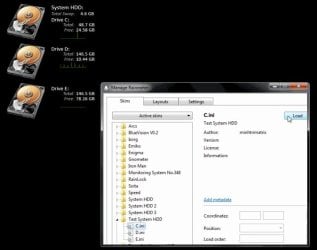
really thanks a lot :) but I'm unable to all three skins at a time if I combine them into single skin. I made three seperate skins SHDD, SHDD 2, SHDD 3 and they are working fine. Could you tell me how to combine all three into one please
 

Attachments

  • test1.jpg
    test1.jpg
    41.8 KB · Views: 0

My Computer My Computer

At a glance

Windows 7 Professional 32bitP6200 @ 2.13GHz2043 MBIntel HD graphics
Computer type
Laptop
Computer Manufacturer/Model Number
Acer 5733Z
OS
Windows 7 Professional 32bit
CPU
P6200 @ 2.13GHz
Memory
2043 MB
Graphics Card(s)
Intel HD graphics
Hard Drives
C: Total - 49899 MB; D: Total - 149999; E: Total - 149999 MB; F: Total - 123107 MB;
Antivirus
Microsoft Security Essentials, ESET NOD 32
Browser
Mozilla
by the way how did you make the default background in the windows BLACK?
 

My Computer My Computer

At a glance

Windows 7 Professional 32bitP6200 @ 2.13GHz2043 MBIntel HD graphics
Computer type
Laptop
Computer Manufacturer/Model Number
Acer 5733Z
OS
Windows 7 Professional 32bit
CPU
P6200 @ 2.13GHz
Memory
2043 MB
Graphics Card(s)
Intel HD graphics
Hard Drives
C: Total - 49899 MB; D: Total - 149999; E: Total - 149999 MB; F: Total - 123107 MB;
Antivirus
Microsoft Security Essentials, ESET NOD 32
Browser
Mozilla
You're welcome

I was not able to find a way to combine two or three together I explained that in the post above earlier but I had to do it same way you did make a separate folder for each drive.

I'm using a custom third-party theme to get the dark gray window.

Jerry
 

My Computer My Computer

At a glance

Win 7 Pro x64 / Win 10 ProIntel(R) Core(TM) i7-3630QM CPU @ 2.40GHz12 GB(1) Intel(R) HD Graphics 4000 (2) NVIDIA GeFo...
Computer type
Laptop
Computer Manufacturer/Model Number
Sager NP9170
OS
Win 7 Pro x64 / Win 10 Pro
CPU
Intel(R) Core(TM) i7-3630QM CPU @ 2.40GHz
Motherboard
CLEVO P170EM
Memory
12 GB
Graphics Card(s)
(1) Intel(R) HD Graphics 4000 (2) NVIDIA GeForce GTX 675M
Sound Card
(1) Realtek High Definition Audio (2) Intel(R) Display Aud
Monitor(s) Displays
17.3
Screen Resolution
1920x1080
Hard Drives
(1) Samsung 860 EVO 500GB(OS) (1) Samsung 860 EVO 500GB(Data)
Keyboard
Backlite
Antivirus
MSE, Malwarebytes Pro
Browser
Firefox
Other Info
DESKTOP: Custom-built.
OS: Win 10 Pro x64.
CASE: Rosewill R5.
CPU: Intel I5 4670K CPU @ 3.40GHz.
CPU COOLER: Cool Master Hyper 212 EVO.
MOTHERBOARD: Asus Z87-A.
MEMORY: Kingston HyperX 2x4 GB.
GPU: Nvidia Geforce 650 TI.
PSU: Corsair TX750.
DRIVES: (1) Samsung 840 120 GB SSD (2) Western Digital blue 500 GB 7200 RPM.
can I get some more info on how to use third party themes here? or should I make a new thread in customization section? I may sound stupid but I'm new to the forum.
 

My Computer My Computer

At a glance

Windows 7 Professional 32bitP6200 @ 2.13GHz2043 MBIntel HD graphics
Computer type
Laptop
Computer Manufacturer/Model Number
Acer 5733Z
OS
Windows 7 Professional 32bit
CPU
P6200 @ 2.13GHz
Memory
2043 MB
Graphics Card(s)
Intel HD graphics
Hard Drives
C: Total - 49899 MB; D: Total - 149999; E: Total - 149999 MB; F: Total - 123107 MB;
Antivirus
Microsoft Security Essentials, ESET NOD 32
Browser
Mozilla

My Computer My Computer

At a glance

Win 7 Pro x64 / Win 10 ProIntel(R) Core(TM) i7-3630QM CPU @ 2.40GHz12 GB(1) Intel(R) HD Graphics 4000 (2) NVIDIA GeFo...
Computer type
Laptop
Computer Manufacturer/Model Number
Sager NP9170
OS
Win 7 Pro x64 / Win 10 Pro
CPU
Intel(R) Core(TM) i7-3630QM CPU @ 2.40GHz
Motherboard
CLEVO P170EM
Memory
12 GB
Graphics Card(s)
(1) Intel(R) HD Graphics 4000 (2) NVIDIA GeForce GTX 675M
Sound Card
(1) Realtek High Definition Audio (2) Intel(R) Display Aud
Monitor(s) Displays
17.3
Screen Resolution
1920x1080
Hard Drives
(1) Samsung 860 EVO 500GB(OS) (1) Samsung 860 EVO 500GB(Data)
Keyboard
Backlite
Antivirus
MSE, Malwarebytes Pro
Browser
Firefox
Other Info
DESKTOP: Custom-built.
OS: Win 10 Pro x64.
CASE: Rosewill R5.
CPU: Intel I5 4670K CPU @ 3.40GHz.
CPU COOLER: Cool Master Hyper 212 EVO.
MOTHERBOARD: Asus Z87-A.
MEMORY: Kingston HyperX 2x4 GB.
GPU: Nvidia Geforce 650 TI.
PSU: Corsair TX750.
DRIVES: (1) Samsung 840 120 GB SSD (2) Western Digital blue 500 GB 7200 RPM.

My Computer My Computer

At a glance

Windows 7 Professional 32bitP6200 @ 2.13GHz2043 MBIntel HD graphics
Computer type
Laptop
Computer Manufacturer/Model Number
Acer 5733Z
OS
Windows 7 Professional 32bit
CPU
P6200 @ 2.13GHz
Memory
2043 MB
Graphics Card(s)
Intel HD graphics
Hard Drives
C: Total - 49899 MB; D: Total - 149999; E: Total - 149999 MB; F: Total - 123107 MB;
Antivirus
Microsoft Security Essentials, ESET NOD 32
Browser
Mozilla
Back
Top