Solved How do I change Windows console font

CharlesKuo

New member
Local time
12:36 PM
Messages
7
Hi all,

I used to set the Windows console font from the default to Consolas. I just did a clean install of Windows 7 Pro x64 on my laptop very recently, and there are very few application programs on it. I'd like to do the same and change the console font to Consolas.

I was going to follow what I did before (which I found on the Internet) by adding a registry entry to the location
HKEY_LOCAL_MACHINE\Software\Microsoft\Windows NT\CurrentVersion\Console\TrueTypeFont
with value name "00" and value data "Consolas". But I went to that registry location only to find out the registry (with name and data exactly as above) was already there. Also, there was another entry for Lucida Console with value name "0" and value data "Lucida Console"

So I simply opened up cmd.exe and checked the Properties/Font section, neither of the above two fonts showed up as a font option. More strangely, even if I change the font size there, after I restart cmd.exe, the font size goes back to the default.

Is there any other place where I need to add a registry entry or modify any settings? Does anyone know how to fix this?

Thanks very much for any help.
 

My Computer

OS
Windows 7 Professional x64

My Computer

Computer Manufacturer/Model Number
Acer / PEW76(B)
OS
Microsoft Windows 7 Home Premium 64-bit SP1
CPU
AMD K10 (45nm Technology)
Motherboard
Acer JE51_DN (Socket S1G4)
Memory
4.00 GB Dual-Channel DDR3 @ 536MHz (7-7-7-20)
Graphics Card(s)
ATI Mobility Radeon HD 4200 Series (Acer Incorporated [ALI])
Sound Card
AMD High Definition Audio Device
Monitor(s) Displays
Generic PnP Monitor on ATI Mobility Radeon HD 4200 Series
Screen Resolution
Dual Monitor: 1366x768 / 1440 x 900
Hard Drives
298GB TOSHIBA MK3275GSX SATA Disk Device (SATA)
PSU
6-Cell Li-ion Battery
I'm sorry. I missread it. You'll need to do this:


  1. Open up Command Prompt
  2. Right-click Command Prompts window
  3. Click "Properties"
  4. Select the "Font" tab
  5. Then choose Consolas
  6. Finally, press "okay."
There you go! You're command prompt now is using the font "Consolas."


NOTE: I noticed that Windows 7 already had Consolas in my Registry. I assume Windows 7 does that automatically.
 

My Computer

Computer Manufacturer/Model Number
Acer / PEW76(B)
OS
Microsoft Windows 7 Home Premium 64-bit SP1
CPU
AMD K10 (45nm Technology)
Motherboard
Acer JE51_DN (Socket S1G4)
Memory
4.00 GB Dual-Channel DDR3 @ 536MHz (7-7-7-20)
Graphics Card(s)
ATI Mobility Radeon HD 4200 Series (Acer Incorporated [ALI])
Sound Card
AMD High Definition Audio Device
Monitor(s) Displays
Generic PnP Monitor on ATI Mobility Radeon HD 4200 Series
Screen Resolution
Dual Monitor: 1366x768 / 1440 x 900
Hard Drives
298GB TOSHIBA MK3275GSX SATA Disk Device (SATA)
PSU
6-Cell Li-ion Battery
I'm sorry. I missread it. You'll need to do this:


  1. Open up Command Prompt
  2. Right-click Command Prompts window
  3. Click "Properties"
  4. Select the "Font" tab
  5. Then choose Consolas
  6. Finally, press "okay."
There you go! You're command prompt now is using the font "Consolas."


NOTE: I noticed that Windows 7 already had Consolas in my Registry. I assume Windows 7 does that automatically.

This is exactly what my problem was. When I am in the "Font" tab, Consolas just does not show up as an option there...
 

My Computer

OS
Windows 7 Professional x64
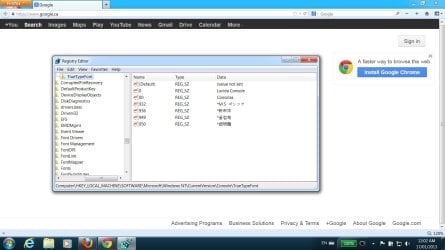
Are you on an Administrative account? Could I have a screen shot of your Registry key?
 

My Computer

Computer Manufacturer/Model Number
Acer / PEW76(B)
OS
Microsoft Windows 7 Home Premium 64-bit SP1
CPU
AMD K10 (45nm Technology)
Motherboard
Acer JE51_DN (Socket S1G4)
Memory
4.00 GB Dual-Channel DDR3 @ 536MHz (7-7-7-20)
Graphics Card(s)
ATI Mobility Radeon HD 4200 Series (Acer Incorporated [ALI])
Sound Card
AMD High Definition Audio Device
Monitor(s) Displays
Generic PnP Monitor on ATI Mobility Radeon HD 4200 Series
Screen Resolution
Dual Monitor: 1366x768 / 1440 x 900
Hard Drives
298GB TOSHIBA MK3275GSX SATA Disk Device (SATA)
PSU
6-Cell Li-ion Battery
Are you on an Administrative account? Could I have a screen shot of your Registry key?

I am on an Administrative account, (and there's no other user account on my machine). I attached a screenshot of my registry.

Again, thanks for all the tries to help me.
 

Attachments

  • screen.jpg
    screen.jpg
    104.9 KB · Views: 17

My Computer

OS
Windows 7 Professional x64
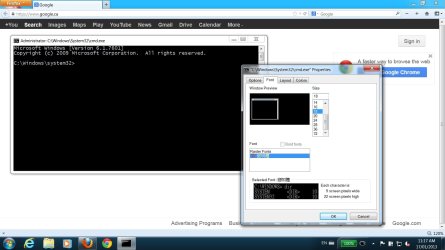
I know I didn't ask this before, but may I ask you to take a picture of your CMD properties? Try to run it as administrative.
 

My Computer

Computer Manufacturer/Model Number
Acer / PEW76(B)
OS
Microsoft Windows 7 Home Premium 64-bit SP1
CPU
AMD K10 (45nm Technology)
Motherboard
Acer JE51_DN (Socket S1G4)
Memory
4.00 GB Dual-Channel DDR3 @ 536MHz (7-7-7-20)
Graphics Card(s)
ATI Mobility Radeon HD 4200 Series (Acer Incorporated [ALI])
Sound Card
AMD High Definition Audio Device
Monitor(s) Displays
Generic PnP Monitor on ATI Mobility Radeon HD 4200 Series
Screen Resolution
Dual Monitor: 1366x768 / 1440 x 900
Hard Drives
298GB TOSHIBA MK3275GSX SATA Disk Device (SATA)
PSU
6-Cell Li-ion Battery
I know I didn't ask this before, but may I ask you to take a picture of your CMD properties? Try to run it as administrative.

Here it is. I ran it as administrator.
 

Attachments

  • cmd-screen.jpg
    cmd-screen.jpg
    98.8 KB · Views: 12

My Computer

OS
Windows 7 Professional x64
I'm researching now... I'm trying my best to help you. I don't see why this isn't working. I know you've most-likely already tried this but, have you restarted your computer? I know Consolas is a default font, but be sure to check if you have it in your system fonts.
 

My Computer

Computer Manufacturer/Model Number
Acer / PEW76(B)
OS
Microsoft Windows 7 Home Premium 64-bit SP1
CPU
AMD K10 (45nm Technology)
Motherboard
Acer JE51_DN (Socket S1G4)
Memory
4.00 GB Dual-Channel DDR3 @ 536MHz (7-7-7-20)
Graphics Card(s)
ATI Mobility Radeon HD 4200 Series (Acer Incorporated [ALI])
Sound Card
AMD High Definition Audio Device
Monitor(s) Displays
Generic PnP Monitor on ATI Mobility Radeon HD 4200 Series
Screen Resolution
Dual Monitor: 1366x768 / 1440 x 900
Hard Drives
298GB TOSHIBA MK3275GSX SATA Disk Device (SATA)
PSU
6-Cell Li-ion Battery
I'm researching now... I'm trying my best to help you. I don't see why this isn't working. I know you've most-likely already tried this but, have you restarted your computer? I know Consolas is a default font, but be sure to check if you have it in your system fonts.

Really, THANKS again for your keeping trying to help.

I have looked around on the Internet before posting my problem here and still haven't got a clue. This used to be a very simple thing on my last computer (which was also Win 7 Pro x64) -- simply adding a registry entry. That's why I found it so weird when it is not working now...

Yes. I definitely have restarted my computer. Also, I checked the Control Panel-->Appearance and Personalization-->Fonts to make sure Consolas is installed on my computer.
 

My Computer

OS
Windows 7 Professional x64

My Computer

Computer Manufacturer/Model Number
Self built
OS
Windows 7 Ultimate x64
CPU
Intel Pentium Dual Core E5200 2.5GHz (3.77GHz OC)
Motherboard
Asus P5Q-E
Memory
Corsair 4GB DDR2 (4x1GB CM2X1024-6400C4)
Graphics Card(s)
Palit GeForce GTS 250 (1024MB)
Sound Card
On Board (ADI AD2000B 8ch HD)
Monitor(s) Displays
Samsung 32in LCD TV
Screen Resolution
1360x768
Hard Drives
2 x 1TB Samsung 103SJ (Raid0)
2 x External 500GB Samsung 502IJ (NexStar 3 HD Enclosures)
PSU
550W Antec Neo HE 550
Case
Antec P180
Cooling
Xigmatex Red Scorpion CPU Cooler. 3x120mm Fans
Keyboard
Logitech MX5000 Laser (Combo)
Mouse
Logitech MX5000 Laser (Combo)
Internet Speed
ADSL2+ (avg 10 Mbps Down, 0.80 Mbps up)
Other Info
Gigabyte GN-WP01GS 54g Wireless Lan Card
Good to hear.
 

My Computer

Computer Manufacturer/Model Number
Self built
OS
Windows 7 Ultimate x64
CPU
Intel Pentium Dual Core E5200 2.5GHz (3.77GHz OC)
Motherboard
Asus P5Q-E
Memory
Corsair 4GB DDR2 (4x1GB CM2X1024-6400C4)
Graphics Card(s)
Palit GeForce GTS 250 (1024MB)
Sound Card
On Board (ADI AD2000B 8ch HD)
Monitor(s) Displays
Samsung 32in LCD TV
Screen Resolution
1360x768
Hard Drives
2 x 1TB Samsung 103SJ (Raid0)
2 x External 500GB Samsung 502IJ (NexStar 3 HD Enclosures)
PSU
550W Antec Neo HE 550
Case
Antec P180
Cooling
Xigmatex Red Scorpion CPU Cooler. 3x120mm Fans
Keyboard
Logitech MX5000 Laser (Combo)
Mouse
Logitech MX5000 Laser (Combo)
Internet Speed
ADSL2+ (avg 10 Mbps Down, 0.80 Mbps up)
Other Info
Gigabyte GN-WP01GS 54g Wireless Lan Card
Back
Top