How do I configure Firefox 3.5.2 ....

Da Ripper

New member
Member
Local time
10:25 AM
Messages
36
so, guys, How do I configure Firefox 3.5.2 so that it won't remember what I typed in the search box? like in the old firefox 3.0 there's an option were you tick the box to allow or not firefox to remember what you type.... :p

I can't seem find that option in 3.5. it's bugging me. :cry:
 

My Computer My Computer

OS
Windows 7
as you probably know, you can delete search history by right clicking on the search box, but this probably isn't what you want.

From what I can see in the privacy tab in the settings, if you set history to custom, you can disable search history, but unfortunately that would take away form history as well, so if form info is important to you, you might want to try something else (or use an external application or extensions that manages form info, but getting complicated just to not have your previous searches appearing when you type :)).

There is probably another way to do this
 

My Computer My Computer

OS
Windows 7 Ultimate x64 build 7600
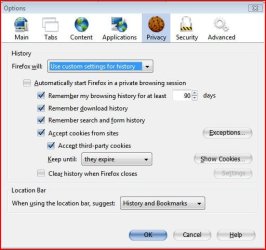
Isn't this where you can alter those settings....?
 

Attachments

  • Capture.JPG
    Capture.JPG
    43.8 KB · Views: 37

My Computer My Computer

Computer type
PC/Desktop
Computer Manufacturer/Model Number
Alienware® ALX X58
OS
Win 7 Ult SP1/Win 10 Pro (all x64)
CPU
Intel® Core™ i7-975 Extreme O/C to 4.02 GHz, 8MB Cache
Motherboard
Asus® P6T Deluxe V2 X58 LGA1366
Memory
24GB Corsair Vengeance DDR3 SDRAM at 1600MHz - 6 x 4096MB
Graphics Card(s)
1792 MB NVIDIA® GeForce® GTX 295 Dual Core
Sound Card
Onboard Soundmax® High-Definition 7.1 Performance Audio
Monitor(s) Displays
Samsung XL2370 LED backlit 23" W/S 2ms response time
Screen Resolution
1920 X 1080
Hard Drives
2 x 500gb SATA II
1 x 1TB SATA II
1 external eSATA LaCie 3TB
(Non-RAID)
PSU
Alienware® 1200 Watt Multi-GPU
Case
Alienware® P2 ALX Chassis with AlienIce™ 3.0 Video Cooling
Cooling
Alienware® High-Perf. Liquid Cooling + Acoustic Dampening
Keyboard
Microsoft® Wireless Entertainment 8000 + Logitech® G15 Wired
Mouse
Microsoft® Wireless Laser 8000 + Logitech® G9 Wired
Internet Speed
1Gb/s
Antivirus
McAfee LiveSafe
Browser
Firefox - latest
Other Info
Using non-RAID on purpose as I find RAID to be too temperamental.
Now set to AHCI

My Computer My Computer

Computer Manufacturer/Model Number
tw33k
OS
Windows 7 Ultimate (x64) SP1
CPU
Intel 3770k 4.6GHz
Motherboard
ASUS Maximus V Formula
Memory
8GB (2x 4GB) Crucial Ballistix
Graphics Card(s)
Sapphire 7950 (1060/1600)
Sound Card
On Board Realtek HD Audio
Monitor(s) Displays
27" Acer B273HU (via HDMI)
Screen Resolution
2048 x 1152
Hard Drives
Crucial M4 128GB
2TB WD Black
1TB Samsung F3 SATA
1TB WD Elite External
2TB WD USB 3.0
PSU
Corsair AX750 Gold
Case
Corsair Obsidian 800DW
Cooling
Corsair H100 (2x AP-121/2x UK-3000 push/pull)
Keyboard
Microsoft Wireless 5000
Mouse
Microsoft Wireless 5000
Internet Speed
5mb/s
Other Info
Logitech z-2300 2.1 speakers
Lamptron FC-5 v2
yes, but as I said, they put together search and form history
 

My Computer My Computer

OS
Windows 7 Ultimate x64 build 7600
Hi Da Ripper are you referring to the location bar or the search bar? For the location bar, if yu look at the pic earlier in the post, at the bottom is and option that says: When using the Location bar suggest: If you select this and choose nothing then you won't have any history popping up every time you type something. For the searchbar all I can think of is turning off suggestions?
 

My Computer My Computer

Computer Manufacturer/Model Number
Generic
OS
Clients: XP/Win7/ubuntu
CPU
E8400
Motherboard
Gigabyte EP35-DS3R
Memory
4Gb HyperX
Graphics Card(s)
ATI 4850
Sound Card
Onboard
Monitor(s) Displays
Samsung P970
Screen Resolution
1280 by 1024
Hard Drives
Samsung SATA-II 500Gb x 3
PSU
Corsair HX520
Case
chieftec
Cooling
Zalman
Keyboard
Logitech
Mouse
Logitech
Internet Speed
512kb
as you probably know, you can delete search history by right clicking on the search box, but this probably isn't what you want.

From what I can see in the privacy tab in the settings, if you set history to custom, you can disable search history, but unfortunately that would take away form history as well, so if form info is important to you, you might want to try something else (or use an external application or extensions that manages form info, but getting complicated just to not have your previous searches appearing when you type :)).

There is probably another way to do this

you're right! :thumbsup:

oh, and Ex_Brit already found teh solution... just after your post. :p :D

thanks, btw.


Isn't this where you can alter those settings....?

deym! there it is... :what:

2iue236.jpg


the one i highlighted is the option i need to uncheck right? :doh:

.... i just tested it, and i think that's it... :thumbsup:


Hi Da Ripper are you referring to the location bar or the search bar? For the location bar, if yu look at the pic earlier in the post, at the bottom is and option that says: When using the Location bar suggest: If you select this and choose nothing then you won't have any history popping up every time you type something. For the searchbar all I can think of is turning off suggestions?

hmmm.... it's like when you search here in the forum and type "office 2010" the next time you type a word that starts with letter "o" then office 2010 will show up... that's what i want to get rid off...

anyways, i believe Ex_Brit already found the solution... :p


------------

thanks again guys! :devil2:
 

My Computer My Computer

OS
Windows 7
You're welcome...!
 

My Computer My Computer

Computer type
PC/Desktop
Computer Manufacturer/Model Number
Alienware® ALX X58
OS
Win 7 Ult SP1/Win 10 Pro (all x64)
CPU
Intel® Core™ i7-975 Extreme O/C to 4.02 GHz, 8MB Cache
Motherboard
Asus® P6T Deluxe V2 X58 LGA1366
Memory
24GB Corsair Vengeance DDR3 SDRAM at 1600MHz - 6 x 4096MB
Graphics Card(s)
1792 MB NVIDIA® GeForce® GTX 295 Dual Core
Sound Card
Onboard Soundmax® High-Definition 7.1 Performance Audio
Monitor(s) Displays
Samsung XL2370 LED backlit 23" W/S 2ms response time
Screen Resolution
1920 X 1080
Hard Drives
2 x 500gb SATA II
1 x 1TB SATA II
1 external eSATA LaCie 3TB
(Non-RAID)
PSU
Alienware® 1200 Watt Multi-GPU
Case
Alienware® P2 ALX Chassis with AlienIce™ 3.0 Video Cooling
Cooling
Alienware® High-Perf. Liquid Cooling + Acoustic Dampening
Keyboard
Microsoft® Wireless Entertainment 8000 + Logitech® G15 Wired
Mouse
Microsoft® Wireless Laser 8000 + Logitech® G9 Wired
Internet Speed
1Gb/s
Antivirus
McAfee LiveSafe
Browser
Firefox - latest
Other Info
Using non-RAID on purpose as I find RAID to be too temperamental.
Now set to AHCI
you're right! :thumbsup:

oh, and Ex_Brit already found teh solution... just after your post. :p :D

thanks, btw.

I am a little confused here, not 100% sure what you mean.

I posted the exact same solution Ex_Brit did (before he did), but in words instead of with a screenshot, and adding a warning as it disables form history as well, so this sentence:

oh, and Ex_Brit already found teh solution... just after your post. :p :D
is it just a funny way to say that?
 

My Computer My Computer

OS
Windows 7 Ultimate x64 build 7600
Yes you did but I guess it's a case of a picture saying more. Thanks for posting the solution.
 

My Computer My Computer

Computer type
PC/Desktop
Computer Manufacturer/Model Number
Alienware® ALX X58
OS
Win 7 Ult SP1/Win 10 Pro (all x64)
CPU
Intel® Core™ i7-975 Extreme O/C to 4.02 GHz, 8MB Cache
Motherboard
Asus® P6T Deluxe V2 X58 LGA1366
Memory
24GB Corsair Vengeance DDR3 SDRAM at 1600MHz - 6 x 4096MB
Graphics Card(s)
1792 MB NVIDIA® GeForce® GTX 295 Dual Core
Sound Card
Onboard Soundmax® High-Definition 7.1 Performance Audio
Monitor(s) Displays
Samsung XL2370 LED backlit 23" W/S 2ms response time
Screen Resolution
1920 X 1080
Hard Drives
2 x 500gb SATA II
1 x 1TB SATA II
1 external eSATA LaCie 3TB
(Non-RAID)
PSU
Alienware® 1200 Watt Multi-GPU
Case
Alienware® P2 ALX Chassis with AlienIce™ 3.0 Video Cooling
Cooling
Alienware® High-Perf. Liquid Cooling + Acoustic Dampening
Keyboard
Microsoft® Wireless Entertainment 8000 + Logitech® G15 Wired
Mouse
Microsoft® Wireless Laser 8000 + Logitech® G9 Wired
Internet Speed
1Gb/s
Antivirus
McAfee LiveSafe
Browser
Firefox - latest
Other Info
Using non-RAID on purpose as I find RAID to be too temperamental.
Now set to AHCI
Back
Top